K67714US - Vorhängeschlösser KENSINGTON - Kostenlose Bedienungsanleitung
Finden Sie kostenlos die Bedienungsanleitung des Geräts K67714US KENSINGTON als PDF.


| Produkttyp | Vorhängeschloss |
| Marke | Kensington |
| Modell | K67714US |
| Abmessungen (ca.) | 5 cm x 3 cm x 1,5 cm |
| Gewicht (ca.) | 50 g |
| Material | Gehärteter Stahlbügel, Kunststoffgehäuse |
| Schließmechanismus | Schlüsselschloss |
| Anzahl der Schlüssel | 2 |
| Bügelstärke | 6 mm |
| Einsatzbereich | Innenbereich |
| Farbe | Schwarz |
| Sicherheitsstufe | Mittel |
| Wartung | Regelmäßige Reinigung und Schmierung des Schließmechanismus |
| Reinigung | Mit einem trockenen Tuch abwischen |
| Reparierbarkeit | Nicht reparierbar, bei Defekt ersetzen |
Häufig gestellte Fragen - K67714US KENSINGTON
Benutzerfragen zu K67714US KENSINGTON
0 Frage zu diesem Gerät. Beantworten Sie die, die Sie kennen, oder stellen Sie Ihre eigene.
Eine neue Frage zu diesem Gerät stellen
Laden Sie die Anleitung für Ihr Vorhängeschlösser kostenlos im PDF-Format! Finden Sie Ihr Handbuch K67714US - KENSINGTON und nehmen Sie Ihr elektronisches Gerät wieder in die Hand. Auf dieser Seite sind alle Dokumente veröffentlicht, die für die Verwendung Ihres Geräts notwendig sind. K67714US von der Marke KENSINGTON.
BEDIENUNGSANLEITUNG K67714US KENSINGTON

Kensington®
Installation Instructions
PERMA DOME CABLE ANCHOR
CONTENTS

text_image
a. PERMA DOME CABLE ANCHOR b. PREP PADS ALCOHOL PREP PADS KENSINGTON ADHESIVEc. ONE-WAY SCREWS (2)
d. ADHESIVE
Limited Lifetime Warranty
KENSINGTON COMPUTER PRODUCTS GROUP ("KENSINGTON") warrants only to the original purchaser of this product from a Kensington-authorized reseller or distributor that this product will be free from defects in material and workmanship under normal use and service. Kensington reserves the right, before having any obligation under this limited warranty, to inspect the damaged Kensington product, and all costs of shipping the Kensington product to Kensington for inspection shall be borne solely by the purchaser. In order to recover under this limited warranty, Purchaser must make claim to Kensington within 60 days of occurrence, and must present acceptable proof of original ownership (such as original receipt, warranty card registration, on-line registration, or other documentation Kensington deems acceptable) for the product. KENSINGTON, at its option, shall repair or replace the defective unit covered by this warranty. Please retain the dated sales receipt as evidence of the original purchaser's date of purchase. You will need it for any warranty service. In order to keep this limited warranty in effect, the product must have been handled and used as prescribed in the instructions accompanying this warranty. This limited warranty does not cover any damage due to accident, misuse, abuse or negligence. This limited warranty is valid only if the product is used with the equipment specified on the product box. Please check product box for details or call KENSINGTON technical support. This limited warranty is non-transferable and does not apply to any purchaser who bought the product from a reseller or distributor not authorized by Kensington, including but not limited to purchases from internet auction sites. This warranty does not affect any other legal rights you may have by operation of law. Contact KENSINGTON at www.support.kensington.com or at one of the technical support numbers for warranty service procedures.
Technical Support
1-800-535-4242 (US and Canada) • (650-572-2700)
www.kensington.com

Kensington Computer Products Group
A Division of ACCO Brands
333 Twin Dolphin Drive
Sixth floor
Redwood Shores, CA 94065
Kensington and the ACCO name and design are registered trademarks of ACCO brands. All other registered and unregistered trademarks are the property of their respective owners.
© 2009 Kensington Computer Products Group, a division of ACCO Brands. Any unauthorized copying, duplicating, or other reproduction of the contents hereof is prohibited without written consent from Kensington Computer Products
Group. All rights reserved. 3/09
901-2299-00
KL
ATTENTION: Please read warning label on the adhesive packaging before handling

text_image
Kensington ADHESIVE Apply evenlyFig. 1 Fig. 2 Fig. 3
text_image
Press and hold 2 minutes
natural_image
Diagram of a black rectangular object with a curved arrow indicating rotation or force, no text or symbols presentINSTALLING PERMA DOME CABLE ANCHORS TO SURFACES
Perma Dome Cable Anchors may be attached to equipment and stationary surfaces. Before installing Perma Domes Cable Anchors, determine the best configuration for your needs. If you do not have a pre-existing anchor point (such as desk hole) available, you should install a Perma Dome Cable Anchor on a stationary surface to use as an anchor point. Perma Dome Cable Anchors may also be installed on equipment when a built-in security slot is unavailable.
- Clean the back of the Perma Dome Cable Anchor (a) and the surface area where the Perma Dome will be applied with the prep pad (b). Dry with a clean cloth.
- Evenly coat the back of the Perma Dome Cable Anchor with the adhesive (d). [fig. 1]
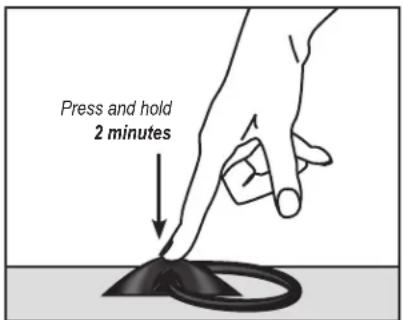
- Adhere the Perma Dome Cable Anchor to the prepared surface by pressing the Perma Dome to the surface for 2 minutes. [fig. 2] Wipe off any excess adhesive with the Prep Pad. Allow to dry for 24 hours before use.
- When possible (such as on wood or composite surfaces), also use a standard screwdriver to install the one-way screws (c) for additional security.
- Thread a security cable (not included) through the Perma Dome Cable Anchor's loop, and follow the instructions for securing your specific cable.