MX950 - Laufband StrengthMaster - Kostenlose Bedienungsanleitung
Finden Sie kostenlos die Bedienungsanleitung des Geräts MX950 StrengthMaster als PDF.


Benutzerfragen zu MX950 StrengthMaster
0 Frage zu diesem Gerät. Beantworten Sie die, die Sie kennen, oder stellen Sie Ihre eigene.
Eine neue Frage zu diesem Gerät stellen
Laden Sie die Anleitung für Ihr Laufband kostenlos im PDF-Format! Finden Sie Ihr Handbuch MX950 - StrengthMaster und nehmen Sie Ihr elektronisches Gerät wieder in die Hand. Auf dieser Seite sind alle Dokumente veröffentlicht, die für die Verwendung Ihres Geräts notwendig sind. MX950 von der Marke StrengthMaster.
BEDIENUNGSANLEITUNG MX950 StrengthMaster
Table Of Contents
Nitrogen Pro
natural_image
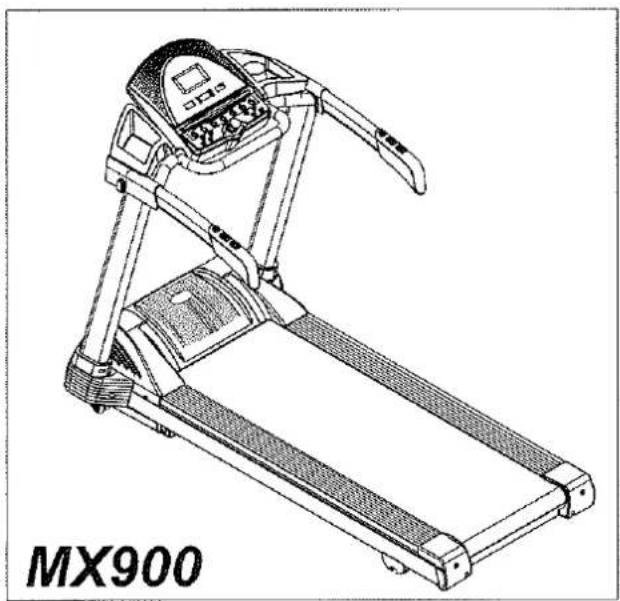
Line drawing of a treadmill with no visible text or symbols on the device itself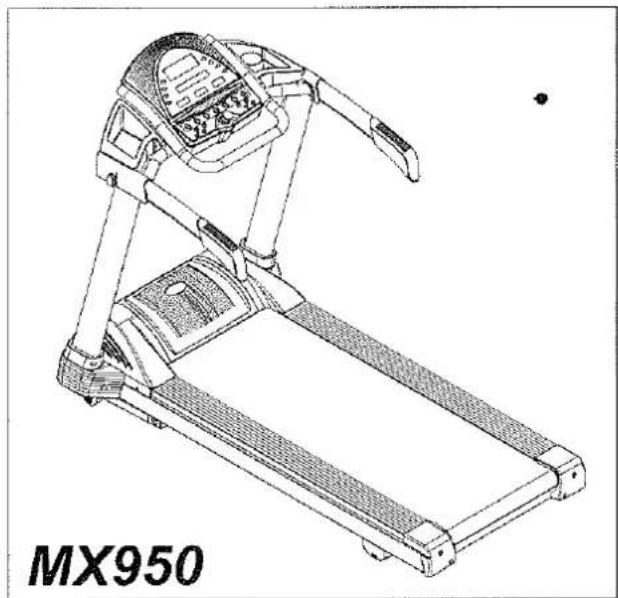
natural_image
Line drawing of a treadmill with visible control panel and side-mounted legs (no text or symbols on the device itself)Congratulations on the purchase of your new motorized treadmill. To help ensure the enjoyable and trouble-free operation of your new treadmill, we strongly suggest you read this manual carefully and follow its recommendations.
■ Important Safety Instruction......1
Assembly Instruction
MX900....2
MX950....4
■ CONSOLE OPERATION ......6
■ Preset Program MX900....11 MX950....12 MX-TFT....13
■ Utilization ....14 ■ Maintenance....15
IMPORTANT SAFETY INSTRUCTIONS
DANGER
- To reduce the risk of electric shock
Always unplug this appliance from the electrical outlet immediately after using and before cleaning.
Use this appliance only for its intended ues as described in this manual. Do not use attachment not recommended by the manufacture.
To disconnect, turn all controls to the off position, than remove plug from outlet.
Connect this appliance to properly grounded outlet only. See Grounding Instructions.
◆ The appliance is intended for household use.
When you are not going to use your treadmill, or when finishing. please remove the safety key from the console then always position the safety key where the children can not take.
Do not use outdoors.
◆ Always unplug the treadmill from the electrical outlet immediately after using and before cleaning, assembling or servicing.
◆ Never leave the treadmill unattended when plugged in.Disconnect by turning off the master power switch and unplugging form outlet.
Never operate this treadmill if it has a damaged cord or plug, is not working properly, if it has been dropped or damaged or if it has been exposed to water.
Do not operate where aerosol products are being used or where oxygen is being administered.
Don't pull the treadmill by its power cord or use the cord as a handle.
◆ Keep close supervision if this treadmill is used by, or near children, persons with disabilities or pets.
◆ Keep dry. Do not operate this treadmill in wet or moist conditions.
◆ Never insert any object into any opening.
Before using the treadmill, always warm up your muscles to prevent the exercise injury.
◆ Please unplug the electrical cord from the electrical outlet, and always prevent the children from danger because of careless touching
◆Keep electric cord away from heated surfaces.
◆Keep hands clear of all moving parts. Never place hands or feet under the treadmill.
Before each use, check that the running belt is aligned and centered on the treadmill bed and all visible fasteners on the treadmill are sufficiently tightened and secure.
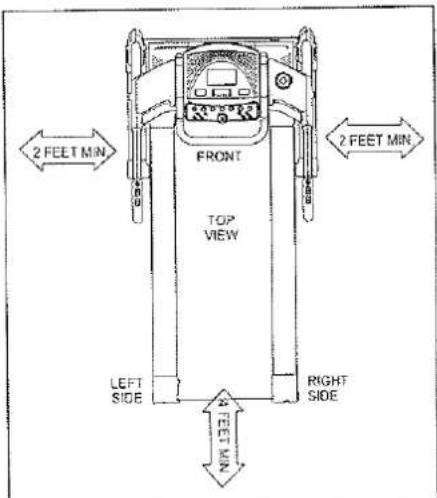
◆ Keep the treadmill on a solid, level surface with sides at least two feet from any walls. Be sure the area around the treadmill remains clear during use and has adequate clearance.
NOTE:
Failure to follow these instructions may lead to personal injury and cause damage to the treadmill. To reduce the risk of burns, fire, electric shock, please keep the following in mind:
ELECTRICAL GROUNDING INSTRUCTIONS
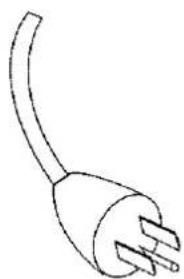
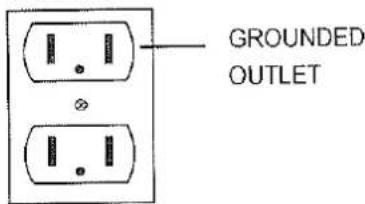
This product must be grounded. If it should malfunction or break down, grounding provides a path of least resistance for electric current to reduce the risk of electricshock. This treadmill is equipped with a cord having equipment grounding connector and a grounding plug. The plug must be plugged into an appropriate outlet that is properly installed and grounded in accordance with all local coades and ordinances.
Danger
Improper connection of the treadmill grounding connector can result in the risk of electric shock. Check with a qualified electrician, if you are in doubt as to whether the product is properly grounded. Don't modify the plug provided with the treadmill. If it won't fit your outlet, have a properly grounded outlet installed by a qualified electrician
Pls pay attention, the power cable need individual power source strictly, can not be usage mutual power supply with another equipment.

Warning
Never use extension cords between the treadmill and wall outlet.
natural_image
Line drawing of a single electrical outlet with three leads (no text or symbols)GROUNDING PIN
Figure
Grounding methods
MX900
ASSEMBLY INSTRUCTION
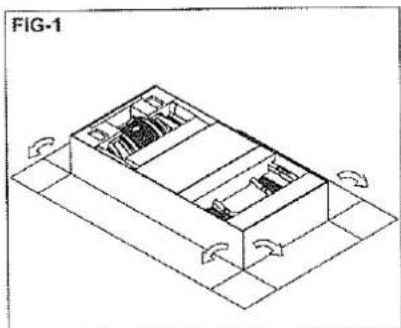
Since your treadmill is a heavy piece of equipment, we recommend that after taking off the top portion of the box, you slit the corners of the lower carton and fold down the sides. This will eliminate the need for you to pick up the treadmill over the sides of the box.
Prior to starting the assembly process take all of the parts out of the box, remove all plastic bags, and lay them out on the floor to become familiar with the components. Make sure that you remove all parts packaged underneath the readmill. You may need to slightly pick up the back of the treadmill to get better access to the parts on the bottom. You will notice that the treadmill is completely assembled except for the handlebars and the display window.
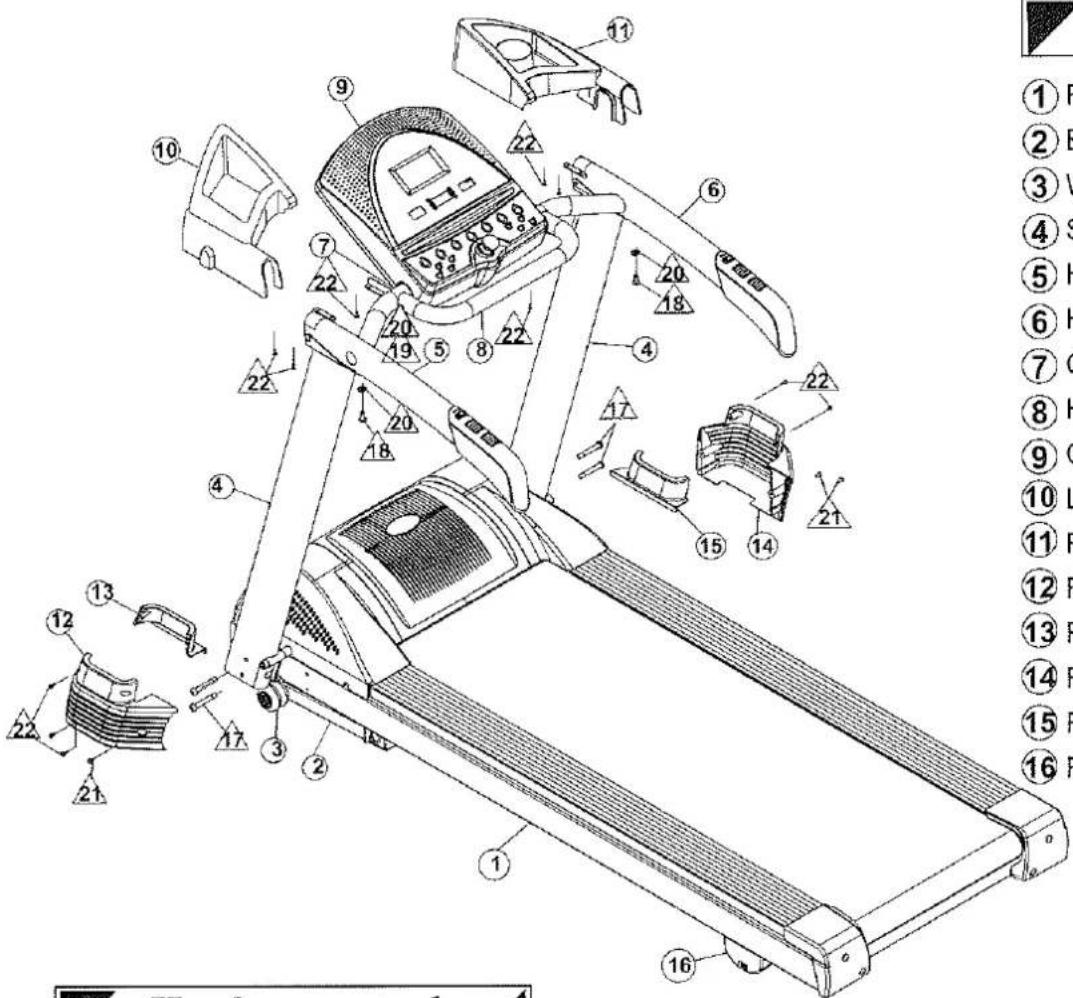
Parts
① Frame
② Base fame
③ Wheel
④ Support Handle
⑤ Handlebar(Left)
⑥ Handlebar(Right)
⑦ Console Bracket
⑧ Handle Rail
⑨ Cosole
⑩ Left Rack
⑪ Right Rack
⑫ Frame cover-Left
⑬ Frame cover-Left
⑭ Frame cover-Right
⑮ Frame cover-Right
⑯ Rear feet
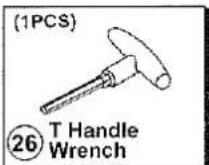
Hardware \`tool
Screws Already in Place on the Treadmill

Tool or Screws in the Plastic Bag
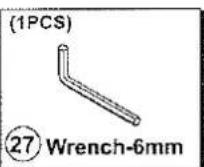
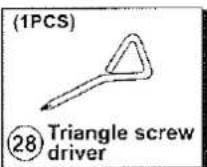
MX900
ASSEMBLY INSTRUCTION
Step 1: Base frame and support handles assembly
natural_image
Isometric technical diagram of a mechanical assembly with directional arrows indicating motion (no text or symbols)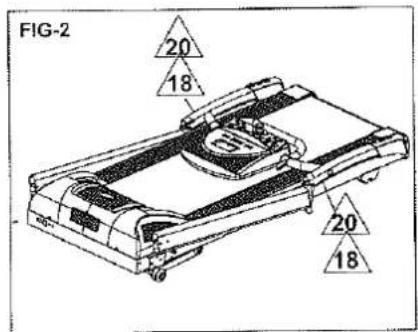
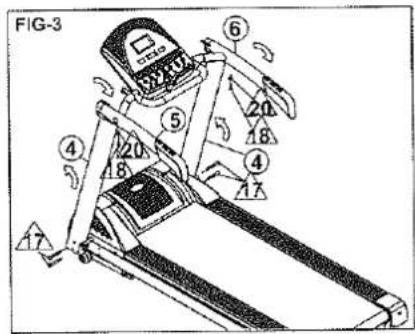
- Flat the shipping box and take out packing material, Styrofoam, parts, screw bag and manual etc. from shipper box.
- Remove screws 18, 20 on right/left handlebars.
- Upright support handle 4 and handlebars⑤⑥. Take out the screws △form bag.
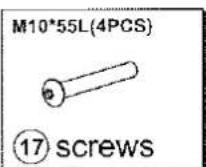
Attach 4 pcs of screws 17 on right/left support handle.
Warning:
- Please hold the treadmill well during above process to avoid treadmill tilt and be careful for safety to be away from getting hurt.
- Be careful not to pinch the cables/harness inside of support handle and handlebar.
Step 2: Frame cover assembly
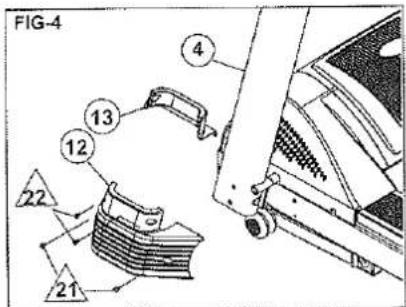
- Remove 2 pcs of screws 22 from left frame cover 13 and Remove 2 pcs of screws 21 from left frame cover. Attach left frame covers 12, 13 on frame and tighten the 2 pcs of screw 21 and 2 pcs of screw 22. (FIG 4)
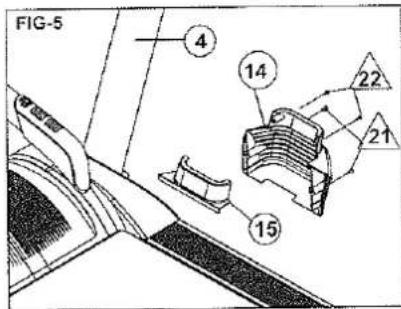
- Remove 2 pcs of screw 14 from right frame cover 15 and Remove 2 pcs of screws 21 from right frame cover. Attach right frame covers 14, 15 on frame and tighten the 2 pcs of screw 14 and 2 pcs of screw 22. (FIG 5)
Step 3: Racks assembly
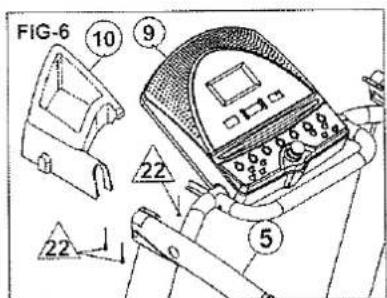
- Remove 3 pcs of screws from left rack. Attach left rack on handlebar and tighten with 3 pcs of screws (FIG 6)
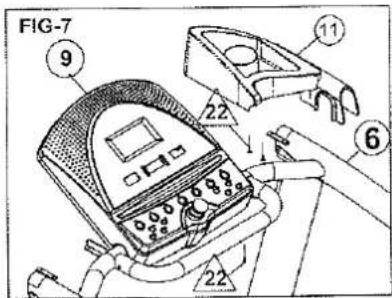
- Remove 3 pcs of screws from right rack. Attach right rack on handlebar and tighten with 3 pcs of screws (FIG 7)
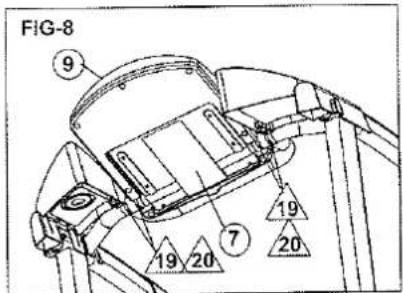
- Rotate console tube to have console on proper position. Tighten screws to fix console. (FIG 8)
MX950
ASSEMBLY INSTRUCTION
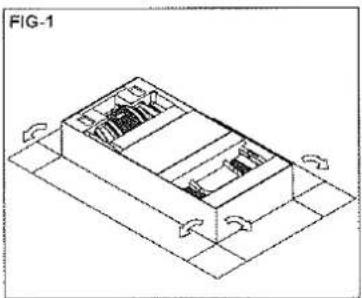
Since your treadmill is a heavy piece of equipment, we recommend that after taking off the top portion of the box, you slit the corners of the lower carton and fold down the sides. This will eliminate the need for you to pick up the treadmill over the sides of the box.
Prior to starting the assembly process take all of the parts out of the box, remove all plastic bags, and lay them out on the floor to become familiar with the components. Make sure that you remove all parts packaged underneath the readmill. You may need to slightly pick up the back of the treadmill to get better access to the parts on the bottom. You will notice that the treadmill is completely assembled except for the handlebars and the display window.
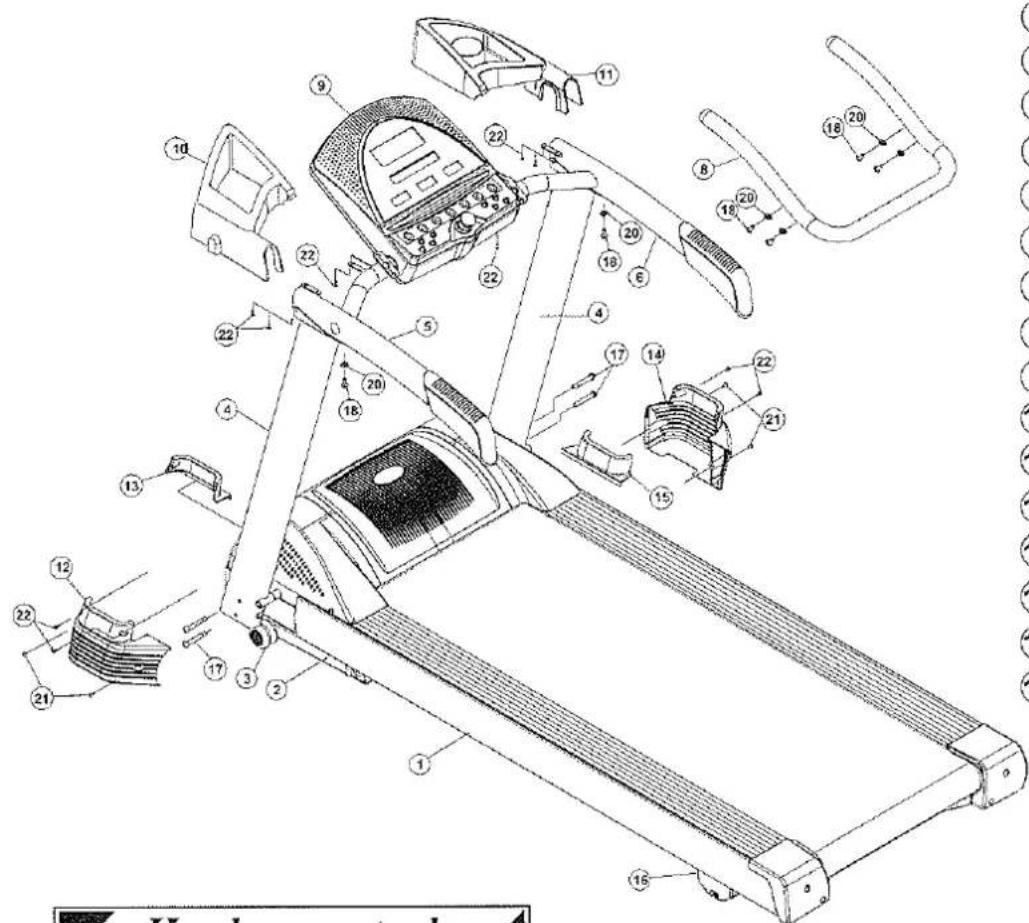
Parts
① Frame
② Base fame
③ Wheel
④ Support Handle
⑤ Handlebar(Left)
⑥ Handlebar(Right)
⑦ Console Bracket
⑧ Handle Rail
⑨ Cosole
⑩ Left Rack
⑪ Right Rack
⑫ Frame cover-Left
⑬ Frame cover-Left
⑭ Frame cover-Right
⑮ Frame cover-Right
⑯ Rear feet
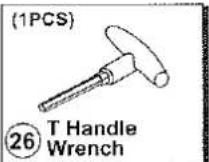
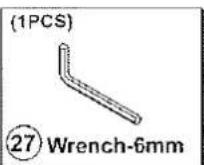
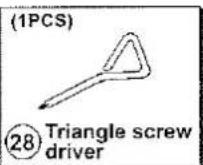
Hardware tool
Screws Already in Place on the Treadmill

Tool or Screws in the Plastic Bag
MX950
ASSEMBLY INSTRUCTION
Step 1: Base frame and support handles assembly
natural_image
Isometric technical diagram of a mechanical assembly with no visible text or symbols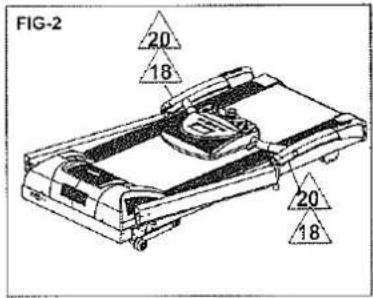
- Flat the shipping box and take out packing material, Styrofoam, parts, screw bag and manual etc. from shipper box.
- Remove screws 18, 20 on right/left handlebars.
- Upright support handle 4 and handlebars⑤⑥. Take out the screws △ form bag.
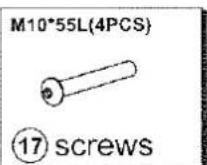
Attach 4 pcs of screws 17 on right/left support handle.
Warning:
- Please hold the treadmill well during above process to avoid treadmill tilt and be careful for safety to be away from getting hurt.
- Be careful not to pinch the cables/harness inside of support handle and handlebar.
Step 2: Frame cover assembly
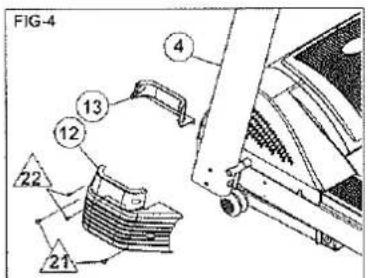
- Remove 2 pcs of screws from left frame cover, and Remove 2 pcs of screws from left frame cover. Attach left frame covers on frame and tighten the 2 pcs of screw and 2 pcs of screw. (FIG 4)
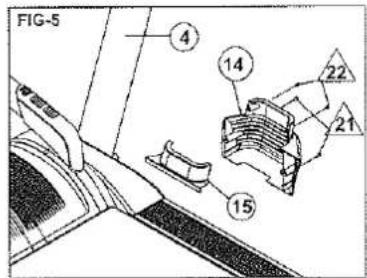
- Remove 2 pcs of screw 14 from right frame cover 15 and Remove 2 pcs of screws 21 from right frame cover. Attach right frame covers 14, 15 on frame and tighten the 2 pcs of screw 14 and 2 pcs of screw 22. (FIG 5)
Step 3: Racks assembly
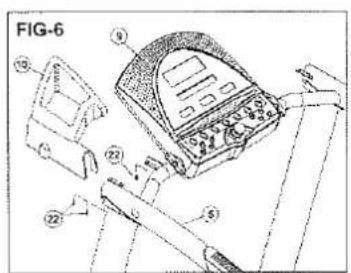
natural_image
Technical line drawing of a treadmill with labeled parts and assembly details (no readable text or symbols)- Remove 3 pcs of screws from left rack. Attach left rack on handlebar and tighten with 3 pcs of screws (FIG 6)
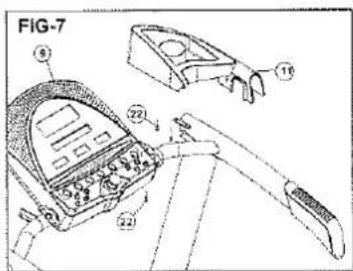
- Remove 3 pcs of screws/22 from right rack. Attach right rack on handlebar and tighten with 3 pcs of screws/22 (FIG 7)
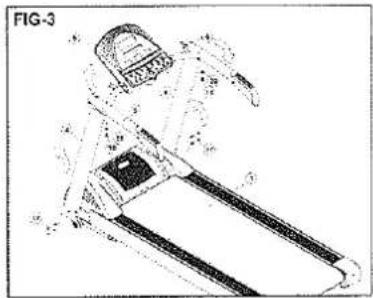
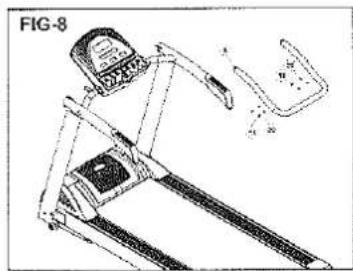
- Lay⑧handlebar on the support handle, to connect⑧handle bar with screw ⑱ & washer ⑳ and tight it
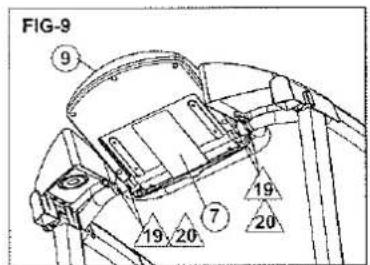
- Rotate console tube to have console on proper position. Tighten screws 9,20 to fix console. (FIG 9)
MX900
CONSOLE OPERATION
Buttons and Windows
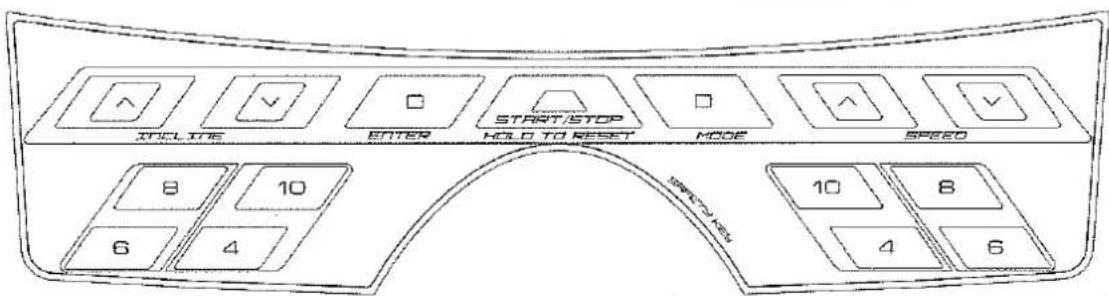
Incline up:
This will select program/level in setting mode before starting. This will increase the elevation in 1 increment.
Incline down:
This will select program/level in setting mode before starting. This will decrease the elevation in 1 increment.
SPEED up:
This will select program/level in setting mode before starting. This will increase the speed in 0.1 km/h or 0.1 mph
SPEED down:
This will select program/level in setting mode before starting. This will decrease the speed in 0.1 km/h or 0.1 mph
ENTER:
This will set-up each program. into every step.
START/STOP:
This will start the treadmill and this will stop the treadmill. There will also be an emergency stop switch. (Safety Key)
MODE:
This will accept programs/level selection. And this will switch display data on data window during exercise.
Quick keys for speed /incline:
Quick keys for incline: 4,6,8,10 Quick keys for speed: 4,6,8,10(km/hr)
If the light under each button is flashing, it means to use that button for next setup process.
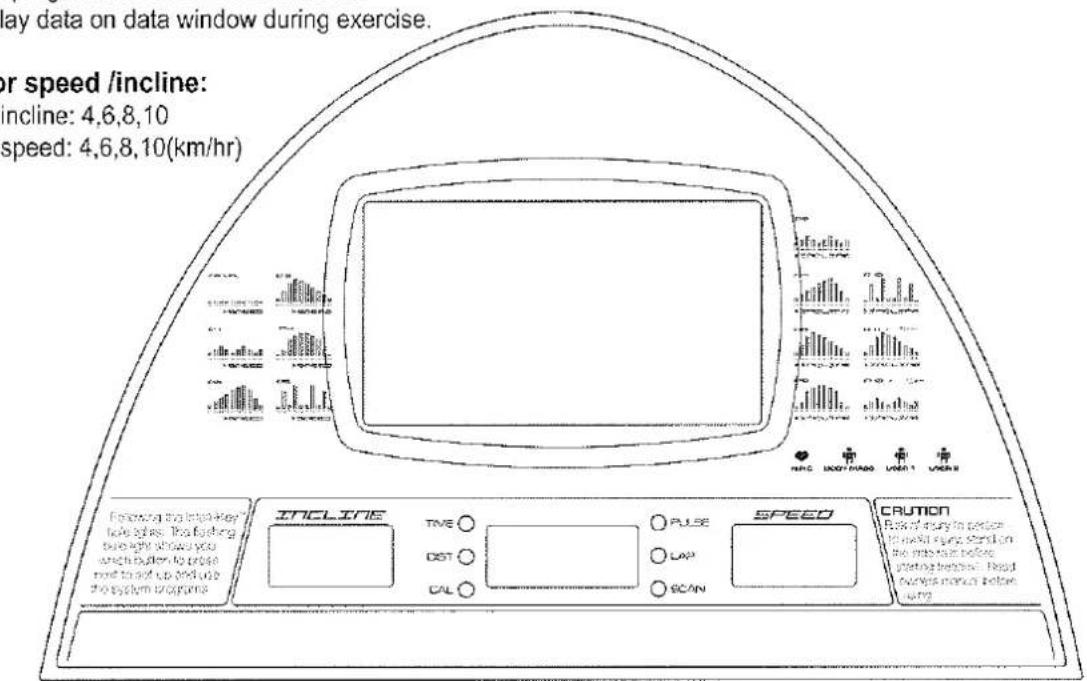
There are 1 LCD window and 3 LED windows.
1) WIN0(Incline) window: shows level of incline
2) WIN1: shows Time, Distance, Calories, Pulse, Lap, Scan
3) WIN2(Speed) window: shows speed
Handlebar toggle for incline and speed adjustment
- Left: for incline adjustment. Increase or decrease by 1 every time.
- Right: for speed adjustment. Increase or decrease by 0.1 km/hr every time.
MX950
CONSOLE OPERATION
Buttons and Windows
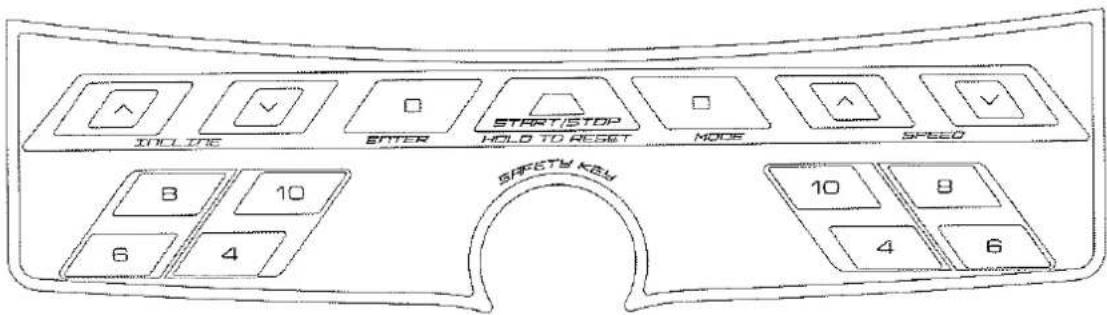
Incline up:
This will select program/level in setting mode before starting.
This will increase the elevation in 1 increment.
Incline down:
This will select program/level in setting mode before starting.
This will decrease the elevation in 1 increment.
SPEED up:
This will select program/level in setting mode before starting.
This will increase the speed in 0.1 km/h or 0.1 mph
SPEED down:
This will select program/level in setting mode before starting.
This will decrease the speed in 0.1 km/h or 0.1 mph
ENTER:
This will set-up each program. into every step.
START/STOP:
This will start the treadmill and this will stop the treadmill. There will also be an emergency stop switch. (Safety Key)
MODE:
This will accept programs/level selection. And this will switch display data on data window during exercise.
Quick keys for speed /incline:
Quick keys for incline: 4,6,8,10
Quick keys for speed: 4,6,8,10(km/hr)
If the light under each button is flashing, it means to use that button for next setup process.
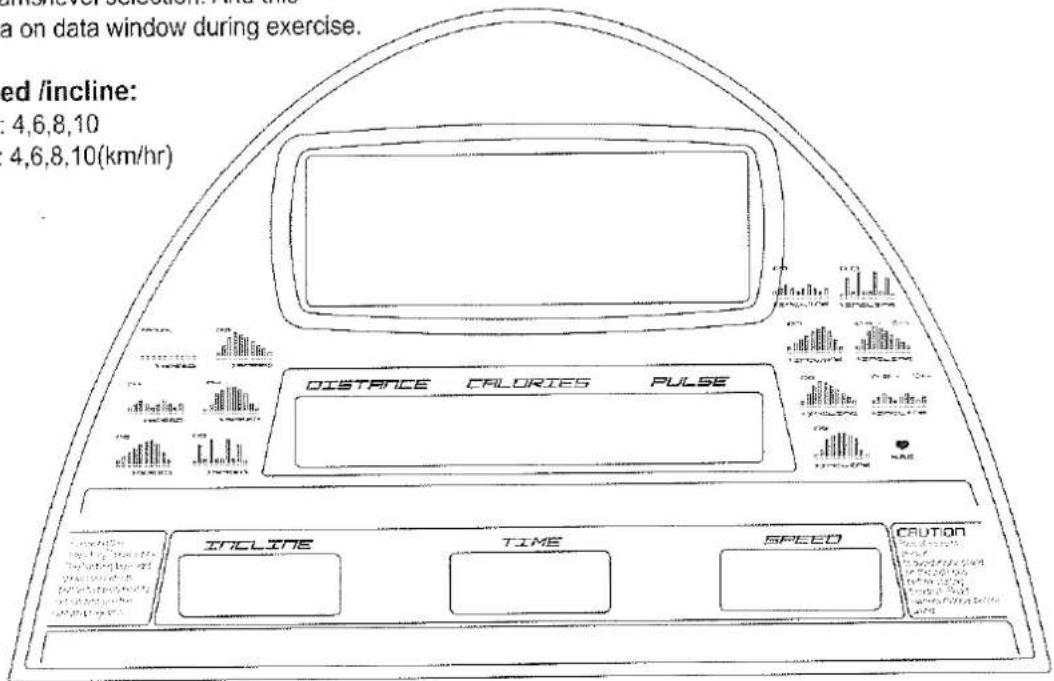
There are 4 LED windows and 12 Alpha numeric display.
Handlebar toggle for incline and speed adjustment
- Left: for incline adjustment. Increase or decrease by 1 every time.
- Right: for speed adjustment. Increase or decrease by 0.1 km/hr every time.
TFT-LCD TV CONSOLE OPERATION
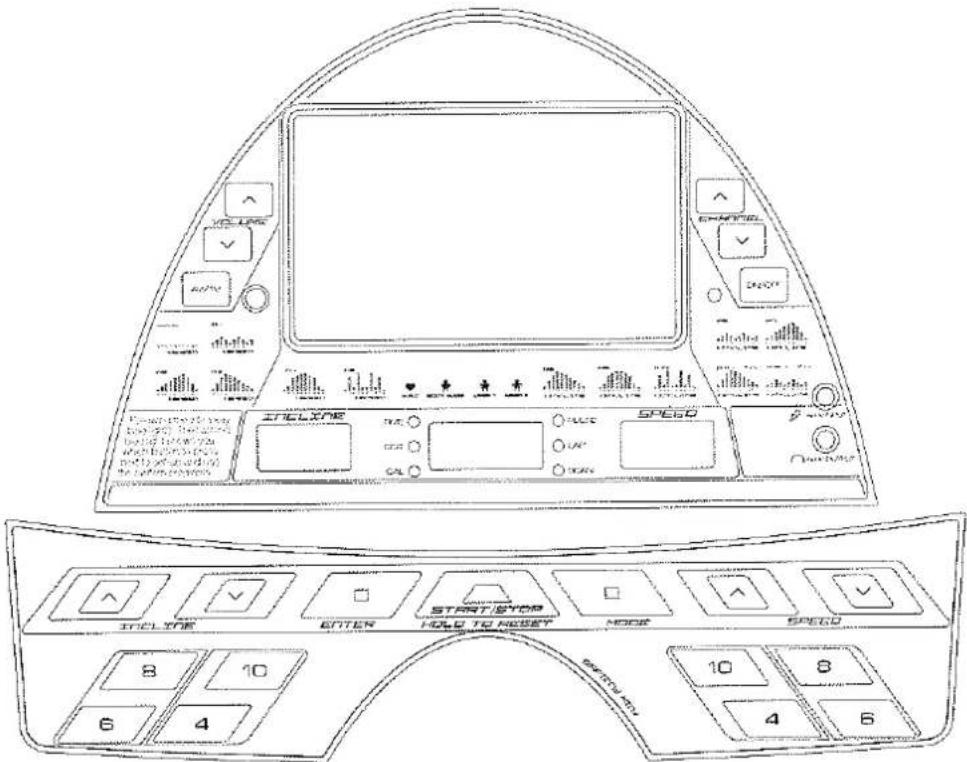
Button function:
| Button | Function |
| POWER ON/OFF | Press to power on or power off TV display. |
| AV/TV | 1. Press to select TV/Video/MP3 Function. TV-AV-MP32. Hold for 3~4 seconds: enter into "MENU" to setup screen. |
| CH+CH- | 1. In TV mode: Press to select channel.2. In MENU mode: Press to select item to set up. |
| VOL+VOL - | 1.In TV/Vedio/MP3 mode: Press to adjust volume.2. In MENU mode: Press to adjust the value of each item. |
MENU Mode: Allowing user to adjust the value of Brightness, Contrast, Color and Tint.
- Hold "MODE" for 3\~4 seconds into "MENU" model. Using button CH+ and CH- to select the item you like to set up.
- Using button VOL+ and VOL- to adjust value of each item as below.
| Item | Description |
| BRIGHTNESS | Adjust BRIGHTNESS. 0 ~ 63 |
| CONTRAST | Adjust CONTRAST. 0 ~ 63 |
| SHARP | Adjust SHARP. 0 ~ 7 |
| COLOR | Adjust COLOR. 0 ~ 63 |
| TINT | Adjust TINT. 0 ~ 63 |
| MUTE | Mute ON/OFF |
| TV SYSTEM | Select TV system. NTSC-M、NTSC-J、PAL-BG、PAL-DK、PAL-AI、SECAM-BG、SECAM-DK、SECAM-L according to Tuner. |
| AUTO SCAN | ON/OFF |
| RESET | Return to DEFAULT value. |
| QUIT | Press VOL+ or VOL- to exit MENU mode. |
MX900/MX950 CONSOLE OPERATION
The MX900 treadmill console is with 1 Manual function, 12 preset programs, 1 H.R.C program, Body Mass and 2 user setting programs.
The MX950 treadmill console is with 1 Manual function, 12 preset programs, 1 H.R.C program.
Manual Function
MX900-1. Attach safety key and press "MODE" into selecting program mode.
- Using speed arrow buttons to choose "Manual" function, then press "ENTER".
- Time window is flashing. Using speed or incline arrow buttons to input workout time (10\~99 Min.)
- Press "START".
MX950-1. Attach safety key and 16 Alpha bumericdisplay shows "Welcome To Strength Master".
-
Press "Mode" into Manual aditing mode. 16 Alpha numeric display shows "SET TIME".
-
Using speed or incline arrow buttons to input workout time.(10\~99 Min.) Press "ENTER".
-
Press "START".
12 Preset Programs
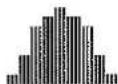
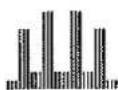
P1\~P5: Automatically change the speed of the treadmill throughout the workout.
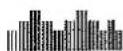
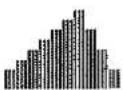
P6\~10: Automatically change the level of incline for the treadmill belt.
P11: 5km distance program. Automatically change the level of incline for the treadmill belt. The user sets the speed to a desired level and the program modifies the incline. The user can override the incline for any segment within the workout but at the end of each workout segment the program will override any adjustments made to the incline.
P12: 10km distance program. Automatically change the level of incline for the treadmill belt. The user sets the speed to a desired level and the program modifies the incline. The user can override the incline for any segment within the workout but at the end of each workout segment the program will override any adjustments made to the incline.
- Attach safety key and press "MODE" into selecting program mode.
- Using speed arrow buttons to choose desired preset program "P1\~P12". Then press "ENTER". LCD window shows speed (P1\~P5) or incline (P6\~P12)
- Using incline arrow buttons to choose desired level (L1\~L3). Then press "ENTER"
- Using speed or incline arrow buttons to input workout time (10\~99 Min.)
Target Heart Rate Program
This program automatically modifies the speed and incline to maintain a preset target heart rate. This target is established in the setup process. The chart on this owners manual should be used to determine the appropriate target heart rate. To set up the target heart rate program, you will need to enter the workout time, age, your target heart rate and max. desired speed.
- Attach safety key and press "MODE" into selecting program mode.
- Using speed arrow buttons to choose "HRC" program. Then press "ENTER".
- Using speed or incline arrow buttons to input your age. (13-80) Then press "ENTER".
- Using speed or incline arrow buttons to input your target heart rate. Then press "ENTER".
- Using speed or incline arrow buttons to input max, desired speed. Then press "ENTER".
- Using speed or incline arrow buttons to input workout time. (10\~99 Min.)
MX900/MX950 CONSOLE OPERATION
Notes:
1) After press "START", there is a warming period for first 3 minutes at incline level 5 and speed 3.0km/hr.
2) After warming up, the program compares actual heart rate and target heart rate every 12-15 seconds.
3) If the actual heart rate is less than target heart rate, increases speed by 0.2km/h every time and increases incline by 1 once changing speed by 5 times. If the actual heart rate is reached target heart rate, decreases speed by 0.2km/h every time and decreases incline by 1 once changing speed by 5 times.
4) If the speed is increased up to max. target speed, then speed can not be increased anymore even though the actual heart rate is still less than target heart rate.
5) If it does not read heart rate signal from user in 30 seconds after warming up period, the treadmill stops into runend mode.
Body Mass (Only for MX900)
- Attach safety key and press "MODE" into selecting program mode.
- Using speed arrow buttons to choose "Body Mass" program. Then press "ENTER".
- Using speed or incline arrow buttons to input your sex, height, weight, and age. Then press "ENTER".
- LCD window shows "Please Hold". Please hold the hand pulse grips.
- It shows BMI on LCD window value after 25 seconds measurement.
Notes:
1) It shows E4 if it does not read signal from hand pulse grips.
| Body Mass Index Comparison table | |
| under weight | <20 |
| IBW | 21~24 |
| Overweight I | 25~29 |
| Overweight II | 30~34 |
| Overweight III | ≥40 |
User setup programs (Only for MX900)
- Attach safety key and press "MODE" into selecting program mode.
- Using speed arrow buttons to choose "User 1" or "User 2" program. Then press "ENTER".
- Using speed or incline arrow buttons to input workout time. (10\~99 Min.) Then press "ENTER".
- During setup process: Incline window shows level of incline, Time window shows number of segment, Speed window shows speed level.
- Using incline arrow buttons to input level of incline for each segment. Using speed arrow buttons to input speed level for each segment. Then press "ENTER" for next segment till finish all 30 segments.
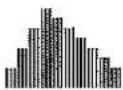
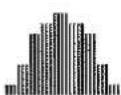
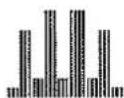
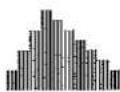
PRESET PROGRAM
Under preset programs, the preset workout time is 30 minutes. You can adjust the workout time while in set program mode.
MX900
| SEGMENT | 1 | 2 | 3 | 4 | 5 | 6 | 7 | 8 | 9 | 10 | 11 | 12 | 13 | 14 | 15 | 16 | 17 | 18 | 19 | 20 | 21 | 22 | 23 | 24 | 25 | 26 | 27 | 28 | 29 | 30 | ||
| Speed Program | P1 | LEVEL 1 | 2 | 2 | 2 | 3 | 3 | 3 | 4 | 4 | 4 | 3 | 3 | 3 | 2 | 2 | 2 | 3 | 3 | 3 | 4 | 4 | 4 | 3 | 3 | 3 | 2 | 2 | 3 | 3 | 2 | 2 |
| LEVEL 2 | 3 | 3 | 3 | 4 | 4 | 4 | 5 | 5 | 5 | 4 | 4 | 4 | 3 | 3 | 3 | 4 | 4 | 4 | 5 | 5 | 5 | 4 | 4 | 4 | 3 | 3 | 4 | 4 | 3 | 3 | ||
| LEVEL 3 | 4 | 4 | 4 | 5 | 5 | 5 | 6 | 6 | 6 | 5 | 5 | 5 | 4 | 4 | 4 | 5 | 5 | 5 | 6 | 6 | 6 | 5 | 5 | 5 | 4 | 4 | 5 | 5 | 4 | 4 | ||
| P2 | LEVEL 1 | 2 | 2 | 2 | 3 | 3 | 3 | 4 | 4 | 4 | 5 | 5 | 5 | 6 | 6 | 6 | 7 | 7 | 7 | 8 | 8 | 8 | 6 | 6 | 6 | 4 | 4 | 4 | 2 | 2 | 2 | |
| LEVEL 2 | 3 | 3 | 3 | 4 | 4 | 4 | 5 | 5 | 5 | 6 | 6 | 6 | 7 | 7 | 7 | 8 | 8 | 8 | 9 | 9 | 9 | 7 | 7 | 7 | 5 | 5 | 5 | 3 | 3 | 3 | ||
| LEVEL 3 | 4 | 4 | 4 | 5 | 5 | 5 | 6 | 6 | 6 | 7 | 7 | 7 | 8 | 8 | 8 | 9 | 9 | 9 | 10 | 10 | 10 | 8 | 8 | 8 | 6 | 6 | 6 | 4 | 4 | 4 | ||
| P3 | LEVEL 1 | 2 | 2 | 2 | 4 | 4 | 4 | 6 | 6 | 6 | 8 | 8 | 8 | 7 | 7 | 7 | 6 | 6 | 6 | 5 | 5 | 5 | 4 | 4 | 4 | 3 | 3 | 3 | 2 | 2 | 2 | |
| LEVEL 2 | 3 | 3 | 3 | 5 | 5 | 5 | 7 | 7 | 7 | 9 | 9 | 9 | 8 | 8 | 8 | 7 | 7 | 7 | 6 | 6 | 6 | 5 | 5 | 5 | 4 | 4 | 4 | 3 | 3 | 3 | ||
| LEVEL 3 | 4 | 4 | 4 | 6 | 6 | 6 | 8 | 8 | 8 | 10 | 10 | 10 | 9 | 9 | 9 | 8 | 8 | 8 | 7 | 7 | 7 | 6 | 6 | 6 | 5 | 5 | 5 | 4 | 4 | 4 | ||
| P4 | LEVEL 1 | 1 | 1 | 1 | 3 | 3 | 3 | 6 | 6 | 6 | 7 | 7 | 7 | 7 | 8 | 8 | 8 | 8 | 7 | 7 | 7 | 7 | 6 | 6 | 6 | 3 | 3 | 3 | 1 | 1 | 1 | |
| LEVEL 2 | 2 | 2 | 2 | 4 | 4 | 4 | 7 | 7 | 7 | 8 | 8 | 8 | 8 | 9 | 9 | 9 | 9 | 8 | 8 | 8 | 8 | 7 | 7 | 7 | 4 | 4 | 4 | 2 | 2 | 2 | ||
| LEVEL 3 | 3 | 3 | 3 | 5 | 5 | 5 | 8 | 8 | 8 | 9 | 9 | 9 | 9 | 10 | 10 | 10 | 10 | 9 | 9 | 9 | 9 | 8 | 8 | 8 | 5 | 5 | 5 | 3 | 3 | 3 | ||
| P5 | LEVEL 1 | 1 | 1 | 1 | 7 | 7 | 7 | 2 | 2 | 2 | 9 | 9 | 9 | 9 | 2 | 2 | 2 | 2 | 9 | 9 | 9 | 9 | 2 | 2 | 2 | 7 | 7 | 7 | 1 | 1 | 1 | |
| LEVEL 2 | 2 | 2 | 2 | 8 | 8 | 8 | 2 | 2 | 2 | 10 | 10 | 10 | 10 | 3 | 3 | 3 | 3 | 10 | 10 | 10 | 10 | 2 | 2 | 2 | 8 | 8 | 8 | 2 | 2 | 2 | ||
| LEVEL 3 | 3 | 3 | 3 | 9 | 9 | 9 | 2 | 2 | 2 | 11 | 11 | 11 | 11 | 4 | 4 | 4 | 4 | 11 | 11 | 11 | 11 | 2 | 2 | 2 | 9 | 9 | 9 | 3 | 3 | 3 | ||
| Incline Program | P6 | LEVEL 1 | 2 | 2 | 2 | 3 | 3 | 3 | 4 | 4 | 4 | 3 | 3 | 3 | 2 | 2 | 2 | 3 | 3 | 3 | 4 | 4 | 4 | 3 | 3 | 3 | 2 | 2 | 3 | 3 | 2 | 2 |
| LEVEL 2 | 3 | 3 | 3 | 4 | 4 | 4 | 5 | 5 | 5 | 4 | 4 | 4 | 3 | 4 | 4 | 4 | 4 | 5 | 5 | 5 | 5 | 4 | 4 | 4 | 3 | 3 | 4 | 4 | 3 | 3 | ||
| LEVEL 3 | 4 | 4 | 4 | 5 | 5 | 5 | 6 | 6 | 6 | 5 | 5 | 5 | 4 | 4 | 4 | 5 | 5 | 5 | 6 | 6 | 6 | 5 | 5 | 5 | 4 | 4 | 5 | 5 | 4 | 4 | ||
| P7 | LEVEL 1 | 2 | 2 | 2 | 3 | 3 | 3 | 4 | 4 | 4 | 5 | 5 | 5 | 6 | 6 | 6 | 7 | 7 | 7 | 8 | 8 | 8 | 6 | 6 | 6 | 4 | 4 | 4 | 2 | 2 | 2 | |
| LEVEL 2 | 3 | 3 | 3 | 4 | 4 | 4 | 5 | 5 | 5 | 6 | 6 | 6 | 7 | 8 | 8 | 8 | 8 | 9 | 9 | 9 | 9 | 7 | 7 | 7 | 5 | 5 | 5 | 3 | 3 | 3 | ||
| LEVEL 3 | 4 | 4 | 4 | 5 | 5 | 5 | 6 | 6 | 6 | 7 | 7 | 7 | 8 | 8 | 8 | 9 | 9 | 10 | 10 | 10 | 10 | 8 | 8 | 8 | 6 | 6 | 6 | 4 | 4 | 4 | ||
| P8 | LEVEL 1 | 2 | 2 | 2 | 4 | 4 | 4 | 6 | 6 | 6 | 8 | 8 | 8 | 7 | 7 | 7 | 6 | 6 | 6 | 5 | 5 | 5 | 4 | 4 | 4 | 3 | 3 | 3 | 2 | 2 | 2 | |
| LEVEL 2 | 3 | 3 | 3 | 5 | 5 | 5 | 7 | 7 | 7 | 9 | 9 | 9 | 8 | 9 | 8 | 7 | 7 | 7 | 6 | 6 | 6 | 5 | 5 | 5 | 4 | 4 | 4 | 3 | 3 | 3 | ||
| LEVEL 3 | 4 | 4 | 4 | 6 | 6 | 6 | 8 | 8 | 8 | 10 | 10 | 10 | 9 | 9 | 9 | 8 | 8 | 8 | 7 | 7 | 7 | 6 | 6 | 6 | 5 | 5 | 5 | 4.4 | 4.4 | |||
| P9 | LEVEL 1 | 1 | 1 | 1 | 3 | 3 | 3 | 6 | 6 | 6 | 7 | 7 | 7 | 7 | 8 | 8 | 8 | 8 | 7 | 7 | 7 | 7 | 6 | 6 | 6 | 3.3.3.3.3.3.3.3.3.3.3.3.3.3.3.3.3.3.3.3.3.3.3.3.3.3.3.3.3.3.3.3.3.3.3.3.3.3.3.3.3.3.3.3.3.3.3.3.3.3.3 .3.3.3.3.3.3.3.3.3.3.3.3.3.3.3.3.3.3.3.3.3.3.3.3.3.3.3.3.3.3.3.3.3.3.3.3.3.3.3.3.3.3.3.3.3.3.3.3.3.3 3.3.3.3.3.3.3.3.3.3.3.3.3.3.3.3.3.3.3.3.3.3.3.3.3.3.3.3.3.3.3.3.3.3.3.3.3.3.3.3.3.3.3.3.3.3.3.3.3.3,3.3.3.3.3.3.3.3.3.3.3.3.3.3.3.3.3.3.3.3.3.3.3.3.3.3.3.3.3.3.3.3.3.3.3.3.3.3.3.3.3.3.3.3.3.3.3.3.3.3-3.3.3.3.3.3.3.3.3.3.3.3.3.3.3.3.3.3.3.3.3.3.3.3.3.3.3.3.3.3.3.3.3.3.3.3.3.3.3.3.3.3.3.3.3.3.3.3.3.3 -3.3.3.3.3.3.3.3.3.3.3.3.3.3.3.3.3.3.3.3.3.3.3.3.3.3.3.3.3.3.3.3.3.3.3.3.3.3.3.3.3.3.3.3.3.3.3.3.3.3.-3.3.3.3.3.3.3.3.3.3.3.3.3.3.3.3.3.3.3.3.3.3.3.3.3.3.3.3.3.3.3.3.3.3.3.3.3.3.3.3.3.3.3.3.3.3.3.3.3.3.(5km) P11 (5km) P12 (10km) P11 (5km) P12 (10km) P11 (5km) P12 (10km) P11 (5km) P12 (10km) P11 (5km) P12 (10km) P11 (5km) P12 (10km) P11 (5km) P12 (10km) P11 (5km)P11 (5km) P12 (10km) P11 (5km) P12 (10km) P11 (5km) P12 (10km) P11 (5km) P12 (10km) P11 (5km) P12 (10km) P11 (5km) P12 (10km) P11 (5km) P12(10km) P11 (5km) P12 (10km) P11 (5km) P12 (10km) P11 (5km) P12 (10km) P11 (5km) P12 (10km) P11 (5km) P12 (10km) P11 (5km) P12 (10km) P11 (5 km) P12 (10km) P11 (5km) P12 (10km) P11 (5km) P12 (10km) P11 (5km) P12 (10km) P11 (5km) P12 (10km) P11 (5km) P12 (10km) P11 (5km) P12 (10km)P11 (5km) P12 (10km) P11 (5km) P12 (10km) P11 (5km) P12 (10km) P11 (5km) P12 (10km) P11 (5km) P12 (10km) P11 (5km) P12 (10km) P11 (5km)P11(5km) P12(10km) P11 (5km) P12 (10km) P11 (5km) P12 (10km) P11 (5km) P12 (10km) P11 (5km) P12 (10km) P11 (5km) P12 (10km) P11 (5km) P12 (10 km) P11 (5km) P12 (10km) P11 (5km) P12 (10km) P11 (5km) P12 (10km) P11 (5km) P12 (10km) P11 (5km) P12 (10km) P11 (5km) P12 (10km) P11 (5km) P 12 (10km) P11 (5km) P12 (10km) P11 (5km) P12 (10km) P11 (5km) P12 (10km) P11 (5km) P12 (10km) P11 (5km) P12 (10km) P11 (5km) P12 (10km) P1 1 (5km) P12 (10km) P11 (5km) P12 (10km) P11 (5km) P12 (10km) P11 (5km) P12 (10km) P11 (5km) P12 (10km) P11 (5km) P12 (10km) P11 (5km) P12 ( 10km) P11 (5km) P12 (10km) P11 (5km) P12 (10km) P11 (5km) P12 (10km) P11 (5km) P12 (10km) P11 (5km) P12 (10km) P11 (5km) P12 (10km) P11 (5km) P11 (5km) P12 (10km) P11 (5km) P12 (10km) P11 (5km) P12 (10km) P11 (5km) P12 (10km) P11 (5km) P12 (10km) P11 (5km) P12 (10km) P11 (5km) P2 (10km) P2 (10km) P2 (10km) P2 (10km) P2 (10km) P2 (10km) P2 (10km) P2 (10km) P2 (10km) P2 (10km) P2 (10km) P2 (10km) P2 (10km) P2 (10km) P2 (10km)(5km) P2 (10km) P2 (10km) P2 (10km) P2 (10km) P2 (10km) P2 (10km) P2 (10km) P2 (10km) P2 (10km) P2 (10km) P2 (10km) P2 (10km) P2 (10km) P2 (10 km) P2 (10 km) P2 (10 km) P2 (10 km) P2 (10 km) P2 (10 km) P2 (10 km) P2 (10 km) P2 (10 km) P2 (10 km) P2 (10 km) P2 (10 km) P2 (10 km) P2 (10 km) P2 (10 km)P2 (10 km) P2 (10 km) P2 (10 km) P2 (10 km) P2 (10 km) P2 (10 km) P2 (10 km) P2 (10 km) P2 (10 km) P2 (10 km) P2 (10 km) P2 (10 km) P2 (10 km) P2 (10 km) P2(10 km) P2 (10 km) P2 (10 km) P2 (10 km) P2 (10 km) P2 (10 km) P2 (10 km) P2 (10 km) P2 (10 km) P2 (10 km) P2 (10 km) P2 (10 km) P2 (10 km) P2 (10 km) P2 (1 0 km) P2 (10 km) P2 (10 km) P2 (10 km) P2 (10 km) P2 (10 km) P2 (10 km) P2 (10 km) P2 (10 km) P2 (10 km) P2 (10 km) P2 (10 km) P2 (10 km) P2 (10 km) P2 (10 km) P2 (10 km) P2 (10 km) P2 (10 km) P2 (10 km) P2 (10 km) P2 (10 km) P2 (10 km) P2 (10 km) P2 (10 km) P2 (10 km) P2 (10 km) P2 (10 km) P2 (10 km) P2 (10 km) 5 km) 5 km) 5 km) 5 km) 5 km) 5 km) 5 km) 5 km) 5 km) 5 km) 5 km) 5 km) 5 km) 5 km) 5 km) 5 km) 5 km) 5 km) 5 km) 5 km) 5 km) 5 km) 5 km) 5 km) 5 km) 4 km) 4 km) 4 km) 4 km) 4 km) 4 km) 4 km) 4 km) 4 km) 4 km) 4 km) 4 km) 4 km) 4 km) 4 km) 4 km) 4 km) 4 km) 4 km) 4 km) 4 km) 4 km) 4 km) 4 km) 4 km) 5 km) 5 km) 5 km) 5 km) 5 km) 5 km) 5 km) 5 km) 5 km) 5 km) 5 km) 5 km) 5 km) 5 km) 5 km) 5 km) 5 km) 5 km) 5 km) 5 km) 5 km) 5 km) 5 km) 5 km) 6 km) 6 km) 6 km) 6 km) 6 km) 6 km) 6 km) 6 km) 6 km) 6 km) 6 km) 6 km) 6 km) 6 km) 6 km) 6 km) 6 km) 6 km) 6 km) 6 km) 6 km) 6 km) 6 km) 6 km) 6 km) 7 km) 7 km) 7 km) 7 km) 7 km) 7 km) 7 km) 7 km) 7 km) 7 km) 7 km) 7 km) 7 km) 7 km) 7 km) 7 km) 7 km) 7 km) 7 km) 7 km) 7 km) 7 km) 7 km) 7 km) 7 km) 8 km) 8 km) 8 km) 8 km) 8 km) 8 km) 8 km) 8 km) 8 km) 8 km) 8 km) 8 km) 8 km) 8 km) 8 km) 8 km) 8 km) 8 km) 8 km) 8 km) 8 km) 8 km) 8 km) 8 km) 8 km) 9 km) 9 km) 9 km) 9 km) 9 km) 9 km) 9 km) 9 km) 9 km) 9 km) 9 km) 9 km) 9 km) 9 km) 9 km) 9 km) 9 km) 9 km) 9 km) 9 km) 9 km) 9 km) 9 km) 9 km) 9 km) 10 km) 10 km) 10 km) 10 km) 10 km) 10 km) 10 km) 10 km) 10 km) 10 km) 10 km) 10 km) 10 km) 10 km) 10 km) 10 km) 10 km) 10 km) 10 km) 10 km) 17 km) 17 km) 17 km) 17 km) 17 km) 17 km) 17 km) 17 km) 17 km) 17 km) 17 km) 17 km) 17 km) 17 km) 17 km) 17 km) 17 km) 17 km) 17 km) 17 km) 18 km) 18 km) 18 km) 18 km) 18 km) 18 km) 18 km) 18 km) 18 km) 18 km) 18 km) 18 km) 18 km) 18 km) 18 km) 18 km) 18 km) 18 km) 18 km) 18 km) 19 km) 19 km) 19 km) 19 km) 19 km) 19 km) 19 km) 19 km) 19 km) 19 km) 19 km) 19 km) 19 km) 19 km) 19 km) 19 km) 19 km) 19 km) 19 km) 19 km) 18 km) 18 km) 18 km) 18 km) 18 km) 18 km) 18 km) 18 km) 18 km) 18 km) 18 km) 18 km) 18 km) 18 km) 18 km) 18 km) 18 km) 18 km) 18 km) 17 km) 17 km) 17 km) 17 km) 17 km) 17 km) 17 km) 17 km) 17 km) 17 km) 17 km) 17 km) 17 km) 17 km) 17 km) 17 km) 17 km) 17 km) 17 km) 16 km) 16 km) 16 km) 16 km) 16 km) 16 km) 16 km) 16 km) 16 km) 16 km) 16 km) 16 km) 16 km) 16 km) 16 km) 16 km) 16 km) 16 km) 16 km) 16 km) 17 km) 17 km) 17 km) 17 km) 17 km) 17 km) 17 km) 17 km) 17 km) 17 km) 17 km) 17 km) 17 km) 17 km) 17 km) 17 km) 17 km) 17 km) 17 km) 19 km) 19 km) 19 km) 19 km) 19 km) 19 km) 19 km) 19 km) 19 km) 19 km) 19 km) 19 km) 19 km) 19 km) 19 km) 19 km) 19 km) 19 km) 19 km) 17 km) 17 km) 17 km) 17 km) 17 km) 17 km) 17 km) 17 km) 17 km) 17 km) 17 km) 17 km) 17 km) 17 km) 17 km) 17 km) 17 km) 17 km) 17 km) 15 km) 15 km) 15 km) 15 km) 15 km) 15 km) 15 km) 15 km) 15 km) 15 km) 15 km) 15 km) 15 km) 15 km) 15 km) 15 km) 15 km) 15 km) 15 km) 15 km) 16 km) 16 km) 16 km) 16 km) 16 km | ||||||
Speed Program:



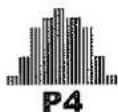
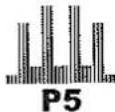
Incline Program:




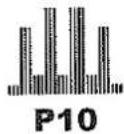
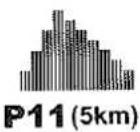
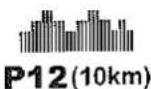
PRESET PROGRAM
Under preset programs, the preset workout time is 30 minutes. You can adjust the workout time while in set program mode.
MX950
| SEGMENT | 1 | 2 | 3 | 4 | 5 | 6 | 7 | 8 | 9 | 10 | 11 | 12 | 13 | 14 | 15 | 16 | 17 | 18 | 19 | 20 | 21 | 22 | 23 | 24 | ||
| Speed Program | P1 | LEVEL 1 | 2 | 2 | 3 | 3 | 4 | 4 | 4 | 3 | 3 | 3 | 2 | 2 | 2 | 3 | 3 | 3 | 4 | 4 | 4 | 3 | 3 | 3 | 2 | 2 |
| LEVEL 2 | 3 | 3 | 4 | 4 | 5 | 5 | 5 | 4 | 4 | 4 | 3 | 3 | 3 | 4 | 4 | 4 | 5 | 5 | 5 | 4 | 4 | 4 | 3 | 3 | ||
| LEVEL 3 | 4 | 4 | 5 | 5 | 6 | 6 | 6 | 5 | 5 | 5 | 4 | 4 | 4 | 5 | 5 | 5 | 6 | 6 | 6 | 5 | 5 | 5 | 4 | 4 | ||
| P2 | LEVEL 1 | 2 | 2 | 3 | 3 | 4 | 4 | 5 | 5 | 6 | 6 | 7 | 7 | 7 | 8 | 8 | 8 | 6 | 6 | 6 | 4 | 4 | 4 | 2 | 2 | |
| LEVEL 2 | 3 | 3 | 4 | 4 | 5 | 5 | 6 | 6 | 7 | 7 | 8 | 8 | 8 | 9 | 9 | 9 | 7 | 7 | 7 | 5 | 5 | 5 | 3 | 3 | ||
| LEVEL 3 | 4 | 4 | 5 | 5 | 6 | 6 | 7 | 7 | 8 | 8 | 9 | 9 | 9 | 10 | 10 | 10 | 8 | 8 | 8 | 6 | 6 | 6 | 4 | 4 | ||
| P3 | LEVEL 1 | 2 | 2 | 4 | 4 | 4 | 6 | 6 | 6 | 8 | 8 | 8 | 7 | 7 | 7 | 6 | 6 | 5 | 5 | 4 | 4 | 3 | 3 | 2 | 2 | |
| LEVEL 2 | 3 | 3 | 5 | 5 | 5 | 7 | 7 | 7 | 9 | 9 | 9 | 8 | 8 | 8 | 7 | 7 | 6 | 6 | 5 | 5 | 4 | 4 | 3 | 3 | ||
| LEVEL 3 | 4 | 4 | 6 | 6 | 6 | 8 | 8 | 8 | 10 | 10 | 10 | 9 | 9 | 9 | 8 | 8 | 7 | 7 | 6 | 6 | 5 | 5 | 4 | 4 | ||
| P4 | LEVEL 1 | 1 | 1 | 3 | 3 | 6 | 6 | 6 | 7 | 7 | 7 | 8 | 8 | 8 | 8 | 7 | 7 | 7 | 6 | 6 | 6 | 3 | 3 | 1 | 1 | |
| LEVEL 2 | 2 | 2 | 4 | 4 | 7 | 7 | 7 | 8 | 8 | 8 | 9 | 9 | 9 | 9 | 8 | 8 | 8 | 7 | 7 | 7 | 4 | 4 | 2 | 2 | ||
| LEVEL 3 | 3 | 3 | 5 | 5 | 8 | 8 | 8 | 9 | 9 | 9 | 10 | 10 | 10 | 10 | 9 | 9 | 9 | 8 | 8 | 8 | 5 | 5 | 3 | 3 | ||
| P5 | LEVEL 1 | 1 | 1 | 7 | 7 | 7 | 2 | 2 | 2 | 9 | 9 | 9 | 2 | 2 | 9 | 9 | 9 | 2 | 2 | 2 | 7 | 7 | 7 | 1 | 1 | |
| LEVEL 2 | 2 | 2 | 8 | 8 | 8 | 2 | 2 | 2 | 10 | 10 | 10 | 3 | 3 | 10 | 10 | 10 | 2 | 2 | 2 | 8 | 8 | 8 | 2 | 2 | ||
| LEVEL 3 | 3 | 3 | 9 | 9 | 9 | 2 | 2 | 2 | 11 | 11 | 11 | 4 | 4 | 11 | 11 | 11 | 2 | 2 | 2 | 9 | 9 | 9 | 3 | 3 | ||
| Incline Program | P6 | LEVEL 1 | 2 | 2 | 3 | 3 | 4 | 4 | 4 | 3 | 3 | 3 | 2 | 2 | 2 | 3 | 3 | 3 | 4 | 4 | 4 | 3 | 3 | 3 | 2 | 2 |
| LEVEL 2 | 3 | 3 | 4 | 4 | 5 | 5 | 5 | 4 | 4 | 4 | 3 | 3 | 3 | 4 | 4 | 4 | 5 | 5 | 5 | 5 | 4 | 4 | 3 | 3 | ||
| LEVEL 3 | 4 | 4 | 5 | 5 | 6 | 6 | 6 | 5 | 5 | 5 | 4 | 4 | 4 | 5 | 5 | 5 | 6 | 6 | 6 | 5 | 5 | 5 | 4 | 4 | ||
| P7 | LEVEL 1 | 2 | 2 | 3 | 3 | 4 | 4 | 5 | 5 | 6 | 6 | 7 | 7 | 7 | 8 | 8 | 8 | 6 | 6 | 6 | 4 | 4 | 4 | 2 | 2 | |
| LEVEL 2 | 3 | 3 | 4 | 4 | 5 | 5 | 6 | 6 | 7 | 7 | 8 | 8 | 8 | 9 | 9 | 9 | 7 | 7 | 7 | 7 | 5 | 5 | 3 | 3 | ||
| LEVEL 3 | 4 | 4 | 5 | 5 | 6 | 6 | 7 | 7 | 8 | 8 | 9 | 9 | 9 | 10 | 10 | 10 | 8 | 8 | 8 | 6 | 6 | 6 | 4 | 4 | ||
| P8 | LEVEL 1 | 2 | 2 | 4 | 4 | 4 | 6 | 6 | 6 | 8 | 8 | 8 | 7 | 7 | 7 | 6 | 6 | 5 | 5 | 4 | 4 | 3 | 3 | 2 | 2 | |
| LEVEL 2 | 3 | 3 | 5 | 5 | 5 | 7 | 7 | 7 | 9 | 9 | 9 | 8 | 8 | 8 | 7 | 7 | 6 | 6 | 5 | 4 | 4 | 3 | 3 | |||
| LEVEL 3 | 4 | 4 | 6 | 6 | 6 | 8 | 8 | 8 | 10 | 10 | 10 | 9 | 9 | 9 | 8 | 8 | 7 | 7 | 6 | 6 | 5 | 5 | 4 | 4 | ||
| P9 | LEVEL 1 | 1 | 1 | 3 | 3 | 6 | 6 | 6 | 7 | 7 | 7 | 8 | 8 | 8 | 8 | 7 | 7 | 7 | 6 | 6 | 6 | 3 | 3 | 1 | 1 | |
| LEVEL 2 | 2 | 2 | 4 | 4 | 7 | 7 | 7 | 8 | 8 | 8 | 9 | 9 | 9 | 9 | 8 | 8 | 8 | 7 | 7 | 4 | 4 | 2 | 2 | |||
| LEVEL 3 | 3 | 3 | 5 | 5 | 8 | 8 | 8 | 9 | 9 | 9 | 10 | 10 | 10 | 10 | 9 | 9 | 9 | 8 | 8 | 5 | 5 | 3 | 3 | |||
| P10 | LEVEL 1 | 1 | 1 | 7 | 7 | 7 | 2 | 2 | 2 | 9 | 9 | 9 | 2 | 2 | 9 | 9 | 9 | 2 | 2 | 2 | 7 | 7 | 7 | 1 | 1 | |
| LEVEL 2 | 2 | 2 | 8 | 8 | 8 | 2 | 2 | 2 | 10 | 10 | 10 | 3 | 3 | 10 | 10 | 10 | 10 | 2 | 2 | 8 | 8 | 8 | 2 | 2 | ||
| LEVEL 3 | 3 | 3 | 9 | 9 | 9 | 2 | 2 | 2 | 11 | 11 | 11 | 4 | 4 | 11 | 11 | 11 | 2 | 2 | 2 | 9 | 9 | 9 | 3 | 3 | ||
| P11 (5km) | LEVEL 1 | 2 | 2 | 4 | 4 | 4 | 6 | 6 | 6 | 8 | 8 | 8 | 7 | 7 | 7 | 6 | 6 | 5 | 5 | 4 | 4 | 3 | 3 | 2 | 2 | |
| LEVEL 2 | 3 | 3 | 5 | 5 | 5 | 7 | 7 | 7 | 9 | 9 | 9 | 8 | 8 | 8 | 7 | 7 | 6 | 6 | 5 | 6 | 5 | 4 | 3 | 3 | ||
| LEVEL 3 | 4 | 4 | 6 | 6 | 6 | 8 | 8 | 8 | 10 | 10 | 10 | 9 | 9 | 9 | 8 | 8 | 7 | 7 | 6 | 6 | 5 | 5 | 4 | 4 | ||
| P12 (10km) | LEVEL 1 | 2 | 2 | 3 | 3 | 4 | 4 | 4 | 3 | 3 | 3 | 2 | 2 | 2 | 3 | 3 | 3 | 4 | 4 | 4 | 3 | 3 | 3 | 2 | 2 | |
| LEVEL 2 | 3 | 3 | 4 | 4 | 5 | 5 | 5 | 4 | 4 | 4 | 3 | 3 | 3 | 4 | 4 | 4 | 5 | 5 | 5 | 3 | 4 | 4 | 3 | 3 | ||
| LEVEL 3 | 4 | 4 | 5 | 5 | 6 | 6 | 6 | 5 | 5 | 5 | 4 | 4 | 4 | 5 | 5 | 5 | 6 | 6 | 6 | 5 | 5 | 5 | 4 | 4 | ||
Speed Program:

P1

P2

P3
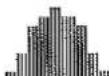
P4
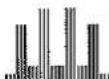
P5
Incline Program:

P6
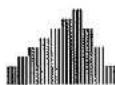
P7
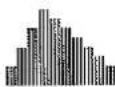
P8
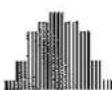
P9
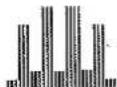
P10
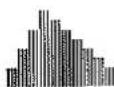
P11(5km)
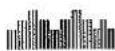
P12(10km)
PRESET PROGRAM
Under preset programs, the preset workout time is 30 minutes. You can adjust the workout time while in set program mode.
TFT-LCD TV
| SEGMENT | 1 | 2 | 3 | 4 | 5 | 6 | 7 | 8 | 9 | 10 | 11 | 12 | ||
| Speed Program | P1 | LEVEL 1 | 2 | 2 | 3 | 4 | 3 | 2 | 3 | 4 | 3 | 2 | 3 | 2 |
| LEVEL 2 | 3 | 3 | 4 | 5 | 4 | 3 | 4 | 5 | 4 | 3 | 4 | 3 | ||
| LEVEL 3 | 4 | 4 | 5 | 6 | 5 | 4 | 5 | 6 | 5 | 4 | 5 | 4 | ||
| P2 | LEVEL 1 | 2 | 3 | 4 | 5 | 6 | 7 | 7 | 8 | 8 | 6 | 4 | 2 | |
| LEVEL 2 | 3 | 4 | 5 | 6 | 7 | 8 | 8 | 9 | 9 | 7 | 5 | 3 | ||
| LEVEL 3 | 4 | 5 | 6 | 7 | 8 | 9 | 9 | 10 | 10 | 8 | 6 | 4 | ||
| P3 | LEVEL 1 | 2 | 4 | 6 | 8 | 8 | 7 | 7 | 6 | 5 | 4 | 3 | 2 | |
| LEVEL 2 | 3 | 5 | 7 | 9 | 9 | 8 | 8 | 7 | 6 | 5 | 4 | 3 | ||
| LEVEL 3 | 4 | 6 | 8 | 10 | 10 | 9 | 9 | 8 | 7 | 6 | 5 | 4 | ||
| P4 | LEVEL 1 | 1 | 3 | 6 | 7 | 7 | 8 | 8 | 7 | 7 | 6 | 3 | 1 | |
| LEVEL 2 | 2 | 4 | 7 | 8 | 8 | 9 | 9 | 8 | 8 | 7 | 4 | 2 | ||
| LEVEL 3 | 3 | 5 | 8 | 9 | 9 | 10 | 10 | 9 | 9 | 8 | 5 | 3 | ||
| P5 | LEVEL 1 | 1 | 7 | 2 | 9 | 9 | 2 | 2 | 9 | 9 | 2 | 7 | 1 | |
| LEVEL 2 | 2 | 8 | 2 | 10 | 10 | 3 | 3 | 10 | 10 | 2 | 8 | 2 | ||
| LEVEL 3 | 3 | 9 | 2 | 11 | 11 | 4 | 4 | 11 | 11 | 2 | 9 | 3 | ||
| Incline Program | P6 | LEVEL 1 | 2 | 2 | 3 | 4 | 3 | 2 | 3 | 4 | 3 | 2 | 3 | 2 |
| LEVEL 2 | 3 | 3 | 4 | 5 | 4 | 3 | 4 | 5 | 4 | 3 | 4 | 3 | ||
| LEVEL 3 | 4 | 4 | 5 | 6 | 5 | 4 | 5 | 6 | 5 | 4 | 5 | 4 | ||
| P7 | LEVEL 1 | 2 | 3 | 4 | 5 | 6 | 7 | 7 | 8 | 8 | 6 | 4 | 2 | |
| LEVEL 2 | 3 | 4 | 5 | 6 | 7 | 8 | 8 | 9 | 9 | 7 | 5 | 3 | ||
| LEVEL 3 | 4 | 5 | 6 | 7 | 8 | 9 | 9 | 10 | 10 | 8 | 6 | 4 | ||
| P8 | LEVEL 1 | 2 | 4 | 6 | 8 | 8 | 7 | 7 | 6 | 5 | 4 | 3 | 2 | |
| LEVEL 2 | 3 | 5 | 7 | 9 | 9 | 8 | 8 | 7 | 6 | 5 | 4 | 3 | ||
| LEVEL 3 | 4 | 6 | 8 | 10 | 10 | 9 | 9 | 8 | 7 | 6 | 5 | 4 | ||
| P9 | LEVEL 1 | 1 | 3 | 6 | 7 | 7 | 8 | 8 | 7 | 7 | 6 | 3 | 1 | |
| LEVEL 2 | 2 | 4 | 7 | 8 | 8 | 9 | 9 | 8 | 8 | 7 | 4 | 2 | ||
| LEVEL 3 | 3 | 5 | 8 | 9 | 9 | 10 | 10 | 9 | 9 | 8 | 5 | 3 | ||
| P10 | LEVEL 1 | 1 | 7 | 2 | 9 | 9 | 2 | 2 | 9 | 9 | 2 | 7 | 1 | |
| LEVEL 2 | 2 | 8 | 2 | 10 | 10 | 3 | 3 | 10 | 10 | 2 | 8 | 2 | ||
| LEVEL 3 | 3 | 9 | 2 | 11 | 11 | 4 | 4 | 11 | 11 | 2 | 9 | 2 | ||
| P11 (5km) | LEVEL 1 | 2 | 4 | 6 | 8 | 8 | 7 | 7 | 6 | 5 | 4 | 3 | 2 | |
| LEVEL 2 | 3 | 5 | 7 | 9 | 9 | 8 | 8 | 7 | 6 | 5 | 4 | 3 | ||
| LEVEL 3 | 4 | 6 | 8 | 10 | 10 | 9 | 9 | 8 | 7 | 6 | 5 | 4 | ||
| P12 (10km) | LEVEL 1 | 2 | 3 | 4 | 3 | 3 | 2 | 2 | 3 | 3 | 4 | 3 | 2 | |
| LEVEL 2 | 3 | 4 | 5 | 4 | 4 | 3 | 3 | 4 | 4 | 5 | 4 | 3 | ||
| LEVEL 3 | 4 | 5 | 6 | 5 | 5 | 4 | 4 | 5 | 5 | 6 | 5 | 4 | ||
Speed Program:

P1
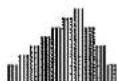
P2
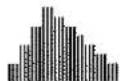
P3
P4
P5
Incline Program:
P6
P7
P8
P9
P10
P11(5km)

P12(10km)
Read carefully the following before using your treadmill
Always stretch your muscles before exercise program. Warm up slowly by walking at a slow speed. Increase workout intensity gradually until you reach your desired workout pace. gradually to an easy walk, allowing your heart rate to decrease to normal situation.
When start the treadmill, always stand with both feet on the step-on side rails.
When finishing, allow the running belt to slow and come to a complete stop before stepping off.
◆ Wear comfortable, nonrestrictive clothing when using the treadmill. Never wear anything loose, such as baggy sweat pants, neckies, loose socks, or jewelry. Never drape towels on or around the treadmill during use.
Before completing an exercise session always
- Allow time to slow your pace, cool down, reducing your heart rate to a normal level before completing your workout.
- Grasp the handlebars and press the SLOW Speed button. Slow your pace to an easy walk.
- Ensure the running belt has come to a complete stop before exiting the treadmill.
Warning
Turn off and unplug the treadmill before proceeding with any maintenance or visual inspections. Failure to do so may result in serious injury. Note: Failure to perform the required periodic and preventative maintenance can void your warranty.
◆ Always use the handrail when stepping on or off the treadmill and when changing incline or speed.
This treadmill is equipped with a safety key - Always clip the cord attached to the safety key to a part of your clothing so the safety key will properly detach from the computer console, therefore stopping the treadmill.
◆ Wear running or walking shoes with high- traction soles. To avoid injury and unnecessary wear on your treadmill, be sure your shoes are free of any debris such as gravel and small rocks.
Warning
If you feel dizzy, nausea, chest pin, or other abnormal symptoms, stop immediately. Consult a physician before continuing use.
At the end of every exercise session always
- Remove the Safety Key from the computer console.
- Use the master power switch to turn the treadmill off. The master power switch is located at the right side of frame next to the electrical cord.
- Always position and store the electrical cord where is clear from all pathways.
- Unplug the electrical cord from the electrical outlet. This is especially important if you are not going to use your treadmill for extended periods.
- Wipe all treadmill surfaces with a dry cloth or towel especially perspiration on the handlebars, control panel, running belt or other treadmill components.
MAINTENANCE
General Cleaning
- Before proceeding, ensure that the treadmill power is off and that is unplugged from the electrical outlet.
- To remove dust, use a small vacuum nozzle to carefully vacuum around all visible components.
- To remove film or dirt use a slightly damp rag with a mild cleaning agent sprayed onto the rag only.
- Be careful not to immerse any treadmill component with any liquids.
Cleaning and inspecting the running belt
Turn off the power and unplug from electrical outlet. Carefully position the treadmill on its side. Use a damp cloth to wipe off the inside of the running belt. Carefully rotate the running belt by hand to clean the entire inside face. Return treadmill to its upright position. If running belt edges are frayed, check the running belt alignment. If seams are splitting, call your retailer or nearest authorized service center.
Aligning the Running Belt
Ensure the running belt is centered on your treadmill at all times. Running style and a non-level surface are two instances that may cause the belt to drift off center. Minor adjustments to the two bolts at the rear of the treadmill are necessary when the belt has drifted off center.
- Press "START" to begin running belt, then increase the treadmill's speed to 5 Km/hr (3 M/hr).
- Stand at the rear of the treadmill to determine which direction the belt is drifting.
- If the belt drifts to the left, turn the left adjustment bolt with wrench # 6 one-quarter of a turn clockwise. (See FIG.C)
- If the belt drifts to the right, turn the right adjustment bolt with wrench #6 one-quarter of a turn clockwise. (See FIG.D)
- Observe the tracking of the belt for about 30 seconds. Repeat step 3, 4 and 5 as needed.
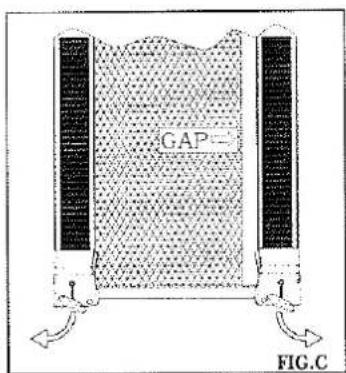
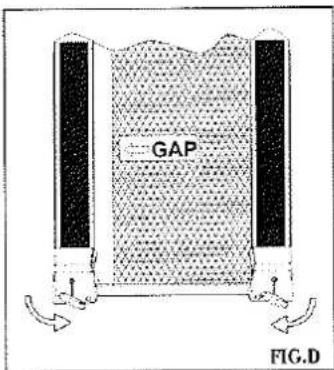
Inspecting Fasteners and Cable
Check that all fasteners are properly tightened and all cables are securely in place. To avoid damaging fasteners, do not over tighten.
Storage
Store your treadmill in a clean and dry environment. Ensure the master power switch is off and is unplugged from the electrical outlet.
Moving
The treadmill has been designed and equipped with wheels for easy mobility. Before moving, ensure the master power switch is in the "OFF" position and the power cord is unplugged from the electrical outlet. Lift the base frame of the treadmill and then roll the treadmill to the desired position.
Running Belt Lubrication
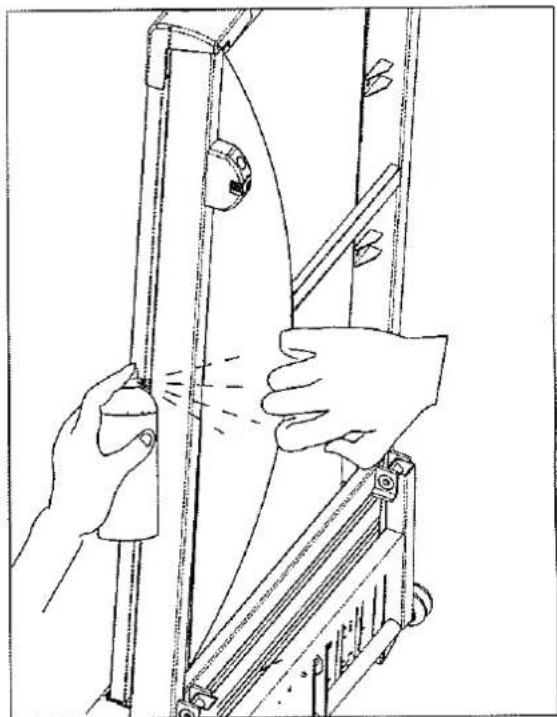
When you feel the noise of running belt is louder, please use silicone fluid spray on running belt. It is easy and quick. Before proceeding, ensure the treadmill power is off and unplugged. Fold up the treadmill to upright position. Loosen the running belt and then spray silicone on the inner side of running belt from both sides. Ensure spray entire running belt. Please see illustration. After spraying, please align the running belt and adjust the running belt tension.
natural_image
Line drawing of hands operating a mechanical device with a curved handle and lever mechanism (no text or symbols)Horizontal Adjustment
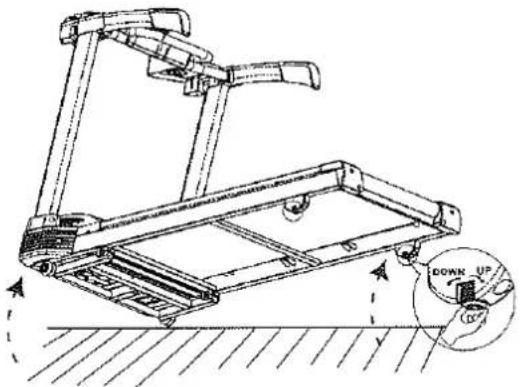
To fit machine on floor stable, you can adjust the 2 screws located under the front of base frame.
- Lift the machine on one side and then turn the screw under the front of base frame.
- Turn the screw clockwise to make the screw up.
- Turn the screw counterclockwise to make the screw down.
natural_image
Technical line drawing of a treadmill with a circular inset showing the down-up force (no text or symbols present)Trouble shooting with Error codes
Electronics continuously runs a self check. If it finds an irregularity, the electronic console will display an error code and stop normal operation for safety.
Error Code Description
E1 Speed Error
E6/E7 Incline Error
| Error Code | MODEL | Trouble shooting |
| E1: | MX900MX950TFT-LCD TV | When E1 is displayed, remove safety key and insert it again to restart treadmill. If E1 is still shown on display, please check the following:1. Please check all cable connection is well connected.2. The treadmill did not move after pressing "Start" and show E1 , please check if there is any part stuck.3. The treadmill run for few seconds after pressing "Start" but stops, please check if the sensor (near flywheel of front roller) is loose or defective.4. Please check wires connected to motor are loose or not.5. Please contact stores for service if E1 can not be solved. |
| E4: | MX900TFT-LCD TV | Under Body Mass program, heart rate is not read during continuous 8 sec.1.Please reset or remove safety key. Then run body mass program again. |
| E6\E7: | MX900MX950TFT-LCD TV | When E6/E7 is displayed , remove safety key and insert it again to restart treadmill . If E6/E7 is still shown on display, please check the following or call for service.1. Reset incline value(1) When the position of incline is lower than middle level, press " Mode" and incline "up" buttons. Hold both buttons and the incline will be raised. Release the two buttons till the incline position is up to middle level.(2) When the position of incline is higher than middle level, press " Mode" and incline "down" buttons. Hold both buttons and the incline will be reduced. Release the two buttons till the incline position is down to middle level. Please try it for few times. If you can not get the incline move, please contact stores for service.Once the incline position is at middle level, please turn off power and re-start. Please see if E6 / E7 goes away. If not, please contact stores for service.2. Please check if red / white incline cables are well connected to MCB.3. If the above steps can not reset incline , please contact stores for service. |