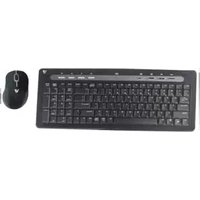
Wireless Keyboard CK2B0-6E1 - Tastatur V7 - Kostenlose Bedienungsanleitung
Finden Sie kostenlos die Bedienungsanleitung des Geräts Wireless Keyboard CK2B0-6E1 V7 als PDF.


| Produkttyp | Kabellose Tastatur (mit Maus) |
| Marke | V7 |
| Modell | Wireless Keyboard CK2B0-6E1 |
| Verbindung | 2,4 GHz (USB-Empfänger) |
| Reichweite | Bis zu 1,8 m (6 Fuß) |
| Stromversorgung Tastatur | 2 x AA-Batterien (im Lieferumfang enthalten) |
| Stromversorgung Maus | 2 x AAA-Batterien (im Lieferumfang enthalten) |
| Anzahl der Hotkeys | 8 |
| Lieferumfang | Tastatur, Maus, USB-Empfänger, AA- und AAA-Batterien, Kurzanleitung |
| Systemanforderungen | Freier USB-Anschluss |
| Automatische Erkennung | Ja (Plug-and-Play) |
| Tastaturlayout | Standard (QWERTY) |
| Mausfunktionen | Optisch, Ein-/Ausschalter |
| Reinigung | Mit einem weichen, trockenen Tuch abwischen; keine Flüssigkeiten verwenden |
| Garantie | 1 Jahr eingeschränkte Garantie (ab Kaufdatum) |
| Reparatur | Nur durch autorisiertes Servicepersonal; keine vom Benutzer austauschbaren Teile außer Batterien |
| Entsorgung | Elektronikschrott gemäß lokalen Vorschriften entsorgen; Batterien getrennt entsorgen |
Häufig gestellte Fragen - Wireless Keyboard CK2B0-6E1 V7
Benutzerfragen zu Wireless Keyboard CK2B0-6E1 V7
0 Frage zu diesem Gerät. Beantworten Sie die, die Sie kennen, oder stellen Sie Ihre eigene.
Eine neue Frage zu diesem Gerät stellen
Laden Sie die Anleitung für Ihr Tastatur kostenlos im PDF-Format! Finden Sie Ihr Handbuch Wireless Keyboard CK2B0-6E1 - V7 und nehmen Sie Ihr elektronisches Gerät wieder in die Hand. Auf dieser Seite sind alle Dokumente veröffentlicht, die für die Verwendung Ihres Geräts notwendig sind. Wireless Keyboard CK2B0-6E1 von der Marke V7.
BEDIENUNGSANLEITUNG Wireless Keyboard CK2B0-6E1 V7


If you are missing any of these items, contact V7 online at www.V7-world.com


Items Included
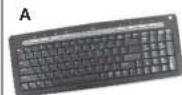
A Wireless keyboard
B AA batteries (2)
C Wireless mouse
D AAA batteries (2)
E USB receiver
This Quick Start Guide
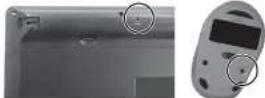
Battery placement

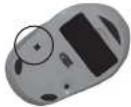
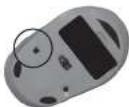
Synchronization buttons
Setting up your keyboard and mouse
1 Insert batteries into mouse and keyboard.
2 Connect the USB receiver into an available USB port on
your computer or into the USB extension cable.
3 Place the keyboard and mouse within 6 feet of the USB receiver. Make sure there are no obstructions between the keyboard, mouse and the USB receiver.
4 The operating system will automatically detect the keyboard and mouse and it will begin working. If it does not work, see Synchronizing your keyboard and mouse.
Synchronizing your keyboard and mouse
Synchronize your keyboard and mouse each time the batteries are changed and if the keyboard or mouse stops responding.
- Press and hold the receiver synchronization button for 3 seconds
2 Press the keyboard synchronization button with a paperclip.
3 Press the mouse synchronization button with a paperclip.
4 The keyboard and mouse will begin working.
Note: If the keyboard or mouse does not work, replace the batteries and repeat Steps 1, 2 or 3.
Using your keyboard
Your wireless keyboard includes 8 hot keys:

Preserving battery life on your mouse
To preserve battery life, turn the mouse off when it is not in use.
For questions regarding your V7 product, please visit www.V7-world.com.
Si no encuentra alguno de estos artículos, comuníquese con V7 en línea en www.V7-world.com


Artículos incluidos
A Teclado inalámbrico
B Pilas AA (2)
C Mouse inalámbrico
D Pilas AAA (2)
E Receptor USB
Esta Guía de inicio rápido
Colocación de las pilas


Botones de sincronización

Configuración del teclado y el mouse
1 Inserte las pilas en el mouse y en el toclado.
2 Conecte el receptor USB en un puerto USB libre de su PC o en el cable de extensión USB.
3 Coloque el teclado y el mouse a una distancia de 6 pies (1.8 m) del receptor USB. Compruebe que no haya obstucciones entre el teclado, el mouse y el receptor USB
4 El sistema operativo detectará automáticamente el teclado y el mouse, y estos empezarán a funcionar. Si no funcionar, consulte Sincronización del teclado y del mouse.
Sincronización del teclado y del mouse
Sinaronice el teclado y el mouse cada vez que cambie las pilas, y si el teclado o el mouse dejan de responder.
1 Pulse y mantenga pulsado el botón de sincronización del receptor durante 3 segundos.
2 Pulse el botón de sincronización del ledado con un
sujetapapeles.
3 Pulse el botón de sincronización del mouse con un sujetapeles.
4 El tedado y el mouse empezarán a funcionar.
Nota: si el ledado o el mouse no funcionar, cambie las pias y repila los pasos 1, 2 o 3.
Uso del teclado
Su tedado incluye 8 tedas de acceso directo:

Conservación de la vida útil de las pilas del mouse
Para conservar la vida de las plas, apague el mouse cuando no lo esté utilizando.
Si tiene preguntas acerca de su producto V7, visite www.V7-world.com.
One Year Limited Warranty
V7 Limited Manufacturer's Warranty covers this Product against defects in materials or workmanship from the date of purchase for a period of twelve (12) months for parts and labor. Liability under the limited warranty shall in time even exceed the cost of replacement with a similar product or the original cost of the product at the time of purchase, whichever is less. This limited warranty does not cover the entire product or any other material, or it is necessary for other or no automatic damage or parts that have been allotted, defaced or removed. Also, it does not apply to repairs or imprisonment necessitated by any cause beyond the control of the Manufacturer including, but not limited to, any malfunction, defects or failures which in the opinion of Manufacturer were caused by or resulting from unauthorized service or parts, improper maintenance, operation and/or impairment, or any other incident on the provisions of accidents, modification or repair by the author, abuse, misuse, neglect, accident, fire, flood, or other acts of God, incorrect, fire voltage or normal wear and less. This limited warranty does not apply to damage that occurs during unpacking, setup, or installation; removal of the product for repair; reinstallation of the product after repair; or shipping cost of the product for any purpose. There are no limitations in the provisions of any other incident on the provisions of any other than this limited limited warranty. All implied warranties including without limitation the implied warranties or merchantability or fitness for a particular purpose, are limited to the durations of this limited warranty. In no event shall V7 be liable for incidental or consequential damages of any nature whatsoever, including but not limited to last profit or commercial loss, to the full extent those damages shall be made in the case of such liability. This warranty is valid in the United States and Canada. Additional information can be found at www.V7-world.com.
Términos de la garantía limitada de un año
La garantía limitada del fabricante de VT cubre a ese producto contra efectos en los materiales o mano de obra a partir de la fecha de compra, durante un período de dosa (12) meses en las repuestas y la mano de obra. La responsabilidad baja esta garantía invada en ningún caso cada曽ar al esteo del repuesto por un producto similar, ni esteo original del producto al momento de obra, como su todo que se darla de la liquidación de una liquidación de la reparación de plástico agreglatad, rasuado, rolo o modificado ni otros acetos cosmetidos, ni piezas que hayan ativo amandas, destructivas e extratidas. Temposo aplicá a reparaciones o repuestas necesarios por cualquier causa fuera del control del fabricante incluyendo, entre otros, cualquier mal funcionamiento, defectos o tantos en el opinión del habitante fueron provocados por o resultado de piezas o servicio no autorizados, inantimentalmente, noble con el valor de su final de la liquidación de una liquidación de las propuestas, accidentos durante el tracción o el envío modificaciones o reprogramas realizadas por el usuario, atusan, uso indabita, negligonesa, accidentes, incantios, inundaciones o otras causas de fuerza mayor, voltaje de línea incorrecto o desegaste natural. Esta garantía limitada no spites a los dechos que ocuman durante al desembalaje, el manaje a la instalación, la excavación del producto para la reparación; la reinstalación del producto despues de la liquidación de la liquidación de la liquidación de la liquidación de la liquidación de la liquidación de la liquidación de la liquidación de la liquidación de la liquidación de la liquidación de la liquidación de la liquidación de la liquidación de la liquidación de la liquidación de la liquidación de la liquidación de la liquidación de la liquidación de la liquidación de la liquidación de la liquidación de la liquidación de la liquidación de la liquidacion


- Items Included
- Setting up your keyboard and mouse
- Synchronizing your keyboard and mouse
- Using your keyboard
- Preserving battery life on your mouse
- Artículos incluidos
- Configuración del teclado y el mouse
- Sincronización del teclado y del mouse
- Uso del teclado
- Conservación de la vida útil de las pilas del mouse
- One Year Limited Warranty
- Términos de la garantía limitada de un año
Marke : V7
Modell : Wireless Keyboard CK2B0-6E1
Kategorie : Tastatur