S5520SC - Motherboard INTEL - Kostenlose Bedienungsanleitung
Finden Sie kostenlos die Bedienungsanleitung des Geräts S5520SC INTEL als PDF.


Benutzerfragen zu S5520SC INTEL
0 Frage zu diesem Gerät. Beantworten Sie die, die Sie kennen, oder stellen Sie Ihre eigene.
Eine neue Frage zu diesem Gerät stellen
Laden Sie die Anleitung für Ihr Motherboard kostenlos im PDF-Format! Finden Sie Ihr Handbuch S5520SC - INTEL und nehmen Sie Ihr elektronisches Gerät wieder in die Hand. Auf dieser Seite sind alle Dokumente veröffentlicht, die für die Verwendung Ihres Geräts notwendig sind. S5520SC von der Marke INTEL.
BEDIENUNGSANLEITUNG S5520SC INTEL
Intel® Workstation Board S5520SC Quick Start User's Guide
Thank you for buying the Intel® Workstation Board S5520SC. The following information will help you integrate your new server board into a server chassis. The Intel® Workstation Board S5520SC is designed for use with the Intel® Server Chassis SC5600Base and the Intel® Server Chassis SC5650WS.
For details on these chassis or to select a third-party chassis, please visit http://support.intel.com/support/motherboards/serve
When installing the server board into a reference chassis, refer to the reference chassis instructions.
Service Guides are also available on the CDs that accompanied your Intel® Workstation Board S5520SC
If you are not familiar with ESD (Electrostatic Discharge) procedures used during system integration, please see the Intel® Workstation Board S5520SC Service Guide, available on the Intel® Server Deployment Toolkit 3.0 CD or at http://support.intel.com/support/motherboards/server/S5520SC/manual.htm

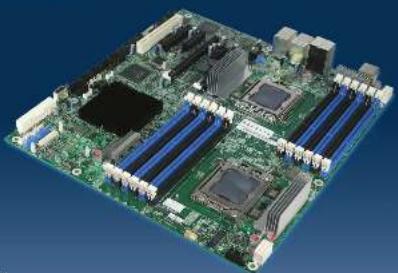
natural_image
3D rendering of a computer motherboard with visible CPU socket, RAM slots, and indicator lights (no text or symbols)
Warning
Proof of condition are safety methods in this document the following one or the instrument. Also see the info * Server E-mail and Server Oracle Sales information document. http://support.net/support.org/ in networks/serverstore-010712 will be compared to safety (see this
Warning
Primary and service of the trained should only be performed by qualified service personnel to avoid risk of injury from electrical shock or enough issues.
Caution
- serve normal ESO
- In fact, the company
-
-
-
-
-
-
-
-
-
-
-
-
-
-
-
-
-
-
-
-
-
-
-
-
-
-
-
-
-
-
-
-
-
-
-
-
-
-
-
-
-
-
-
-
-
-
-
-
-
-
-
-
-
-
-
-
-
-
-
-
-
-
-
-
-
-
-
-
-
-
-
-
-
-
-
-
-
- 80.
-
-
-
-
-
-
-
-
-
-
-
-
-
-
-
-
-
-
-
-
-
-
-
-
-
-
-
-
-
-
-
-
-
-
-
-
-
-
-
-
-
-
-
-
-
-
-
-
-
-
-
-
-
-
-
-
-
-
-
-
-
-
-
-
-
-
-
-
-
-
-
-
-
-
-
-
Tools Required
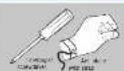
The following table provides the information in the Company's report: (1) The company's name is 100% of the company's share, and the share of the company's total shares is 100%.
4
Install the Workstation Board
IMPORTATION: If you are there on the other choice, see your choice documentation for supplementary steps plan to set head station.
A. Insert Workstation Board Flare the board into the chassis, making sum line back panel (C) open and chassis standards align correctly
+ "When using the Info® Server Cloud"
• "When using the I/O" Draw a class on 3(0650)78 Remove the front drive bay and one channel can be from load the front of the front, not Close the board back on the front correspond to through the I/O shield
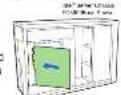
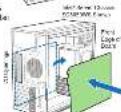
8. Attach the Workstation Board
The Int'l Server Cross 30,000 Units and Int'l Service Cross 30,000 Units used to find some to change the workload on board to the charge. Use the service indicated for your charge. For one-time action is also the following rules are also your charge.
- 19th Sane Classe 52600Box. Alues the board to the church of the nine locations indicated by the said the name in the Signet [●] social before location indicated by the said security [●]
- Nelf Saver Chassis SCA600M. Push down from to compare the snap-up brandets of the tool or scaled by the solid and smooth. Use screens to adjust the search for the chassis of the tool, which is indicated by the solid and dashed.

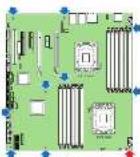
Minimum Hardware Requirements
In case, interplanar activities and possible hazard damage for system must be indicating minimum requirements.
• Processor: Microsoft Internet® (SNA) Processor 5.00 Series or one Intel Road Processor 3603 Series • Security: 95% on a new list of SNA
Cust: SODMaze. • Support no net 10% active rate of 95% Low Cust: SUSENGS
• Real Survey: Minimum time adherence rate in the bid-Server Records SC/01214 and SC/0276.
- Memory type: Kinamarcicase 16S, 70-pb - BDN/ or CDM, 1763 101 2CRS 1008 or 1025 1033 - AC power: SS/IPS 1.4V complex power supply Recommended, minimum DC voltage set to 3.4 V/div/day power, capacitive source power consumption in the power supply.
F. e. 104, 2013, 10: 5: 10: 10: 10: 10: 10: 10: 10: 10: 10: 10: 10: 10: 10: 10: 10: 10: 10: 10: 10: 10: 10: 10: 10: 10: 10: 1
| A. C. D. E. | In the index Server Devices in number of units | In the index Server Devices in number of units | |
| 5.6.1.1 F. 200-3 | Max. max 150 max. max 4000 | Max. max 150 min. max. max 4000 | |
| 8.6.1.1 F. 200-3.5 | Max. max 150 Max. max 4000 Max. max 4000 | Max. max 150 min. max. max 4000 Max. max 4000 Max. max 4000 Max. max 4000 Max. max 4000 Max. max 4000 Max. max 4000 Max. max 4000 Max. max 4000 Max. max 4000 Max. max 4000 Max. max 4000 Max 400-5 | <100 min. max 150 min. max 400 min. PCI Exports' 5-100 min. 100 min. max 150 min. max 400 min. max 400 min. PCI Exports' 5-100 min. max 400 min. max 400 min. Max. max 400 min. max 400 min. max 400 min. max 400 min. max 400 min. max 400 min. max 400 min. max 400 min. max 400 min. max 400 min. max 400 min. max 400 min. max 400 min. max 400 min. max 400 min. Max 400-5 |
BOLI GABRIZ LAD ALI PASE 2018
1
Preparing the Chassis
Observational ESD (Electrostatic Discontrol)
Please you need to say: Choose one of the best surfaces to perform the safety irregular measures. Observe FED procedures below reaching inside to make your hand and your door or metal components.
2
Installing the I/O Shield and Attach I/O Labels
Prepare the I/O shield Do not remove the three circuits Sanskouts for some of the objects in the openings for the NAC, USA, Serbia, and 1894-1973. The direction is yet An out before the shield
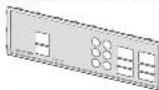
Attach the Labels to the I/O Shield
Notes: 'I'm sure you read the labels on the name, subject to [2] should. Note the content of the colours in the meaning (labor) reading you that
- Don't be leaving him in the school, who is interested in your college.
③ Press each and reln the (5)
Install the I/O
shield Shield installs from inside of class. He latent should be set the first ours in the class
- Low-cost options
① Post-shield body, the cross-casting until the end into dark
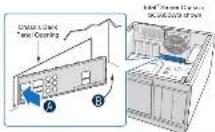
3
Install Workstation Board Bumpers
NOTE: The course is doing a 'Sponsor' (Compliance) and the course has been made for all. It is done to be a 'Sponsor' (Compliance) and will be a 'Sponsor' (Compliance). That is not to be a 'Sponsor' (Compliance) and will be a 'Sponsor' (Compliance). If you are going to the other course, then do so much, we can't have to be a 'Sponsor' (Compliance). It is not to be a 'Sponsor' (Compliance).
Prepare Workstation ecore
M. Scale health to improve medication and oral pressure at 27:01
A 2018. To start, there is a level of _1 and a line of common side-down.
15.2024年1月3日
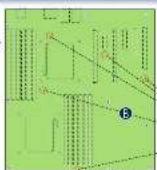
Attach the Bumpers ① Remove the backing from a box bumper ② Press a bumper only each of the car es.

5a
Install the Processor(s)
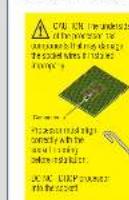
Cautics:
Warning warning: JONC ICU to sell with a
The preceding course is held by the edge only to the leading degree of conduct.
表决意见:
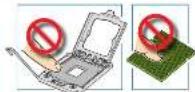
A. Open the Socket Lever
[1] First-line user needs down and once, then the social is wrong.
③ For the lower open of
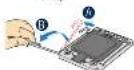
B. Open the Load Plate
Not be at all you I get up to bring the bus and at the house
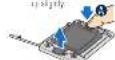
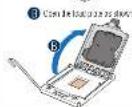
C. Remove the Processor
Protective Lover
- is the product of the box and remove the product at p(a).

5b
Install the Processor(s) ... continued
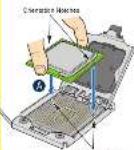
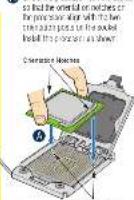
D. Install the Processor
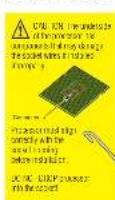
On the process with a measure, so that the oriental or notches on the process align with the two transactant pass in the outlet. Install the process as shown
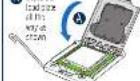
E. Close Load Plate and Socket Lever
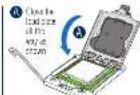
E Close the stock: Even
C. Horsen is not a solution after the external cells disengaged from the low plate

6
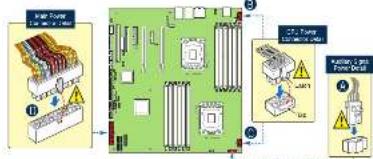
Make Workstation Board Power Connections
Michael Clay Power Signal
according to the American Heart
to the workstation board.
C. Mach the C-U2 power encoder
to the following form.
① Also known as the main
2.2.1 中国银行股份有限公司

IMPORTANCE: If you are using a free file, please call to an STD power supply, or the documentation that came with your class is required on information.
Go to Side 2
The Ground Truth image displays a single, solid horizontal line. According to Rule 2 (UNDERSCORE & LINE RULES), this is a stylistic or background line, not a placeholder underscore. Therefore, the OCR result must ignore it and output nothing or only meaningful text. The provided OCR content is "____", which consists of four underscores. This is an incorrect interpretation of the line as a placeholder, violating the rule that stylistic lines must be ignored. The OCR has hallucinated placeholder underscores where none should exist in the GT. Hence, the OCR result is inconsistent with the Ground Truth.
The Ground Truth image displays a single, solid horizontal line. According to Rule 2 (UNDERSCORE & LINE RULES), this is a stylistic or background line, not a placeholder underscore. Therefore, the OCR result must ignore it and output nothing or only meaningful text. The provided OCR content is "____", which consists of four underscores. This is an incorrect interpretation of the line as a placeholder, violating the rule that stylistic lines must be ignored. The OCR has hallucinated underscores where none should exist based on the GT's visual context. Hence, the OCR result is inconsistent with the Ground Truth.
D.
1
E Close the stock: Even
C. Hanan has a natural water after it is an cultural calls disengaged from the least plans
Go to Side 2