S-W25B - Dockingstation Voxicon - Gratis brugsanvisning og manual
Find enhedens vejledning gratis S-W25B Voxicon i PDF-format.


Brugerspørgsmål om S-W25B Voxicon
0 spørgsmål om dette apparat. Besvar dem du kender, eller stil dit eget.
Stil et nyt spørgsmål om dette apparat
Download vejledningen til din Dockingstation i PDF-format gratis! Find din vejledning S-W25B - Voxicon og tag din elektroniske enhed tilbage i hånden. På denne side er alle dokumenter nødvendige for brugen af din enhed offentliggjort. S-W25B af mærket Voxicon.
BRUGSANVISNING S-W25B Voxicon

VOXICON
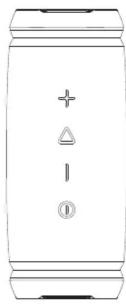
Portable Wireless Stereo Speaker
USER MANUAL
S-W25B
Package Includes
- 1 x Speaker
- 1 x Micro-USB Cable
• 1 x AUX Cable (Φ3.5mm) - 1 x User Manual
- 1× Textil strap
Overview of the Speaker
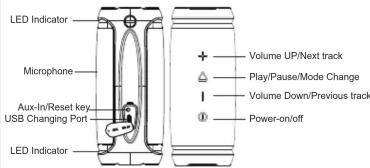
Charging
- Before first time use, fully charge the built-in battery.
- Connect the Micro-USB Cable (included) between
- the DC IN port on the speaker, and
- a USB port on a computer or USB AC Adapter.
| LED Indicator | Battery Status |
| Flash Red | Low battery (<10%) |
| Solid Red | Under Charging |
| Solid Green | Full charged |
Note: When the battery charge <3%, the speaker will power off automatically.
Power On
Press ⑩ button until hear a rising tone and LED
indicator light on.
Power Off
Press Ⓛ button until hear a descending tone and
LED indicator light off.
Bluetooth connection
Make sure that the speaker is within 10 meters from your mobile device.
- Press ① button until hear a rising tone and LED
indicator fast blinking blue - Go to the Bluetooth settings on your mobile device,
search and select "S-W25B" from the list. - Once paired, the LED indicator turns solid blue.

Note:
- When power on, the speaker automatically reconnects to the last mobile device it was connected to. (The speaker can memorize maximum of 8 paired devices).
- The speaker will automatically shut down after 10 minutes in pairing mode if no devices are paired for power saving.
Music Control
Play / Pause....Click ▼
Volume Up ...... Click +
Volume Down.... Click -
Next track.... Press and Hold +
Previous track.... Press and Hold
Switch Bluetooth mode/Aux-in mode.....Click
Speakerphone (in Bluetooth Connection)
Answer an incoming call.....Click ▼
Reject an incoming call..... Press and Hold ▼
End the current call...... Click ▼
Redial last-called number.....Press and Hold
Bluetooth Disconnection
Press “+”, “−” buttons simultaneously LED Indicator fast blinking blue to disconnect the current connected device, and go into new Bluetooth-paring mode.

TWS (True Wireless Stereo) Function
The TWS technology enables you to use two speakers pairing via Bluetooth to create a wireless dual-channel system to deliver true stereo sound effect.
TWS connection operation
- Place the two speakers near each other (the distance should not be over 10 meters).
2.Power on the two speakers, double click the button button on one speaker as MASTER speaker (playback left channel), the LED indicator fast blinking blue and green, then the two speaker will pair to each other automatically (The other speaker will be as SLAVE speaker and playback right channel)
3.Once paired, the MASTER speaker LED indicator slow flash blue.
Disconnect the TWS connection
Press “+”, “-” button on one of the speaker simultaneously until LED Indicator fast blinking blue to disconnect the TWS connection.

Listening music from external audio source
- Power on the speaker.
- Using the AUX Cable(Φ3.5mm), connect your external device to AUX-in port on speaker.
- It will automatically turn to AUX-in mode, the LED Indicator turns solid green.
Note: Under AUX-IN mode, skip songs and speakerphone function are not workable.
Sound mode
Double click ▲ the play/pause button to change the sound mode. The LED indicator slowly flash blue in outdoor mode, and the LED indicator keep solid blue in indoor mode.
Remark: This speaker's default mode is indoor.
Mode Change Button △ : Outdoor/Indoor
IPX6 Water-Resistant Feature
This Speaker is IPX6 Water-Resistant for rainfall, spills, or water jets, but do NOT submerge it in water or liquids.
IMPORTANT Note - To ensure the speaker is prepared to use for water-resistant, remove all the cable connections and close the port protection cover tightly.
Reset the speaker: If the function buttons without working, disconnect the charging cable, place a small pin(Φ<3mm) into the reset key and hold it for 2 seconds until the LED light off
5
Specifications
- Bluetooth Version: 4.2
• Suport:A2DPV1.2,AVRCPV1.4,HPV1.6,HSPV1.2 - Wireless work distance:10 meters
• Rated Power: 2 x 12.5W - Driver Unit: 2 xφ48mm (4Ω,2x15W)
• Frequency response: 80Hz-16kHz
• Signal-to-noise ratio: >70dB
• Battery type: Lithium-ion (7.2V/2000mAh)
• DC input voltage/current: MICRO USB DC 5V/0.5A - 2A - Playtime: 7-11 hours (varies by volume level and content)
- Battery charge time: 2.5 hours
• Dimensions: 186.6 x78x78 mm
• Weight: 620g
Caution
- Keep the speaker and its accessories away from the reach of kids as they might cause a choking hazard.
-
Keep the speaker away from fire, water, liquids, extreme heat, and strong magnetic fields.
-
Do NOT use this speaker at high volume for extended periods, as this may cause permanent hearing damage or loss.
Do NOT drop or knock the speaker on hard surfaces.
Do NOT use chemicals or detergents to clean the speaker. - Do NOT scrape the surface with sharp objects
Do NOT make unauthorized alterations to this product.
Troubleshooting
Cannot power on
Charge the speaker and make sure it has enough battery.
Cannot connect with the device
- Please check the follows:
• The Bluetooth device supports A2DP profile
• The speaker is within 10m from the device
• The speaker is in pairing mode, the LED indicator blinking
blue.
No Sound
• Make sure the music volume is at audible level on both
your device and speaker
• Make sure your device is successfully paired with the
speaker, the LED indicator turn solid blue
Poor sound quality
Move the device closer to this speaker or remove any obstacle between them.
Declares that the design and manufacturing of this
product complies with the European
Directives for CE-Marking as stated below:
2014/35/EU (LVD)
2014/30/EU (EMC)
2011/65/EU (RoHS)
2014/53/EU (RED)


- Package Includes
- Charging
- Power On
- Power Off
- Bluetooth connection
- Note:
- Music Control
- Speakerphone (in Bluetooth Connection)
- Bluetooth Disconnection
- TWS (True Wireless Stereo) Function
- TWS connection operation
- Disconnect the TWS connection
- Listening music from external audio source
- Sound mode
- Mode Change Button △ : Outdoor/Indoor
- IPX6 Water-Resistant Feature
- Specifications
- Caution
- Troubleshooting
- Cannot power on
- Cannot connect with the device
- No Sound
- Poor sound quality
Mærke : Voxicon
Model : S-W25B
Kategori : Dockingstation