CAM-TY12 - Ukategoriseret PAC - Gratis brugsanvisning og manual
Find enhedens vejledning gratis CAM-TY12 PAC i PDF-format.


Brugerspørgsmål om CAM-TY12 PAC
0 spørgsmål om dette apparat. Besvar dem du kender, eller stil dit eget.
Stil et nyt spørgsmål om dette apparat
Download vejledningen til din Ukategoriseret i PDF-format gratis! Find din vejledning CAM-TY12 - PAC og tag din elektroniske enhed tilbage i hånden. På denne side er alle dokumenter nødvendige for brugen af din enhed offentliggjort. CAM-TY12 af mærket PAC.
BRUGSANVISNING CAM-TY12 PAC
Introduction & Features
The CAM-TY12 is a reverse camera T-harness that gives the ability to either add a reverse camera input for compatible TOYOTA and SCION OEM touchscreen radios or retain the factory camera when replacing the factory radio. Simple plug and play installation.
Installation:
When adding a reverse camera to an OEM radio:
- Disassemble dash and remove the radio.
- Disconnect the 24 pin connector from the back of the factory radio (if equipped) and install the T-harness.
- Connect the RCA from the aftermarket camera to the female RCA located in the T-harness
- The OEM radio, when connected to this harness, will provide a +6v power output if needed. Most aftermarket cameras require +12v for power, if your camera requires +12v then you will need to find a reliable source of +12 volt ACC power. If not being used please insulate the pin located at the end of the red wire.
- To function properly the camera must have power before the vehicle is placed into reverse, so using the reverse lamp as a power source is not recommended for proper functionality.
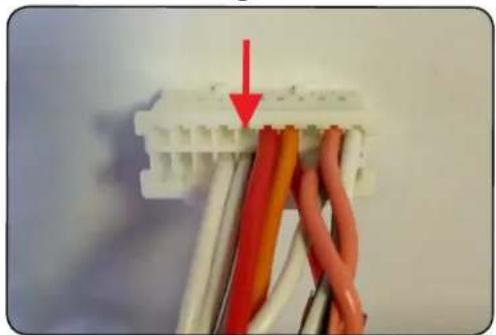
- Normally a reverse trigger is provided by the vehicle manufacturer, as long as the camera has power when the vehicle is placed into reverse, the radio should automatically switch to the reverse camera. In the event that the radio does not automatically switch to the reverse camera a +12v reverse signal will need to be added to Pin 2 of the 28 pin connector. See Fig 1.
Fig. 1
natural_image
Close-up of a white plastic electrical connector with multiple colored wires, no visible text or symbolsWhen retaining the factory reverse camera with an aftermarket radio:
- Connect the factory 24 pin camera harness to the T-harness.
- Connect the male side of the RCA into the aftermarket radios reverse camera input.
- Connect the loose black wire to chassis ground.
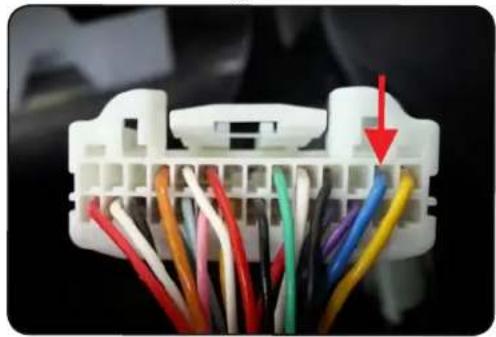
- Insert the pin located on the end of the red wire into the pin 12 location in the 20 pin connector of the RP4.2-TY11. This pin is located next to the red/white programmable +12v output. See Fig. 2. If an RP4.2-TY11 is not being used along with this harness then the red wire will need to connect to +6v. This may require an adapter to step down the voltage from +12v to +6v.
Fig. 2