
NVR-3331BBD - Vægte NEVIR - Gratis brugsanvisning og manual
Find enhedens vejledning gratis NVR-3331BBD NEVIR i PDF-format.


Brugerspørgsmål om NVR-3331BBD NEVIR
0 spørgsmål om dette apparat. Besvar dem du kender, eller stil dit eget.
Stil et nyt spørgsmål om dette apparat
Download vejledningen til din Vægte i PDF-format gratis! Find din vejledning NVR-3331BBD - NEVIR og tag din elektroniske enhed tilbage i hånden. På denne side er alle dokumenter nødvendige for brugen af din enhed offentliggjort. NVR-3331BBD af mærket NEVIR.
BRUGSANVISNING NVR-3331BBD NEVIR
DECLARACIÓN DE CONFORMIDAD
NEVIR, S.A. declara bajo su responsabilidad que el aparato indicado cumple los requisitos de las siguientes directivas:
DIRECTIVA EMC
EN 55017-1:2017+A11:2020 EN 55014-02:2015
DIRECTIVA ROHS
2011/65/EU
Descripción del aparato: BASCULA PERSONAL ELECTRÓNICA Modelo NEVIR: NVR-3331BBD Importador: NEVIR, S.A.
Dirección del importador: NEVIR, S.A.
C/ Margarita Nelken, 12
Polig. Ind. El Triángulo
28830 San Fernando de Henares Madrid
BASCULA PERSONAL ELECTRÓNICA
MANUAL DE INSTRUCCIONES
NVR-3331BBD
natural_image
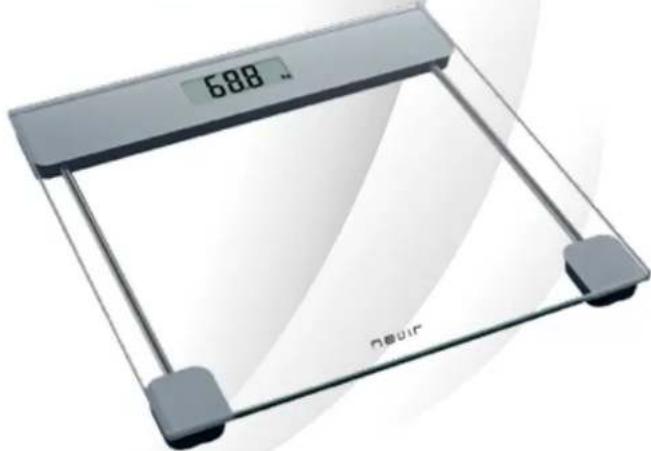
Digital kitchen glass with a digital display showing 688 degrees (no text or symbols on the device itself)BATERÍA
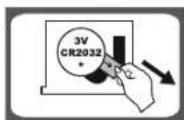
Tipo 1: 3V (GR2082) Litio
Por favor retire el protector como indica la imagen para que haga contacto la unidad con la pila.

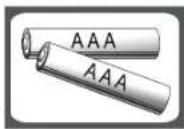
1.5V AAA
baterías no incluidas.
■ SUSTITUCIÓN DE LAS PILAS
text_image
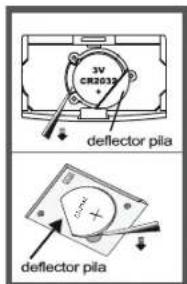
3V CR2012 deflector pila deflector pilaimagen 1
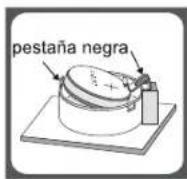
imagen 2
Condié 1: Abra el compartimento de la bateria situada en la parte trasera. Imagen 1
A. Extraiga la pila usada con ayuda de un objeto punzante, tal y como se muestra imagen 1.
B. Instale la nueva pila poniendo uno de los extremos de la pila bajo del regulador y presionando hacia abajo.
Por favor tenga en cuenta la polaridad indicada en el compartimento y pila.
Condición : Abra el compartimento de la batería situada en la parte trasera. Imagen 2.
A. Tire de la pestaña negra hacia afuera y la batería saldrá..
B. Instale una batería nueva colocando un lado de la batería debajo del contacto y luego presionando hacia abajo el otro lado. Por favor, tenga en cuenta la polaridad.


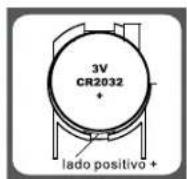
imagen 3
Condición: Abra la tapa del compartimento de la batería en la parte posterior de la báscula, si la tapa de la batería es del tipo que se muestra en la imagen 3.
A. Presione la batería suavemente, la batería se soltara automáticamente.
B. Instale la batería nueva conectando primero un lado de la batería a la placa positiva y luego presionando hacia abajo el otro lado. Tenga en cuenta la polaridad.
Condinié: Abra la tapa del compartimento de la batería en la parte posterior de la báscula, si la tapa de la batería es del tipo que se muestra en la imagen 4.
A. Sacar las pilas usadas (con la ayuda de un objeto punzante, si fuese necesario)
B. Instale una batería nueva colocando un lado de la batería y luego presionando hacia abajo el otro lado. Por favor, tenga en cuenta la polaridad.
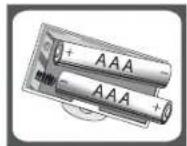
imagen 4
■ MEDICIÓN
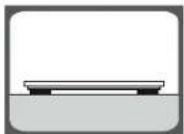
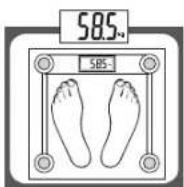
Paso 1: Para asegurarse de la precisión, coloque la báscula sobre un piso firme y plano y evite las alfombras o superficies blandas.
Observación: Si la báscula es una de nuestra serie "slimm" (indicada en el paquete), asegúrese de colocarla sobre una superficie dura como mármol, baldosas, etc., y asegúrese de que no haya cuerpos extraños debajo de la báscula antes de pesarse.
Step 2: Pise suavemente la báscula, luego la báscula se encenderá automáticamente. Párese de manera uniforme sobre la báscula sin moverse y espere hasta que el peso que se muestra en la pantalla esté estable y bloqueado.


■ APAGADO AUTOMATICO
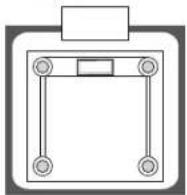
Cuando bajes de la báscula, se apagará automáticamente. El apagado automático se produce si la pantalla muestra una lectura de peso estable durante aproximadamente 8 segundos.
CONVERTIR UNIDADES DE PESO
Si la báscula tiene un sistema de medición métrico (kilogramos) e imperial (libras, piedras), puede convertir la unidad de peso de la siguiente manera:
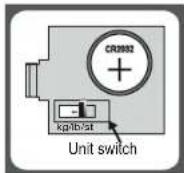
Condición si el interruptor de la unidad está dentro del compartimento de la batería
A. Abra la tapa de la batería en la parte posterior de la báscula. B. Tire hacia arriba y hacia abajo del interruptor de unidad para convertir la unidad de escala entre kg-lb-st.
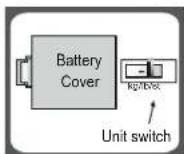
Condición 2: si el interruptor de la unidad está en la parte posterior de la báscula
A. Busque el interruptor de la unidad en la parte posterior de la báscula. B. Tire hacia arriba y hacia abajo del interruptor de unidad para convertir la unidad de escala entre kg-lb-st.
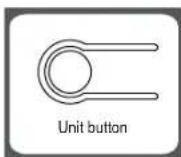
Condición 3: si el interruptor de la unidad está en la parte posterior de la báscula
A. Busque el interruptor de la unidad en la parte posterior de la báscula. B. Presione el botón de conversión de unidades cuando la báscula esté encendida, la pantalla LCD muestra la unidad de peso actual. Presione el botón nuevamente para convertir la unidad de peso.

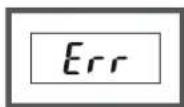
■ INDICADOR DE SOBRECARGA
Sobrecarga en la báscula. (max. darga Por favor, bajese de la báscula.
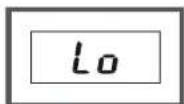
■ INDICADOR DE BATERÍA BAJA
Batería Baja. Por favor instale una nueva pila.
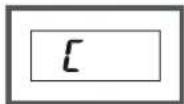
RE-TEST
Display "L" reajuste de la bascula se indica cuando ha sufrido un desajuste. Se ajusta automaticamente.
CONSEJOS DE USO Y MANTENIMIENTO
- La plataforma podría resbalar si esta mojada. ¡Mantener siempre seca!
- Manténgase quieto mientras esta encima de la báscula-
- NO GOLPEE, sacuda o deje caer la báscula.
- Trate la báscula con cuidado, ya que se trata de un instrumento de precisión.
- Limpie la báscula con un paño húmedo y con cuidado para que no entre agua dentro. NO utilice limpiadores químicos o abrasivos.
- Mantenga la bascula siempre en un lugar seco y frio.
- Guarde la báscula siempre en posición horizontal.
- Si no enciende la bascula, compruebe la batería no se haya desplazado, o esta agotada, en caso necesario cambie la batería.

- Si se muestra un error por pantalla o no puede apagar la báscula, quite las pilas durante 3 segundos y vuélvalas a instalar para solventar el fallo. En caso de no funcionase pongase en contacto con NEVIR.
BÁSCULA NO VALIDA PARA USO NO COMERCIALES, NO ESTANDO CUBIERTA POR LA GARANTIA.


nevir®
ELECTRONIC PERSONAL SCALES
INSTRUCTIONS FOR USE
NVR-3331BBD
natural_image
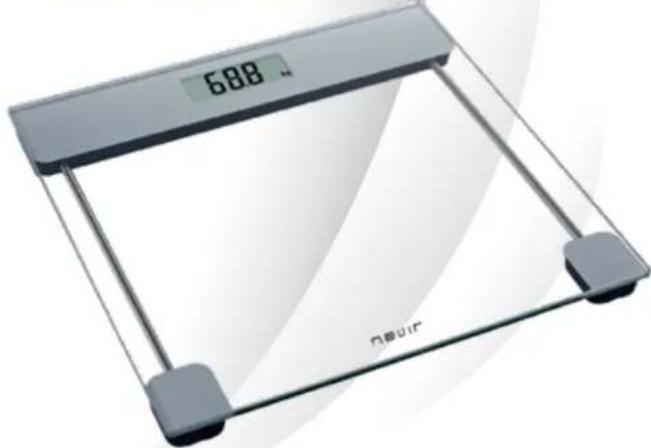
Digital kitchen glass with a digital display showing 688 degrees (no text or symbols on the device itself)


Type 1: 3V lithium batteries(CR2032). Please remove the isolation sheet from the battery contact before use.
Type 2: 1.5V AAA batteries (excluded)
Condition 1: Open battery case cover on the back of scale, if battery case is the type shown in picture 1,
A. Take out the used battery with the aid of a cuspidal object, as shown in picture 1.
B. Install new battery by putting one side of the battery beneath the battery baffle and then pressing down the other side. Please take note to the polarity.
Condition 2: Open battery case cover on the back of scale, if battery case is the type shown in picture 2,
A. Pull the black tab outwards and the battery will come out.
B. Install new battery by putting one side of the battery beneath the contact and then pressing down the other side. Please take note to the polarity.


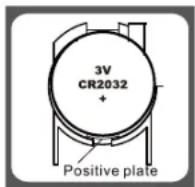
picture 3
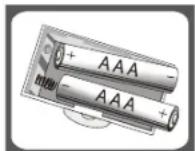
picture 4
Condition 3: Open battery case cover on the back of scale, if battery case is the type shown in picture 3,
A. Press battery gently, the battery will pop up automatically.
B. Install new battery by connecting one side of battery to the positive plate first, and then pressing down the other side. Please observe the polarity.
Condition 4: Open battery case cover on the back of scale, if battery case is the type shown in picture 4,
A. Take out the used batteries (with the aid of a cuspidal object, if needed)
B. Install new battery by putting one side of the battery and then pressing down the other side. Please take note to the polarity.
Step 1: To make sure accuracy, place the scale on a hard, flat floor and avoid carpet or soft surface.
Remark: If the scale is one of our "slim" series (indicated on package), make sure to put it on hard surface such as marble, floor tile etc., and make sure no foreign bodies beneath the scale before weighing.
Step 2: Gently step on the scale, then the scale will be automatically turned on. Stand evenly on the scale without moving and wait until your weight shown on display is stable and locked.


■ AUTOMATIC SWITCH OFF
natural_image
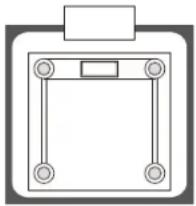
Simple line drawing of a square frame with four circular ends and a rectangular top (no text or symbols)When you step off the scale, it will automatically switch off. Auto shut-off occurs if display shows stable weight reading for approximate 8 seconds.
■ TO CONVERT WEIGHT UNIT
If the scale is with both measuring system of Metric(kilograms) and Imperial (pounds, stones), you can convert weight unit as follow:
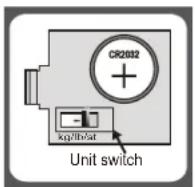
Condition 1: if the unit switch is inside battery case,
A. Open battery case cover on the back of scale.
B. Pull up and down the unit switch to convert scale unit between kg-lb-st.
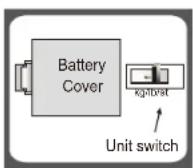
Condition 2: if the unit switch is on the back of the scale,
A. Find unit switch on the back of scale.
B. Pull up and down the unit switch to convert scale unit between kg-lb-st.
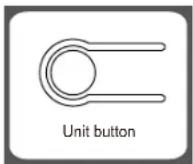
Condition 3: if the unit switch is on the back of the scale,
A. Find unit switch on the back of scale.
B. Press the unit conversion button when scale is power on, LCD shows current weight unit. Press the button again to convert weight unit


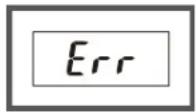
■ OVERLOAD INDICATION
Scale overload. (max. weight capacity is indicated on the scale).
Please step off to avoid damage.

■ LOW BATTERY INDICATION
Battery power is low. Please install new battery.
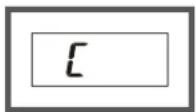
RE-TEST
Display " [ " when you step off the scale, means this weight reading with error. Please re-test.
ADVICE FOR USE & CARE
- The platform will be slippery when it is wet. Keep it dry!
- Keep standing still during the course of weighing.
- DO NOT strike, shock or drop the scale.
- Treat the scale with care as it is a precise instrument.
- Clean the scale with a damp cloth and avoid water getting inside the scale. DO NOT use chemical/abrasive cleaning agents.
- Keep the scale in cool place with dry air.
- Always keep your scale in horizontal position.
- If failed to turn on the scale, check whether battery is installed, or battery power is low. Insert or replace new battery.
- If there is error on display or can not turn off the scale for a long time, please take off the battery for about 3 seconds, then install it again to remove soft-fault. If you can not resolve the problem, please contact your dealer for consultation.
- Do not use it for commercial purpose.


