
RC3 - Kontakt Mercury - Gratis brugsanvisning og manual
Find enhedens vejledning gratis RC3 Mercury i PDF-format.


Brugerspørgsmål om RC3 Mercury
0 spørgsmål om dette apparat. Besvar dem du kender, eller stil dit eget.
Stil et nyt spørgsmål om dette apparat
Download vejledningen til din Kontakt i PDF-format gratis! Find din vejledning RC3 - Mercury og tag din elektroniske enhed tilbage i hånden. På denne side er alle dokumenter nødvendige for brugen af din enhed offentliggjort. RC3 af mærket Mercury.
BRUGSANVISNING RC3 Mercury
natural_image
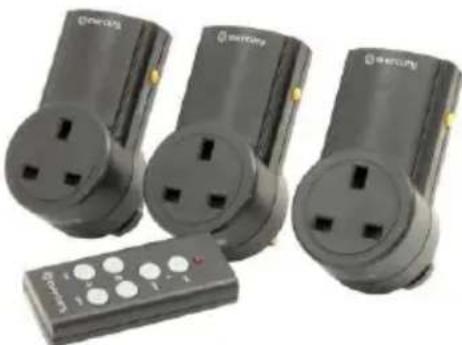
Three black electrical power outlets with three connected devices, one remote control (no visible text or symbols)Wireless Remote Control Mains Sockets - Set of 3
Order ref: 350.113UK
User Manual
Leaving an appliance in standby can still consume up to 70% of full power and can shorten the life of the appliance by 15%. These adaptors can be controlled individually by the remote supplied. Ideal for a wide variety of electrical appliances and a great solution for controlling appliances in inaccessible places, or for people with limited mobility.
Specification:
| Quantity in set | 3 sockets, 1 remote |
| Voltage | 240Vac, 50Hz |
| Max. load | 2400W per socket |
| Max. current | 10A per socket |
| Standby power | 1W |
| Transmission frequency | 433.92MHz |
| Remote: range | Up to 30m (clear line of sight) |
| Remote: battery | 12V, A23 |
| Socket: dimensions | 112 x 58 x 65mm |
| Remote: dimensions | 81 x 35 x 15mm |
| Weight | 410g |
Features:
- Reduces fire risk and protects your appliances
- Remote control operates up to 30m away from socket
- Sockets are pre-programmed with remote control supplied for instant use
• Additional sockets and remotes can be added using self-learning function - Reduces your household energy costs and carbon footprint
Operation:
All socket receivers have been pre-paired to the supplied remote and can be used immediately. To re-pair the remote control with any receiver socket, please follow the instructions below:
1) Plug the socket in and turn on by pressing the yellow button on the side of the unit.
2) Press and hold the yellow button again until the socket turns off.
3) Press the desired "ON" key on the remote.
4) The socket should now be synchronised with the desired "ON" and "OFF" key on the remote.
It is also possible to pair multiple sockets to the same remote or to pair up to 3 remotes to a single socket by using the same procedure above.
Unpairing a socket from the remote is also possible by unplugging the socket from the mains. Press and hold the yellow button on the side of the socket while plugging the socket back in, keep the button pressed for 5 seconds and the socket should be un-paired from all remotes.
If sockets are not responding correctly or the LED indicator on the remote control becomes dim, then the battery should be changed at the earliest possible opportunity. Install the 12V (23A) battery in the battery compartment; making sure the polarity is the correct way around. Always dispose of old batteries with consideration for the environment.
Warning:
- For reasons of electrical safety, this socket must never be immersed in water, exposed to damp conditions or excessive force.
- Do not use this product if you find that it is damaged in any way.
- Never exceed the maximum load current.
- Do not attempt to repair this product or take it apart under any circumstances, as this will invalidate your warranty.

text_image
CEUK CAThis product is classed as Electrical or Electronic equipment and should not be disposed with other household or commercial waste at the end of its useful life. The goods must be disposed of according to your local council guidelines.