WAT-2200P - Overvågningskamera Watec - Gratis brugsanvisning og manual
Find enhedens vejledning gratis WAT-2200P Watec i PDF-format.


Brugerspørgsmål om WAT-2200P Watec
0 spørgsmål om dette apparat. Besvar dem du kender, eller stil dit eget.
Stil et nyt spørgsmål om dette apparat
Download vejledningen til din Overvågningskamera i PDF-format gratis! Find din vejledning WAT-2200P - Watec og tag din elektroniske enhed tilbage i hånden. På denne side er alle dokumenter nødvendige for brugen af din enhed offentliggjort. WAT-2200P af mærket Watec.
BRUGSANVISNING WAT-2200P Watec
This Operation Manual covers safety, camera functions, installation and the correct operating procedure for the WAT-2200P. First, we ask you to read this Operation Manual thoroughly, then install and operate the WAT-2200P as advised. In addition, for future reference, we also advise safekeeping of this manual.
If you do not understand the installation, operation or safety instructions expressed in this manual, please contact the distributor or order from where the WAT-2200 ^2 was purchased. Not understanding the contents of the Operation Manual sufficiently may cause damage to the camera, personal belongings and/or result in injury.
Guide to the Safety Symbols
Symbols used in this operation manual:

"Danger", may lead to a serious accident such as death or injury caused by fire or electric shock.

"Warning", may cause severe damage such as a physical injury.

"Caution", may incur injury and cause damage to peripheral objects in the immediate surroundings.
Cautions for Safety
The WAT-220CP is designed to be used safely. If not used safely, I may lead to a physical accident caused by line and electric shock. Therefore, please keep and read the, "Cautious for safety" below for protection against accidents.

• Do not disassemble and/or modify the WAT-2200P.
• Do not operate the WAT-2200P with wet hands.

- Use a stabilized power adaptor designed for DC+120±10%, with a current capacity of more than 250mA for the WAT-230B
The recommended voltage is DC+12V±10%. Also, we advise the Use of an 'inline user' power line to protect the camera and peripheral equipment, where applicable.
Do not expose the WAT-2200P to wetness or high moisture conditions.
The WAT-2200P is designed and approved for indoor use only. The WAT-2200P is not water-resistant or waterproof. If the location of the camera is outdoors or in an outdoor like environment, we recommend that you use an outdoor camera housing.
Protect the WAT-2200P from condensation.
Keep the WAT 2200P dry at all times during storage and
operation.
Should the camera not work properly, unplug the power immediately. Then check the camera according to the "Problems and Trouble shooting" section.

- Avoid the striking of hard objects or dropping the WAT-2200P. The WAT-2200P uses high quality electrical parts and precision
components and may inadvertently be damaged if not cared for properly.
Do not connect any power supply directly to the video out terminal of the unit.
Do not connect the WAT-2200P with any monitor using a video power single transmission terminal. The WAT-2200P unless HD SOI output and is not designed for use with this type of equipment. We also advise you to read the operation manual of the monitor you plan to use before any connections are made.
Do not install the WAT-2200P in a position subject to direct sunlight.
Surlight spinning directly ante the WAT 200P lens can cause damage to the sensor.
Select a stable place for installation of the WAT-2200P. Use an appropriately rated mount curable and strong for all installation position.
Do not move the WAT-2200P with the cables connected. Before moving the WAT 2200P, always remove the video cat and power cable from the rear of the camera first.
Avoid using the WAT-2200P near any XXX ("strong" deleted) electro-magnetic field.
In the event of exposure to electromagnetic waves (causing the monitored image to become distorted) we recommend the camera be shielded by an appropriate protective casing.
Problems and Trouble Shooting
Trouble Shooting:
Disconnect the camera immediately should any of the following occur:
- An optimal picture cannot be obtained, after checking that all the cables and connections are correctly in place
• Smoke or any unusual odor emerges from the WAT-2200P
• An object becomes embedded or a quantity of liquid seeps into the camera housing
- More than the recommended voltage on and amperage has been applied to the WAT-2200P by mistake
• Anything unusual occurring to any equipment connected to the WAT 2200P
Required Action:
①Switch off the main power supply to the camera.
② Remove the power and video cables connected to the WAT-2200P.
③ Contact the distributor or dealer from which the WAT-2200P was purchased
About EMC
The WAT-2200P is in conformity with EMG test standards carried out by authorized organizations in Japan.
FCC Perl15 close D
EN61003-6-3/EN50139-4
※Please use an auxiliary power supply (eg: UPS) to this camera to comply with EN50130-4 of EMG standards.

Do not modify the WAT-220CP. A modified camera may not
conform to EMC beet standards.
Contents
Hetering to the illustration below, confirm all parts are present upon receipt of camera.
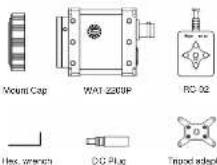
Lone Mount Cap
Description of Parts
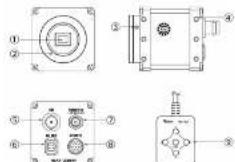
①IMAGE SENSOR Sensor Window
- The light receiving face of the image sensor
[Dr], water or oil deposits on the image sensor will cause an unclear picture on the monitor. Attach the lens cap to protect the lens and the sensor from contamination and damage.
2LENS MOUNT
- Mount for the lens (CS-mount)
ICS Mount Set SCPEWS (Consider using "BACK FOCUS" screws instead) - There are 3 adjustable hexagonal screws. Each screw is placed at intervals of 120° around the housing for fine focusing at the lens.
@CAMERA MOUNTING FEATURES
- These mounting features are used to mount the camera. Bolt Size : M3, Depth 4mm. If utilizing a tripod, please attach the supplied tappa adaptor by fixing the 4 bolt locations. There are a total of 24 mm aparting features encompassing the sides, top and bottom of the camera.
⑤VIDEO CUT (BNC)
- The terminal for SDI signal output.
⑧DC-IRIS SOCKET
- This socket is for the DG auto-iris lons cable connector
② POWER IN Terminal (with a lock)
• Connection for DC power plug to power line camera. ©REMOTE CONTROL TERRIN
③REMOTE CONTROL TERMINAL
• The terminal designed for connection with the same control for setting the voltage on the screen.
⑨ Barryle Centro Unit
- Remote control unit providing access to adjustments, settings the function/ion the screen (OSDI).
Power Supply
Use a stabilized power adaptor designed for DC-12W, with a current capacity of more than 250 mA. Use the optional DG plug if the shape or polarity of the DG plug of the power adaptor to be used is not compatible with the camera (See the drawing below).

Marking 14 out of
The wiring of the corrector must be exact.
Be careful not to touch the other tamarial white wing. Protect the wing appearance by using insulating tape or
shrinks tubing after wiring
To prevent inadvertent disconnection while in use, please
secure the connector to the power terminal on the camera
by turning "A" in the figure to the right in the clockwise direction. If the above are and otherwise not achieved, damage to the
WAT-2200P and power adapter may occur and may also cause fire.
Set-up and Operation
1) Ensure that the power to the WAT 2200P and the peripheral equipment is turned oil before making any connections.
2) Remove the lens mount cap from the WAT-2300P and attach the CS-mount lens. Use the optional G-mount adaptor (3/CMA-R) when a C-mount lens is used.
3) Connect the iris control cable to EDC-IRIS SOCKET on the WAT-2200P when a DC auto-iris lens is being used. If the aperture is not stable, please adjust by using the camera setting adjustment software.
4) Connect 5VIDEO OUT on the WAT-2200P with the monitor, using a high-frequency coaxial cable with 75Ω impedance.
5) Insert the power plug of the power adaptor into (7) POWER IN on the back panel of the WAT 2200P. Confirm that the power adaptor is not connected to the power plug before inserting of the power plan into (7) POWER IN.
6) Turn on the power to the WAT-2300P, monitor and all other allied equipment. When a picture cannot be obtained on the monitor, or a problem occurs, check and follow the procedure mentioned in the Problems and Trouve
[1] Stock and related to probability mentioned in the [^1 -Estimate data: Tracking Shooting] section.
7) Adjust the focus and in is until optimal image clarity through the lens is achieved. If the picture is still out of focus, open the its fully and loosen. ③ CS Mount Set SCREWS with the hex wrench and move the lens forwards until a fully focused and clear picture is obtained.
| Manual Lens | Adjust the focus and irs to the next position on the lens. |
| Motorized Zoom Lens | Back focus is required via CS Mount. Set Screw adjustment as well as possible. Adjust the ns level on the camera, then adjust the focus on the lens. See below. |
| DC Auto ns Lens | Adjust the ns level on the camera. Then adjust the focus on the lens. See below. |
8) When detailed settings are required or a clear image is not obtained, correct the remote control to ©REMOTE_CONTROL TERMINAL, then set the
functions on the screen by © OPERATION BUTTON
Please connect the optional serial communication cable to 3REMOTE CONTROL TERMINAL to charge the camera settings with the software if needed.
Options
To purchase these options, please contact the distributor or dealer from which you purchased the WAT 2203P.
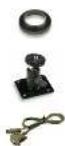
C-mount Adaptor (34CMA-R)
This ion mount adaptor is used to convert a CS mount to a C mount.
Mini Stand (MS50)
A convenient stand for the WAT-22007. With this stand, the camera can be adjusted to any desired angle.
Serial Communication Cable
The case for changes the camera setting with the software.
关于电子信息产品污染控制标识
| 环境使用期限 | 名称 | 有害物质或危害 | |||||
| 泪 | 误 | 录 | 六的泪 | PBB | PSDE | ||
| 小黄 | ○ | ○ | ○ | ○ | ○ | ○ | |
| 拟手象相持 | × | ○ | ○ | ○ | ○ | ○ | |
| 电线基线 | ○ | ○ | ○ | ○ | ○ | ○ | |
| 附件 | ○ | ○ | ○ | ○ | ○ | ○ | |
| 其它金属 | × | ○ | ○ | ○ | ○ | ○ | |
C. 深圳市有售有售股份且已获得的股份同时申请自缴出资50万T 11363-2016股交纳的股票在以下。 C. 深圳市有售有售股份且已获得的股份第一大股东转让价款金额超过50万T 11363-2016股交纳的股票在 于回购后取得的对价合计金额为40万以下。C. 股权让收款项合计125,000万元
尚未制定或采用实际情况
| 气泡名称 | 12.8% | 11.4% | 99% | ||||
| 包装箱 | |||||||
Specifications
| Model | WAT 220P |
| Pick up Element | 1/2.8-inch CMCS Image sensor |
| Number of total pixels | 190GW (×120GW) |
| Number of Effective Poids | 1380V/1080Pa |
| 190GW (×180GW) | |
| 720P | |
| Unit cell size | 2.5μm × 2.5μm |
| Imaging system | RGB-W array mask that on dhp |
| Sync. System | Intima |
| Scanning System | Progressive |
| Video Output | 3G SDI (Level A, SGA, FL, FL4AM, Compressor) HD-SDI/SHP/T292M, Compressor) |
| Output format | 3G-SDI 1060p50, 1060p5C, 1060p59.64 |
| 3G-SDI 136000, 136000, 1390059.84, 1360p30, 1360p25, 1360p26.97, 720p50, 720p50, 720p59.84 | |
| Minimum duration | 0.1 N, F12 |
| S/N | More than 500B |
| Function settings | OSD(On Screen Display) opened by remote controlor RS-282 (Compatible) |
| AE mode | AUTO MANUAL |
| Shotor speed | 3HT, 1/100, 1/120, 1/200, 1/500, 1/1000, 1/2000, 1/5000, 1/1000 sec |
| Fisherless mode | ON/OFF |
| ACC | HIGH / MEDIAN / LOW |
| AVG | 3 - 30dB |
| White branche | ATW / 20W / 3 Pread |
| Noise reduction | 20NR ON/OFF |
| Privacy mode | 16 areas (RS-232) |
| Mirror image | OFF / ON (HFLP, v FUP) |
| Back light compensation | ON / OFF |
| Delay | ON / OFF |
| White blotch connection | 1023 pixels |
| Lens Fts | DC |
| Power Supply | DC1 12V±10% |
| Power Consumption | 2.22W (165mA) |
| Operating Temperature | -19 ~ +80°C |
| Storage Temperature | -30 ~ 70°C |
| Operating Storage Humidity | 95% RH × loss (Without convection) |
| Lens mount | CS mount (black boots adscabio) |
| Size | 48(W x 150Hz x 68.5MHz mm) |
| Weather | Approx. 13Hz |
• Design and specifications are signed to choose virtual policies.
- Wake is not responsible for any inconvenience or the attendant damages to the video and monitoring recording equipment caused by misuse, miss operation or improper wiring of our equipment.
* If for any reason the VAT-2200P does not work properly, or if you have any questions regarding installation or operation, please contact the distributor or dealer from which it was purchased.
Contact information

Add: 254-2 Nhenkoku, Dahaji, Tauruoka-Shi,
YemagataKen, 507-0017 Japan
TEL: +81-235-23-4400 FAX: +91-235-23-4409
Email: info-o@sales.co.jp
URL: http://www.walesc.co.jp
5020200-Y200WCI