
ASB-1215WL - Ukategoriseret AIWA - Gratis brugsanvisning og manual
Find enhedens vejledning gratis ASB-1215WL AIWA i PDF-format.


Brugerspørgsmål om ASB-1215WL AIWA
0 spørgsmål om dette apparat. Besvar dem du kender, eller stil dit eget.
Stil et nyt spørgsmål om dette apparat
Download vejledningen til din Ukategoriseret i PDF-format gratis! Find din vejledning ASB-1215WL - AIWA og tag din elektroniske enhed tilbage i hånden. På denne side er alle dokumenter nødvendige for brugen af din enhed offentliggjort. ASB-1215WL af mærket AIWA.
BRUGSANVISNING ASB-1215WL AIWA
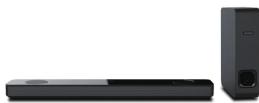
2.1 Soundbar
CONNECTIONSCONNECTIONNadb1Soundbar TECHNICAL INFORMATION
aiwa
2.1 CH SOUNDBAR
AS8-1215WL
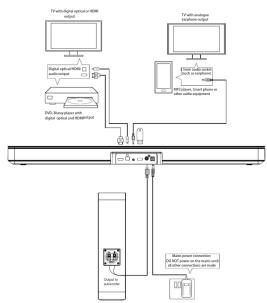
CONNECTING THE SOUNDBAR TO THE TV
- Power connection: First connect the DC output of the power adaptor to the
soundbar, then plug into a suitable AC socket. Do not power on the mains until
all the other connections have been made.
- Connect the Subwoofer of
ensuring correct potambes.
- Connection to TV: If your TV has an OPTICAL or HDMI port with ARC, use an OPTIONAL or HDMI link to serve the corresponding port on the reverse
OPTICAL or HDMI cable to connect to the OR
If your TV does not have ORTICAL or HDMI (ABC) use a 3.5mm AUX cable to
If your TV does not have OF TICAL or HDMI (ARVC), use a 5.3mm AUX cable to connect the Auxiliary output or the headphone jack on the TV to the AUX IN port
on the soundbar.
CONNECTING THE SOUNDBAR TO OTHER DEVICES
- OPTICAL input or HDMI (ARC) on the soundbar to OPTICAL output or HDMI
(ARC) of other devices (Blue-ray/ DVD player/ gaming consoles).
- Other audio sources are Bluetooth, USB and AUX IN.
OPERATING INSTRUCTIONS
Turning on: Turn on at th
Turn on at the mains outlet, then press the POWER Button on the front of the
soundbar, of the POWER Button on the remote control. To turn off, first press the POWER Button to set the unit
to turn off, first press the PC turn off at the mains outlet
Bluetooth mode:
- Press the M Button on the unit or ⏻ Button on the remote control until Bluetooth
Mode is selected.
- On your Bluetooth-enabled device, choose 'Aiwa ASB-1215WL' the name of
the soundbar and connect. Once paired, you can play music from your
Bluetooth-enabled device on the soundbar.
USB mode:
-
Connect a USB memory device to the USB port.
-
Press the M Button on the unit or ⏻ Button on the remote control until USB
mode is selected. Now you can play music from the USB device on the soundbar Note: Only ms? - WMA files are played. Maximum sine of device that are
Note. Only mps, WMA files can be played. Maximum size of device that can be appended in 32GB
be connected is 32GB AUDIORTICAL HDMI
-
Connect the device using
-
Press the M Button on the unit or 📋 Button o
-
Press the W. Button on the unit of ☐ Button on the remote comfort repeatedly to select the correct mode to play music from the connected device on the soundbar.
dicate the best means to play, musts from the bestdest side on the examination
flowchart
graph TD
    A["Trans-digital processing module"] --> B["Data transfer"]
    B --> C["Network switch"]
    C --> D["Server Rack"]
    D --> E["Data transfer"]
    E --> F["Network switch"]
    F --> G["Server Rack"]
    G --> H["Data transfer"]
    H --> I["Network switch"]
    I --> J["Server Rack"]
    J --> K["Data transfer"]
    K --> L["Network switch"]
    L --> M["Server Rack"]
    M --> N["Data transfer"]
    N --> O["Network switch"]
    O --> P["Server Rack"]
    P --> Q["Data transfer"]
    Q --> R["Network switch"]
    R --> S["Server Rack"]
    S --> T["Data transfer"]
    T --> U["Network switch"]
    U --> V["Server Rack"]
    V --> W["Data transfer"]
    W --> X["Network switch"]
    X --> Y["Server Rack"]
| Amplifier | |
| Power Output | 12W*2+25W |
| Frequency Response | 45HZ-20KHz |
| Main Unit | |
| Power Supplier | Input:100-240V~50-60HZOutput: 15V/2A |
| Power Consumption | 50W |
| Dimensions | 750*110*54mm (Main Unit)95*365*385mm (Subwoofer) |
| Remote control | |
| Battery | 2 x AAA |
| Bluetooth | |
| Bluetooth Version | BT4.2+EDR |
aiwa
Instruction Manual
2.1 Soundbar
SAFETY INFORMATION
2.1 Soundbar
SAFETY INFORMATION
2.1 Soundbar
MAIN UNIT
2.1 Soundbar
SUBWOOFER 2.1 Soundbar
REMOTE CONTROL
Important!
Please read the instructions carefully before installation and use.
Power Source
Only use the power supply that is provided with the unit. Using an unauthorised power supply will invalidate your guarantee and may irrecoverably damage the product.
Disconnect your soundbar from the mains power supply during thunderstorms.
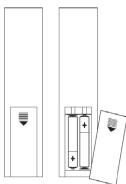
If the soundbar will not be used for a long period of time, make sure that the mains power is unplugged and the battery is removed from the remote control battery compartment. The supply terminals are not to be short circuited.
Never throw batteries in a fire or attempt to open the outer casing. Batteries are harmful if swallowed, so keep away from young children
CAUTION: Danger of explosion if batteries are incorrectly replaced. Replace only with the same or equivalent type.
Moisture and Water
Do not leave the unit in low temperatures as moisture can form inside the product, which may damage the circuit board.
Do not immerse in water or other liquids; do not use in the immediate vicinity of water such as bathtubs, washbowls, swimming pools etc.
Heat Sources and Flames
Do not leave the unit in high temperatures as the electronic devices and plastic parts may warn in the heat.
Keep the unit away from bright sunlight or heat sources, such as a radiator.
No naked flame sources, such as lit candles, should be placed on the product.
Ventilation
Do not block or cover slots, holes or openings by placing the unit on soft furnishings such as carpets, rugs or beds as these are provided for functionality and/or ventilation to ensure safe operation.
General Safety Information
This product is intended for indoor, household use only. Keep the product and all its parts out of reach of small children. This product is not intended for use by persons (including children) with reduced physical, sensory or mental capabilities, or lack of experience and knowledge, unless they are supervised or given instruction concerning the use of the appliance by a person
responsible for their safety. Do not attempt to open the product. This product does not contain any user serviceable parts. Unauthorised handling of the device may damage it and will void your warranty. Do not use your soundbar near emergency/intensive care medical equipment or during an electrical storm.
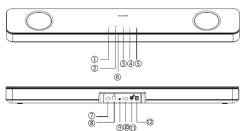
- Press and hold: Power on/Standby
- Switch between different modes (BT/USB/AUX/OPTICAL/HDMI-ARC)
- Press and release: Play/Pause
Press and hold: Unpair a BT de - Press and hold: Volume down
Press and release. Skip backward - Press and hold, volume d
Press and release. Skip forward - Mode LED Indicator
- HDMI ARS
- HDMIARC
-
Optical
-
Aux in sock
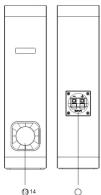
10 USB
- Output to Subwoofer
- DC socket
- Inverter tube
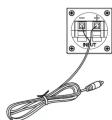
14 Subwoofer speaker inputs
Note: Ensure correct polarities when connecting the Subwoofer speaker inputs from the Soundbar Red wire to the positive (+), black wire to the negative (-).
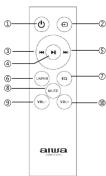
- Power on/Standby
- Switch between different modes(BT/USB/AUX in/Optical/HDMI-ARC)
- Skip backward
- Play/Pause
- Skip forward
- Unpair a Bluetooth device
- Change the EQ setting
- Mute/Unmute the sound
- Volume dow
- Volume up
- Install the remote batteries
01
02
03
04
05