Octave Soundbar - Højttaler Argon - Gratis brugsanvisning og manual
Find enhedens vejledning gratis Octave Soundbar Argon i PDF-format.


Brugerspørgsmål om Octave Soundbar Argon
0 spørgsmål om dette apparat. Besvar dem du kender, eller stil dit eget.
Stil et nyt spørgsmål om dette apparat
Download vejledningen til din Højttaler i PDF-format gratis! Find din vejledning Octave Soundbar - Argon og tag din elektroniske enhed tilbage i hånden. På denne side er alle dokumenter nødvendige for brugen af din enhed offentliggjort. Octave Soundbar af mærket Argon.
BRUGSANVISNING Octave Soundbar Argon

ARGON AUDIO
OctaveSoundbar Quick start
We care about the Environment
By refraining from inserting a full printed manual with our Argon Audio products we save more than 20 tons of paper each year.
See back side of this insert for Quick start guide
Safety
Safety Instructions

text_image
CAUTION RISK OF ELECTRIC SHOCK DO NOT OPEN- Unplug this product from the wall outlet before cleaning. Do not use this product near water or moisture. Do not spill liquids on the product. Clean only with a dry cloth.
- Place the unit on a solid surface.
- Do not put it in a closed bookcase or a cabinet that may keep air from flowing through its ventilation openings.
- Do not install near any heat sources, such as radiators, heat registers, stoves or other appliances that produce heat.
- Protect the power cord from being walked on or pinched, particularly at plugs and the point where they exit from the product.
- During Lightning storms, unplug the product from the power source or if unused for long periods of time. This will prevent lightning and power-line surge damage to the product.
- Do not attempt to service this product yourself. Opening or removing covers may expose you to dangerous voltages or
other hazards. Please contact the manufacturer to be referred to an authorized service center near you.
- Do not overload wall outlets, extension cords, or integral power circuits as this can result in a risk of fire or electric shock.
- Never push any object through the product openings, as this can result in fire, electric shock or damage.
- Use proper power sources. Plug the product into a proper power source, as described in the operating instructions or as marked on the product.

If there is a Lightning flash with an arrow head on the product, it's intended to alert the User of the presence of un-insulated "dangerous voltage" within the product, that might be of sufficient magnitude to constitute a risk of electric shock to persons.

If there is an Exclamation point on the product, it's intended to alert the User that there is important operating and maintenance (servicing) information in the User manual.

ARCON AUDIO
OctaveSoundbar Quick start
Connections
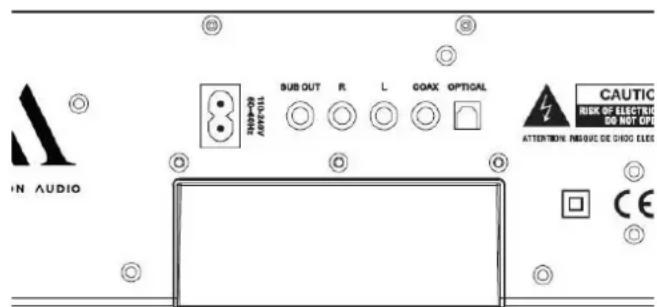
You can connect your TV to the Octave Soundbar using an optical cable, coax cable or an RCA cable. The soundbar also has built in Bluetooth for playing music from a phone, tablet, computer etc. If you have a subwoofer, you can connect this to the subwoofer output. The soundbar will then stop playing any bass below 80 Hz, so your subwoofer crossover should be set to 80 Hz or above.
Quick start
Start up
- Mount the soundbar on your wall, or place it on your TV bench. If possible, place the soundbar so that it is in ear height when sitting in your preferred listening position.
- Connect the Power cord into an electric outlet and into the back of the Octave soundbar.
- Connect the soundbar to your TV using either optical, coax or RCA.
- You can use the included remote control to switch between the inputs, or you can press the "power" button on top of the soundbar to cycle between them.
Basic Operating
- Note that when playing Bluetooth, you can adjust the volume on your device as well as on the soundbar. Be aware that if you have turned the volume up on the soundbar, and turn back to one of the other inputs, they might be quite loud.
- If you need to remove your phone from Bluetooth devices, you can either do this under the Bluetooth settings on your phone, or set the soundbar back to pairing by holding the "Pair" button on the remote or on the soundbar until the LED starts flashing blue.
- Remote function from Samsung and Sony TV remotes: Octave soundbar supports most Samsung, LG and Sony remote functions for "Volume +/-" and "Mute". If you use the Octave soundbar with a Samsung, LG or Sony TV it allows you to have only one remote control (the TV remote) to control the basic and useful functions.
Inputs
text_image
IN AUDIO SUB OUT R. L. COAX OPTICAL CAUTIC RISK OF ELECTRIC DO NOT OPEN ATTENTION: PROJEC DE CHOC ELEC CESub out: For subwoofer connection using a subwoofer cable
R & L: RCA connection for some older TVs, CD player, streaming etc.
Coax: Digital connection using a coax cable
Optical: Digital connection using an optical cable
LED colors
The color of the LED signifies different inputs.
Blue: Bluetooth (blinking if in pairing mode)
Purple: Optical
White: Coax
Green: RCA