COM-5711/S - Mus Steren - Gratis brugsanvisning og manual
Find enhedens vejledning gratis COM-5711/S Steren i PDF-format.


Brugerspørgsmål om COM-5711/S Steren
0 spørgsmål om dette apparat. Besvar dem du kender, eller stil dit eget.
Stil et nyt spørgsmål om dette apparat
Download vejledningen til din Mus i PDF-format gratis! Find din vejledning COM-5711/S - Steren og tag din elektroniske enhed tilbage i hånden. På denne side er alle dokumenter nødvendige for brugen af din enhed offentliggjort. COM-5711/S af mærket Steren.
BRUGSANVISNING COM-5711/S Steren

STEREN
COM-525R
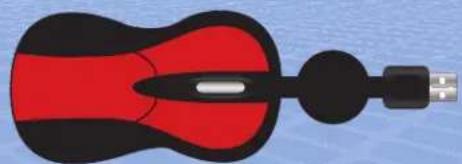
Red retractable optical mouse
Instruction manual
natural_image
Illustration of a red and black mouse with a USB port, no text or symbols presentV0111
S1-S
Before using your new Steren Red retractable optical mouse, please read this instruction manual to prevent any damage. Put it away in a safe place for future reference.
IMPORTANT
• Always use a soft, clean, dry cloth.
- Warranty is void if you try to open the device.
- Do not use or store the equipment near wet places.
FEATURES
The mini optical mouse, by its size, is perfect for use with portable computers such as laptops. It has 800 DPIs resolution, scroll wheel and 3-buttons.
The retractable cable with USB connector allows a fast storage by avoiding entanglement when storing it in your suitcase or briefcase and it is 75 cm length.
Made of soft touch red plastic.
CONTROLS
text_image
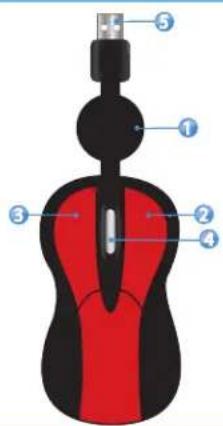
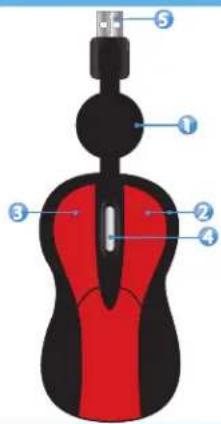
Labeled diagram of a computer mouse with numbered parts for identification1.- Retractable cable
2.- Right button
3.- Left button
4.- Scroll / middle button
5.- USB Connector
INSTALLATION
-
- Turn the computer on.
-
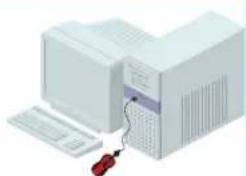
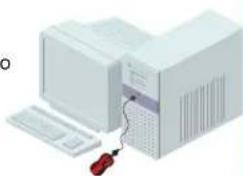
- Connect the USB cable to an available USB port.
natural_image
Illustration of a desktop computer setup with a tower, keyboard, and mouse (no text or symbols visible)-
- The computer will detect the new hardware. Automatically will be installed the required files.
-
- After few seconds, the mouse will be ready to be used.
-
- To set the parameters, open Control Panel >> Mouse and change them according your needs.
Control Panel menu is located in Start menu.
- To set the parameters, open Control Panel >> Mouse and change them according your needs.
SPECIFICATIONS
Input: 5V = 100mA (x USB)
Resolution: 800 DPI

Product design and specifications are subject to change without previous notice.

STEREN
Product: Red retractable mini optical mouse Part number: COM-525R
Brand: Steren
WARRANTY
This Steren product is warranted under normal usage against defects in workmanship and materials to the original purchaser for one year from the date of purchase.
CONDITIONS
1.- This warranty card with all the required information, invoice or purchase ticket, product box or package, and product, must be presented when warranty service is required.
2.- If the product stills on the warranty time, the company will repair it free of charge.
3.- The repairing time will not exceed 30 natural days, from the day the claim was received.
4.- Steren sell parts, components, consumables and accessories to customer, as well as warranty service, at any of the addresses mentioned later.
THIS WARRANTY IS VOID IN THE NEXT CASES:
If the product has been damaged by an accident, acts of God, mishandling, leaky batteries, failure to follow enclosed instructions, improper repair by unauthorized personnel, improper safe keeping, among others.
a) The consumer can also claim the warranty service in the purchase establishment.
b) If you lose the warranty card, we can reissue it, if you show the invoice or purchase ticket.
RETAILER INFORMATION
Name of the retailer
Address ____
Product
Brand
Part number ____
Serial number ____
Date of delivery ____
In case your product fails or have questions, please contact your nearest dealer. If you are in Mexico, please give a call to our Call Center. Call Center

01 800 500 9000

STEREN
COM-525R
Mini mouse óptico rojo con cable retráctil
Manual de instrucciones
natural_image
Illustration of a red and black computer mouse with a USB port, shown against a blue background (no text or symbols)V0111
S1-S
Antes de utilizar su nuevo Mini mouse óptico con cable retráctil rojo Steren, lea este instructivo para evitar cualquier mal funcionamiento. Guárdelo para futuras referencias.
IMPORTANTE
- Siempre utilice un paño suave, limpio y seco para limpiar el equipo.
- No intente abrir el equipo, puede ocasionar malfuncionamiento y anulación de la garantía.
- No use ni almacene este equipo en lugares donde existan goteras o salpicaduras de agua.
CARACTERÍSTICAS
El mini mouse óptico, por su tamaño, es perfecto para usar con equipos portátiles como laptops. Tiene resolución de 800 DPIs, rueda de desplazamiento (scroll) y 3 botones.
El cable retráctil con conector USB permite un rápido almacenaje del mismo evitando que se enrede al guardarlo en su maleta o portafolios y tiene una longitud de 75 cm.
Fabricado en plástico suave al tacto color rojo.
CONTROLES
1.- Cable retráctil
2.- Botón derecho
3.- Botón izquierdo
4.- Scroll / Botón central
5.- Conector USB
text_image
Diagram of a computer mouse with numbered parts labeled 1 through 5INSTALACIÓN
1.- Encienda la computadora.
2.- Conecte el cable USB del ratón en un puerto USB disponible.
natural_image
Illustration of a desktop computer tower with a red screwdriver inserted, no text or symbols present3.- La computadora detectará el nuevo hardware. Automáticamente se instalarán los archivos necesarios.
4.- Después de la instalación de drivers el ratón estará listo para su uso.
5.- Para ajustar las opciones del ratón, abra el menú de Panel de Control / Mouse y realice los cambios que desee.
El menú de" Panel de control" se encuentra en el menú de Inicio de Windows.
ESPECIFICACIONES
Alimentación: 5V = 100 mA (x USB)
Resolución: 800 DPI

El diseño del producto y las especificaciones pueden
cambiar sin previo aviso.

STEREN
Producto: Mini mouse óptico roj con cable retráctil.
Modelo: COM-525R
Marca: Steren
PÓLIZA DE GARANTÍA
Esta póliza garantiza el producto por el término de un año en todas sus partes y mano de obra, contra cualquier defecto de fabricación y funcionamiento, a partir de la fecha de entrega.
CONDICIONES
1.- Para hacer efectiva la garantía, presente ésta póliza y el producto, en donde fue adquirido o en Electrónica Steren S.A. de C.V.
2.- Electrónica Steren S.A de C.V. se compromete a reparar el producto en caso de estar defectuoso sin ningún cargo al consumidor. Los gastos de transportación serán cubiertos por el proveedor.
3.- El tiempo de reparación en ningún caso será mayor a 30 días,contados a partir de la recepción del producto en cualquiera de los sitios donde pueda hacerse efectiva la garantía.
4.- El lugar donde puede adquirir partes, componentes, consumibles y accesorios, así como hacer válida esta garantía es en cualquiera de las direcciones mencionadas posteriormwente.
1.- Cuando el producto ha sido utilizado en condiciones distintas a las normales.
2.- Cuando el producto no ha sido operado de acuerdo con el instructivo de uso.
3.- Cuando el producto ha sido alterado o reparado por personal no autorizado por Electrónica Steren S.A. de C.V.
ESTA PÓLIZA NO SE HARA EFECTIVA EN LOS SIGUIENTES CASOS:
El consumidor podrá solicitar que se haga efectiva la garantía ante la propia casa comercial donde adquirió el producto. Si la presente garantía se extraviara, el consumidor puede recurrir a su proveedor para que le expida otra póliza de garantía, previa presentación de la nota de compra o factura respectiva.
DATOS DEL DISTRIBUIDOR
Nombre del Distribuidor
Domicilio
Producto
Marca
Modelo
Número de serie
Fecha de entrega
En caso de que su producto
presente alguna talla, acuda al contro de distribución más cercano
centro de distribución más cercano a su domicilio y en caso de tener
alguna duda o pregunta por favor
llame a nuestro Centro de Atención
a Clientes, en donde con gusto le
atenderemos en todo lo relacionado
con su producto Steren,
Centro de Atencion a Clientes

01 800 500 9000
ELECTRONICA STEREN S.A. DE C.V.
Camarones 112, Obrero Popular, 02840, México, D.F. RFC: EST850628-K51
STEREN PRODUCTO EMPACADO S.A. DE C.V.
Biólogo Maximino Martínez No. 3408 Int. 3 y 4, San Salvador Xochimanca, México, D.F. 02870, RFC: SPE941215H43
ELECTRONICA STEREN DEL CENTRO, S.A. DE C.V.
Rep. del Salvador 20 A y B, Centro, 06000, México. D.F. RFC: ESC9610259N4
ELECTRONICA STEREN DE GUADALAJARA, S.A.
López Cotilla No. 51, Centro, 44100, Guadalajara, Jal. RFC: ESG810511HT6
ELECTRONICA STEREN DE MONTERREY, S.A.
Colón 130 Pte., Centro, 64000, Monterrey, N.L. RFC: ESM830202MF8
ELECTRONICA STEREN DE TIJUANA, S.A. de C.V.
Calle 2a, Juárez 7636, Centro, 22000, Tijuana, B.C.N. RFC: EST980909NU5