PP1002A - Højttaler Podium Pro - Gratis brugsanvisning og manual
Find enhedens vejledning gratis PP1002A Podium Pro i PDF-format.


Brugerspørgsmål om PP1002A Podium Pro
0 spørgsmål om dette apparat. Besvar dem du kender, eller stil dit eget.
Stil et nyt spørgsmål om dette apparat
Download vejledningen til din Højttaler i PDF-format gratis! Find din vejledning PP1002A - Podium Pro og tag din elektroniske enhed tilbage i hånden. På denne side er alle dokumenter nødvendige for brugen af din enhed offentliggjort. PP1002A af mærket Podium Pro.
BRUGSANVISNING PP1002A Podium Pro
Podium Pro Audio
Model PP1002A
10" 2-Way Self-Powered Speaker
User's Manual
Podium Pro Audio
Audio at its highest level
http://www.podiumproaudio.com
© 2009
INTRODUCTION
Podium Pro Audio self-powered loudspeakers are a high performance yet economical source of portable live sound reinforcement. Applications include speech, vocals, stage monitor and music playback. Used in accordance with the information provided this product will give years of trouble free use.
PP1002A FEATURES
• Rugged, light weight ABS construction.
○ Built-in handle makes setup/teardown easy.
○ Rubber feet for added stability
- Perforated metal grill.
○ Built-in 1-1½" (38mm) pole mount socket.
- 10" steel basket woofer.
o High temperature woofer voice coil
• Titanium diaphragm
• High power amplifier.
o Built-in MIC/LINE mixing capability.
- Midrange control.
- Dynamic microphone input.
o Buffered and balanced loop through allows linking any
number of speakers.
BEFORE YOU BEGIN
• Read these instructions.
• Follow these instructions.
• Heed all warnings
• Do not use where the speaker may get wet.
• Avoid placing the speaker in direct sunlight.
- Never place this speaker in clone proximity to a heat source such as
- Never place this speaker in close a radiator, sleeve or heater vent.
- Never defeat the polarizing or safety ground on the AC cord
- Never shall the polishing or safety grounds on the Air bore. Be certain all equipment is OFF before making or breaking
- Be certain an equipment is OFF before making or breaking connections.
- Algeus leuven
- Always lower the volume control to minimum (full doorbell-clockwise) before turning speaker ON or OFF.
- Never allowed to support a power
- Never attempt to connect a power amplifier's speaker level output to the PP1002A's inputs.
- Clean only with a dam
- Clean only with a clamp (not wet) cloth.
- Refer all service needs to qualified personnel. There are no user serviceable components inside.
TROUBLESHOOTING
| Symptom | Likely Cause | What To Do |
| No sound. | AC power not connected or no AC power. | Verify the presence of AC power. |
| Power switch off. | Turn speaker on. | |
| AC fuse blown. | Replace AC low (3A) if one fuse also blows speaker needs replace. | |
| Speaker in ON but no sound. | No input signal. | Verify signal present at input connection(s). |
| Source level set too low. | Turn the source output level up. | |
| Volume control set too low (full counter-clockover). | Turn MASTER volume up (clockwise). | |
| Microphone connected but no sound from microphone. | Microphone requires phantom power. | Change to a Dynamic Microphone or add a microphone preamp that provides phantom power. |
| Sound is distorted even when volume is low. | Defective microphone. | Repair or replace microphone. |
| Defective microphone cables. | Repair or replace cable. | |
| The source level is too high, overloading the LINE input. | Turn the source output down; Raise the MASTER volume (clockwise) to restore desired loudness. | |
| AC line voltage too low. | Correct AC circuit fault. | |
| Source signals is distorted. | Correct source fault. | |
| Excessive bias in system. | Improper gain settings. | Lower MASTER volume. Then increase the source output level and/or MIC level to restore desired loudness. |
| Hum or buzz level rises and falls when volume level is raised or lowered. | Source has faulty safety ground. | Replace SAWG ground connection or repair source adjustment. |
| Faulty cabling between source and speaker. | Repair or replace cable. | |
| Constant hum or buzz unaffected by volume setting. | Faulty safety ground connection. | Restore safety ground. |
| Induced from AC cords. | Ris-route AC power cables away from the audio interconnected cabling. | |
| “Ground loop” (circulating ground current). | Break (Rf) the audio ground using a 5" PHONE plug adapter device for the pipe. Connect between the source and speaker. | |
| Excessive length unbalanced cable from source. | Use balanced cables whenever possible. Use a Direct Injection Box (DI Box) to convert unbalanced sources to balanced. | |
| Improper gain structure. | Increase source and/or microphone output level and decrease speaker volume and/or MIC level(s). |
2
PP1002A SPECIFICATIONS
System Description: Self powered, ported 10" two-way
Frequency range (-10dB): 28Hz - 20kHz
Maximum acoustic output level: 120dB
System power rating: 250 Watts (program material)
500 Watts peak.
MID control range: ±12dB @ 3kHz
Power requirements: 110VAC, 50/60Hz
Enclosure: ABS plastic
Weight: 32lb. (14.5kg)
WARNING
PROLONGED EXPOSURE TO HIGH SOUND LEVELS
Podium Pro Audio PP1002A loudspeaker is capable of generating sound pressure levels (SPL) sufficient to cause permanent hearing damage to performers, production crew and audience members. Caution must be taken to avoid prolonged exposure to SPL levels in excess of 90dB. For example: Always place the speakers in such a manner that no audience members or personnel are continuously exposed to sound levels in excess of 90dB.
CONNECTIONS AND CONTROLS
① MASTER This control adjusts the loudness of this speaker. It has no effect on LINK ^® .
⑦ MID This control varies ±12dB
centered at 3kHz. It has no effect on
LINK®
③ MIC This control adjusts the level of the microphone connected to the MIC ^® input.
④ POWER LED lights green when the speaker is connected to AC power and the POWER ^® switch is ON.
⑤ MIC This input will accept either an XLR or 14 " PHONE plug, balanced or unbalanced.
⑥ LINE This input accepts a 14 * PHONE plug, balanced or unbalanced.
⑦ LINK Use this output to link multiple speakers to a single source. LINK is
the sum of the MIC ^® and LINE ^® inputs, including the MIC ^® control setting. The MASTER ^® and MID ^® controls have no
effect on LINK.
⑧ POWER ON/OFF Switch.
® AC 110V 50/60Hz power cord input.
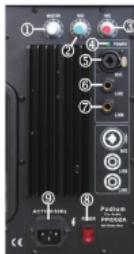
Figure 1
6
3
INSTALLATION
Padium Pro Audio speakers are intended for portable applications where the speakers will be placed directly on the stage floor or mounted on a suitable speaker stand.
VERY IMPORTANT: This product is NOT intended for permanent installations. Such installations must follow rigorous standards, including cable or chain rigging for safety. No rigging anchor points are provided and any attempt to modify the enclosure for this purpose will weaken the structure. Therefore, any overhead placement requiring rigging cannot be considered safe.
FLOOR PLACEMENT: Speakers should be placed in a secure, dry and level location. Be sure to cover or tape down any cabling that crosses a traffic lane. Try to place the speakers between the microphone(s) and the audience. This will minimize acoustic feedback.
STAGE "FOLDBACK" MONITOR: Place the PP1002A on its side, along the front edge of the stage aimed toward the performers. Exact placement is strongly influenced by type and placement of the microphone(s).
STAND MOUNTING: Podium Pro Audio speakers are compatible with standard 1-3/4" (38mm) stands.
Tip: Sound quality and coverage area are best when the tweeter is between 2 to 4 feet above the audience ear level.
- Speaker stands must only be used on smooth level surfaces.
- Be certain you select a stand rated for at least 40lb. Contact your dealer for recommendations.
- NEVER MOUNT MORE THAN ONE SPEAKER ON A STAND.
- Do not attempt to mount the speaker on a stand without an assistant. 1. Mount the speaker on its stand prior to making any electrical connections.
- Check that the set screw in the speaker base is backed out
enough to clear the stand post.
-
After placement, verify that the stand post is fully seated in the speaker base.
-
Tighten the set screw (by hand) to lock the speaker in place.
Failure to do so may result in injury or equipment damage.
- Route and secure all cabling such that there are no tripping hazards.
Use gaffer's tape or other retaining system liberally.
- Any cabling which crosses a traffic lane must be covered or taped down.
- Add weight (i.e. sandbags) to the base of the stand for added stability. In a windy outdoor location this is vitally important!
AC POWER DISTRIBUTION
It is very important to provide adequate AC power to each speaker in the system. Performance of the PP1002A may be degraded if the AC voltage drops more than five volts. The length of the run and the number of speakers connected dictate the appropriate gauge AC cord (extension cord) to use. Use the following table to establish the correct gauge AC cord to use.
CAUTION
CAUTION Never connect more than five PP-100A speakers to a single AC cord run. If more than five speakers are used add additional AC cords in parallel as needed.
| Cord Gauge | ONE PP1002A | TWO PP1002A | THREE PP1002A | FOUR PP1002A | FIVE PP1002A |
| 16 | up to 200' | up to 100' | up to 60' | up to 50' | up to 40' |
| 14 | up to 300' | up to 150' | up to 100' | up to 75' | up to 60' |
| 12 | up to 500' | up to 250' | up to 150' | up to 125' | up to 100' |
SIGNAL DISTRIBUTION
Podium Pro Audio speakers can accept either balanced or unbalanced line level sources and/or microphones.
- A balanced interconnect is a three conductor system. Two inner wires carry the audio signal differentially (opposite phase) and the third wire is for ground reference and shielding only.
- An unbalanced interconnect is a two-wire system wherein the center conductor (aka "HOT") carries the signal and the shield/ground conductor is also a signal conductor.
The PP1002A will accept two common interconnects, XLR and 12 " PHONE. XLR cables are always balanced. 12 " PHONE cables can be balanced or unbalanced. Balanced interconnects provide superior noise immunity, especially for runs over 10 feet. It is recommended that you see balanced interconnects whenever possible.
LINKING MULTIPLE SPEAKERS
See Figure 1 for control and connection locations.
To link (daisy-chain) multiple speakers, use a 12 " PHONE interconnect from the LINK ^ connector of the first speaker to the LINE ^ connector of the second speaker. The PP1002A employs a buffered, fully balanced LINK ^ circuit. Therefore there is no practical limit to the number of speakers that can be linked!
Tip: To use this feature effectively it is necessary to understand exactly what LINK ^① is. It is the sum of the MIC ^② and LINE ^③ inputs. This includes their relative levels as set by the MIC ^④ control.
Note that the MASTER ^® and MID ^® controls have no effect on LINK ^® . This allows you to optimize each speaker as necessary without altering the other linked speakers.
5