
Crasher Slim - Højttaler JLab - Gratis brugsanvisning og manual
Find enhedens vejledning gratis Crasher Slim JLab i PDF-format.


Brugerspørgsmål om Crasher Slim JLab
0 spørgsmål om dette apparat. Besvar dem du kender, eller stil dit eget.
Stil et nyt spørgsmål om dette apparat
Download vejledningen til din Højttaler i PDF-format gratis! Find din vejledning Crasher Slim - JLab og tag din elektroniske enhed tilbage i hånden. På denne side er alle dokumenter nødvendige for brugen af din enhed offentliggjort. Crasher Slim af mærket JLab.
BRUGSANVISNING Crasher Slim JLab
natural_image
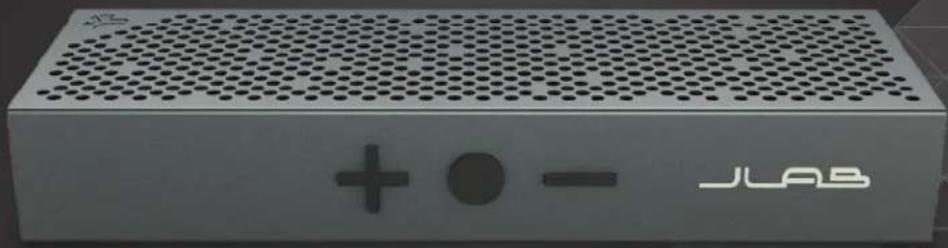
Exterior view of a JLAB audio amplifier device with perforated grille and control buttons (no readable text beyond branding)CRASHERSLIM
RUGGED PORTABLE BLUETOOTH® SPEAKER
USER MANUAL
ACCESSORIES
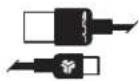
MICRO USB CABLE
SPEAKER PORTS / BUTTONS
VOLUME - / TRACK BACK
(hold for 1 + sec)
VOLUME + / TRACK FORWARD
(hold for 1+ sec)

text_image
- ● + JLABPOWER / PLAY / PAUSE / HANDS FREE
AUX INDICATOR INPUT LIGHT
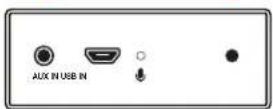
USB INPUT MIC
CHARGING
Note: For optimum performance, charge overnight with Micro USB cable prior to using.
1 Before charging, it is recommended you turn off the Crasher Slim.
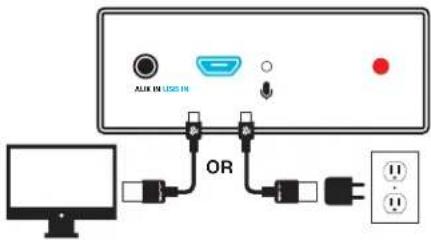
2 Connect the Crasher Slim to your computer or wall outlet using the provided Micro USB cable and/or 5V power adapter.
3 The indicator light on the side of the Crasher Slim will turn red indicating charging is in progress. When it turns off, charging is complete.
text_image
ALIX EN LUSG IN ORPOWER + BLUETOOTH FUNCTION
1 Once the Crasher Slim is fully charged, press the Power button to turn it on. You will hear a sound prompt signifying the speaker is on.
2 The Crasher Slim will automatically be in Bluetooth pairing mode upon start up. The indicator light on the side of the speaker will flash blue.
3 Use your mobile device to search for the Bluetooth signal. The Crasher Slim will appear on your Bluetooth device list. Enter PIN code "0000" if prompted.
4 The indicator light will flash blue in 2 second intervals indicating that Bluetooth is connected. You will also hear a sound prompt. The unit will sync to play songs on your device when connected successfully.
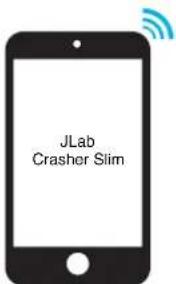
text_image
JLab Crasher Slim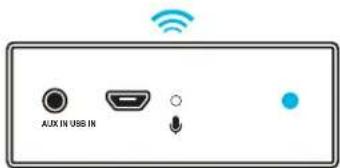
text_image
AUX IN USB INNotes:
- Bluetooth is a wireless radio technology, which means it is sensitive to objects between the speaker and the connected device.
The speaker is designed to be used within 33 feet (10 meters) of a connected device, with no major objects in between (walls, etc.). - Once successfully connected, the speaker will memorize your device and automatically pair when turned on in the future. Only one device may be connected at a time. To pair a different device, first unpair the current one through its Bluetooth settings.
- The Bluetooth will enter a low power consumption status after 15 minutes without connection. At this time, the indicator light will flash blue every 5 seconds. To wake up the speaker, hold down the PLAY/PAUSE button for 3 seconds.
- If for any reason Bluetooth connection is lost, manually reconnect your Bluetooth device.
BUTTON FUNCTIONS
VOLUME + TRACK CONTROL

[+]
Press to increase volume.
Hold down 1+ sec to skip to next track.
[-]
Press to decrease volume.
Hold down 1+ sec to skip to previous track.
PLAY / PAUSE / HANDS FREE TELEPHONE CALLS
![JLab Crasher Slim - [-] - 1](/content/2026/05/886464/images/fb0b287ff0a82203e4daf1ea99040c5b724137f434d63fa9f385a67b08858c1e.jpg)
PLAYBACK:
Press to temporarily pause a playback; press again to resume.
BLUETOOTH CALLING:
Press to answer incoming phone calls. Press again to end the call.
UN-PAIRING:
To disconnect Bluetooth calling, hold down the Play button for 3 seconds. You will hear a sound prompt.
AUX IN FUNCTION
The Crasher Slim has an AUX IN port. You can use audio from devices such as a mobile phone, computer, MP3 player, etc. with a 3.5mm AUX cable.
Use a 3.5mm AUX cable (not included) to connect the audio output terminals of your chosen device to the audio input terminal (AUX IN) of the Crasher Slim.
Note: The Crasher Slim will give priority to AUX playback whenever both the AUX input terminal and the Bluetooth are connected simultaneously. Once the 3.5mm device is disconnected, the Crasher Slim will return to the music on the Bluetooth connected device.
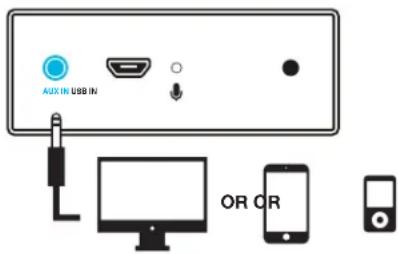
text_image
AUX IN USB IN OR ORCAUTIONS
- Listen to music at a suitable volume for enjoyment in order to not cause damage to your hearing and/or speaker system.
- Store in a well ventilated area.
- To reduce the risk of fire or electric shock, do not spill or spray liquid of any kind on or in the unit.
- Keep the unit away from an open flame such as fire, candle, etc.
- Avoid extreme heat, cold and humidity.
-
Only use attachments/accessories specified by the manufacturer.
-
Do not drop any objects into the unit through the openings.
- Do not place anything heavy on the unit.
- To ensure proper ventilation and proper operation, never cover or block the slots and opening with a cloth or other materials.
- The maximum working temperature is 95^ / 35^ .
- Lithium batteries (like all rechargeable batteries) are recyclable and should NOT be recycled or disposed of in normal household waste. Contact your local government for disposal or recycling practices in your area.
We love that you are rocking JLab Audio! We take pride in our products and fully stand behind them.

YOUR SATISFACTION IS GUARANTEED
You may exchange or return merchandise purchased within 30 days of the purchase date.
Please return the item to the location you purchased it. If your item has been opened or used, restrictions may apply.

YOUR WARRANTY
You may register your product at jlabaudio.com/register. All warranty claims are subject to JLab Audio authorization and at our sole discretion. Retain your proof of purchase to ensure warranty coverage.

CONTACT US
Customer Support VIP Help Line:
1.866.358.6640 (Monday - Friday 9:00 AM - 5:00 PM PST)
Or for even faster service, email us at:
service@jlabaudio.com