AV665SCW28 - Overvågningskamera AVUE - Gratis brugsanvisning og manual
Find enhedens vejledning gratis AV665SCW28 AVUE i PDF-format.


Brugerspørgsmål om AV665SCW28 AVUE
0 spørgsmål om dette apparat. Besvar dem du kender, eller stil dit eget.
Stil et nyt spørgsmål om dette apparat
Download vejledningen til din Overvågningskamera i PDF-format gratis! Find din vejledning AV665SCW28 - AVUE og tag din elektroniske enhed tilbage i hånden. På denne side er alle dokumenter nødvendige for brugen af din enhed offentliggjort. AV665SCW28 af mærket AVUE.
BRUGSANVISNING AV665SCW28 AVUE
Color IR Dome Camera User Manuel
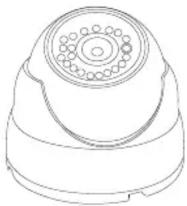
AV665SCW28
DESCRIPTION
This IR Dome Camera adopt high sensitivity sensor and advanced circuit design, the resolution up to 600TVL, support automatic white balance, high S/N Ratio, clear picture, with the function of color to black automatically, with IR-CUT filter design, easily have 24 hours day and night.
ATTENTION
Thank you for your purchasing this product. Before attempting to connect or operate this product, please read these instructions carefully and save this manual for future use.
- Use the Appropriate Power Supply
The input power for A B C D E F G H I O V the appropriate power. Wrong connection may cause malfunction and/or damage to the video camera.
- Do not attempt to disassemble the camera.
To prevent electric shock, do not remove screws or covers. There are no user serviceable parts inside. Ask a qualified service person for servicing.
- Handle the camera with care.
Do not abuse the camera. Avoid striking, shaking, etc. The camera could be damaged by improper handling or storage.
- Do not expose the camera to rain or moisture, or try to operate it in wet areas. Do not place the camera in the following locations:
Locations where temperature is lower than -10 or higher than 50; °C Locations where humidity is higher than 95%;
Locations where there are large amounts of water vapor and steam.
-
Do note use strong or abrasive detergents when cleaning the camera body. Use a dry cloth to clean the camera when dirty. In case the dirt is hard to remove. Use a mild detergent and wipe gently.
-
Clean the sensor faceplate with care.
When cleaning the sensor panel, do not use strong or abrasive detergents. Use a piece of lens tissue or cotton tipped applicator and ethanol.
- Do not attempt to aim the camera at the sun
Do not attempt to aim the camera at the sun or other extremely bright objects that causes mear to appear irrespective of whether the camera is operating or not. This can damage the sensor.
- Do not put the camera in a place with interference.
When this camera is installed near the equipment like wireless communication device which emits strong electromagnetic field, some irregularity such as noise on monitor screen may happen.
FEATURES

Adopt high performance sensor, the image is clear, exquisite
Auto color to black function
Day and Night Monitoring daytime with enough light, color image, at night, low light, change to black image automatically to improve the sensitivity and picture quality.

High resolution
Up to 600TVL high resolution.

High S/N Ratio.
S/N Ratio definition: the ratio between signal voltage and noise voltage, the higher of the ratio, the less interference of the noise, and the image is more clearer.

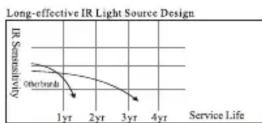
Long-life IR LEDS Design
High-performance IR LED, whose brightness is several times higher and service life longer than an ordinary LED's with 22m IR range.

Automatic gain control (AGC)
In order to output standard video signal under different illumination conditions, The amplifier gain need to adjust automatically in large scope. It can increase the sensitivity automatically when low light and enhance the signal output to have a clear bright image.

Auto White Balance
ATW is the cameras' reversion of the white objects, it can adjust the room temperature and outside temperature. When the temperature change, the human eye can see that white is white, This is because human eye can adapt to the changes of the color temperature, but the camera does not perform well equally, when Light occurs, the white color will change to others after shooting. White Balance technology can correct this problem
PARTS INSTRUCTION AND INSTALLATION
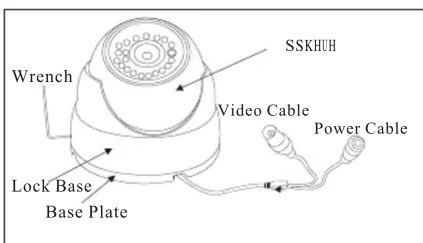
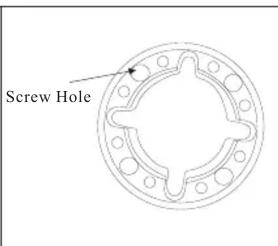
- Take out the fixing screws on the lock base by the allen wrench in the accessory bag. (Another way: hold the base plate and turn it in anti-clockwise direction)
- Separate the base plate from the lock base.
- Use screws to fix the base plate to the needed place.
- Then put the sphere and the lock base to where they belong and screw up the fixing screws.
DIMENTION(MM)
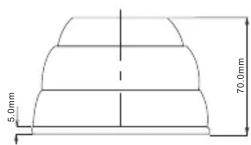
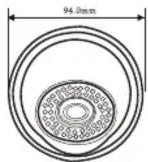
SPECIFICATION
| Model No | AV665SCW28 |
| Image Sensor | 1/3 High Sensitivity Sensor |
| TV System | NTSC |
| Sync System | Internal |
| Resolution | 600TVL |
| Mini Illumination | 0Lux when IR on |
| White Balance | AUTO |
| Gain Control | AUTO |
| S/N Ratio | >50dB |
| Electronic Shutter | Auto(1/50~1/12,000 second) |
| Gamma Correction | 0.45 |
| Lens | 2.8mm |
| IR Light | 20PCS,22m/75 ft IR distance |
| Weather Proof rate | Ip66 |
| Operation Temp | 14* F-122* F |
| Video Output | Composite BNC 1.0V p-p 75Ω |
| Power | DC12V ±V |
| Consumption | IR off(80MA,0.98W),IR on(310MA,3.81W) |
| Dimension | 3.1"x 2.3" |
| Weight | 1.07lbs |
*Specifications subject to change without notice.
Mærke : AVUE
Model : AV665SCW28
Kategori : Overvågningskamera