VCI-NIS2 - Ukategoriseret PAC - Gratis brugsanvisning og manual
Find enhedens vejledning gratis VCI-NIS2 PAC i PDF-format.


Brugerspørgsmål om VCI-NIS2 PAC
0 spørgsmål om dette apparat. Besvar dem du kender, eller stil dit eget.
Stil et nyt spørgsmål om dette apparat
Download vejledningen til din Ukategoriseret i PDF-format gratis! Find din vejledning VCI-NIS2 - PAC og tag din elektroniske enhed tilbage i hånden. På denne side er alle dokumenter nødvendige for brugen af din enhed offentliggjort. VCI-NIS2 af mærket PAC.
BRUGSANVISNING VCI-NIS2 PAC
1000 1101 1102 1091 1081
Class 2
Step 2
J1050 1.12 0.00 1.14 1.21 1.30 1.31 1.32
Inaccuracies or Typographical Errors: The information in these instruction could contain technical or other mistakes, inaccuracies or typographical errors. PAC may make changes to the materials in these instructions at any time without notice. The information in these instructions may be out of date, and PAC makes no commitment to update such information.
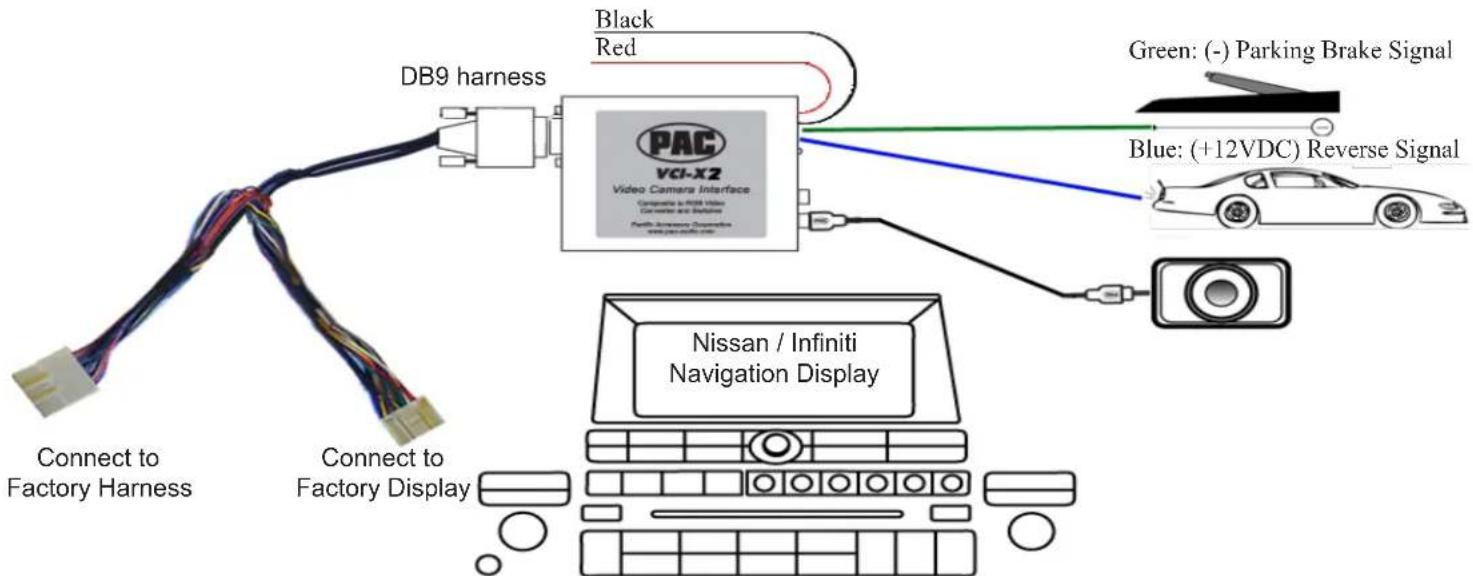
Connecting the DB9 Harness:
- Remove the factory navigation display screen.
- Disconnect the factory 24 pin plug from the back of the factory display screen.
- Connect the VCI-NIS2's 24 pin plug into the back of the factory display screen.
- Connect the factory 24 pin plug to the VCI-NIS2's 24 pin harness.
Wiring the VCI-NIS2's power, ground and switch input wires:
- Connecting the power supply wires: Connect the VCI-NIS2's BLACK wire to chassis ground. Connect the RED wire to a switched +12 volt source. The RED and BLACK wires are the ones coming out from the DC 12V side of the case.
- Wire the VCI-NIS2's BLUE wire the vehicle's +12 volt reverse light supply wire. The reverse wire will show +12 volts when the vehicle is put into reverse.
- Connect the Video Back-up Camera's (optional) video output to the VCI-NIS2's Video 2 input. (Optional: The VCI-NIS2's Video 1 input can be used for a second video backup camera. The toggle switch selects between the radio's normal display or Video 1 input. Video 2 input has precedence over Video 1 input, when the blue wire receives +12volts, regardless of the switch position.)
- Wire the VCI-NIS2's GREEN wire to the vehicle's negative parking brake supply wire. The parking brake will show continuity to ground when the parking brake is on.
- After all connections have been verified, connect the DB9 harness to the VCI-NIS2 interface and tighten the thumb screws.
Testing the VCI-NIS2:
-
Turn the vehicle and navigation unit on. The navigation display should show normal information.
* If there is no image on the display, check for correct power connection on the VCI-NIS2. Check to be sure molex connectors are connected securely.
* If the image on the display scrolls across the screen, make sure the molex connectors are connected securely. -
Temporarily put the vehicle into reverse being careful not to back into anything or anyone. The display screen will change to the video back-up camera mode. Put vehicle back to Park and the navigation display should show normal information. *If the navigation map screen disappears and you get a blank screen when the vehicle is put into reverse, check the video back-up camera for proper power and video cable connection.
NOTE: For use ONLY in vehicles with factory installed navigation or color LCD screen. Video input accepts only NTSC composite signal. Will NOT work with PAL signal.
flowchart
graph TD
    A["Connect to Factory Harness"] --> B["DB9 harness"]
    C["Connect to Factory Display"] --> B
    B --> D["PAC VCI-X2 Video Camera Interface"]
    D --> E["Blue: (+12VDC) Reverse Signal"]
    D --> F["Nissan / Infiniti Navigation Display"]
    G["Black Red"] --> D
    H["Green: (-) Parking Brake Signal"] --> D
    I["Blue: +12VDC"] --> D
DISCLAIMER: Under no circumstances shall the manufacturer or the distributors of the VCI-NIS2 parts be held liable for consequential damages sustained in connection with the VCI-NIS2. The manufacture and its distributors will not, nor will they authorize any representative or any other individual to assume obligation or liability in relation to the VCI-NIS2 other than its replacement.