
PGR35B - Hi-Fi System Planet Audio - Gratis brugsanvisning og manual
Find enhedens vejledning gratis PGR35B Planet Audio i PDF-format.


Brugerspørgsmål om PGR35B Planet Audio
0 spørgsmål om dette apparat. Besvar dem du kender, eller stil dit eget.
Stil et nyt spørgsmål om dette apparat
Download vejledningen til din Hi-Fi System i PDF-format gratis! Find din vejledning PGR35B - Planet Audio og tag din elektroniske enhed tilbage i hånden. På denne side er alle dokumenter nødvendige for brugen af din enhed offentliggjort. PGR35B af mærket Planet Audio.
BRUGSANVISNING PGR35B Planet Audio

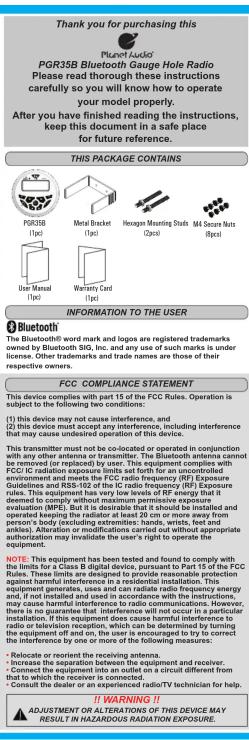
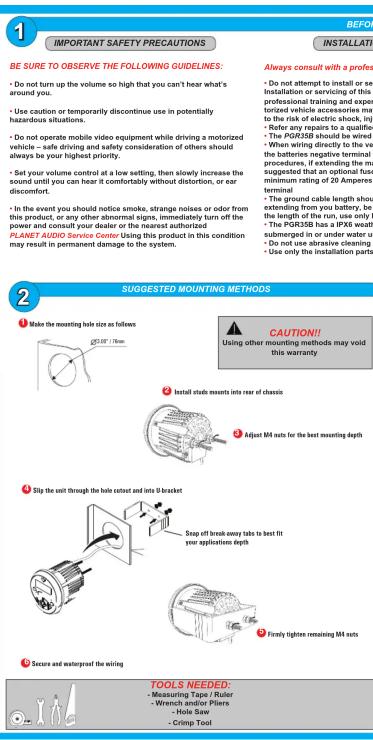
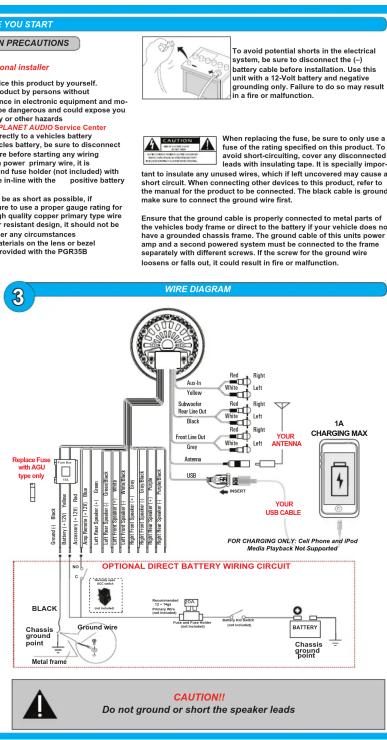


#

EN | | | |
OPERATION QUICK START GUIDE
A
SOURCE MODES


rights reserved. No part of this publication may be reproduced, distributed, or transmitted in any form or by any means, including photocopying, recording, or other electronic or mechanical methods, and the miles omitted permission of R-ANET AUDIO.
TUNER SETUP
B
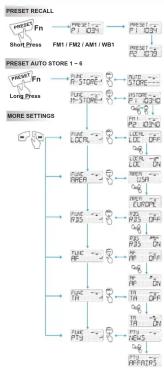
flowchart
graph TD
    A["PM1/FM2/AM1/WB1"] --> B["PREST. RECALL"]
    B --> C["PREST. POST. RECALL"]
    C --> D["PREST. POST. POST. POST. POST. POST. POST. POST. POST. POST. POST. POST. POST. POST. POST. POST. POST. POST. POST. POST. POST. POST. POST. POST. POST. POST. POST. POST. POST. POST. POST. POST. POST. POST. POST. POST. POST. POST. POST. POST. POST. POST. POST. POST. POST. POST. POST. POST. POST. POST. POST. Post 1-6"]
    E["PM1/FM2/AM1/WB1"] --> F["PREST. RECALL"]
    F --> G["PREST. POST. RECALL"]
    G --> H["PREST. POST. POST. POST. POST. POST. POST. POST. POST. POST. POST. POST. POST. POST. POST. POST. POST. POST. POST. POST. POST. POST. POST. POST. POST. Post 1-6"]
    I["PM1/FM2/AM1/WB1"] --> J["PREST. RECALL"]
    J --> K["PREST. POST. RECALL"]
    K --> L["PREST. POST. POST. POST. POST. POST. POST. POST. POST. POST. POST. POST. POST. POST. Post 1-6"]
    M["PM1/FM2/AM1/WB1"] --> N["PREST. RECALL"]
    N --> O["PREST. POST. RECALL"]
    O --> P["PREST. POST. POST. POST. Post 1-6"]
    Q["PM1/FM2/AM1/WB1"] --> R["PREST. RECALL"]
    R --> S["PREST. POST. RECALL"]
    S --> T["PREST. POST. Post 1-6"]
    U["PM1/FM2/AM1/WB1"] --> V["PREST. RECALL"]
    V --> W["PREST. Post 1-6"]
    X["PM1/FM2/AM1/WB1"] --> Y["PREST. RECALL"]
    Y --> Z["PREST. Post 1-6"]
    AA["PM1/FM2/AM1/WB1"] --> AB["PREST. RECALL"]
    AB --> AC["PREST. Post 1-6"]
    AD["PM1/FM2/AM1/WB1"] --> AE["PREST. RECALL"]
    AE --> AF["PREST. Post 1-6"]
    AG["PM1/FM2/AM1/WB1"] --> AH["PREST. RECALL"]
    AH --> AI["PREST. Post 1-6"]
    AJ["PM1/FM2/AM1/WB1"] --> AK["PREST. RECALL"]
    AK --> AL["PREST. Post 1-6"]
    AM["PM1/FM2/AM1/WB1"] --> AN["PREST. RECALL"]
    AN --> AO["PREST. Post 1-6"]
    AP["PM1/FM2/AM1/WB1"] --> AQ["PREST. RECALL"]
    AQ --> AR["PREST. Post 1-6"]
    AS["PM1/FM2/AM1/WB1"] --> AT["PREST. RECALL"]
    AT --> AU["PREST. Post 1-6"]
    AV["PM1/FM2/AM1/WB1"] --> AW["PREST. RECALL"]
    AW --> AX["PREST. Post 1-6"]
    AY["PM1/FM2/AM1/WB1"] --> AZ["PREST. RECALL"]
    AZ --> BA["PREST. Post 1-6"]
    BB["PM1/FM2/AM1/WB1"] --> BC["PREST. RECALL"]
    BC --> BD["PREST. Post 1-6"]
    BE<fcel>PREST.
PREST.
PREST.
PREST.
PREST.
PREST.
PREST.
PREST.
PREST.
PREST.
PREST.
PREST.
PREST.
PREST.
PREST.
PREST.
PREST.
PREST.
PREST.
PREST.
PREST.
PREST.
PREST.
PREST.
PREST.
PREST.
PREST.
PREST.
PREST.
PREST.
PREST.
PREST.
PREST.
PREST.
| Location | |||
| Length of Pounds for FUNCTION types | Benzene Body Mass Index | Non-ICEI System (self system) | To avoid through FUNCTION types |
| Mode | Settle No. | Settle No. | Trend |
| Readout | Report | - | - |
| Aust | - | - | - |
| Auto Show | Price to access to A100 inside, the sliding window is 250 mm thick, and 100 a. I am 100 m2. AMI 100m2presents automatically | - | - |
| When a sealed ticket movement is not, press PMI to determine the price of100 or 150; if it is100 or 150, then150 or $200. | |||
| Local DoPrint | - Only only stories can be displayed with signal can be broadcast. - If the traffic environment is not available, - Off: Stations of both strong and weak bodies can be handled. | ||
| - | |||
| Area | Detect suitable country by for this site: USA - EUROPE - ASIA / ASIA | ||
| - | |||
| RIO DoPrint | - | ||
| Af DoPrint | - Of the road will show for several stories with string packet, but with the same program identification as follows: - Off: Stations of both strong and weak bodies can be handled. | ||
| - Off: Stations of Af doPrint | |||
| TJ DoPrint | - The road will show that traffic assessment, and will automatically switch in the route enabled if the station has been installed at the top of the board. - Off: Stations of TJ doPrint are also set on traffic conditions. When the traffic reimbursement is not available, please call to the station before being issued. - Off: Traffic assessment does not eat out. | ||
| PYY | - The road will have a high level of traffic program (e.g., motorized vehicle) and low level of operation type. - Available Programs Type: POF - Open Circuit - Open Circuit M. CALGICEL - MITCH M. JAZIN, COUNTRY, NATIONAL O'DENUE M. KATKINI, CHINA NUTRIAN, CHINA YUNION, CHINA ZHIYUAN, SPORTS - EDUCAT, DREAM, CULTURE, SCIENCE - WARDISH, WATER & CHEMICAL, SCIENCE, SOCIETY, SCIENCE AND TECHNOLOGY, SCIENCE AND TECHNOLOGY | ||
©
AUDIO and SYSTEM SETUP
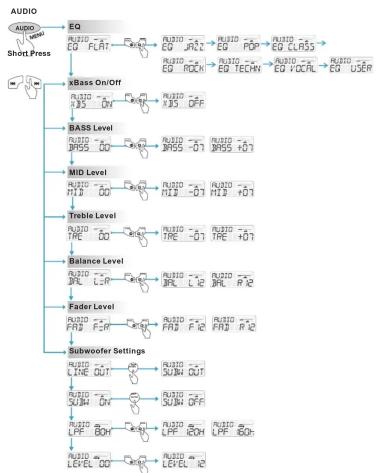
flowchart
graph TD
    A["Short Press"] --> B["EQ"]
    B --> C["xBass On/Off"]
    C --> D["BASB Level"]
    D --> E["MID Level"]
    E --> F["Treble Level"]
    F --> G["Balance Level"]
    G --> H["Fader Level"]
    H --> I["Subwoofer Settings"]
    I --> J["Output"]
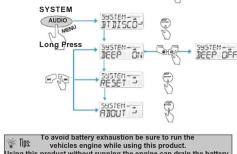
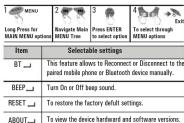
D

RADIO OPERATION
1) Press the SRC button to select RADIO
2) Press ▶ to MUTE, press again to UNMUTE
3) To advance stations press
4) To skip previous stations press
5) Press the button to display RADIO information
6) Press the PRESET button to recall PRESETS 1 \~ 6
E

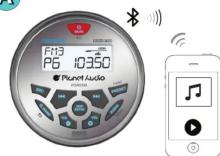
PAIRING & DISCOVERING A NEW BLUETOOTH CONNECTION
1) Power on the PGR35B by pressing and holding down the Power button for 1 second, the Bluetooth ICON will be tested to press up the PGR35B in response to a Bluetooth icon.
will start to flash signalling that the PGR35B is now ready for Bluetooth pairing
NOTE: You have 2 minutes before you must restart this procedure over again.
2) Now that the PGR35B is in pairing mode:
[Non-Text]
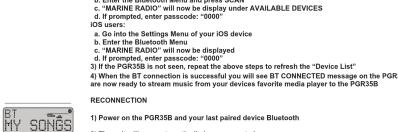

1) Power on the PGR35B and your last paired device Bluetooth
2) The unit
2) The line with their systematically to be introduced
3) If your device was previously paired with the PGR35B, but it wasn't the last paired device:
a. Ensure no other devices are currently paired
b. Press and hold MENU button to manually connect / reconnect to the PGR35B
4) If the device is out of range from the PGR35B, it will disconnect automatically:
5)The PGR35B will reconnect to the device once in range, a confirmation message will be displayed on the LCD
BLUETOOTH STREAMING MUSIC
F

1) Press the SRC button to select BT AUDIO
2) Press ▶ to start PLAY, press again to PAUSE
3) To skip songs or advance tracks press, press and hold to FAST FORWARD
4) To select the previous track press the button 🎩, press and hold to FAST REWIND
Long
5) Press the 📄 button to display song ID3 information
G

1) Press the SRC button to select USB
2) Press 10.4 to start PLAY press again to PAUSE
2) To skin goze or advance tracks press, press and hold to EAST FORWARD
3) To skip songs or advance tracks press , press and hold to FAST FOR 4) To select the previous track press , press and hold to FAST REWIND
5.10.2018
5) Press the button to display song ID3 information
H

1) Press the SRC button to select AUX IN
(1)
2) Press to MUTE, press again to UNMUTE.

#
Mærke : Planet Audio
Model : PGR35B
Kategori : Hi-Fi System