
XpressKit 528T Relay Module - Fjernbetjening Viper - Gratis brugsanvisning og manual
Find enhedens vejledning gratis XpressKit 528T Relay Module Viper i PDF-format.


Brugerspørgsmål om XpressKit 528T Relay Module Viper
0 spørgsmål om dette apparat. Besvar dem du kender, eller stil dit eget.
Stil et nyt spørgsmål om dette apparat
Download vejledningen til din Fjernbetjening i PDF-format gratis! Find din vejledning XpressKit 528T Relay Module - Viper og tag din elektroniske enhed tilbage i hånden. På denne side er alle dokumenter nødvendige for brugen af din enhed offentliggjort. XpressKit 528T Relay Module af mærket Viper.
BRUGSANVISNING XpressKit 528T Relay Module Viper
This special accessory is an adjustable timer with a built-in 15A relay. The 'pulse' timer can be triggered by a + or - pulse, or a change of state (from + to -, or visa-versa) on the stripe wire.
Note: Do not exceed 15 amp draw with the 528T or damage will occur. If more current is needed, use the timer with an external 30 amp SPDT relay.

This product has many popular uses by installers of mobile electronics. Some examples include: creating a wait-to-start trigger for remote starting diesel vehicles that do not have wait to start triggers.
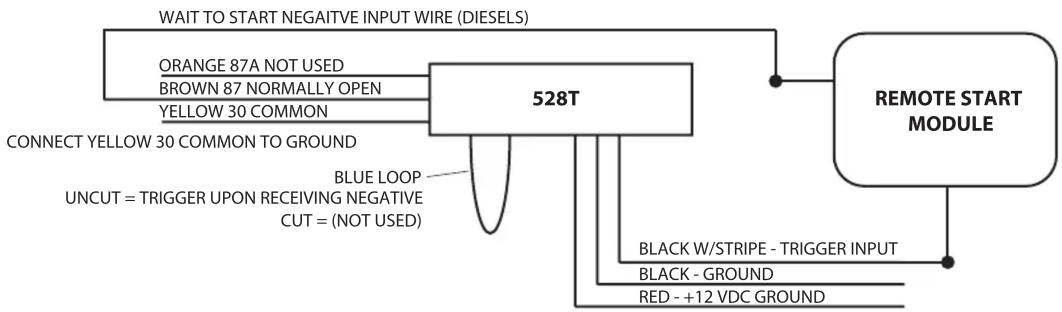
flowchart
graph TD
    A["528T"] --> B["ORANGE 87A NOT USED"]
    A --> C["BROWN 87 NORMALLY OPEN"]
    A --> D["YELLOW 30 COMMON"]
    A --> E["CONNECT YELLOW 30 COMMON TO GROUND"]
    A --> F["BLUE LOOP"]
    F --> G["UNCUT = TRIGGER UPON RECEIVING NEGATIVE CUT = (NOT USED)"]
    A --> H["REMOTE START MODULE"]
    H --> I["BLACK W/STRIPE - TRIGGER INPUT"]
    H --> J["BLACK - GROUND"]
    H --> K["RED - +12 VDC GROUND"]
    A --> L["WAIT TO START NEGATIVE INPUT WIRE (DIESELS)"]
If you need to disconnect a circuit for a certain amount of time so that the alarm does not activate, you can use the pulse timer's normally closed circuit. Pulse the strip wire to disconnect the circuit for up to 60-seconds.

flowchart
graph LR
    A["DOORSWITCH"] --> B["528T"]
    B --> C["ALARM DOORSWITCH INPUT"]
    B --> D["ORANGE 87A NORMALLY CLOSED"]
    B --> E["BROWN 87 NOT USED"]
    B --> F["YELLOW 30 COMMON"]
    B --> G["BLUE LOOP"]
    G --> H["UNCUT = TRIGGER UPON RECEIVING NEGATIVE CUT = (NOT USED)"]
    B --> I["BLACK W/STripe - NOT USED"]
    B --> J["BLACK - GROUND"]
    B --> K["RED - +12 VDC GROUND"]




Mærke : Viper
Model : XpressKit 528T Relay Module
Kategori : Fjernbetjening