
Cosmo 600 - Hi-Fi System Hollyland - Gratis brugsanvisning og manual
Find enhedens vejledning gratis Cosmo 600 Hollyland i PDF-format.


Brugerspørgsmål om Cosmo 600 Hollyland
0 spørgsmål om dette apparat. Besvar dem du kender, eller stil dit eget.
Stil et nyt spørgsmål om dette apparat
Download vejledningen til din Hi-Fi System i PDF-format gratis! Find din vejledning Cosmo 600 - Hollyland og tag din elektroniske enhed tilbage i hånden. På denne side er alle dokumenter nødvendige for brugen af din enhed offentliggjort. Cosmo 600 af mærket Hollyland.
BRUGSANVISNING Cosmo 600 Hollyland
COSMO 600
DESCRIPTION
Thank you for purchasing Hollyland Cosmo 1200 wireless high-definition video transmission system. The product uses the latest wireless Transmission technology, and is widely used in filmmaking, sports event and education industries. It transmits uncompressed, non-delayed HD signals, with a transmission range of 600ft.
KEY FEATURES
● Uncompressed, non-delay wireless HD video transmission at the radio and television level
• 200 meters transmission Range
● Frequency Band: 5.1\~5.9GHz, Support different regional frequency configurations
- SDI/HDMI input and SDI Loop out, Dual SDI output, HDMI output
● Support one transmitter to transmit video, multiple receivers receive simultaneously
● Both the transmitter and the receiver can mount the battery
- 7\~36V DC Wide voltage input
● Support USB interface software upgrade
• Stable and reliable industrial metal casing
APPLICATION

HOLLYLAND
PACKING LIST
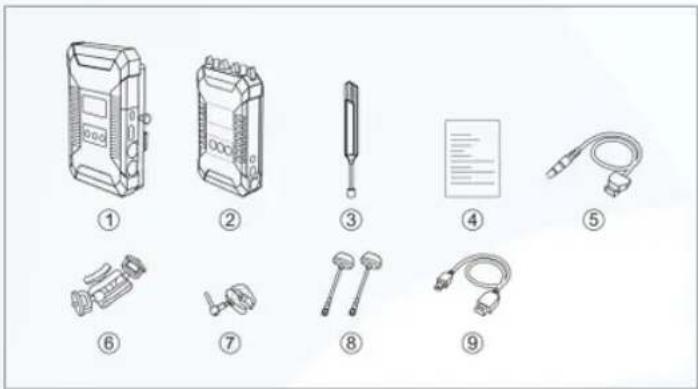
- Receiver x1
2.Transmitter x1
3.5GHz Antenna x3
4.User manual x1
5.DC Conversion Cable x2
6.7-inch magic arm x1
7.Crab Clamp x1
8.Mushroom Antenna x2
STANDARD SETUP

HOLLYLAND
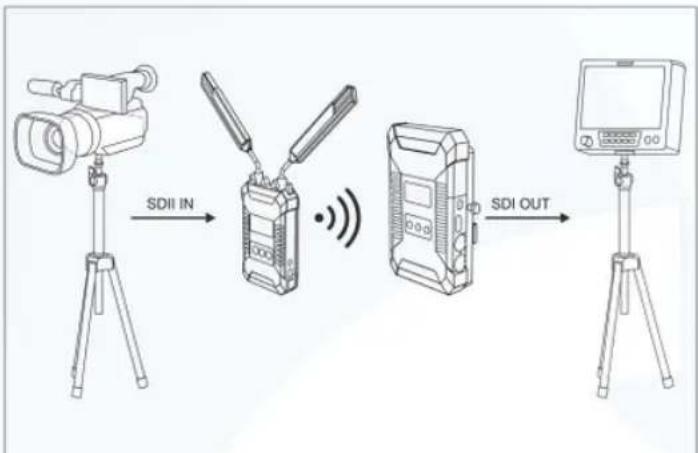
flowchart
graph LR
    A["Camera"] -->|SDI IN| B["Wireless Device"]
    B --> C["Radio Station"]
    C -->|SDI OUT| D["Monitor"]
The wireless high-definition video transmission system uses the latest wireless Transmission technology, and transmits broadcast- Level, uncompressed and non-delayed HD signals. The transmitter supports SDI&HDMI input and SDI loop-out, while the receiver supports dual SDI output and HDMI output. The transmitter works on a certain channel in broadcast mode, with a transmission distance of 600ft.

HOLLYLAND
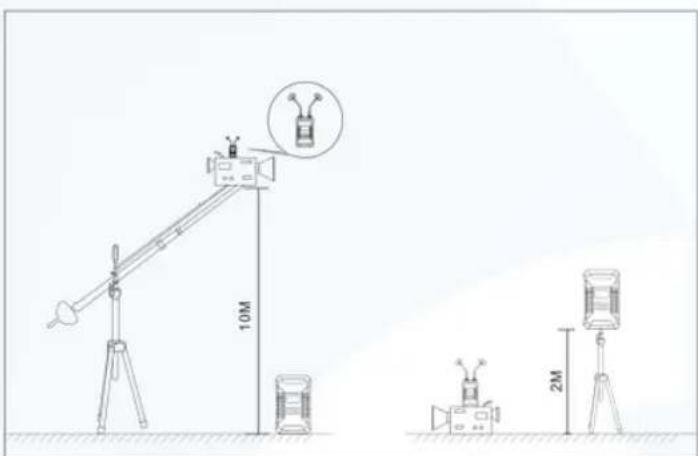
This product includes mushroom antennas as accessory. When the height difference between the transmitter and the receiver is large, it is recommended to use a mushroom antenna to improve the stability of wireless transmission.

HOLLYLAND
PRODUCT INTERFACES
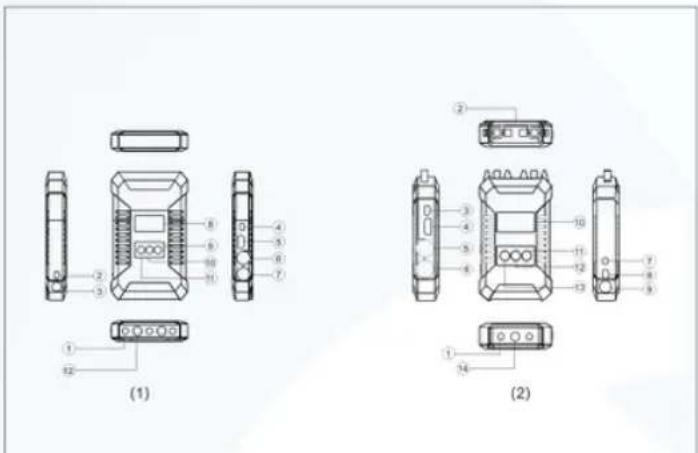
(1) Receiver
1.1/4-20 Screw hole
2.RP-SMA Antenna male interface
3.Mini USB interface
4.HDMI input interface
5.3G SDI Loop out interface

HOLLYLAND
3.DC Power interface
4. Mini USB interface
5.HDMI input interface
6.3G SDI output interface 1
7.3G SDI output interface 2
8.OLED screen
9.Channel selection button
10. Frequency adjustment and confirm button
11. Channel subtract selection button
12.3/8-16 Screw hole
13. Channel subtract selection button
14.3/8-16 Screw hole
INSTALLATION
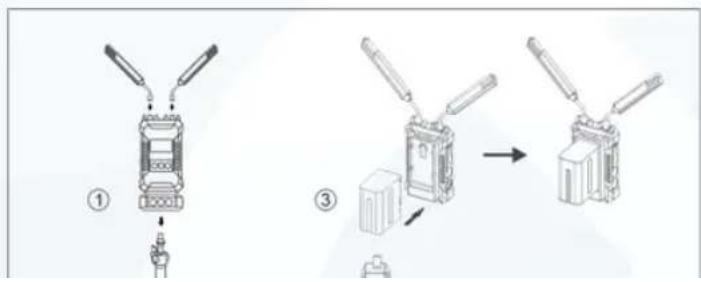

HOLLYLAND
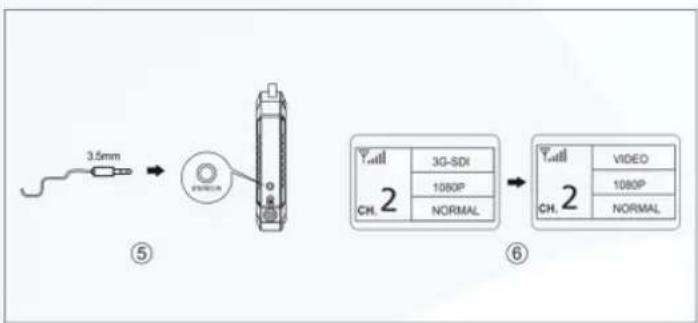
flowchart
graph LR
    A["3.5mm"] --> B["Device"]
    B --> C["Display"]
    C --> D["2D Display"]
    D --> E["Video"]
    D --> F["1080P"]
    D --> G["NORMAL"]
-
Connect the transmitter audio stereo in
-
Set up connection
When the receiver does not receive the signal, the display shows the status of 'No Video', no format display
OLED DISPLAY
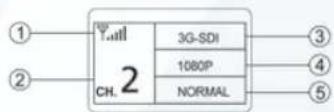

HOLLYLAND
When the connection is set up, the transmitter OLED menu display as below,
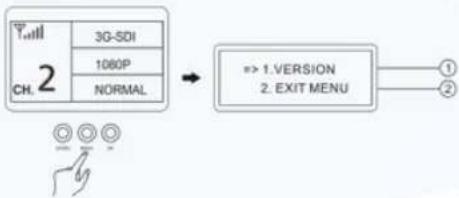
flowchart
graph LR
    A["Ch. 2"] --> B["3G-SDI"]
    A --> C["1060P"]
    A --> D["NORMAL"]
    B --> E["=> 1.VERSION\n2. EXIT MENU"]
    E --> F["①"]
    E --> G["②"]
Long press'MENU' for 6 seconds to enter the function menu, display as below: 1.Version for the device
programme.
2.Exit Menu
When the connection is set up, the receiver OLED menu display as below.
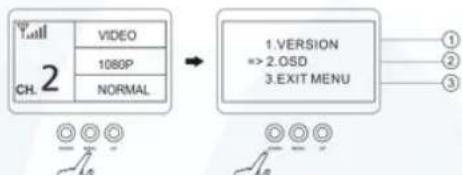
flowchart
graph LR
    A["2"] --> B["VIDEO"]
    A --> C["1080P"]
    A --> D["NORMAL"]
    B --> E["1. VERSION"]
    C --> E
    D --> E
    E --> F["EXIT MENU"]
    style A fill:#f9f,stroke:#333
    style B fill:#ccf,stroke:#333
    style C fill:#ccf,stroke:#333
    style D fill:#ccf,stroke:#333
    style E fill:#cfc,stroke:#333
    style F fill:#fcc,stroke:#333

HOLLYLAND
1.Version for the device programme.
2.OSD - display the received signal quality
3.Exit Menu
OSD MENU :
Press DOWN button and move the selection to OSD enter the OSD menu.
- OSD OFF-turn off the received signal quality display
- OSD OFF- turn on the received signal quality display
- RETURN to previous menu.
PARAMETERS
| Transmitter | Receiver | |
| Interface | SDI Input (BNC female);SDI Loop Out (BNC female);HDMI Input (Type A female);2 Antenna Interfaces (RP-SMA male);DC Power Input, Mini USB;3.5mm Analog audio input | SDI 1 Output (BNC female) ;SDI 2 Output (BNC female);HDMI Output (Type A female);DC Power Input, Mini USB; |
| Supply Voltage Range | 7-36V DC | 7-36V DC |
| selected),SMPTE-259/274/292/296/372/424/425; | ||
| Output Video | / | HDMI: |
| Format | 480p60,576p50,720p50/59.94/60,1080i50/59.94/60,1080p23.98/24/25/29.9/30/50/59.94/60;SDI:3G,HD,and S D -SDI(auto-selected),SMPTE-259/274/292/296/372/424/425; | |
| Input Audio | SDI embedded 2 channel 24 | / |
| Format | bit/48KHZ | |
| Output Audio | / | SDI embedded 2 channel 24 |
| Format | bit/48KHZ | |
| Frequency Band | 5.1-5.9GHz,Configurable with China, North America and Europe | 5.1-5.9GHz,Configurable with China, North America and Europe |
| Modulation Mode | OFDM-16QAM | OFDM-16QAM |
| Transmission | Maximum 17dBm | / |
| Power | ||
| Receiver | / | -75dBm |
| Sensitivity | ||
| Bandwidth | 40MHz | 40MHz |
FAQ
- No video output on display
1). Please check TX and RX power first. If power is supplied by battery or external power source, please make sure the battery or external power source works normally
2). Please check that the antenna connected to the transmitter and receiver is securely mounted.
Then check if the transmitter shows the source and format; if not, check if the SDI cable or HDMI cable connected to the transmitter is reliably connected to the camera or if the camera has video output.
3). Please check input video format is compatible with this product specs

HOLLYLAND
4). Please check if battery power is too low.
2. Poor output video quality
1). Check if SDI or HDMI input or output cable is plugged well
2). Make sure the Transmitter and Receiver are placed at least 1.5 meters above the ground
3). Please check the wireless signal strength indicating "RSSI" status. There should be at least 2-3 RSSI LED lit if the user wants to get better video quality. If there is only 1 RSSI LED or no LED light, that means the received wireless signal is too weak. Please change to other frequency channels in case some exist interference, or decrease the transmission distance.
Mærke : Hollyland
Model : Cosmo 600
Kategori : Hi-Fi System