VK5 - Skærm Ikan - Gratis brugsanvisning og manual
Find enhedens vejledning gratis VK5 Ikan i PDF-format.


Brugerspørgsmål om VK5 Ikan
0 spørgsmål om dette apparat. Besvar dem du kender, eller stil dit eget.
Stil et nyt spørgsmål om dette apparat
Download vejledningen til din Skærm i PDF-format gratis! Find din vejledning VK5 - Ikan og tag din elektroniske enhed tilbage i hånden. På denne side er alle dokumenter nødvendige for brugen af din enhed offentliggjort. VK5 af mærket Ikan.
BRUGSANVISNING VK5 Ikan
VK5 Deluxe Kit QUICKSTART GUIDE
natural_image
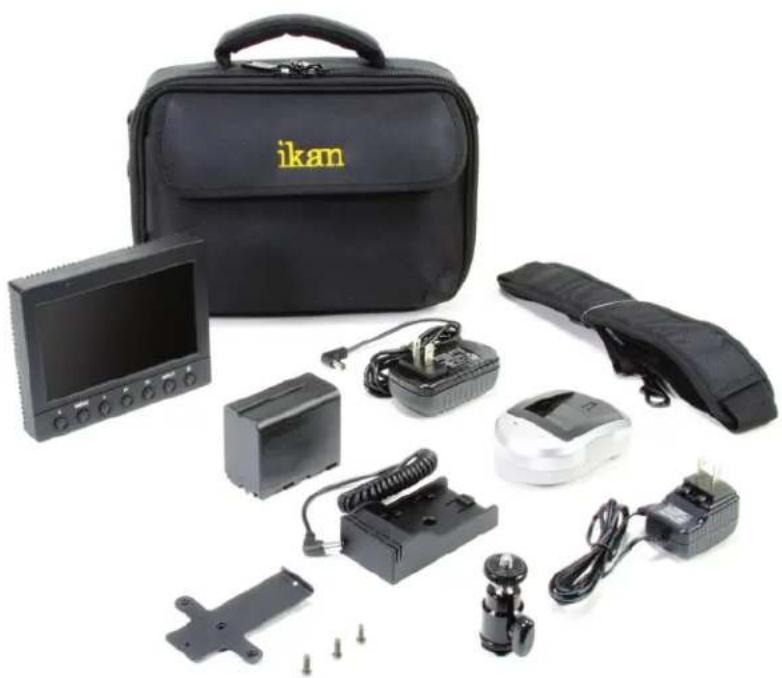
Product photo of a black Ikan device kit with labeled components including monitor, battery pack, and sensors (no visible text or symbols beyond branding)What's included
□ 1 x VK5 Monitor
□ 1 x AC Adapter
□ 1 x Camera Shoe Mount
□ 1 x Sunhood
□ 1 x Soft Case
☐ 1 x DV Battery, Battery Plate
& Charger (Check one)
Checked by
CONDITIONS OF WARRANTY SERVICE
• Free service for one year from the day of purchase if the problem is caused by manufacturing errors.
- The components and maintenance service fee will be charged if the warranty period has expired.
Free Service will not be Provided in the Following Situations: (* Even if the product is still within the warranty period.)
- Damage caused by abuse or misuse, dismantling, or changes to the product not made by the company.
- Damage caused by natural disaster, abnormal voltage, and environmental factors etc.
VK5 Deluxe Kit QUICKSTART GUIDE
text_image
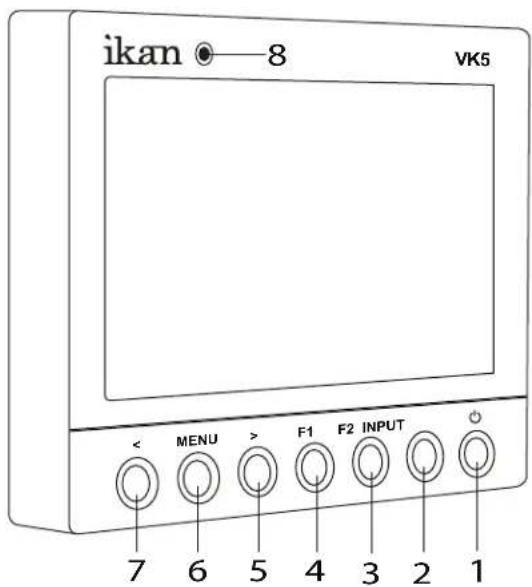
ikan 8 VK5 << MENU > F1 F2 INPUT 7 6 5 4 3 2 11 Power Button
Power ON / OFF
2 INPUT Button AV, YPbPr, HDMI,
3 F2 Button
Function key actions are selected in the menu
4 F1 Button
Function key actions are selected in the menu
5 > Button
Toggle up in Pixel-to-Pixel setting mode
6 MENU Button
Access to the main menu.
In Menu, push button to select menu setting
In Pixel-to-Pixel mode, hold down the MENU button to switch directions
7 < Button
Toggle right in Pixel-to-Pixel setting mode
8 Power Indicator Light
When the power is ON, the LED green lights up
When the power is connected and it's OFF,
the LED red lights up
text_image
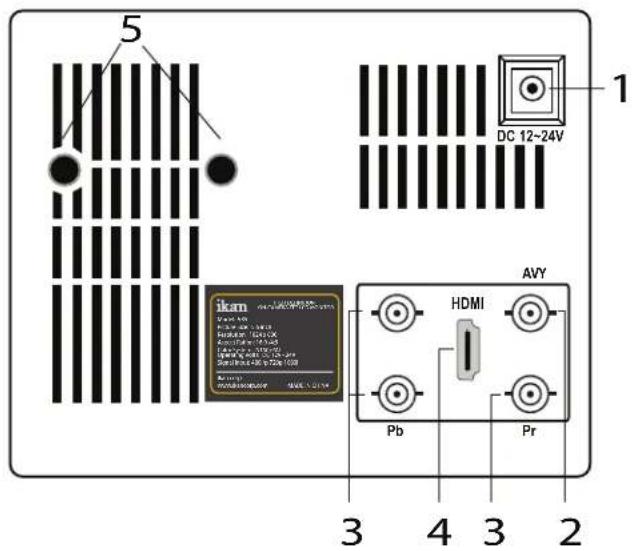
5 DC 12-24V 1 ikam HDMI AVY Pb Pr 3 4 3 21 DC 7-24V power terminal
Standard DC Connection
2 AV terminal (BNC)
Composite signal input terminal
3 YPbPr terminal (BNC)
Component signal input terminal
4 HDMI terminal
HDMI input terminal
5 VESA 100mm Mount Holes Threaded for M4x.07 screws. Use to attach pro battery plate adapter or for mounting third party vesa mounts.
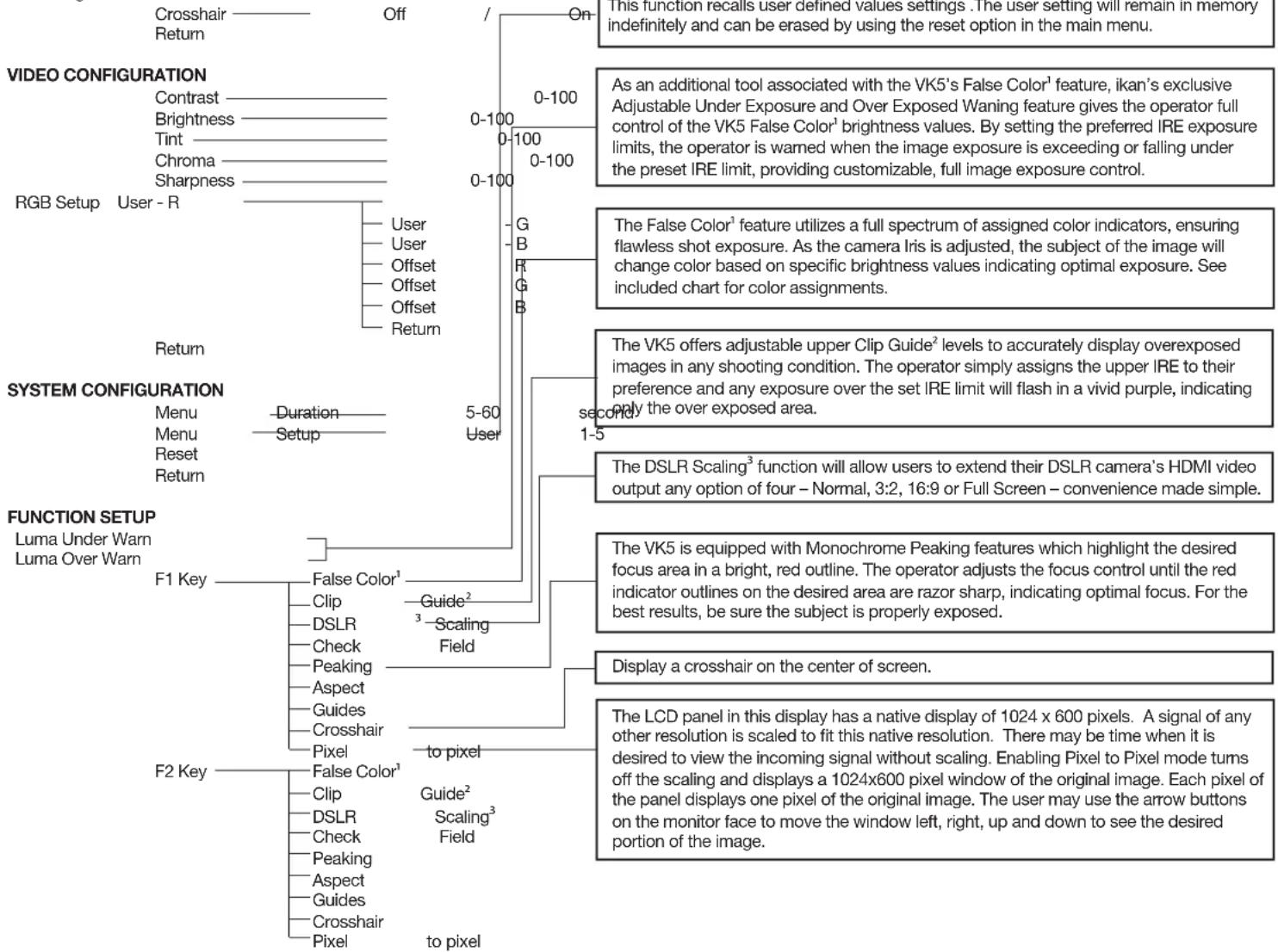
User programmable function buttons. For quick access, the user may program the F1 and F2 buttons to enable frequently accessed monitor features. Via the main monitor configuration menu, either button may be assigned to perform the following
VK5 Deluxe Kit QUICKSTART GUIDE
CONFIGURATION OF SETTING MENUS
GUIDES
Guides Full OFF / Mode 1 / Mode 2 / Mode 3
Guides 4:3 OFF / Mode 1 / Mode 2
G. Background Normal / Half / Black—
flowchart
graph TD
    A["Crosshair"] --> B["Off"]
    C["Return"] --> B
    D["User - R"] --> E["User"]
    D --> F["User"]
    D --> G["Offset"]
    D --> H["Offset"]
    D --> I["Offset"]
    D --> J["Return"]
    K["RGB Setup"] --> L["User"]
    K --> M["User"]
    K --> N["User"]
    K --> O["User"]
    P["User"] --> Q["G"]
    P --> R["B"]
    P --> S["R"]
    T["User"] --> U["G"]
    T --> V["B"]
    W["User"] --> X["G"]
    W --> Y["B"]
    Z["User"] --> AA["G"]
    Z --> AB["B"]
    AC["User"] --> AD["G"]
    AC --> AE["B"]
    AF["User"] --> AG["G"]
    AF --> AH["B"]
    AI["User"] --> AJ["G"]
    AK["User"] --> AL["B"]
    AM["User"] --> AN["G"]
    AO["User"] --> AP["G"]
    AQ["User"] --> AR["B"]
    AS["User"] --> AT["G"]
    AU["User"] --> AV["B"]
    AW["User"] --> AX["G"]
    AY["User"] --> AZ["G"]
    BA["User"] --> BB["B"]
    BC["User"] --> BD["G"]
    BE["User"] --> BF["G"]
    BG["User"] --> BH["G"]
    BI["User"] --> BJ["G"]
    BK["User"] --> BL["G"]
    BM["User"] --> BN["G"]
    BO["User"] --> BP["G"]
    BQ["User"] --> BR["G"]
    BS["User"] --> BT["G"]
    BU["User"] --> BV["G"]
    BW["User"] --> BX["G"]
    BY["User"] --> BZ["G"]
    CA["User"] --> CB["G"]
    CC["User"] --> CD["G"]
    CE["User"] --> CF["G"]
    CG["User"] --> CH["G"]
    CI["User"] --> CJ["G"]
    CK["User"] --> CL["G"]
    CM["User"] --> CN["G"]
    CO["User"] --> COB["G"]
    CP["User"] --> CPB["G"]
    CS["User"] --> CSB["G"]
    CT["User"] --> CU["G"]
    CV["User"] --> CY["G"]
    CZ["User"] --> CZB["G"]
    DA["User"] --> DZ["G"]
    DB["User"] --> DBB["G"]
    DC["User"] --> DCB["G"]
    DD["User"] --> DDY["G"]
    DV["User"] --> DVB["G"]
    DW["User"] --> DWC["G"]
    DX["User"] --> DXB["G"]
    DXR["User"] --> DXR1["G"]
    DXLR["User"] --> DXLR1
    DXLR1 --> DXLR1
    DXLR1 --> DXLR1
    DXLR1 --> DXLR1
    DXLR1 --> DXLR1
    DXLR1 --> DXLR1
    DXLR1 --> DXLR1
    DXLR1 --> DXLR1
    DXLR1 --> DXLR1
    DXLR1 --> DXLR1
    DXLR1 --> DXLR1
    DXLR1 --> DXLR1
    DXLR1 <--> DCLR1
EXIT
Notes:
^1 False Color (for HDMI only)
^2 Clip Guide (for HDMI only)
^3 DSLR Scaling (for HDMI only)