KM88 - Tastatur Kurzweil - Gratis brugsanvisning og manual
Find enhedens vejledning gratis KM88 Kurzweil i PDF-format.


Brugerspørgsmål om KM88 Kurzweil
0 spørgsmål om dette apparat. Besvar dem du kender, eller stil dit eget.
Stil et nyt spørgsmål om dette apparat
Download vejledningen til din Tastatur i PDF-format gratis! Find din vejledning KM88 - Kurzweil og tag din elektroniske enhed tilbage i hånden. På denne side er alle dokumenter nødvendige for brugen af din enhed offentliggjort. KM88 af mærket Kurzweil.
BRUGSANVISNING KM88 Kurzweil
OWNER'S MANUAL
THE FCC REGULATION WARNING (for the USA)
This equipment has been tested and found to comply with the limits for a Class B digital device, pursuant to Part 15 of the FCC Rules. These limits are designed to provide reasonable protection against harmful interference in a residential installation. This equipment generates, uses, and can radiate radio frequency energy and, if not installed and used in accordance with the instructions, may cause harmful interference to radio communications. However, there is no guarantee that interference will not occur in a particular installation. If this equipment does cause harmful interference to radio or television reception, which can be determined by turning the equipment off and on, the user is encouraged to try to correct the interference by one or more of the following measures:
- Reorient or relocate the receiving antenna.
- Increase the separation between the equipment and receiver.
- Connect the equipment into an outlet on a circuit different from that to which the receiver is connected.
- Consult the dealer or an experienced radio/TV technician for help.
If items such as cables are included with this equipment, you must use those included items.
Unauthorized changes or modification to this system can void the user's authority to operate this equipment.
CAUTION
The normal function of the product may be disturbed by Strong Electro Magnetic Interference. If so, simply reset the product to resume normal operation by following the owner's manual. In case the function could not resume, please use the product in other location.
Packing list
- Music stand 1PC
• Music stand block 1PC - Manual 1PC
- USB cable 1PC
Keep this manual
After reading this manual, please
keep it for later reference.
PRECAUTIONS
Location
Using the unit in the following locations can result in a malfunction.
- In direct sunlight
- Locations of extreme temperature or humidity
• Excessively dusty or dirty locations - Locations of excessive vibration
- Close to magnetic fields
Power Supply
Please connect the designated AC adapter to an AC outlet of the correct voltage.
Do not connect it to an AC outlet of voltage other than that for which your unit is intended.
Interference with other electrical devices
Radios and televisions placed nearby may experience reception interference.
Operate this unit at a suitable distance from radios and televisions.
Care
If the exterior becomes dirty, wipe it with a clean, dry cloth. Do not use liquid cleaners such as benzene or thinner, or cleaning compounds or flammable polishes.
Handling
To avoid breakage, do not apply excessive force to the switches or controls.
Keeping foreign matter out of your equipment
Never set any container with liquid in it near this equipment. If liquid gets into the equipment, it could cause a breakdown, fire, or electrical shock.
Be careful not to let metal objects get into the equipment.
Turning the Power On or Off
- Please make sure the KM88 is properly connected to a computer via USB, or to a power supply via optional DC adapter.
- Press the [POWER] switch on the rear panel. The Joystick LED will light up.
- Connect an external MIDI instrument to the KM88 via the USB / MIDI OUT jacks.
- Move the [VOLUME] slider to set to the volume to a desired level.
- To turn off the power, press the [POWER] switch. The Joystick LED will turn off.
Note: When you power on the KM88, it will use the last selected Multi and Global settings.
Connecting to the Kurzweil KM88 Editor on a Computer
You can use the KM88 Editor application on a computer edit various settings and send them to the instrument for performance.
You can connect the KM88 to the application via USB.
Please refer to the application's owner's manual for connection and operation details.
Note: Kurzweil KM88 Editor application :
Mac OS version: 10.12.0 or greater.
PC (Windows 10) OS version: 1809 or greater.
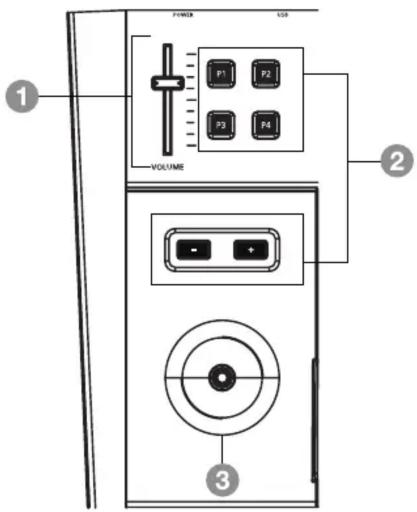
Front Panel
1. VOLUME Slider
Adjust the master volume. This slider is programmable via the KM88 Editor application.
2. Buttons
These buttons are programmable via the KM88 Editor application. By default the -/+ buttons adjust Transposition.
3. Joystick
This Joystick is used to control pitch bend (when moving horizontally) and modulation (when moving vertically).
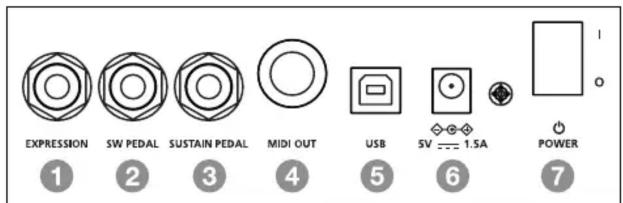
Rear Panel
1. EXPRESSION
For connecting a CC pedal.
2. SW PEDAL
For connecting a switch pedal.
3. SUSTAIN PEDAL
For connecting a sustain pedal.
4. MIDI OUT
This 5-pin jack is for connecting an external MIDI device.
5. USB
For connecting to computer.
6. POWER Jack
For connecting the power adapter (optional).
7. POWER Switch
Turn the power on or off.
Button Functions
After connecting the instrument to the KM88 Editor application on a computer, you can select and assign various functions to the 6 front panel buttons.
1. Multi X
This function allows you to specify a Multi number which will be selected when the button is pressed. This is useful for selecting frequently used favorite Multis.
2. Multi + and Multi -
These functions select the next or previous Multi in the list when the button is pressed.
3. Transposition + and Transposition -
These functions tune the pitch of all Zones in all Multis in semitones when the button is pressed.
4. MMC Play and MMC Stop
These functions send MMC Play or MMC Stop messages when the button is pressed. MMC Play and MMC Stop messages can be used to start or stop playback in connected hardware or software sequencers (such as a hardware drum machine or a DAW on a computer).
5. Programmable Button
This function allows you to control a Virtual Switch assignment (MIDI CC number) when the button is pressed.
6. Mute/Activate a Zone
This function allows you to switch a Zone's Status between Mute and Active when the button is pressed.
7. MIDI Panic
Send All Notes Off and All Controllers Off and reloads the selected Multi.
Restoring Factory Defaults
Caution: This will delete all user Multi data. Before restoring defaults, you may wish to use the KM88 Editor application to save a backup file of your user data. To restore factory defaults, hold down the rightmost key on the keyboard then power on the KM88. Keep holding down the rightmost key until all of the front panel buttons light. The KM88 will reset to factory default settings, and delete all user Multi data.
Specifications
Keyboard
RPHA - 88 fully-weighted Real Piano Hammer-Action Keys
Multis
128 (8 factory preset + 120 user editable)
Power
DC 5V / 1.5A
Dimension (L × W × H)
1385 x 317 x 124 mm
Weight
18.5 kg
- OWNER'S MANUAL
- THE FCC REGULATION WARNING (for the USA)
- CAUTION
- Packing list
- Keep this manual
- PRECAUTIONS
- Location
- Power Supply
- Interference with other electrical devices
- Care
- Handling
- Keeping foreign matter out of your equipment
- Turning the Power On or Off
- Connecting to the Kurzweil KM88 Editor on a Computer
- Front Panel
- VOLUME Slider
- Buttons
- Joystick
- Rear Panel
- EXPRESSION
- SW PEDAL
- SUSTAIN PEDAL
- MIDI OUT
- USB
- POWER Jack
- POWER Switch
- Button Functions
- Multi X
- Multi + and Multi -
- Transposition + and Transposition -
- MMC Play and MMC Stop
- Programmable Button
- Mute/Activate a Zone
- MIDI Panic
- Restoring Factory Defaults
- Specifications
- Keyboard
- Multis
- Power
- Dimension (L × W × H)
- Weight
Mærke : Kurzweil
Model : KM88
Kategori : Tastatur