PA6BT - Højttaler Galaxy Audio - Gratis brugsanvisning og manual
Find enhedens vejledning gratis PA6BT Galaxy Audio i PDF-format.


Brugerspørgsmål om PA6BT Galaxy Audio
0 spørgsmål om dette apparat. Besvar dem du kender, eller stil dit eget.
Stil et nyt spørgsmål om dette apparat
Download vejledningen til din Højttaler i PDF-format gratis! Find din vejledning PA6BT - Galaxy Audio og tag din elektroniske enhed tilbage i hånden. På denne side er alle dokumenter nødvendige for brugen af din enhed offentliggjort. PA6BT af mærket Galaxy Audio.
BRUGSANVISNING PA6BT Galaxy Audio
GALAXY AUDIO
Full Range Powered Personal Monitor
Quick Start Guide
PA6BT
Included Components
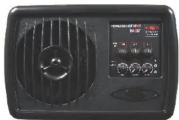
- PA6BT x1
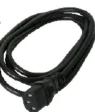
- IEC Power Cable x1
- MSA-1 Stand Adapter x1
-
Quick Start Guide x1
-
-
-
[Non-Text]
-

Setup
[Non-Text]
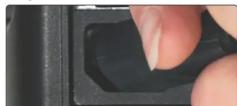
Connect power cable to PA6BT, connect other end to a power outlet.
2
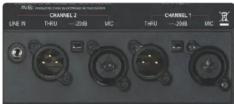
Choose the input needed and for what channel(s) needed:
XLR/1/4" Combo Jack for mic, or balanced/unbalanced line level.
1/8" for stereo from a media player etc.
3
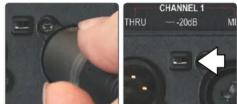
For a balanced mic signal, plug the XLR male end of the cable into the XLR/1/4" Combo Input on the PA6BT. For strong signals, engage the -20dB Pad Switch to prevent distortion.
4
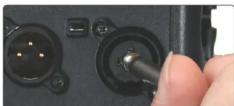
For Balanced or Unbalanced Line Level, plug the 1/4" cable into the XLR/1/4" Combo Jack on the PA6BT.
5
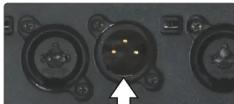
Connect a female XLR to the Thru output to feed the channel's XLR input to another device.
[Non-Text]
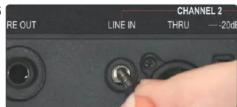
For a stereo signal from an MP3 player, attach 1/8" stereo cable into the Channel 2 1/8" input.
7
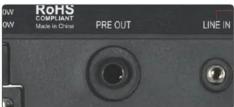
The Pre Out provides a Line Level mix of all three channels.
Stand Mounting (Optional)
1
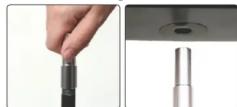
Attach the MSA-1 to the mic stand, then Lift the PA6BT over the stand, align it up with the hole.
2
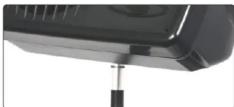
Bring the PA6BT down onto the stand gently until secure.
Operation
1
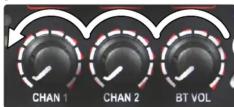
Ensure that both channels and/or the Bluetooth® controls have their levels lowered by turning counter-clockwise.
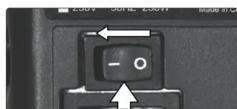
Flip the power switch on.
3
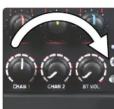
Level controls: turn clockwise to raise the level. Turn counter-clockwise to lower the level.
4
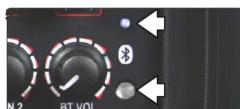
Using Bluetooth® - Press the Bluetooth® button. The Bluetooth® LED will flash for 15 seconds. Locate the PA6BT on your device and select to pair. If pairing fails, turn Bluetooth® off and try again. The button also acts as a Stop/Play/Pause. Powering the unit off will disconnect.
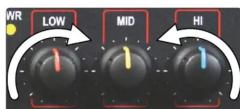
EQ controls - Low/Mid/Hi: To increase the low, mid, and high frequencies, turn the appropriate tone control clockwise. To decrease, turn counter-clockwise.
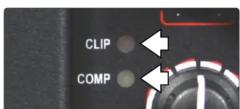
Reduce Input Levels if the Clip LED turns on. Max. level is reached when the yellow "Comp" light flashes at peak levels. If the light is on constantly, turn the levels down to avoid damage to the PA6BT.

MAKERS OF THE ORIGINAL HOT SPOT PERSONAL MONITOR

PA6BT
Full Range Powered Personal Monitor
Bluetooth®
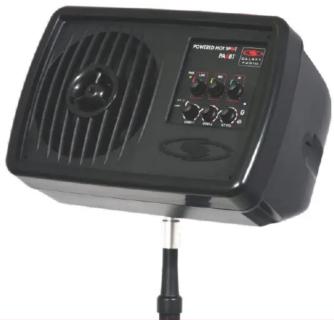
natural_image
Black industrial fan device with ventilation grille and control panel (no visible text or symbols)Quick Start Guide
FAQ
- Q. How can I mount my PA6BT to a wall?
A. Instructions for the optional YBHS bracket kit can be found in the Hot Spot manual, located at: http://galaxyaudio.com/pdfs/HotSpot-Manual.pdf
- Q. I do not get output on the Thru jack when using a 1/4" input.
A. The Thru output is only for the XLR input.
- Q. Can I use a condenser microphone with the PA6BT?
A. Yes, there is 15VDC Phantom Power on the XLR inputs.
- Q. If I turn the PA6BT off, will I have to reconnect my Bluetooth® device?
A. No, the PA6BT remembers the last device it is paired with and will automatically reconnect.
- Q. Can I pause the music from my Bluetooth device using the PA6BT?
A. Yes, when the music is playing, press the Bluetooth® button once. It will pause the music. Press again and it will resume.

The Personal
Monitor Experts
BE HEARD™
Other Helpful Sources
PA6BT Product Page

PA6BT Manual
(PDF Download)

PA6BT Cutsheet
(PDF Download)

PA6BT How To Video

Specifications subject to change without notice.
601 E. Pawnee Wichita, KS 67211 316. 263.2852 FAX 316.263.0642 www.galaxyaudio.com
Distributed in Canada by Audio Distributors International (ADI) 1275 Newton, unit 6 Boucherville, QC J4B 5H2 Canada
Boucherville, QC J4B 5H2 Canada
Printed in China V20161011
123.7.2.1
Mærke : Galaxy Audio
Model : PA6BT
Kategori : Højttaler