
CT-210 - Radio MIDLAND - Gratis brugsanvisning og manual
Find enhedens vejledning gratis CT-210 MIDLAND i PDF-format.


Brugerspørgsmål om CT-210 MIDLAND
0 spørgsmål om dette apparat. Besvar dem du kender, eller stil dit eget.
Stil et nyt spørgsmål om dette apparat
Download vejledningen til din Radio i PDF-format gratis! Find din vejledning CT-210 - MIDLAND og tag din elektroniske enhed tilbage i hånden. På denne side er alle dokumenter nødvendige for brugen af din enhed offentliggjort. CT-210 af mærket MIDLAND.
BRUGSANVISNING CT-210 MIDLAND
Contents
Maintenance 2
Features 2
Main indicators/controls 3
LCD display 5
Basic operations 6
Advanced operations 15
Menu operations
Self-Programming mode.... 17
Self-programming chart 18
Technical specifications 19
Troubleshooting guide 20
Content
• 1 transceiver
- 1 antenna
- 1 battery pack
- 1 belt clip
• 1 fast desktop charger
- User manual
If any items are missing, contact your dealer.
Maintenance
Your Two Way Radio is an electronic product of exact design and should be treated with care. The suggestions below will help you to fulfill any warranty obligations and to enjoy this product for many years.
- Do not attempt to open the unit. Non-expert handling of the unit may damage it.
- When using regulated power supply, take notice of power voltage that must be between 6V and 8V to avoid damaging the unit.
- Do not store the Radio under the sunshine or in hot areas.
- High temperatures can shorten the life of electronic devices, and warp or melt certain plastics.
- Do not store the radio in dusty, dirty areas
- Keep the Radio dry. Rainwater or damp will corrode electronic circuits.
- If it appears that the Radio diffuses peculiar smell or smoke, please shut off its power immediately and take off the charger or battery from the Radio.
- Do not transmit without antenna.
- Apparatus provided with replaceable lithium battery: warning close to the battery. Batteries shall not be exposed to excessive heat such as sunshine, fire or the light
- Adaptor ac-dc is a direct plug in equipment. Warning: mains plug used as disconnect device shall remain readily operable.
Features
- 4W Output power (VHF/UHF)
■ 128 groups of memory channels - 25KHz/12.5KHz Channel spacing compatible
- Automatic Numbering Identification (ANI) code
■ Built-in VOX function - All channels scan and priority channel scan
- Scrambler
- LCD backlight adjustable in 3 different colours
Emergency alarm - 50 CTCSS and 104 DCS Normal/Inverted selectable
■ Time-out Timer (TOT) - Busy channel lockout
Main indicators/controls
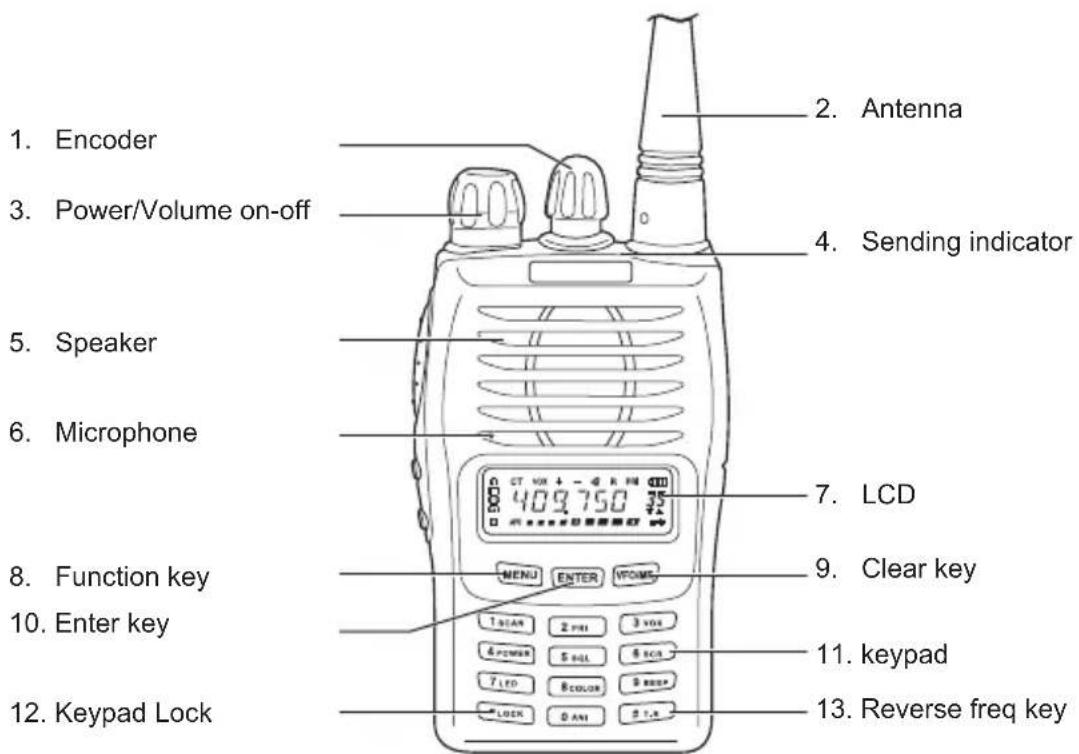
text_image
1. Encoder 2. Antenna 3. Power/Volume on-off 4. Sending indicator 5. Speaker 6. Microphone 7. LCD 8. Function key 9. Clear key 10. Enter key MENU ENTER VCOME 11. keypad 12. Keypad Lock 13. Reverse freq key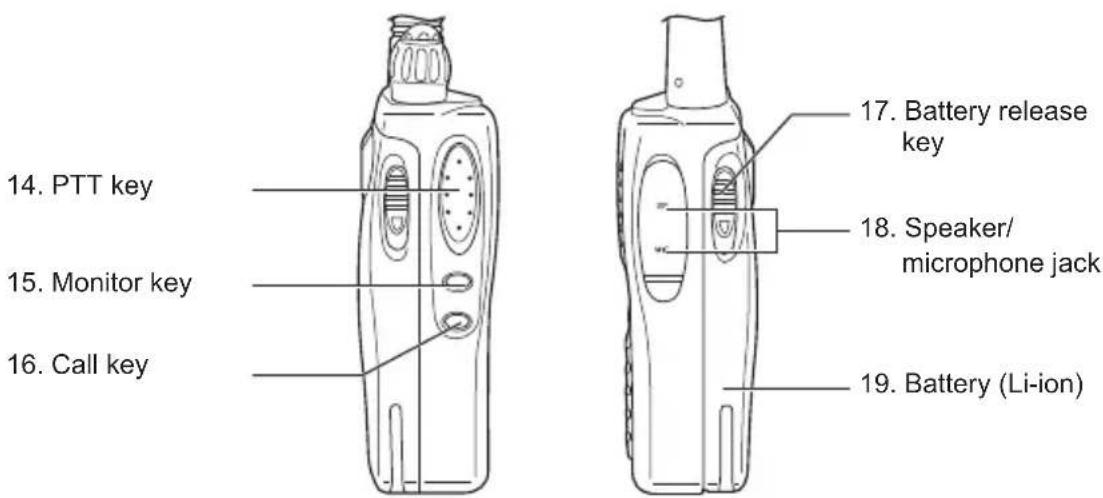
text_image
14. PTT key 15. Monitor key 16. Call key 17. Battery release key 18. Speaker/ microphone jack 19. Battery (Li-ion)Main indicators/controls - description
| Power/volume on-off | To turn on/off the radio and adjust the volume level. |
| Sending indicator | Press thePTTis pressed, it glows to indicate the transmitting status. |
| Busy indicator | When the channel is busy, the display shows5 9 |
| PTT key | When pressed, it enables the transmission. |
| MONI (monitor) key | Hold down this key in receiving mode: the channel in use will be monitored. The busy channel indicator will glow. |
| Call key To call your partner | |
| VFO/MR | To exit the menu and to switch from VFO to Memory mode. |
Socket and connector
| SMA Connector For connecting the supplied antenna | |
| Speaker/microphone jack | If you want to use a speaker or a microphone, connect them to this socket. If not, prevent water from dropping into it. |
LCD display
Many icons are shown on the display when the radio is on. The following table can help you to identify each of them.
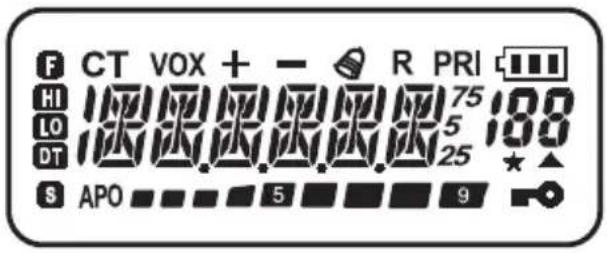
text_image
F CT VOX + - R PRI HI 75 LO 5 DT 25 S APO 5 9| Battery level indicator | |
| +/- | Shows the TX offset direction in relation to the frequency |
| HI/LO | Power level indicator (HI=High/LO=Low) |
| Frequency scanning indication | |
| Keypad lock | |
| DT | Displays when DCS is turned on |
| CT CTCSS | turned on |
| VOX VOX | turned on |
| Call Function | |
| R Display | reverse frequency |
| PRI | Priority scan activated |
| Received signal strength and TX power | |
| Frequency in use | |
| 188 | Function menu |
| The scan finds a signal(open squelch) |
RX
Basic operations
Supplied antenna
Insert the base of the supplied antenna into the SMA connector and rotate it clockwise. Make sure the antenna has set down.
Take out the antenna from the base by rotating it counterclockwise rotation.
Turn on and off the power
If you want to turn on the power, rotate the PWR/VOL knob clockwise until a beep is heard. All icons and frequencies appear on the screen. You can adjust your desired volume by turning the knob.
To turn off the power, rotate the PWR/VOL knob counterclockwise rotation. All the icons on the display will disappear and the radio is off.
Adjusting volume
After turning on the radio, rotate the PWR/VOL knob clockwise to increase the volume and counter -clockwise to decrease.
Transmitting/Receiving
Firstly, hold down briefly the MONI button to make sure that the frequency is not busy and then press the PTT. Speak 4/10cm far from the unit.
The TX indicator lights up.
Release the PTT key to receive.
Emergency Alarm
Hold down the CALL key for 1 second and press MONI: the radio will switch to emergency alarm.
Repeater tone
When you press any key, a note at 1750Hz is generated. It gives the possibility to link to repeaters.
text_image
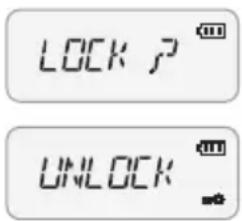
LOCK P UNLOCKKeypad Lock
To Lock or unlock the buttons.
In channel/Frequency mode, press and hold down the key for two seconds. The keypad will lock. Repeat the same procedure to unlock it.
Setting Reverse Frequency Function
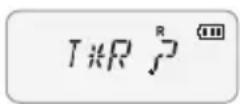
This function is possible only when you are linked to a repeater: it permits to invert the TX frequency with the RX frequency. In Channel/Frequency mode, hold down for two seconds until "R" appears on the display. Repeat the same procedure to return to the previous frequency setting.
Scanning
The Scan version is very useful to monitor the channels before transmitting.
1. Scan all the channels
In Channel/Frequency status, press MENU, 1SCAN ENTER 1SCAN, ENTER the radio will scan from the channel in use through all the channels. Whenever any activity is detected, the radio will suspend the scan for 5 seconds. It will then continue to scan unless you press PTT or ENTER key to end scanning.
2. Priority channel scan
In Frequency Mode, press MENU, 1 SCAN, 2 PRI ENTER. The radio will scan from the current frequency through all the frequency range within 1MHz. Whenever any activity is detected, the radio will suspend the scan for 5 seconds. It will then continue to scan unless you press the PTT or ENTER key to end scanning.
Select scan type
In Frequency mode, press and rotate the Encoder until the display shows "SCAN 13". Press ENTER and turn the Encoder knob again to select the scan type (TO/CO/SE). Confirm your selection with ENTER and exit by pressing VFCMP twice.
TO: Time-operated scan
Even though the radio stops on a busy channel, it will continue scanning the other channels.
CO: Carrier-operated scan
The radio stops on a busy channel until there is no activity, and then radio begins scanning the other channels.
SE: Search scan
The radio stops on a busy channel and exits the Scan mode.
DTMF Code
In Channel/Frequency mode, press PTT and digit a number on the keypad.

flowchart
graph LR
    A["MENU"] --> B["A"]
    C["ENTER"] --> D["B"]
    E["VFO/MR"] --> F["C"]
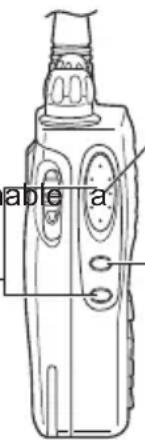
Flank keys
PTT + CALL: push to enable a 1750Hz tone
PTT: push to transmit and release it to receive
MONI: push it to monitor the frequency in use
text_image
a b e aSelect Mode
Hold down ENTER and turn on the power: the radio can switch between the Channel and Frequency mode. Repeat the procedure to pass to the other mode. In Frequency mode, presFOIMR to switch between the Frequency mode and Channel+Frequency mode.
To store a frequency
To store a frequency and its settings (CTCSS,DCS, SHIFT REPEATERS etc) follow the procedure below:
- at first, choose all the settings to store,
- press the MENU button,
- then, push VFO/MR,
- rotate the Encoder knob and select the memory number where you want to store the frequency and its settings.
- confirm your selection by pressing VFOIMR.
(note: a triangle displayed underneath the channel number indicates that it has already been stored).
8
Delete a memory
1. Delete one stored channel
In VFQIMR Mode turn off the power.
Hold down the VFC/MR key and turn on the unit. "DEL?" and the stored channel number will be displayed. Turn YES, 7, 81 the Encoder knob or select the channel to delete. Push ENTER until "YES?" appears on the display; push it again to confirm.
2. Reset (Delete all the settings in Frequency mode)
Hold down the MENU button and turn on the unit until "RESET?" is displayed. Press ENTER until "VFO?" is shown on the display; push it again for confirmation.
3. Delete all settings
Hold down MENU and turn on the unit until "VFO?" is shown on the display. Turn the Encoder knob to select "FULL?", then press ENTER to delete all the settings in Frequency and VFO modes.
° RESETP
o IFO P
n FULL P
Advanced Operations
Selecting the VOX sensitivity level
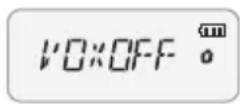
The VOX function is deactivated by default. To activate it follow the procedure here below:
- press the MENU button;
- turn the Encoder knob until the display shows 'VOX' (menu 03);
- push the ENTER key;
- turn again the Encoder knob and select the desired VOX level (you can choose amongst 9 different levels);
- push the ENTER key again;
- to exit, press twice VFOIMR.
To activate and select rapidly the VOX function, you can do it also by operating on the fast menu: press the MENU key and then 3 vox and follow the procedure above described starting from point 3.
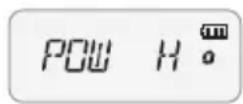
Setting the transmission power
To select the desired power level:
- press the MENU button;
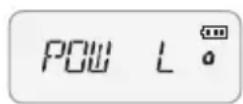
- turn the Encoder knob until 'POW' (menu 04) is displayed
- push ENTER;
- turn the Encoder knob and select the desired power level (you can choose between 2 levels: 'H' ed 'L');
- press ENTER;
- press twice the VFO/MR knob to exit.
To activate and select rapidly the power level, you can also use the fast menu: press key and then and follow the procedure above described starting from point 3.
Setting squelch
To select the squelch level:
- press the MENU button;
- turn the Encoder knob until 'SQL'(menu 05) is displayed
- push ENTER;
- turn the Encoder knob and select the desired squelch level (9 different levels are available);
- press ENTER;
- press twice the VFO/MR knob to exit.
To activate and select rapidly the squelch level, you can also
use the fast menu: press the key and then and follow the procedure above described starting from point 3.
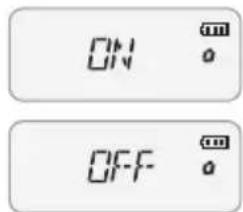
Scrambler on/off
To activate the scrambler, follow this procedure:
- press the MENU button;
- turn the Encoder knob until 'SCRM' (menu 06) is displayed
- push ENTER;
- turn the Encoder knob and activate/deactivate the scrambler (ON = activated; OFF = deactivated);
- press ENTER;
- press twice the VFO/MR knob to exit.
To activate/deactivate rapidly this function, you can also use the fast menu: press the MENU key and then and follow the procedure above described starting from point 3.
text_image
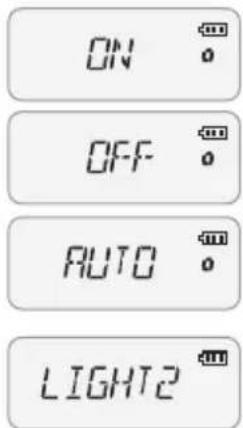
ON OFFBacklight on/off
To select the LCD backlight:
- press the MENU button;
- turn the Encoder knob until 'LED' (menu 07) is displayed
- push ENTER;
- turn the Encoder knob and activate/deactivate the function: 3 different options are available (AUTO, ON, OFF);
- press ENTER;
- press twice the VFC/MR knob to exit.
To activate/deactivate rapidly the backlight, you can also use the fast menu: press the MENU key and then follow the procedure above described starting from point 3.
text_image
ON OFF AUTO LIGHT2Select the backlight colour
To select the backlight colour:
- press the MENU button;
-
turn the Encoder knob until 'LIGHT' (menu 08) is displayed
-
push ENTER;
-
turn the Encoder knob and choose the desired colour (3 different colours are available);
-
press ENTER;
-
press twice the VFCIMR knob to exit.
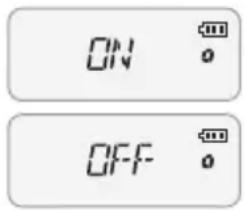
To select it rapidly, you can also use the fast menu: press
text_image
ON OFFthe MENU key and then set follow the procedure above described starting from point 3.
Beep on/off
The keypad beep is activated by default. To deactivate it:
- press the MENU button;
- turn the Encoder knob until 'BEEP' (menu 09) is displayed
- push ENTER;
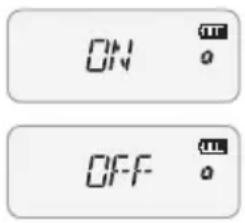
- turn the Encoder knob and activate/deactivate the beep (ON = beep enabled; OFF = beep disabled);
- press ENTER;
- press twice the VFOMR knob to exit.
To activate/deactivate the keypad beep, you can use the fast menu: press the MENU key and then and follow the procedure above described starting from point 3.
text_image
ON OFFAutomatic Numbering Identification (ANI) on/off
You can set an automatic number identifier visible from the radio's display of your partner each time you send a call signal.
To activate this function:
- press the MENU button;
- turn the Encoder knob until 'ANI' (menu 10) is displayed;
- press ENTER;
- rotate the Encoder knob and activate/deactivate the function. ON = activated, OFF = deactivated;
- push ENTER again;
- press twice VFOIMR to exit.
To activate/deactivate the keypad beep, you can also use the fast menu: press the MENU key and then follow the procedure above described starting from point 3.
text_image
o 5--D 7 13 o 5--D 0 o 5--D +Repeater shift (for communications through repeaters)
To select this function, follow these steps:
- press the MENU button;
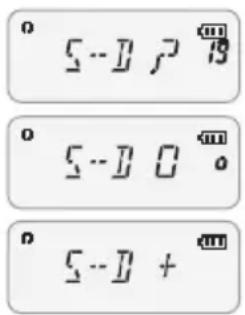
- rotate the Encoder knob until 'S-D' (menu 19) is displayed;
- press ENTER;
- turn the Encoder knob and select the repeater shift. You can choose amongst the following options +, - and 0;
- press ENTER again;
- press twice VFO/MR to exit
To select the repeater shift you can use the fast menu: press the MENU key and then follow the procedure above described starting from point 3.
Repeater shift adjustment (for communications through repeaters)
- press the button;
-
turn the Encoder knob until 'DIFFR' (menu 15) is displayed
-
push ENTER;
-
turn the Encoder knob and select the repeater shift. can also enable it by digitizing the frequency directly on the keypad.
-
press ENTER;
Select the frequency step
- press the MENU;
-
turn the Encoder knob until 'STEP' (menu 20) is displayed
-
push ENTER;
-
turn the Encoder knob and select the desired fr step. You can choose amongst: 5 KHz, 10 KHz, 6.25 KHz, 12.5 KHz and 25 KHz;
-
press twice the VFO/MR knob to exit
Select the CTCSS and DCS tones
To select a CTCSS tone
- press the MENU button;
-
turn the Encoder knob until 'C-CDC' (menu 16) is displayed
-
push ENTER;
-
turn the Encoder knob and select the desired subaudio tone;
-
press ENTER to confirm.
To select a DCS tone:
-
select 'C-CDC' (menu 16) either with the Encoder knob or with the fast access;
-
Press ENTER
-
Press the Newton;
-
turn the Encoder knob and select the desired DCS level;
-
press ENTER again for confirmation.
While selecting the DCS codes, if you press you will select the normal (N) or inverted (I) DCS codes.
Voice function (only in English)
With this function, you activate a voice that informs about any operation/selection you are doing. To activate it, follow these steps:
- press the MENU button;
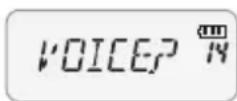
- turn the Encoder knob until 'VOICE' (menu 14) is displayed;
- push ENTER
- turn the Encoder knob and activate/deactivate the function. (ON = enabled; OFF = disabled);
- Push ENTER again;
- press twice the VFOIMR knob to exit.
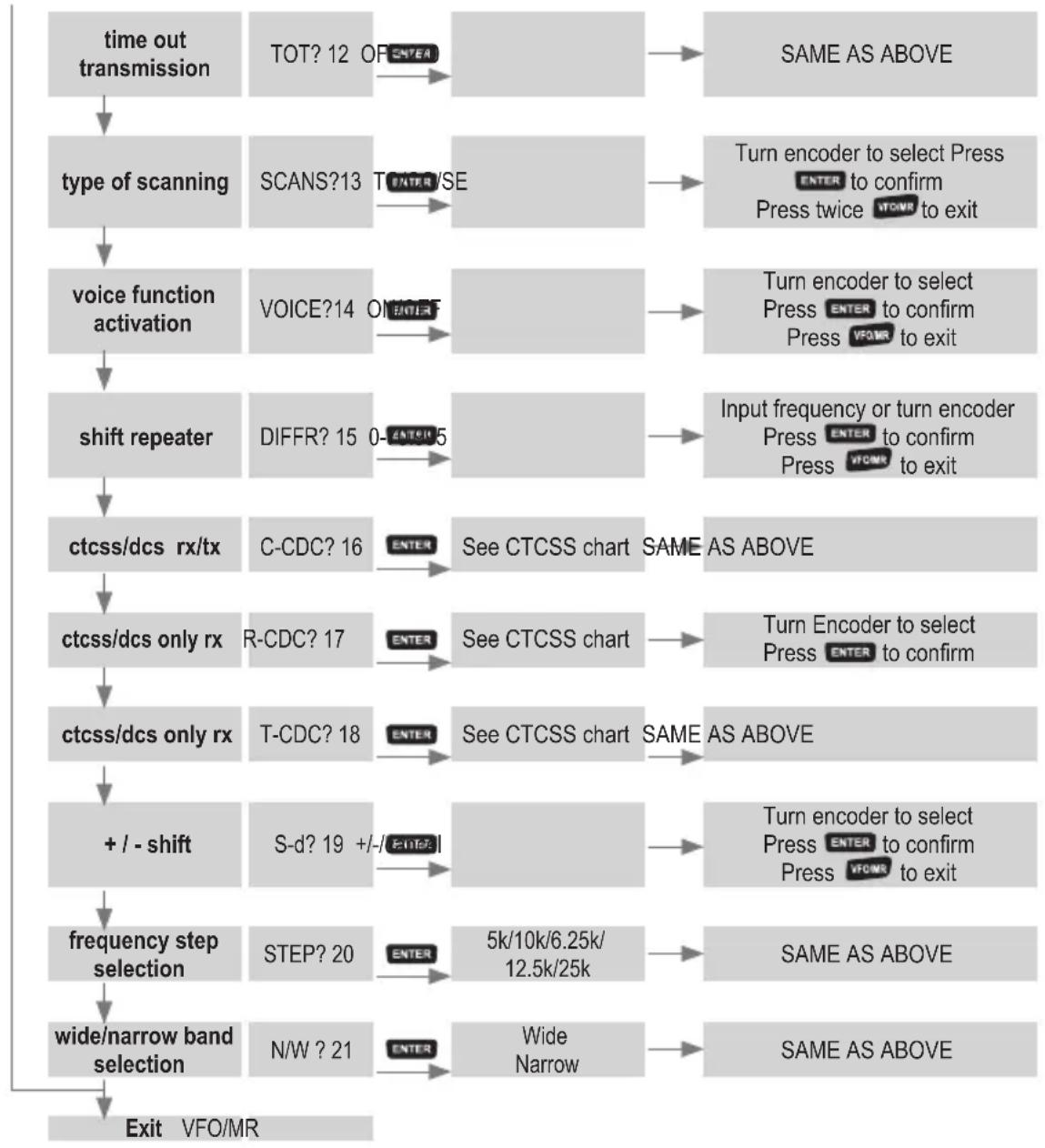
Menu Operation
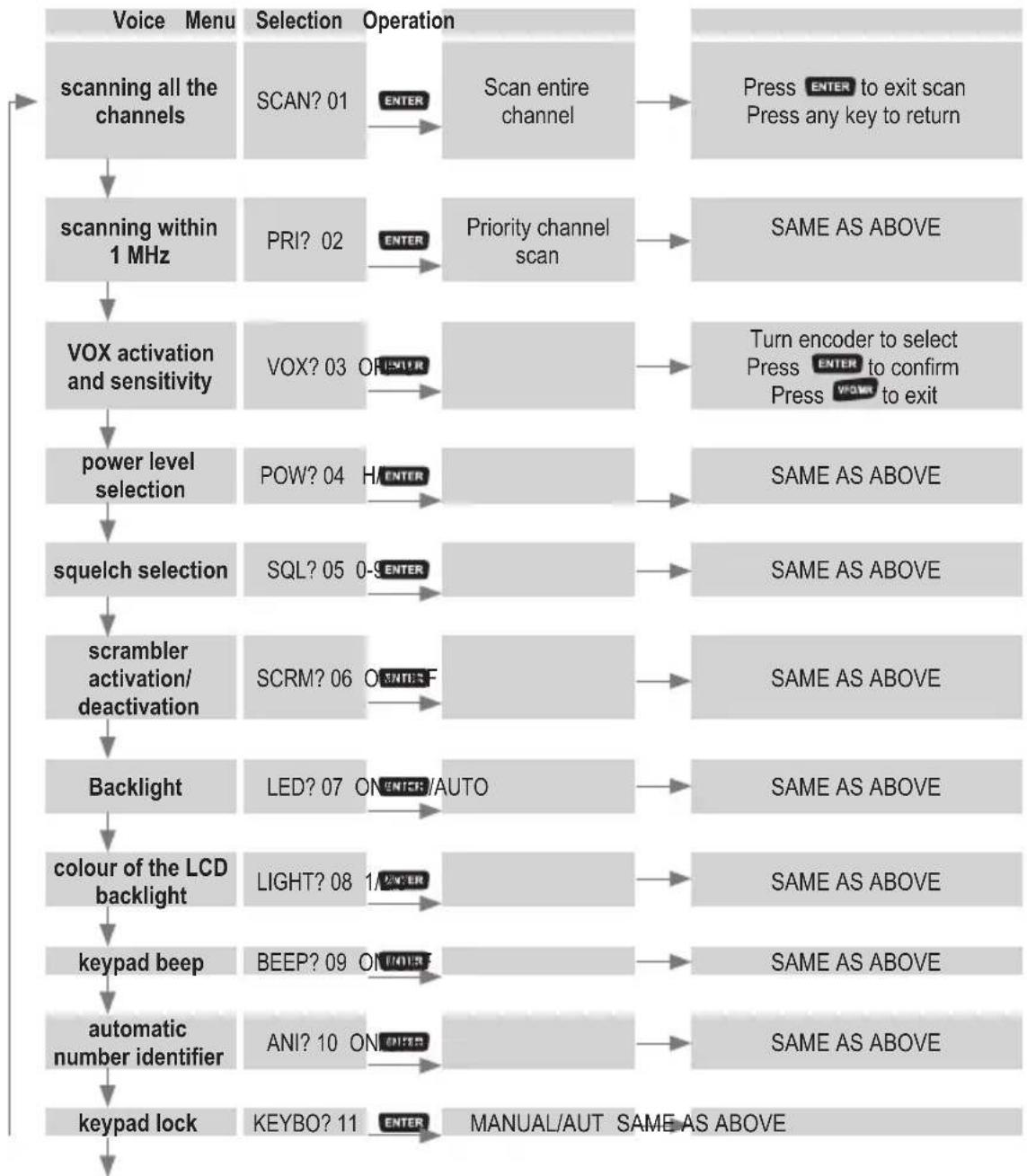
To operate with all the parts/settings of the menu, you have to follow these general steps:
1 Press the MENU button.
2 Turn the Encoder knob to select the desired menu.
3 Press ENTER and turn the Encoder knob to choose the desired setting.
4 Press to confirm.
flowchart
graph TD
    A["scanning all the channels"] --> B["scanning within 1 MHz"]
    B --> C["VOX activation and sensitivity"]
    C --> D["power level selection"]
    D --> E["squelch selection"]
    E --> F["scrambler activation/deactivation"]
    F --> G["Backlight"]
    G --> H["colour of the LCD backlight"]
    H --> I["keypad beep"]
    I --> J["automatic number identifier"]
    J --> K["keypad lock"]

    subgraph Operation
        L["SCAN? 01"] --> M["ENTER"] --> N["Scan entire channel"] --> O["Press ENTER to exit scan\nPress any key to return"]
    end

    subgraph Target
        P["PRI? 02"] --> Q["ENTER"] --> R["Priority channel scan"] --> S["SAME AS ABOVE"]
        T["VOX? 03"] --> U["ENTER"] --> V["Power Level Selection"] --> W["Turn encoder to select\nPress ENTER to confirm\nPress POWER to exit"]
        X["SQL? 05"] --> Y["ENTER"] --> Z["Same as ABOVE"]
        AA["SCRM? 06"] --> AB["ENTER"] --> AC["Same as ABOVE"]
        AD["LIGHT? 08"] --> AE["ENTER"] --> AF["Same as ABOVE"]
        AG["BEEP? 09"] --> AH["ENTER"] --> AI["Same as ABOVE"]
        AJ["ANI? 10"] --> AK["ENTER"] --> AL["Same as ABOVE"]
        AM["KEYBO? 11"] --> AN["ENTER"] --> AO["MANUAL/AUT SAME AS ABOVE"]
    end
flowchart
graph TD
    A["time out transmission"] --> B["type of scanning"]
    B --> C["voice function activation"]
    C --> D["shift repeater"]
    D --> E["ctcss/dcs rx/tx"]
    E --> F["ctcss/dcs only rx"]
    F --> G["ctcss/dcs only rx"]
    G --> H["+ / - shift"]
    H --> I["frequency step selection"]
    I --> J["wide/narrow band selection"]
    J --> K["Exit VFO/MR"]

    subgraph Time Out
        L["TOT? 12 OF ENTER"] --> M["SAME AS ABOVE"]
        N["SCANS?13 ENTER/SE"] --> O["Turn encoder to select Press ENTER to confirm Press twice VTO/MR to exit"]
        P["VOICE?14 ON ENTER"] --> Q["Turn encoder to select Press ENTER to confirm Press VFO/MR to exit"]
        R["DIFFR? 15 0- ENTER 5"] --> S["Input frequency or turn encoder Press ENTER to confirm Press VFO/MR to exit"]
    end

    subgraph C
        T["C-CDC? 16"] --> U["See CTCSS chart SAME AS ABOVE"]
        V["R-CDC? 17"] --> W["See CTCSS chart"]
        X["T-CDC? 18"] --> Y["See CTCSS chart SAME AS ABOVE"]
        Z["S-d? 19 +/- ENTER"] --> AA["Turn encoder to select Press ENTER to confirm Press VFO/MR to exit"]
        AB["STEP? 20"] --> AC["5k/10k/6.25k/12.5k/25k"] --> AD["SAME AS ABOVE"]
        AE["N/W ? 21"] --> AF["Wide Narrow"] --> AG["SAME AS ABOVE"]
    end
Note: parts from 16 to 21 are available only in Frequency mode.
In Channel mode only parts from 1 to 15 are active.
To pass rapidly from Frequency to Channel mode or vice versa, switch on the unit and hold down the ENTER button.
| NAME ON/OFF | Turn encoder to select Press ENTER to confirm Press VFOMR to exit |
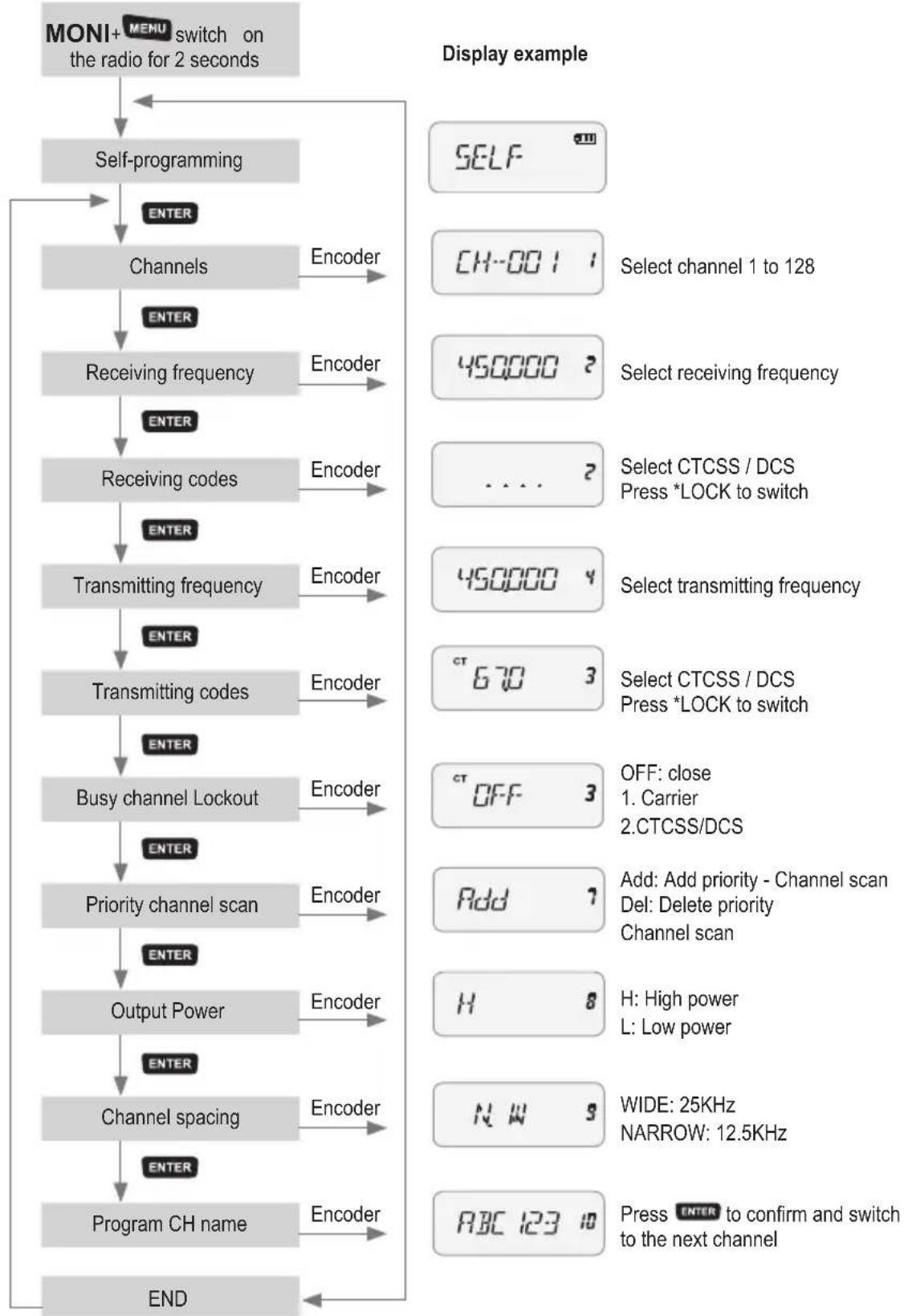
Self-Programming mode
To enter in Self-Programming mode, follow these steps:
-
while turning on the unit, hold down 'MONI' and MENU until 'SELF' is displayed;
-
press ENTER;
-
turn the Encoder knob and select the memory number to program;
-
push ENTER again;
-
digit the desired rx frequency;
-
press ENTER;
-
press *LOCK and with the Encoder knob select the desired CTCSS in RX (if you press it again, you can select a DCS code);
-
press ENTER;
-
digit the desired tx frequency;
-
push ENTER;
-
press LOCK and with the Encoder knob select the desired CTCSS in TX (if you press it again, you can select a DCS code);
-
press ENTER;
-
with the Encoder knob, enable/disable the busy channel lockout (you can choose: OFF, 1 carrier, 2 CTCSS/DCS);
-
press ENTER;
-
by turning the Encoder knob, you can enable/disable the priority channel scanning;
-
press ENTER ;
-
turn the Encoder knob and select the power level in tx H (high) or L (low);
-
press ENTER;
-
turn the Encoder knob and select the transmission mode: WIDE or NARROW;
-
push ENTER;
-
rotate the Encoder knob and select the first letter for the name of the programmed channel. To switch to the next channel, push the button and turn the Encoder knob;
-
press ENTER;
-
switch off the unit to finish the programming procedure and return to the standard modality.
Self-programming chart
flowchart
graph TD
    A["MONI+ MENU switch on the radio for 2 seconds"] --> B["Self-programming"]
    B --> C["ENCER"]
    C --> D["Channels"]
    D --> E["ENCER"]
    E --> F["Receiving frequency"]
    F --> G["ENCER"]
    G --> H["Receiving codes"]
    H --> I["ENCER"]
    I --> J["Transmitting frequency"]
    J --> K["ENCER"]
    K --> L["Transmitting codes"]
    L --> M["ENCER"]
    M --> N["Busy channel Lockout"]
    N --> O["ENCER"]
    O --> P["Priority channel scan"]
    P --> Q["ENCER"]
    Q --> R["Output Power"]
    R --> S["ENCER"]
    S --> T["Channel spacing"]
    T --> U["ENCER"]
    U --> V["Program CH name"]
    V --> W["ENCER"]
    W --> X["END"]
Technical specifications
General
| Frequency Range CT210: 144-146MHz; CT410: 430-440MHz |
| Working Temperate -20°-+50° |
| Operating Voltage DC 7.4V |
| Operate Mode Simplex or Semi-duplex |
| Dimension 100mm×58mm×33mm (Antenna excluded) |
| Weight 203g (Including battery) |
| Antenna impedance 50Ω |
| Duty cycle 5/5/90 |
Transmitter
| Frequency Stability ±2.5PPM | |
| Output Power CT210: >5W/CT410: >4W | |
| Max Frequency Deviation ≥5KHz | |
| Audio Distortion ≤3% | |
| Adjacent Channel Power Within European legal terms | |
| Spurious Radiation | Within European legal terms |
| Occupied Bandwidth | Within European legal terms |
Receiver
| RF Sensitivity <0.2μV | |
| Audio Distortion | ≤3% |
| Audio Response | 300Hz ÷ 3KHz |
| Adjacent Channel Selectivity | Within European legal terms |
| Intermodulation Rejection Within European legal terms | |
| Spurious Response | Within European legal terms |
| Blocking | Within European legal terms |
Troubleshooting guide
| Problem Solution | |
| No Power | The battery pack may be dead. Recharge or replace it. |
| The battery pack may not be installed correctly. Remove it and install it again. | |
| Battery power dies shortly after charging | The battery pack life is finished. Replace the battery pack with a new one. |
| Cannot talk to or hear other members in your group | Make sure you are using the same frequency and CTCSS/DCS tone as the other members in your group. |
| Other group members may be too far away. Make sure you are within the range of the other radios. | |
| Other voices (besides group members) are present on the channel. | Change the CTCSS/DCS tone. |
| Be sure to change the tone on all radios in your group. |