
Link Zone MW70 - Router ALCATEL - Gratis brugsanvisning og manual
Find enhedens vejledning gratis Link Zone MW70 ALCATEL i PDF-format.


Brugerspørgsmål om Link Zone MW70 ALCATEL
0 spørgsmål om dette apparat. Besvar dem du kender, eller stil dit eget.
Stil et nyt spørgsmål om dette apparat
Download vejledningen til din Router i PDF-format gratis! Find din vejledning Link Zone MW70 - ALCATEL og tag din elektroniske enhed tilbage i hånden. På denne side er alle dokumenter nødvendige for brugen af din enhed offentliggjort. Link Zone MW70 af mærket ALCATEL.
BRUGSANVISNING Link Zone MW70 ALCATEL
Thank you for choosing LINKZONE
There's quick guide to get your up and morning and moving the next of your new choice through away.
If you're a deal for the retail, then visit www.alphabetmobile.com where you will find more information about your UNIQONE.
If you intend to use your LINKZONE which connects to your charger for more than 7 days, then it indicates that you receive the artery. In a cold any patients damage
What's in the box
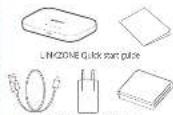
USB cable Power adapter Battery
Power indicator
Solid blue: The power is larger (2.4-100%) Flash club: The device is in charging. Solid red: The battery is lower than 25%.
Inserting the SIM card
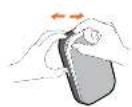
- Open the back cover.
We suggest that you just take up of the that is to the bar slot at the same time and will the cover outwards to open it.
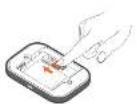
2 Press and push the GW card to install GW card in the conditional.
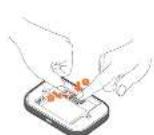
Remove the SIM card
In run, pull the SIM card out. I can study. Write one mark one 54 spring at first, and then pull the SIM card out.
Inserting the battery
Ensure that the pls in the territory and signal with the pls in your device.

Close the back cover with the loop holes aligned.

Charging your device
Ceramic, the reasonable LAIS calls on home your LIME/CHN. (see La-Ala#l 56/7A or 56/2A) charger is recommended.
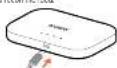
Once charged, you're ready to go. Press down on the power button for a new seconds and your LPA/2001 will turn on.
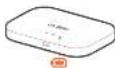
Getting to know your LINKZONE
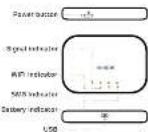
Note: The battery LED will light up when the device is powered.
Getting online
1 Ensure your UNZONE is switched on and connected in the network.
- Or the device you want to connect to the internet, quite the network settings and sends for your Mobile Air-Fi network name. You can find your default password on the last, located on the underside of the battery case.
A. Click account
- Enter the password found on the local located on the under do of the battery box
You've got mail - reading your text messages
When you see the little error option local to indicate it means you we got a test.
-
Voice sure you've got a device connected in your LING/OHL - see 'Gelming Delive' for more information.
-
Note 192.158.1.1 in a year's format turnover - tip, its band - a benchmark this for order access to next time.
3 Enter your own name and password, the default ones are really simple, you can change these later if you like. Username: admin Password: admin
- You are now on your LINKONE home page. Here you can click on the last resource can to read your text. You can also change your settings such as passwords or saved home.
Forgotten your password?
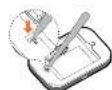
I can target your new world, just need your choice and you will be look up and running in a little. Use a portion or about it to gently press the best button.
Not responding?
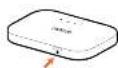
If the device becomes in equivalent, long process and last the device turns on 10 seconds until the device rebuses.
LINK APP
-
Make sure your device is connected to the
-
See the 20 code.
-
Descrited the LINK APP from Appalone on Google Playnow.
-
Close on LRF APP version (log-1) in the management page.

Note: The UNK app and exercise share the same powerward. Federal powerward is a bit

Quick Start Guide

CJB:120ALAAE