BOC-857 - Dockingstation Steren - Gratis brugsanvisning og manual
Find enhedens vejledning gratis BOC-857 Steren i PDF-format.


Brugerspørgsmål om BOC-857 Steren
0 spørgsmål om dette apparat. Besvar dem du kender, eller stil dit eget.
Stil et nyt spørgsmål om dette apparat
Download vejledningen til din Dockingstation i PDF-format gratis! Find din vejledning BOC-857 - Steren og tag din elektroniske enhed tilbage i hånden. På denne side er alle dokumenter nødvendige for brugen af din enhed offentliggjort. BOC-857 af mærket Steren.
BRUGSANVISNING BOC-857 Steren

STEREN
Bocina Bluetooth mini bazooka
Manual de instrucciones
BOC-857
V0.0
0918A

natural_image
Illustration of a white cylindrical object with a curved neck and attached straps, no text or symbols present.CARGA DE BATERÍA
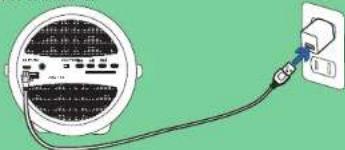
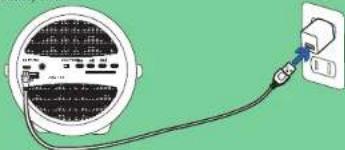
Cargue completamente la caterla de la bodina por 4 horas antes de usarla. Durante la carga el LED encenderá en color rojo:
No deje la bocina conectada por más de 4 horas, sobrecargarla puede afectar negativamente el tiempo de vida de la baterla.

natural_image
Illustration of a wall-mounted electrical meter connected to a power outlet (no text or symbols visible)MODO BLUETOOTH
- Encienda la bocina
La bocina emitirá un tono y el LED permaneceré encandido.
- Active el Bluetooth en su dispositivo móvil y seleccione:
STEREN BOC 657
Si la vinculación fue exitosa, la bocina emitirá un sonido.
- Inicie la reproducción de música desde su dispositivo móvil
Presione el botón. ➤ para detener o reanudar la canción.
Presione el botón para pasar a la siguiente canción
Presista El Batech para plazo de la siguiente calidad
Presione el botón 📄 para regresar a la canción anterior
Lea todas las instrucciones antes de usar este producto.
PRECAUCIONES
- Este aparato no se destina para utilizarse por personas (incluyendo niños), cuyas capacidades físicas, sensoriales o mentales sean diferentes o estén reducidas, o carezcan de experiencia o conocimiento.
• Los niños deben supervisarse para asegurar que no empleen el aparato como juguela.
• No use la bocina si se ha caído o ha sido dañada de alguna manera.
- Las reparaciones deben ser realizadas por personal calificado.
- Coloque la bocina sobre una superficie uniforme, libre de vibraciones y lejos de fuentes de calor
- Mantenga la bocina fuera del alcance de los niños.
- No toque la música a niveles excesivos, especialmente cerca de los niños, ya que pueden producirse daños en la audición.
"La operación de este equipo está sujela a las siguientes dos condiciones: (1) es posible que este equipo o dispositivo no cause interferencia perjudicial y (2) este equipo o dispositivo debe aceptar cualquier interferencia, incluyendo la que pueda causar su operación no deseada."
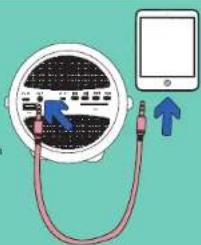
MODO AUXILIAR
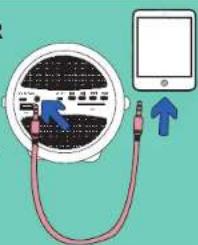
Presione el botón para detener o reanudar la canción.
Para cambiar de canción hágalo desde su Smlarphone.
text_image
Diagram showing connections between a device with labeled ports and an arrow indicating direction of connection to the screen.MODO RADIO FM
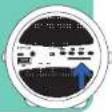
Conecta el cable micro USB en el puerto micro USB: este cable sirve como una antena y mejora la recepción de FM. Encienda la bocina, y presione el bolón MODE hasta seleccionar la función de radio.
Presione una vez el bolón para buscar y grabar en memoria las estaciones de radio.
Utilice los botones 📄 o 🌐 para cambiar las estaciones.
MODO USB / SD
-
Encienda la bocina
-
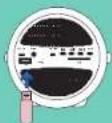
Inserte una memoria SD o USB en la ranura
correspondiente.
La reproducción comenzará automáticamente.
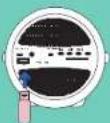
Presione el botón para detener o reanudar la pista.
Presione el botón 📂 para pasar a la siguiente canción o mantenga presionado para avanzar segundos de la canción
Presione el botón para regresar a la canción anterior o mantenga presionado para regresar segundos de la canción
-
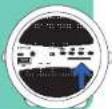
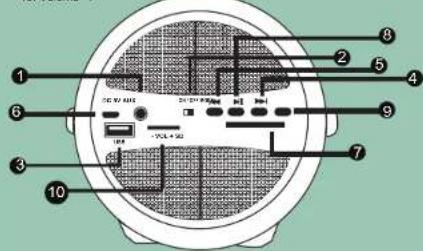
Entrada para dispositivos con conector 3,5 mm
-
Interruptor encendido / apagado
-
Puerto USB
-
Adelantar
-
Atrocer?
-
Puerto de carga Micro USB
-
Puerto SD
-
Pausar / Reproducir
-
Camciar Modo (Bluetooth, Recio FM, USB, SD o Auxiliar)
-
Volumen +/-
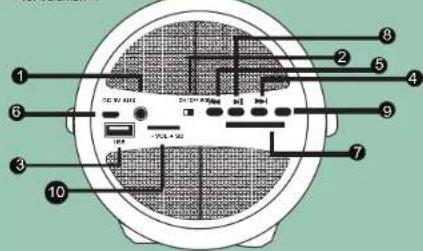
text_image
Diagram of a device rear panel with numbered components and labeled ports, likely for electronics or wiring instructions.* Puede cambiar la función dependiendo del modo en que se encuentre.
ESPECIFICACIONES
Alimentación: 5 V = 1 A (x USB)
Potencia: 5 Wims
Bocina: 10 W, 4 Ohms
Respuesta en frecuencia: 100 Hz - 20 kHz
Sensibilidad 82 dB+/-3 dB
Bateria: 3.7 V = 1500 mAh
Relación señal / ruido: 95 dB
Distorsión: <3%

STEREN® Products: Doscine Bluetooth mini bezpoka
Harcy Staro
1.2.3.4.5.6.7.8.9.10.11.12.13.14.15.16.17.18.19.20.21.22.23.24.25.26.27.28.29.30.31.32.33.34.35.36.37.38.39.40.41.42.43.44.45.46.47.48.49.50.51.52.53.54.55.56.57.58.59.60.61.62.63.64.65.66.67.68.69.70.71.72.73.74.75.76.77.78.79.80.81.82.83.84.85.86.87.88.89.90.91.92.93.94.95.96.97.98.99.100
[Unreadable]
- Dura hava, 1965 in gucula, pravente nata yola e'produzione in bruce le miofico e la Bactuca (2008) da C.
In the case of the first 10 years, we have to be a result of that year.
-
17.00. 20.00. 21.00. 22.00. 23.00. 24.00. 25.00. 26.00. 27.00. 28.00. 29.00. 30.00.
-
- 20
2014年1月1日
-
I'm a man who is a man who is a man who is a man who is a man who is a man who is a man who is a man who is a man who is a man who is a man who is a man who is a man who is a man who is a man who is a man who is a man who is a man who is a man who is a man who is a man who is a man who is a man who is a man who is a man who is a man who
-
In the present study, a small number of students were enrolled in 2017.
2018年1月,公司与上海浦东发展银行股份有限公司签订了《关于使用部分闲置募集资金进行现金管理的协议》。
сост моба отчёте науруто и р. 2017, снта привале яй тяж в ах в грамдаю, а к сършестоу, умал жит в ах руменькую чай не варотен дат роза, не ви алинина дат и яксп и ар
(二)公司利润分配
11:30:56 18:45:58
Borogu Wajimio Nazrada No. 560, San Caiyakar, Southwara, DC.Azapazamol, Dengzirba No. 13911 (RC: 120) 876641
STERENPRODUCIONALDO S. DE C.V.
Auxiliar México, Co. No 265 Sérieure Nature, Inc. 34 Ool Laran de Ecuimayo - Técnorte de Bell, Esporte de Mexico, CA: 542X BFC
51-412
四、表决情况
(186)
(一)现场会议登记
C. 2016年,公司与上海浦东发展银行股份有限公司上海市分行(以下简称“浦发银行”)签订了《关于使用部分闲置募集资金进行现金管理的协议》。
The following table is provided in the image:
2017年7月

STEREN
Mini bazooka bluetooth speaker
Instruction Manual
BOC-857
V0.0
0918A

natural_image
Line drawing of a white cylindrical object with a curved neck and attached straps, against a teal background (no text or symbols)BATTERY CHARGE
Fully charge the speaker battery for 4 hours before using it. During charging the LED will light red
Do not leave the speaker connected for more than 4 hours, overloading it can negatively affect the time of battery life.

natural_image
Illustration of a wall-mounted electrical meter connected to a power outlet (no text or symbols visible)BLUETOOTH MODE
- Turn on the speaker.
The horn will emit a tone and the LED will remain on.
- Activate Bluetooth on your mobile device and select: "STEREN BOC-857".
If the link was successful, the nom will emit a sound.
- Start music playback from your mobile device.
Press the button → to stop or resume the song.
Press the button 📄 to move to the next song
m - 1 0 ;
Press the button 📄 to return to the previous song
Read all instructions before using this product.
CAUTIONS
- This device is not intended for use by people (including children), whose physical, sensory or mental abilities are different or reduced, or who lack experience or knowledge.
• Children should be supervised to ensure they do not use the device as a toy.
- Do not use the hom if it has been dropped or damaged in any way.
- Repairs must be carried out by qualified personnel.
- Place the horn on a uniform surface, free of vibrations and away from
sources of heat.
- Keep the horn out of the reach of children.
- Do not play music at excessive levels, especially near children, as hearing damage may occur.
"Operation of this equipment is subject to the following two conditions: (1) this device or device may not cause harmful interference, and (2) this device or device must accept any interference, including interference that may cause undesired operation."
AUX MODE
Press the button 📋 to Stop or resume the song
To change the song, do it from your Smartphone.
text_image
Diagram showing a device connected to a cable with labeled components and an upward arrow indicating direction.RADIO FM MODE
Connect the micro USB cable to the micro USB port. This cable serves as an antenna and improves FM reception. Turn on the speaker, and press the MODE button until the radio function is selected
Press the button ☐ once to search and record the radio stations in memory. Use the ☐ or ☐ buttons to change the seasons.
USB/SD MODE
-
Turn on the speaker.
-
Insert an SD or USB memory into the
corresponding slot
Playback will start automatically.
Press the button ➤ to stop or resume the track
Press the button ⚠️ to move to the next song or hold down to advance seconds of the song
Press the button ☑ to return to the previous song or press and hold to return seconds of the song
-
Input for devices with 3.5 mm connector
-
Switch on / off
-
USB port
-
USB port
-
Advance
-
Late
-
Micro USB charging port
-
SD Port
-
Pause / Play
-
Change Mode (Bluetooth, FM Radio, USB, SD or Auxiliary).
-
Volume +/-
text_image
1 2 3 4 5 6 7 8 9 10 VCL 4.444 VCL 4.444 VCL 4.442* You can change the function depending on the mode you are in.
SPECIFICATIONS
Input: 5V---1A (x USB)
Power output: 5 Wrms
Speaker: 10 W, 4 ohms
Frequency response: 100 Hz -20 kHz
Sensitivity: 52dB +/-3dB
Battery: 3.7 V --- 1500 mAh
SNR: >95 dB
THD: <3%

STEREN® Product: University hospital assistant Wolgi: BOC 457
Brand: Steve
(1) 2017年1月1日
H. 2016, 48, 2017, 31, 2018, 31, 2019, 31, 2020, 31, 2021, 31, 2022, 31, 2023, 31, 2024, 31, 2025, 31, 2026, 31, 2027, 31, 2028, 31, 2029, 31, 2030, 31, 2031, 31, 2032, 31, 2033, 31, 2034, 31, 2035, 31, 2036, 31, 2037, 31, 2038, 31, 2039, 31, 2040, 31, 2041, 31, 2042, 31, 2043, 31, 2044, 31, 2045, 31, 2046, 31, 2047, 31, 2048, 31, 2049, 31, 2050, 31, 2051, 31, 2052, 31, 2053, 31, 2054, 31, 2055, 31, 2056, 31, 2057, 31, 2058, 31, 2059, 31, 2060,
from the date of previous
COSMOB
-
This warranty has not the required information, in line or without it.
-
The research in the current time, the company will expand its share of charge.
-
The repairing time will not exceed 20 min/24 days, from the day, the claim was
-
A lot of the men who are in the home
公司及董事会全体成员保证信息披露内容的真实、准确和完整,没有虚假记载、误导性陈述或重大遗漏。
THE WORKS OF THE NEXT CABB
THE EXCAUTER CHEN OBTAGE OF AN ACCOUNTANCE OF 2016 FINANCIAL BANKING (MAY-DEC-2016).
(1) Farmed become in proper side-bending, along with
- 2014年,公司与上海浦东发展银行股份有限公司签订了《关于使用部分闲置募集资金进行现金管理的协议》。
RETAILER INFORMATION
hans sitas ralabit
2016
BHA
125% of 300m³
In case your research have been done, you will agree with your mind.
61.227.575.0219
01 558 558 9360