DA-2200PRO - Karaoke Vocopro - Gratis brugsanvisning og manual
Find enhedens vejledning gratis DA-2200PRO Vocopro i PDF-format.


Brugerspørgsmål om DA-2200PRO Vocopro
0 spørgsmål om dette apparat. Besvar dem du kender, eller stil dit eget.
Stil et nyt spørgsmål om dette apparat
Download vejledningen til din Karaoke i PDF-format gratis! Find din vejledning DA-2200PRO - Vocopro og tag din elektroniske enhed tilbage i hånden. På denne side er alle dokumenter nødvendige for brugen af din enhed offentliggjort. DA-2200PRO af mærket Vocopro.
BRUGSANVISNING DA-2200PRO Vocopro
VocoPro
ULTIMATE CHOICE OF KARAOKE ENTERTAINMENT
DA-2200
Professional Digital Key Control Karaoke Mixer
Excellent Features:
11 Step Digital Key Controller
Professional Digital Echo with Repeat and Delay Controls
Multi-audio Control
Twin Stereo Audio/Video Inputs allow Two Separate A/V Sources to be used
Music Bass, Treble and Volume Controls
Microphone Master, Bass and Treble Controls
19" Rack Mountable Design
Echo On/Off Switch on all Three Mic Channels

CAUTION
RISK OF ELECTRIC SHOCK DO NOT OPEN
CAUTION: TO REDUCE THE RISK OF ELECTRIC SHOCK, DO NOT REMOVE COVER (OR BACK) NO USER-SERVICABLE PARTS INSIDE REFER SERVICING TO QUALIFIED SERVICE PERSONNEL
natural_image
Warning symbol of a lightning bolt inside a triangle (no text or numbers)The lightning flash with arrowhead symbol, within an equilateral triangle, is intended to alert the user to the presence of uninsulated dangerous voltage within the product's enclosure that may be of sufficient magnitude to constitute a risk of electric shock to persons.

natural_image
Warning symbol: triangle with exclamation mark (no text or numbers)The exclamation point within an equilateral triangle is intended to alert the user to the presence of important operating and maintenance (servicing) instructions in the literature accompanying the appliance.
WARNING
TO REDUCE THE RISK OF FIRE OR ELECTRIC SHOCK, DO NOT EXPOSE THIS APPLIANCE TO RAIN OR MOISTURE.
CAUTION
TO PREVENT ELECTRIC SHOCK, DO NOT USE THIS (POLARIZED) PLUG WITH AN EXTENSION CORD. RECEPTACLE OR OTHER OUTLET UNLESS THE BLADES CAN BE FULLY INSERTED TO PREVENT BLADE EXPOSURE.
VocoPro
TABLE OF CONTENTS
Caution 2
Specifications 3
Name of Parts and their Functions (Front Panel) 4
Name of Parts and their Functions (Rear Panel) 5
Basic Connections 6
Troubleshooting 7
DA-2200 Professional Digital Key Control Karaoke Mixer
SPECIFICATIONS
Graphic Equalizer Section:
Connector RAC / Unbalanced
Input Impedance 47k
Bands 1 1/3 ISO Spacing
Range +/- 15dB
T.H.D. <0.01%
Frequency Response 20Hz-20KHz 0.5dB
Noise Ratio >90dB
Mic Section:
Connector 1/4 TRS / Unbalanced
Input Impedance 1.5k
T.H.D. <0.1%
Frequency Response 20 Hz-15KHz -3dB
Noise Ratio >60dB
High +/-15dB
Mid +/-15dB
Mid Freq. 250 Hz-6KHz
Low +/-15dB
Digital Echo Up to 300mS
DA-2200 Professional Digital Key Control Karaoke Mixer
Front Panel
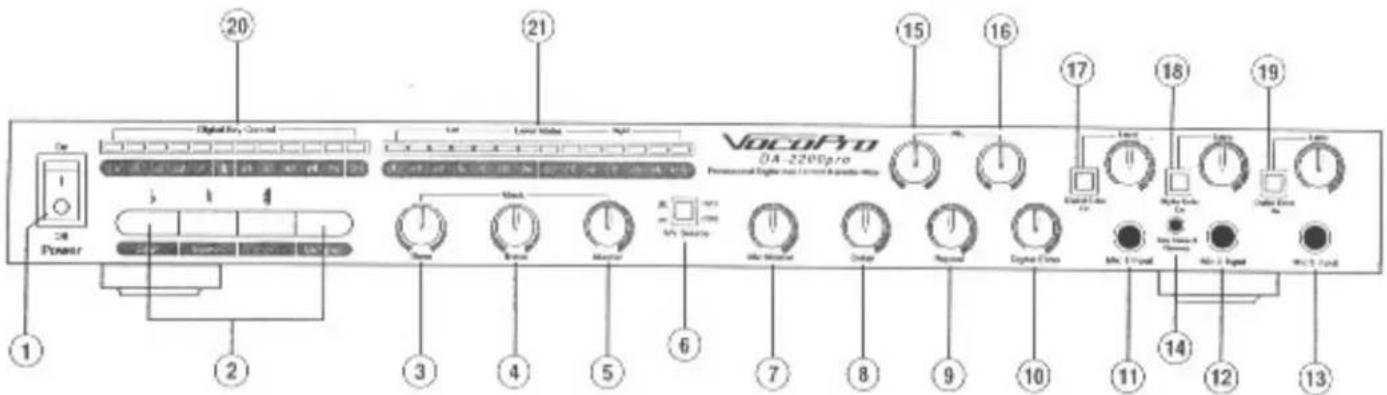
(1) POWER BUTTON: Turns on the power to the DA-2200PRO
(2) KEY CONTROL:
Flat Key (down or b): Press this key to LOWER the pitch of the song selection being played. This feature lowers the pitch of the song one half-step for each time it is pressed, to as many as five half-steps. The flat keys part of the Key Control feature and will work with the external players when properly connected to the DA-2200PRO. Note: The Key Control feature will not change the tempo of the song being played.
Natural Key (b): Press the natural key once to RETURN the pitch of song selection being played to its natural key or pitch. The natural key is part of the Key Control feature and will work with the external player when properly connected to the DA-2200PRO. Note: The Key Control feature will not change the tempo of the song being played.
Sharp Key (up or #): Press this key to RAISE the pitch of the song selection being played. This feature raises the pitch if the song one half — step for each time it is pressed, up to five half-steps. The sharp key is part of the Key Control feature and will work with the external player when properly connected. The Key Control feature will not changed the tempo of song being played.
Multiplex: The Multiplex feature works only with discs recorded in the Multiplex format. It will delete the vocal track on Multiplex CD s or tapes.
(3) MUSIC BASS CONTROL: This controls the amount of bass in the music being played.
(4) MUSIC TREBLE CONTROL: This controls the amount
of treble in the music being played.
(5) MUSIC MASTER: Turn left to turn down or turn off the source music. Turn right to turn up the source music.
(6) A/V SOURCE: Press this to select both audio and video between the two input sources you wish to play. (DVD, CDG)
(7) MIC MASTER: Use this control to adjust the overall volume of all the microphones.
(8) MIC DELAY: Adjusts the length of each interval of the Digital Echo effect.
(9) MIC REPEAT: Adjusts the interval repetition of the echo effect.
(10) MIC ECHO LEVEL CONTROL: Adjusts the Digital Echo parameters for the overall amount of digital effect on the mic channels.
(11) MIC1 INPUT: Microphone input jack for 1st microphone.
(12) MIC2 INPUT: Microphone input jack for 2nd microphone.
(13) MIC3 INPUT: Microphone input jack for 3rd microphone.
(14) KEY CONTROL REMOTE: Connection for key control microphone (changes key remotely- sold separately). Do not use the remote for any other purpose as doing so may damage the unit.
(15) MIC BASS: These controls are used to boost or cut the low frequency response of the microphones.
(16) MIC TREBLE: These controls are used to boost or cut the high frequency response of microphones.
(17) DIGITAL ECHO (ON/OFF): Turn on the Digital Echo On or Off for the mic1 input.
(18) DIGITAL ECHO (ON/OFF): Turn on the Digital Echo On or Off for the mic2 input.
(19) DIGITAL ECHO (ON/OFF): Turn on the Digital Echo On or Off for the mic3 input.
(20) STEREO KEY CONTROL DISPLAY: Displays the number of half - steps up (+) or down(-) you have chosen. When the display reads zero 0 you are in the songs natural key.
(21) LEVEL METER: Displays overall volume level from both the music and the microphone.
DA-2200 Professional Digital Key Control Karaoke Mixer
Rear Panel
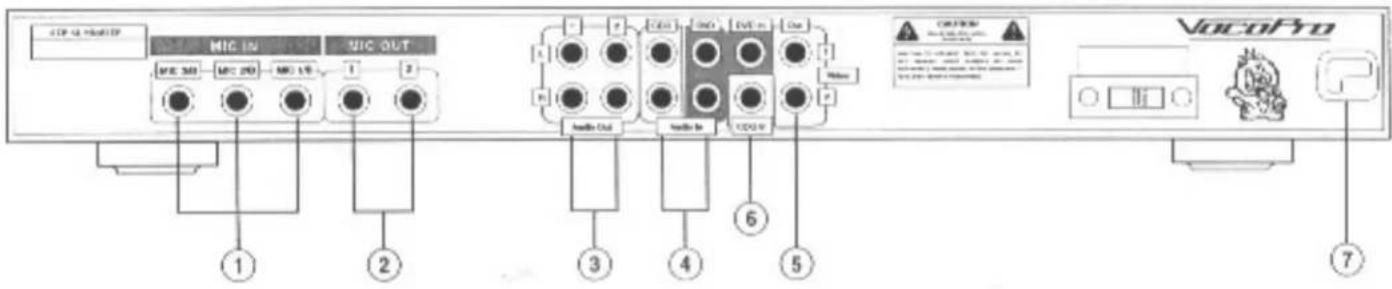
(1) REAR MICROPHONE INPUT JACKS A, B AND C: Six microphones can be connected at the same time with both the front and rear microphone input jacks.
(2) STEREO MICROPHONE ECHO EFFECT OUTPUT JACKS:
Outputs the digital echo effects without mixing the music, so the unit can work as an independent digital echo processor when connected to another mixer or a laser karaoke player.
(3) AUDIO OUTPUT JACKS (1 and 2): Outputs (pre-out) the mix sound between the microphone and the music, connect to
the AUX/INPUT jacks of a power amplifier or a pre-amp.
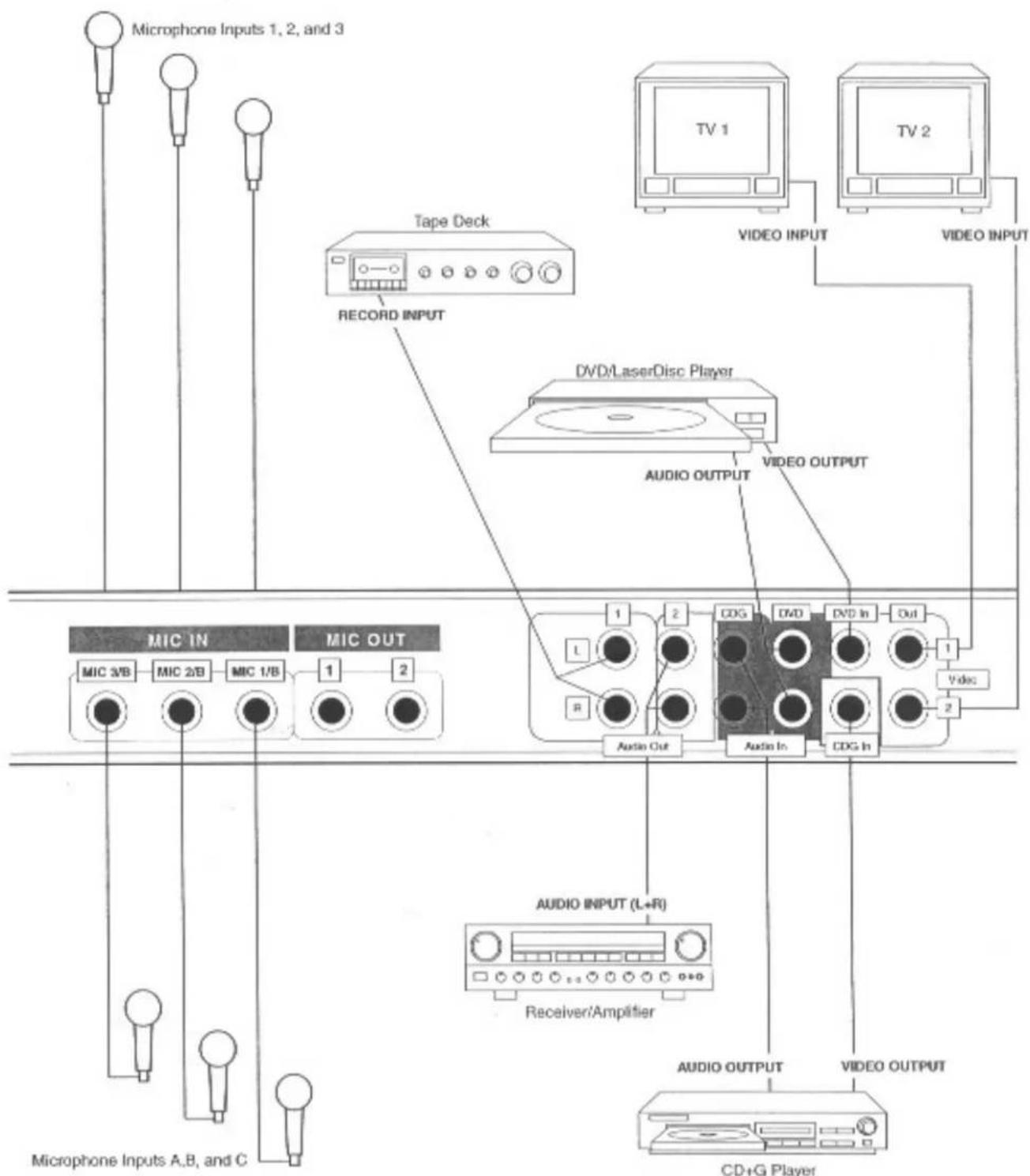
(4) AUDIO INPUT JACKS: Connect these jacks to the audio output jacks of up to two source players. (DVD player, CDG player)
(5) VIDEO OUTPUT JACKS: Connect these jacks to the Video Input jacks of up to two TV monitors.
(6) VIDEO INPUT JACKS: Connect these jacks to the video output jacks of up to two source players. (DVD player, CDG player.)
(7) VOLTAGE SELECTOR: Use these selectors to select between different input voltage. 110V — For U.S. Systems, 220V — For European Systems.
DA-2200 Professional Digital Key Control Karaoke Mixer
Rear Panel CONNECTIONS
flowchart
graph TD
    A["Microphone Inputs 1, 2, and 3"] --> B["Tape Deck"]
    B --> C["RECORD INPUT"]
    C --> D["VIDEO INPUT"]
    D --> E["TV 1"]
    D --> F["TV 2"]
    B --> G["DVD/LaserDisc Player"]
    G --> H["AUDIO OUTPUT"]
    H --> I["VIDEO OUTPUT"]
    J["MIC IN"] --> K["MIC 3/VB"]
    J --> L["MIC 2/B"]
    J --> M["MIC 1/B"]
    N["MIC OUT"] --> O["1"]
    N --> P["2"]
    Q["Audio In"] --> R["CDG In"]
    S["Audio Output"] --> T["CDG"]
    U["Audio Input (L+R)"] --> V["Receiver/Amplifier"]
    W["Audio OUTPUT"] --> X["CD+G Player"]
    Y["VIDEO OUTPUT"] --> Z["Video Output"]
DA-2200 Professional Digital Key Control Karaoke Mixer
TROUBLESHOOTING
| PROBLEM | CAUSE | SOLUTION |
| 1. No Sound | ¥No Power. | ¥Connect the power cord and turn on the power. |
| ¥Music or microphone level is set too low. | ¥Turn up the music volume for both the right and left channels (see 2 of page 2 of the manual) or turn up the master microphone volume (see 5 of page 2 of the manual) or turn up the individual microphone level controls (see 9 of page 2 of the manual). | |
| ¥Input source not switched correctly. | ¥Select to the proper input from the input sources selector (see 11 of page 2 of the manual). | |
| ¥Receiver / AMP not switched correctly. | ¥Check the receiver's input switch and make sure it is switch properly. Then turn up the volume of the receiver. | |
| ¥Improperly connected. | ¥Check the connections page of the manual, make sure that all the inputs and outputs are properly connected. | |
| 2. Vocal sound distorted | ¥The microphone's parametric equalizer is not properly. | ¥Set the microphone's High and Low-EQ. at middle, and turn the Mid-EQ to max. Then sing into the microphone, and adjust the Mid-sweep until the desire frequency of the vocal is found. Turn down the Mid-EQ., sing into the microphone again, and turn up or down the high and Low EQ. until the desire vocal sound is found. |
| 3. Music can only be heard from one side of the speaker | ¥One side of the music level is not turn on. | ¥Turn on both sides of the music volume by sliding both music level control up. |
| 4. Vocal can only be heard from one side of the speaker | ¥The microphone pan control is set to one side. | ¥Turn the microphone pan control to the center. |
| 5. No echo | ¥Echo on/off button is at off position. | ¥Turn on the echo on/off button. |
| 6. The guided vocal can not be cancelled | ¥The CD or tape is not a Karaoke Multiplex disc or tape. | ¥Check and make sure it is a karaoke disc or tape. |
- VocoPro
- DA-2200
- Professional Digital Key Control Karaoke Mixer
- Excellent Features:
- CAUTION
- RISK OF ELECTRIC SHOCK DO NOT OPEN
- WARNING
- TABLE OF CONTENTS
- DA-2200 Professional Digital Key Control Karaoke Mixer
- SPECIFICATIONS
- Graphic Equalizer Section:
- Mic Section:
- Front Panel
- Rear Panel CONNECTIONS
- TROUBLESHOOTING
Mærke : Vocopro
Model : DA-2200PRO
Kategori : Karaoke