
Xtreme - Powerbank RAVPower - Gratis brugsanvisning og manual
Find enhedens vejledning gratis Xtreme RAVPower i PDF-format.


Brugerspørgsmål om Xtreme RAVPower
0 spørgsmål om dette apparat. Besvar dem du kender, eller stil dit eget.
Stil et nyt spørgsmål om dette apparat
Download vejledningen til din Powerbank i PDF-format gratis! Find din vejledning Xtreme - RAVPower og tag din elektroniske enhed tilbage i hånden. På denne side er alle dokumenter nødvendige for brugen af din enhed offentliggjort. Xtreme af mærket RAVPower.
BRUGSANVISNING Xtreme RAVPower
RAVPower 26,800mAh External Battery Pack
USER MANUAL
Model NO.: RP-PB41
Thank you for choosing the RAVPower Xtreme 26,800 mAh External Battery Pack. Below are a few steps to help you get started.
What's in the Box
1 x RAVPower 26,800 mAh External Battery Pack (Model: RP-PB41)
- 2 x Micro-USB Cable
- 1 x Travel Pouch
• 1 x Quick Start Guide
Specifications
| Model | RP-PB41 |
| Capacity | 26,800 mAh |
| Input | DC 5 V / 2.1A Max |
| Output | Output 1: 2.4A MaxOutput 2: 2.1A MaxOutput 3: 1A Max |
| Dimensions | 17.3 x 8.1 x 2.3 cm / 6.8 x 3.2 x 0.9 inches |
| Net Weight | 400 g / 16 oz |
Product Diagram
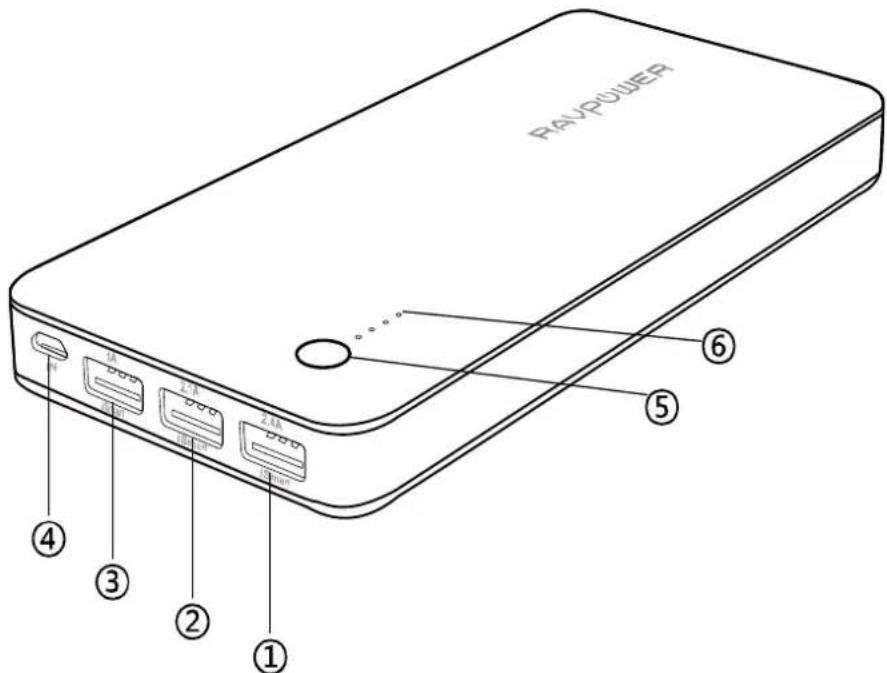
-
iSmart USB Output 1
-
Micro-USB Input
-
iSmart USB Output 2
-
Power Button
-
iSmart USB Output 3
-
Power Indicator
Charging the battery pack
Use the charging cable to connect the battery pack to any active USB port or a 2.1A or higher output charger. Charging will start automatically, and when the battery pack is fully charged, the battery level indicator will have all 4 LEDs on for 10 seconds and turn off automatically.
Charging your device
Connect the battery pack to your device using the USB charging cable or your own OEM cable. Charging will start automatically and stop when your device is at full battery (press the power button once if charging does not start).
* Power button
Press power button once to start charging when connected with your mobile devices. The battery pack will automatically turn off in 30 seconds after your device is fully charged.
Check battery level
Press the power button once to check battery level. We recommend charging the battery pack when less than 2 battery indicator LEDs remain.
Caution
- It is normal for the battery pack to become slightly warm during charging / discharging
- Keep away from heat, moisture, and liquid
- Not waterproof, please keep away from liquidor water
- Do not dismantle the battery pack
● Fully charge the battery pack at least once every six months
No charging?
If after connecting, your battery pack is not charging your device:
- Charge the battery pack to full capacity
- Try a different cable (use original OEM cable if possible)
- Try a different connection sequence (connect the charging cable to the battery pack first, then connect with your device)
- Contact our customer support
Warranty
RAVPower external battery packs are covered by RAVPower 18-months warranty from the date of its original purchase. If any problem occurs, please contact us by email at support@ravpower.com.We will instruct you on how to return the defective unit back to us for repair/ replacement.
We only provide warranty cover for products purchased from RAVPower or RAVPower authorized distributor. If you have purchased your charger from a different seller, please contact your seller for warranty cover and post-sales services.
NORTH AMERICA
E-mail:
support@ravpower.com(US)
support.ca@ravpower.com(CA)
Tel: 1-888-456-8468 (Monday-Friday:9:00 - 17:00 PST)
Address: 2228 Junction Ave, San Jose, CA 95131
EUROPE
E-mail:
support.uk@ravpower.com (UK)
support.de@ravpower.com(DE)
support.fr@ravpower.com(FR)
support.es@ravpower.com(ES)
support.it@ravpower.com(IT)
EU Importer: ZBT International Trading GmbH, Lederstr 21a,
22525 Hamburg, Deutschland
ASIA PACIFIC
E-mail: support.jp@ravpower.com (JP)
www.ravpower.com
Mærke : RAVPower
Model : Xtreme
Kategori : Powerbank