
UW6 F2C WB 2 - Fryser WHIRLPOOL - Gratis brugsanvisning og manual
Find enhedens vejledning gratis UW6 F2C WB 2 WHIRLPOOL i PDF-format.


Brugerspørgsmål om UW6 F2C WB 2 WHIRLPOOL
0 spørgsmål om dette apparat. Besvar dem du kender, eller stil dit eget.
Stil et nyt spørgsmål om dette apparat
Download vejledningen til din Fryser i PDF-format gratis! Find din vejledning UW6 F2C WB 2 - WHIRLPOOL og tag din elektroniske enhed tilbage i hånden. På denne side er alle dokumenter nødvendige for brugen af din enhed offentliggjort. UW6 F2C WB 2 af mærket WHIRLPOOL.
BRUGSANVISNING UW6 F2C WB 2 WHIRLPOOL

SENSING THE DIFFERENCE
QUICK START GUIDE
EN
Read the Instructions for Use carefully before using the appliance.
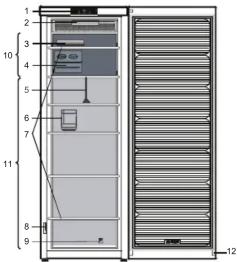
-
Control panel *
-
Light (LED system) *
-
Ice packs*
-
Ice Mate* or Ice tray*
-
Drawer divider*
-
Drawer drive
-
Bottle weight
-
Bottle rack ^™ 7. Glass shelves
-
Glass shelves
-
Rating plate with commercial name *
-
Rating plate with commercial name *
-
Down reversibility kit
-
Door reversibility kit "
-
Area for freezing fresh food or to store
frozen food
-
Area for storing frozen foods
-
Door seal
* Available on selected models
HOW TO START THE APPLIANCE
After plugging the appliance to the mains, it starts the operation automatically. After starting the appliance, wait at least 4-6 hours before placing food into the appliance. When the appliance is connected to the power supply, the display lights up and all the icons appear on the display for approximately 1 second. The default (factory) values of the freezer compartment settings light-up.
HOW TO REVERSE DOOR SWING
- see enclosed Instructions for Use (Version_2)
Is recommended to reverse door swing by two persons.
There is not foreseen door reversibility for:
- models with integrated handle
- models with glass panel on the door.
Specifications, technical data and images may vary from model to model.

www.whirlpool.eu/myfridge
00800-400 88 400 free-gratuit
FREEZE CONTROL indicator

6 ^th SENSE FREEZE CONTROL indicator
6th Sense Freeze Control is an advanced technology that reduces freeze burns and food preserves its original quality and color.
ECO NIGHT FUNCTION (NIGHT TIME RATE) /
FREEZE CONTROL button
Eco Night Function
Press to activate/deactivate the Eco Night function.
The Eco Night function enables appliance energy consumption to be concentrated in the reduced rate hours, generally at night (see the Instructions for Use). Freeze Control
Freeze Control is an advanced technology that reduces temperature fluctuations in the whole freezer compartment to minimum.
To activate/deactivate the Freeze Control function press for 3 seconds the FREEZE CONTROL button. If the function is engaged and the user modify the freezer temperature out of the working range, the function is automatically switched off.
In case of Fast freezing is engaged, the function "Freeze control" is inhibited until the Fast Freezing function switched off.(see the Instructions for Use)
ON/STANDBY button
To put the product in Stand-by, press and hold for 3 seconds. All the icons turn off except On/Standby indicator ⏻. To reactivate the appliance press once (briefly) this button.
TEMPERATURE DISPLAY
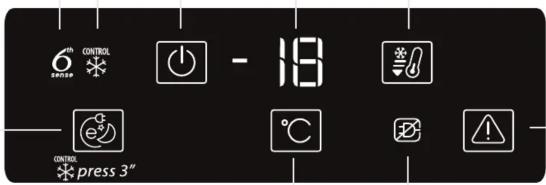
TEMPERATURE SETTING button
The appliance is normally factory-set for operation at the recommended temperature of -18^ . The internal temperature can be adjusted between -16^ and -24^ , proceeding as follows:
- Press to change the set point (°C). The storage temperature can be changed by -1°C with each pressure of the button: the value changes cyclically between -16°C and -24°C.
FAST FREEZE button
To activate/deactivate the Fast Freeze function simply press Fast Freeze button (see the Instructions for Use). The Fast Freeze function switches off automatically after 50 hours.
STOP ALARM button
Press in case of alarm (see the below Alarm Table).
ALARMS TABLE
ALARMS TYPE Signal Cause Cure
| Door open alarm | The acoustical alarm is activated and the Alarm Indicator 📁 blinks. | The door has remained open for more than 2 minutes. Close the door or press the Stop Alarm to mute the acoustical alarm. | |
| Temperature alarm | The Temperature display blinks (°C) and the Alarm Indicator 📁 remains on. | The inside temperature is not adequate. | Press the Stop Alarm button 📁; the acoustical alarm stops, the Temperature Display (°C) blinks and the Alarm Indicator 📁 remains on until a temperature < -10°C is reached. |
| Long Black-Out alarm | The Black Out Alarm icon 📁 remains on, the Alarm indicator 📁 sinks and the Temperature display (°C) blinks, showing the maximum temperature reached during blackout. | Prolonged power failure, able to cause the inside temperature to increase to 0°C. | Press the Stop Alarm button 📁; the acoustical alarm stops, the Temperature Display (°C) blinks and the Alarm Indicator 📁 remains on until a temperature < -10°C is reached. |
| Malfunction The letter “F” blinks on the display (°C). Product malfunction. Contact the After-sales Service. | |||
AE BG CZ PLFIDK NL FR DE GR HU IT KZ NO PT RO RU SK ES SE UA GB
400010844875
195138709.00


- QUICK START GUIDE
- HOW TO START THE APPLIANCE
- HOW TO REVERSE DOOR SWING
- FREEZE CONTROL indicator
- th SENSE FREEZE CONTROL indicator
- ECO NIGHT FUNCTION (NIGHT TIME RATE) /
- FREEZE CONTROL button
- Eco Night Function
- ON/STANDBY button
- TEMPERATURE SETTING button
- FAST FREEZE button
- STOP ALARM button
- ALARMS TABLE
Mærke : WHIRLPOOL
Model : UW6 F2C WB 2
Kategori : Fryser