MAG275 - Medieafspiller Infomir - Gratis brugsanvisning og manual
Find enhedens vejledning gratis MAG275 Infomir i PDF-format.


Brugerspørgsmål om MAG275 Infomir
0 spørgsmål om dette apparat. Besvar dem du kender, eller stil dit eget.
Stil et nyt spørgsmål om dette apparat
Download vejledningen til din Medieafspiller i PDF-format gratis! Find din vejledning MAG275 - Infomir og tag din elektroniske enhed tilbage i hånden. På denne side er alle dokumenter nødvendige for brugen af din enhed offentliggjort. MAG275 af mærket Infomir.
BRUGSANVISNING MAG275 Infomir
PRODUCT INFORMATION
Product:
Serial Number:
MAC:
Q.C. representative
The set includes as follows:
IPTV Set-Top-Box -1 pc.
External Power -1 pc.
Supply Unit, 12 V ID: Descent Control
AAA batteries -2 pc.
Instruction manual -1 pc.
Package box -1 pc.
Optionally the set may include as follows:
3,5 mm Jack to 3 RCA cable -1 pc.
LAN network cable -1 pc.
HDMI to HDMI cable -1 pc.
WARRANTY SERVICE COUPON
Dear customer! Thank you for purchasing this
ct and we hope you like it.
Your warranty
By virtue of the present Coupon the absence of defects in manufacturing of the product and its compounds is warranted for a year-term counted since date of purchase.
If during the mentioned warranty term the defects of materials or operation of product will be found, the product would be repaired or its defective parts would be replaced free of charge in the service center according to the following conditions.
Conditions
- The present warranty is only valid if the defective product is provided with properly filled in Warranty Service Coupon. If date of purchase is not pointed, the warranty term is counted since date of the product manufacturing which is defined under serial number. Service center reserves the right to refuse free warranty service and parts replacement
in case the mentioned above documents are not presented or the filled in it information is not complete or unreadable.
-
The present warranty does not enable the right for compensation and cover of loss received as a result of rearrangement of the product.
-
The present guarantee is invalid if model or serial number of the product is altered, erased, removed or unreadable.
-
The present warranty does not cover the following:
4.1. any adaptations and alterations with the aim of perfection and widening of the common scope of the product application specified in the Manual.
4.2. devices not specified in the coupon. 4.3. damage caused in result of:
a) improper maintenance including but not limited by following:
(1) use of the product not according to its intended purpose or Manual,
(2) mounting and maintenance of the product in conditions not corresponding to safety standards and regulations valid in the country of use.
(3) incorrect software installation (provides by service operator)
b) repair performed by not authorized service centers or dealers;
c) accidents, lightning stroke, flood, fire, incorrect ventilation:
d) transporting excluding cases when it is carried out by ASC
e) faults of system in which the present product had been using.
The present warranty does not encroach on legitimate rights of the customer enabled to him by the existing legislation and rights of the customer related to the dealer which may appear from the purchase-sale agreement had been concluded by them.
Warranty Service Coupon (to be filled in by a shop-assistant)
Date of Purchase:
Company-Seller
Address of Company-Seller:
I have no claims as to appearance and package contents. I accept the conditions of warranty service Signature of Customer
MANUFACTURER: "Telecommunication Technologies" Ltd, 1-A Tamozhennaya Square Odessa 65026 Ukraine
Place of Stamp
of Company-Seller
USAGE INSTRUCTION
Thanks you for
choosing our "IPTV
Set-Top-Box'
Follow the instructions of the present Manual to immerse yourself in the world of digital television.
Please read carefully the present manual before using the product.
Please keep the present manual at hand for referring to it in your further actions. Your services provider should supply you the separate manual containing the information, how to access to the services that are provided by service provider of the digital television.
Safe Using
Warning, Attention
Please pay your attention to footnotes with symbols that warn about the potential dangerous situations, such as

Warning!
Such symbol points to the dangerous actions which may cause injure the user.

Attention!
Points the situations described in the present instruction which may cause danger to the arrangement or to other equipment.
Pictograms: Warning and Attention are included into present User's Manual to ensure your safety and the product proper maintenance. Please follow the very instructions.
Enclosures
Use the accessories supplied with your arrangement or recommended by the manufacturer only.
Using of the accessories which are not supplied or not sanctioned by the manufacturer may be dangerous for the User or do harm to the arrangement operation.
Using of the not appropriate accessories eliminates guarantees of the product therewith.
Water and Moisture
To avoid damage which can cause ignition of the present product or lesion to the User with electrical current, the product and its accessories should not be undergone with any liquids, rain or high moisture.
Don't use the present product in the places where it may be exposed to the contact with a liquid or vapour.
Maintenance of Product
Service
The product should not be disassembled. The tries of the disassembling of the product may be dangerous for your life and for serviceability of the product. The selfsupporting disassembling invalidates you the product guarantee.
The maintenance should be effected by qualified specialists in service centers only. The product possesses protective sealings. Breaking or changing of the mentioned sealings invalidates guarantee of the product.
Cleaning
The product and accessories should be rubbed with dry cloth or tissue only. To ensure safety, before shell cleaning switch the power supply off the alternative current socket.
The shell may be cleaned from persistent spots with a slightly wet cloth or cleaning tissue.
Don't use cleaner or polish, benzol, solvents, abrasive items, liquid or aerosol detergent means for the product and accessories cleaning.
COPYRIGHTS AND TRADEMARKS
License for Software
Software Use Agreement
IMPORTANT – read carefully: when using the Software with your device, you agree thereby with every clauses of the Software Use Agreement. If you do not agree with the terms and conditions of the Software Use Agreement, you should immediately stop using the device and return it to your services provider completely.
License provision; limitations
According to this Agreement, Telecommunication Technologies, Ltd and your services provider are jointly to provide you with non-exclusive and non-transferrable license, without the right to sublicense, for use of all software and documents with the product only. You recognize and acknowledge that Telecommunication Technologies and your services' provider may regularly renew, change or extend the product software abilities. You confirm that:
a) You will not take attempts to change or extend or decompile or disassembly or redesign, nor otherwise get access to the software source code. b) You will not take attempts to delete or upload the product software. Any sale or transfer of the product will be ruled hereby.
Ownership
The Manufacturer and the Manufacturer's own licensors keep all the rights constituting ownership, including patent, copyright, trademark, and other intellectual property for the Software; and any improvement and modification of the Software. You recognize and acknowledge that the license according hereof does not grant you ownership for the Software but only restricted right of use it, according to provisions of this Agreement.
Warranty for the Software
To the maximum extent, according to applicable law, the Company does not make any submission and declines any and all warranties, whether express or implied, as to the Software, including, with no limitations, any implied demand warranties, correspondence to target destination, abuse of rights of third parties, neither those being result of interrelations or result of commerce. The Company does not guarantee the Software will be free of defects or errors; that any defects or errors will be corrected, or any function abilities of the Software will meet all your requirements.
Disclaimer
To the maximum extent, according to applicable law, the Company, its suppliers or licensors does not bear responsibility for probable loss of profit, suspension of activity, loss of information, or data or monetary funds, or for indirect, unforeseen, special, punitive or other loss or damage, which happen under this Agreement, use thereof or inability to use the Software, even in the case the Company or its suppliers or licensors have been informed of the possibility of such losses or
damages.
Expiration
This Agreement and licenses provided hereafter should be cancelled immediately, if you are unable to meet the license restrictions, as specified herein. The Company may cancel such agreement without prior notice.
After expiration of validity hereof, you should return all the Software, documents and accessories to the services supplier.
Miscellaneous
This Agreement is governed by the Law of Ukraine, regardless of its principles and conflicts. You agree thereby all disputes arising out of this Agreement will be subject to exclusive jurisdiction and be defined as a legal or administrative authority. The agreement should be agreed thereby for personal and exclusive jurisdiction and consideration of cases by those Courts. If any of terms or conditions hereof proves to be invalid by any applicable article or legal norms, it is deemed invalid. Any breach or default in payment, or any delay in implementation of any right will be deemed invalid. Any other law is not applied to any transaction payment. This Agreement is entire and exclusive agreement by and between you and the Company and prevails over any and all previous, whether oral or written, agreements and arrangements. This Agreement is subject to change in writing activity by duly authorized representative of the Court.
HIGH DEFINITION
IPTV SET-TOP-BOX
INSTRUCTION MANUAL
MAG270
IPTV SetTopBox
MAG275
IPTV SetTopBox
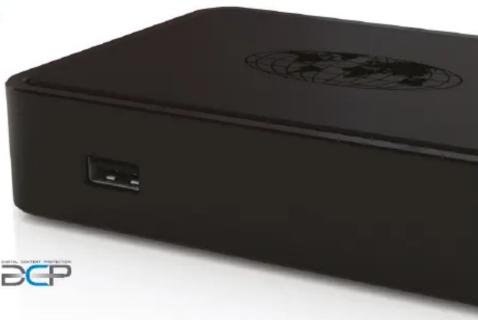
natural_image
Close-up of a black electronic device with a circular logo on the top and a small port, no visible text or symbols on the device body.HDMI™
DOLBY.
DIGITAL

SPECIFICATIONS
Physical Parameters
Model MAG270 / MAG275 Weight: 100 gm
weight: 190gr.
proximately). 87 mm depth
127 mm width
30 mm height
Operation temperature:
33°F - 104°F (1°C - 40°C)
Humidity: 5% \~ 93% RH
(without condensate)
Ethernet Interface
Ethernet Connector
RD-4.5 shielded UTR and CTR 5
Cable: OTP and STP 5 categories Speed: Auto-choice 10/100 Mbit
Indicators: Green - Connection.
Yellow - Activity
USB Interface
Type: USB 2.0
Quantity
TV antenna connector
TV aerial plug: IEC 169-2(PAL) connector
Reception of TV signal
Standards of TV: DVB-C/T (MAG-270)
DVB-C/1/12 (MAG-275)
Supported Audio-Video
Formats
Video Decoder: MPEG-4p10/H.264
MPEG-4 p2 MPEG-2
VC-1 (optional)
Audio Decoder: Dolby Digital (AC-3),
MPG-1 layers I & II,
MPEG-1/2 layers III (mn3) 16 bit PCM
(mps), 10-bit PCM
Supported video modes
FullHD - 1080(p,i)
HD - 720p
576p PAI 576i
PAL-3701 NTSC-480i
NISQ 100
Audio-Video Interfaces
Audio connectors: TRRS, (On adapter cable:
White=Left channel, Red=Right channel
2 V RMS nominal
10 KΩ
Composite Video Interface
Type: TRRS (Yellow connector on
Output: 1Vp-p
Power Supply Interface
Connector: DC cylindrical
2.1mm × 5.5mm
Type:
plug-and-socket,
DC current, center plus
Input: 12V ± 10%
Power. Less than 10 W in typical cond
in typical conditions
Outer Power Supply Unit
Type: Pulse with universal inlet
Input: 110\~240 V AC,
50\~60 Hz, 0.5 A max
Output:
Package
Type: cardboard box
oprox.)
57 mm height,
220 mm width
157 mm depth
Shipping Weigl
580 gr
SERVICE CENTERS
Service Centers List:
Europe, Africa, Asia:
56 Kaiserstrasse, Frankfurt Germany, 60329
e-mail: warranty@infomir.eu
USA:
2626 East 14th Street, Suite 101
Brooklyn, NY 11235 USA
e-mail: sales@infomirusa.com
Russia:
Moscow, Zorge Str., 9a, build.2, Russia, 125252
Tel: 8 915 055 89 61
e-mail: warranty@infomir.com
Ukraine and other regions
that are not mentioned above
4-D, Marshal Zhukov Avenue, Odessa, Ukraine, 65121
Tel: +38-(048)-740-67-40
e-mail: warranty@inflomir.edu
Additional Information:
Additional and extended information you can see by reference:
http://www.infomir.eu/
Notice of Copyright
©Telecommunication Technologies Ltd. All rights reserved.
The information contained herein is the property of Telecommunication Technologies Ltd. (the Company). Not any part hereof can be copied, reprinted, transferred, retyped, saved in search engine, modified or translated into any other language, including computer one, nor sublicensed in any way, whether electronic,
mechanical, magnetic, optical, chemical, manual or other one, without prior written consent by the Company Manager responsible for the Product, located at: 1a, Tamozhennaya Sq., Odessa 65026, Ukraine.
Any illegal use of the materials contained herein, by any person, will lead the person to the responsibility for the Company's damages.
Legal Clause
The Company will not bear any responsibility for any errors/mistakes, contained herein, neither any loss nor damage resulting from or related to this or the information contained herein, even if the Company has been notified of such loss or damage probability.
This document is intended for acquaintance with and training only. The Company reserves the right for changing specifications and other information contained herein, without prior notice.
Warranty
Warranty for your product is supplied via your services' provider. In the event your product requires maintenance service, you should contact the services' supplier directly.
Trademarks
Инфомир, Infomir are the trademarks of Infomir
The term UDM and UDM/High Definition Multimedia
The terms HDMI and HDMI high-definition multimedia Interface, and the HDMI logo are trademarks or
registered trademarks of HDMI Licensing Administrator,
Inc. in the United States and other countries.
Secure Media is the trademark of Secure Media
Naticc, MA. The product includes the copyright protection
technology, protected by American patents and
other intellectual property rights.
The use of the protection technology should be
authorized by the macrovision company and use for domestic use or use in the system paid-seen.
unless otherwise allowed by the Macrovision
Company. Redesigning and disassembling is illegal
legal. Approvals
ECC registration and requirements
The following paragraphs specify requirements
and information based on the Fed
Communication Committee Rules
Federal Communication Committee Rules, Part 15
The device has been tested and proved
corresponding to the Class B digital hardware
parameters, according to Part 15 of the Federal Communication Committee Rules. The Rules have
been developed to reduce the harmful affect to
living environment. The equipment generates,
uses and may emit radio-frequency energy, it is not installed neither used in accordance with the
manual that causes radio interference. However, in
specific installation, no guarantee exists t
interference fail to appear. To correct the interference, the following should be given a try:
- To increase distance between the equipment
and receiver.
- To connect the equipment in other way
• To take reference from dealer or skilled tele-radio technician
The following
The device corresponds to Federal
communication committee rules, Part 13, and is governed by the following two conditions:
• The device should not cause harmful affe
- The device should accept any interference in.
including the one able to cause unwanted
operation
Company name: Telecommunication Technologies
Ltd
1a, Tamozhennaya Sq., Odessa 65026, Ukraine
Safety
The Product:
MAG270 / MAG275 IPTV Set-Top Box
Power supply:
DC 12 V, 1A, Class III
Standards:
IEC 60065:2001 CAN/CSA-C22.2
No. 60065-03 UL 6500
EEC 72/23/EEC и 89/336/EEC.
Directive WEEE (2002/96/EC)
The Product is in accordance with the Directive
WEEE.

(No text)
(No text to output)
m = 311
COPYRIGHTS AND TRADE
m = 311
License for Software
ABOUT YOUR MAG270 / MAG275
About your MAG270 / MAG275
Thank you for purchasing of our product MAG270 / MAG275, which makes it possible to possess access to TV and movies through your digital television service.
You can control all functions of MAG270 / MAG275 by using remote control for navigating on screen menu provided by your service provider.
Getting Started
Please become acquainted in the next chapter how unpack and turn on power supply your MAG270 / MAG275.
In case of your product had been already adjusted for you by your provider look into "Use of Remote Control to control the device" for information how to use the product.
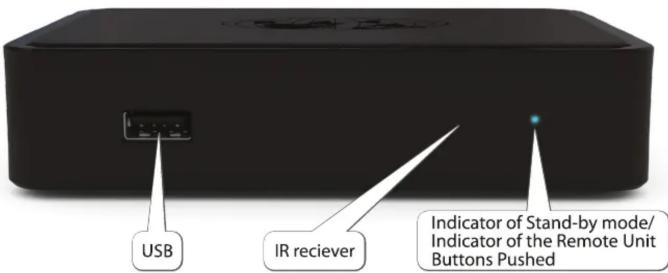
UNPACKING AND INSTALLATION THE PRODUCT
After the product extraction out of the
package it is necessary to handle it with care, do not drop, shake it and afford other influence.
The product is designed for horizontal allocation onto flat surface.
Do not place the product onto slippery surface, in place where it may be exposed to vibration or hazard to drop and other possible risks to the product to be damaged which may cause invalidation the product guarantee.
Do not dispose the product onto soft surface like on the carpet, bed, etc., for such surfaces cease access to the ventilation openings and complicate air flow that may cause to the product overheating and to invalidate guarantee in result.
Do not locate the product into the furniture in case of vacant clearance around the product is not provided for the sufficient product ventilation.
Do not place the product in place where it may be exposed to influence of direct sunlight, next to the sources of open fire and convectors.
Do not dispose the product on surfaces which in operating process may get warm, for instance,
video record player or intensifier and do not put anything on the top of the shell as well. Do not cover the product with anything. Containing liquids objects, such as vase, plant pot are not to be placed next to or on the product.
Do not touch or move the product during its operation. Switch off the product if you need to shift it.
The product is intended for use indoors. The power supply cord is to be put to prevent its deformation and jamming and touching it
with other objects as well. The power supply
cord is not to be laid under the carpets or blocked with anything where any damage may not be noticed.
Power supply unit
The product should be used with power supply unit provided by the manufacturer only.
The power supply unit is fitted out with plug which is intended for connecting to socket in your country usage. In case of the necessity in the product connecting in other country or in the region with other data of electric circuit the power supply unit adopted for use in the specified area should be received from the manufacturer.
Operation
The outer power supply unit of the product is getting warm in operation. In case of outer power supply unit gets hot, switch off promptly and get in touch with the equipment supplier for its replacement. Protection from atmospheric electricity or not using for a long time.
On coming the thunderstorm and also in case of the product is intended to be in no use for a long time, disconnect the power supply cord out of socket, switch off Ethernet, video and audio cables.
It is to protect the product from thunder discharges and power surges in the circuit.. Usage with Plasma Displays
In the product usage for watching with plasma screens do not pause the picture more than 5 minutes, otherwise it may cause 'burn-out' pixels on the screen. It is not considered as a defect of the product but peculiarity of plasma screens structure. The producer does not bear the responsibility for damages had been caused in such manner.
The Arrangement Designation
The product is intended to select digital audio & video channels from transport streams, decode and display them on TV. Any other use is prohibited.
It means Telecommunication Technologies insists on the product usage in entirely accordant to the law of copyright. The compliance with the specified laws leaves on conscience of the user. The unauthorized copying of the protected materials or spreading of the specified copies under definite conditions may violate the law of copyright and is to be previously adopted by possessor of the rights for the further commercial use.
Updating Software
The product possesses the capability of automatic software updating. The manufacturer and your services provider reserve the right for automatic software updating to improve the product functional capability.
During the software updating the product should not be used for watching and switched off until the complete software updating.
During the software updating the product switching off is inadmissible. The updating takes several minutes and since then you are able to continue enjoy on all delights of digital television services.
The product and accessories are packed into recycled package and plastic bags. Please keep all the packing materials for the further transportation. MAC270 / MAC275 is delivered with the following accessories:
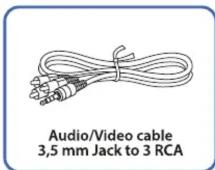
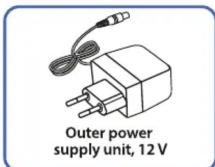
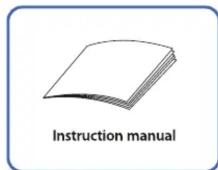
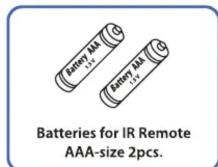
In case of absence of any of the specified accessories please refer to your services provider.
BACK PANEL MAG270 / MAG275
Connecting on the Back Panel
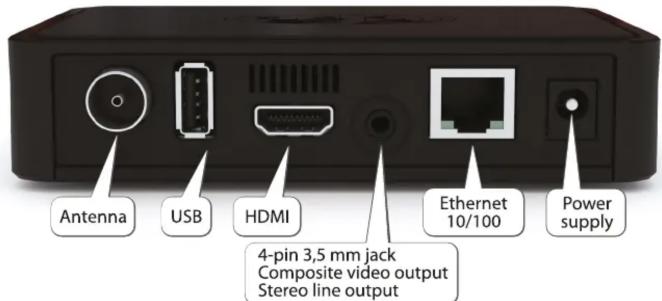
Digital TV Connecting to the Network
MAG270 / MAG275 receives TV channels and movies from the "digital TV" network.
Your services provider had been already installed the connection with the mentioned network.
- Connect cable for "digital TV" network into "digital TV"/Ethernet port on your product.
CONNECTING TO MAG270 / MAG275
The typical product connecting to TV and audio intensifier is shown on the presented diagram:
CONNECTING TO TV-SET WITH HDMI CONNECTOR - BEST QUALITY
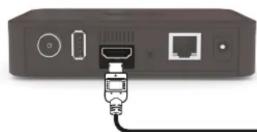
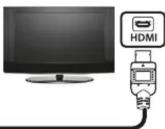
| Connector: | HDMI |
| Cable: | HDMI |
| Video: | SD + HD |
| Audio: | digital |
CONNECTING TO TV-SET (AUDIO/VIDEO INPUT) - GOOD QUALITY
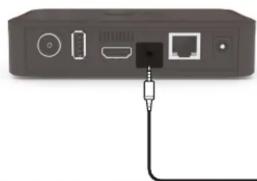
natural_image
Back panel of a network device showing ports and an Ethernet cable (no text or symbols visible)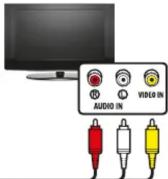
| Connector: | CVBS, L, R |
| Cable: | 3,5 mm Jack to 3 RCA |
| Video: | only SD |
| Audio: | analog |
| Composite video signal.For video/audio connection | |

Warning! Switch off all arrangements (TV, intensifier, etc.) and take power supply out of socket before connecting and
any cables disconnecting. In case of the intensifier does not connected leave digital audio outlets of your product not connected.
Video Connecting
The product allows connecting the following video cables: - HDMI – provides the best quality of picture and allows playing of digital video of high definition (HD). - Composite (CVBS) - enables standard picture quality. Use the connection with the best quality which could be applied with your equipment. - In case of your TV has HDMI inlet, use HDMI cable for the product connecting to TV through HDMI outlets. - In case of your TV is capable to operate with connection through component video inlet, use component video cable for the product connecting to TV through component video outlets.

Attention! In all cases follow coloration of
connectors and sockets on your equipment.
Audio Connecting
The product allows to conduct the following connections: • Left and right channels for playing stereo sound through (L and R outlets).

Attention! After the product unpacking please wait up
until the arrangement warms up to indoor temperature to avoid condensation which may cause
temperature to avoid condensation which may cause short circuit.

Warning! Be careful in connecting your TV cable to MAG270 / MAG275. Do not touch the plug of the TV antenna cord
with hands
USING REMOTE CONTROL TO CONTROL THE DEVICE
This section explains how to unpack Remote Control (RC) and prepare it for work. Your service provider can supply the product with an alternative RC. In that case please refer to the manual supplied by your service provider.
Inserting batteries
Remote Control requires two batteries type AAA, R03, LR03, UM-4, 286.
Inserting batteries into Remote Control.
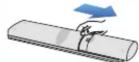

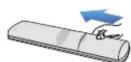
Shift the battery cover located
on back side of RC as shown
in the picture
Insert two batteries type AAA
(included in package) taking care
to observe the correct polarity
as shown on RC
Replace the battery cover as
shown in the picture.
Average lifetime of a batteries
is about 1 year
Important information about using batteries
Do not mix different types of battery or old and new batteries.
Do not use rechargeable batteries with the remote control.
Remove the batteries from the remote control if you are not going to use it for several weeks, to avoid the risk of leakage.
Please respect your environment and any local regulations and dispose of old batteries in a responsible manner.

Caution! Do not attempt to recharge the batteries.
Immediately remove any leaking batteries. Take care when handling leaking batteries as they may cause burns to the skin or eyes, or other physical injuries.
Introduction into the Programmable Remote Control Unit
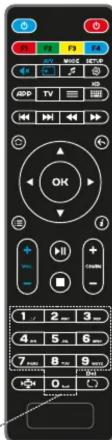
MAG270 / MAG275 package includes a remote control with a special block of five programmable buttons (marked with blue print colour), which you may want to choose for controlling other devices (TV set, amplifier).
To program the buttons do the following:
Press the «On/Off» and «A/V» buttons at the same time and hold it for 2 seconds. When the green light of the «On/Off» button will stop blinking and will light steadily, it means the RC is ready to learn.
- Press the button you want to «teach» — the green light will start blinking.
- Place the infrared lamps of two RCs opposite each other and press the button on the RC of the other device, the function of which you wish to copy on device RC. Hold for 2 seconds.
• After the green light two quick blinks you may continue programming other buttons.
- Repeat the procedure described above for all buttons you want to program for controlling external devices.
- Press the the «On/Off» and «A/V» buttons to save the programmed data; the green light should fade off.
Reset
Press SETUP and OK buttons at same time and hold for 2 seconds red LED will flash 5 times. Reset is done.
Programmable section
Additional

Sound On/Off
AV
Menu
Exit
Back
Info ⓘ

Confirm

Change a
pect ratio
To select a TV channel
[Non-Text]
MODE
#
SETUP
APP
TV
三
D
←
→
#
→
+
CHSABN
O
▶II
①
Del
C
Turn the Media
Player Off/Off
Change audio mode
Setup menu
Context menu
Quick TV access
TV Guide
Virtual keyboard
The image is too blurry to recognize any text content.
Skip
[Unreadable]
广力云
[Non-Text]
Switch channels
[Non-Text]
Play / Pause
Stop
-
Update
- PRODUCT INFORMATION
- WARRANTY SERVICE COUPON
- Your warranty
- Conditions
- Warranty Service Coupon (to be filled in by a shop-assistant)
- USAGE INSTRUCTION
- Thanks you for
- choosing our "IPTV
- Set-Top-Box'
- Safe Using
- Warning, Attention
- Warning!
- Attention!
- Enclosures
- Water and Moisture
- Maintenance of Product
- Service
- Cleaning
- COPYRIGHTS AND TRADEMARKS
- License for Software
- Software Use Agreement
- License provision; limitations
- Ownership
- Warranty for the Software
- Disclaimer
- damages.
- Expiration
- Miscellaneous
- HIGH DEFINITION
- IPTV SET-TOP-BOX
- INSTRUCTION MANUAL
- SPECIFICATIONS
- Physical Parameters
- Ethernet Interface
- USB Interface
- TV antenna connector
- Reception of TV signal
- Supported Audio-Video
- Supported video modes
- Audio-Video Interfaces
- Power Supply Interface
- Outer Power Supply Unit
- Package
- SERVICE CENTERS
- Service Centers List:
- Europe, Africa, Asia:
- USA:
- Russia:
- Ukraine and other regions
- Additional Information:
- Notice of Copyright
- Legal Clause
- Warranty
- Trademarks
- legal. Approvals
- ABOUT YOUR MAG270 / MAG275
- Getting Started
- UNPACKING AND INSTALLATION THE PRODUCT
- BACK PANEL MAG270 / MAG275
- CONNECTING TO MAG270 / MAG275
- Video Connecting
- Audio Connecting
- USING REMOTE CONTROL TO CONTROL THE DEVICE
- Inserting batteries
- To program the buttons do the following:
- Reset
Mærke : Infomir
Model : MAG275
Kategori : Medieafspiller