
FS108P - Netværksswitch NETGEAR - Gratis brugsanvisning og manual
Find enhedens vejledning gratis FS108P NETGEAR i PDF-format.


Brugerspørgsmål om FS108P NETGEAR
0 spørgsmål om dette apparat. Besvar dem du kender, eller stil dit eget.
Stil et nyt spørgsmål om dette apparat
Download vejledningen til din Netværksswitch i PDF-format gratis! Find din vejledning FS108P - NETGEAR og tag din elektroniske enhed tilbage i hånden. På denne side er alle dokumenter nødvendige for brugen af din enhed offentliggjort. FS108P af mærket NETGEAR.
BRUGSANVISNING FS108P NETGEAR

FS108P IG 11oct2.fm Page 1 Friday, October 12, 2012 3:29 PM
NETGEAR
Installation Guide
Connect with Innovation™
ProSafe 8-Port Switch with 4-Port PoE FS108P
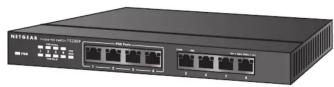
Step 1. Connect equipment
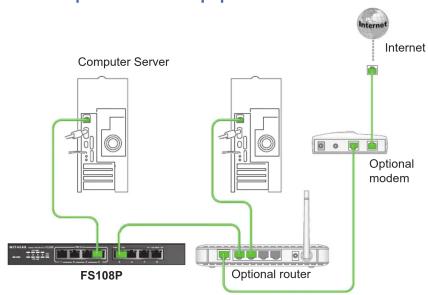
flowchart
graph TD
    A["Computer Server"] --> B["FS108P"]
    B --> C["Optional router"]
    C --> D["Internet"]
    D --> E["Internet modem"]
    C --> F["Green line path from Computer Server to FS108P"]
    style A fill:#f9f,stroke:#333
    style B fill:#ccf,stroke:#333
    style C fill:#cfc,stroke:#333
    style D fill:#fcc,stroke:#333
    style E fill:#cff,stroke:#333
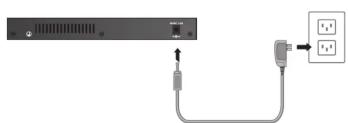
Step 2. Connect power Step 3. Check status
natural_image
Diagram showing a server rack connected to a plug and a socket (no text or symbols present)
Power LED

Or

PoE Active
Port LEDs

100 Mbps link
(left LED)

10 Mbps link

Activity (blinking)

No link (off)
PoE Max. LED

Less than 7W of PoE
power is available

PoE MAX LED was active
in the previous 2 minutes (blinking)

PoE ports are working normally (off)


FS108P IG 11oct2.fm Page 2 Friday, October 12, 2012 3:29 PM
Specifications
| Specification Description | |
| Network interface 10/10 | 0Mbps Auto-Uplink RJ45 ports with PoE enabled (ports 1 - 4)10/100Mbps Auto-Uplink RJ45 ports (port 5 - 8) |
| Network cable Category | 5 (Cat 5) or better Ethernet cable |
| Ports 8 | |
| Power adapter 48V @ | 1.25A DC input |
| PoE Power consumption | 53W max (all PoE ports, ports 1 to 4), 15.4W max per PoE port |
| Weight 0.74 kg (1.7 lbs) | |
| Dimensions(W x D x H) | 235 mm x103 mm x 27 mm9.3 in, x 4.1 in.x 1.1 in. |
| Operating temperature | 0 to 40 C (32 to 104 F) |
| Operating humidity 10% | to 90% relative humidity, non-condensing |
| Electromagnetic compliance | CE Class B; FCC Class B; VCCI Class B; C-Tick Class B, CCC |
| Safety agency approvals | CE/LVD, CCC |
CE
For the complete EU Declaration of Conformity, visit
http://support.netgear.com/app/answers/detail/a_id/11621/.
Statement of Conditions: In the interest of improving internal design, operational function, and/or reliability,
NETGEAR reserves the right to make changes to the products described in this document without notice.
NETGEAR does not assume layout(s) described herein.
Technical Support
After installing your device, locate the serial number on the label of your product and use it to register your product at https://my.netgear.com.
You must register your product before you can use NETGEAR telephone support.
NETGEAR recommends registering your product through the NETGEAR web site.
For product updates and web support, visit http://support.netgear.com.

This symbol appears in accordance with the European Union Directive 2002/96 on the Waste Electrical and Electronic Equipment (the WEEE directive). If you dispose of this product in the European Union, treat and recycle it in accordance with your jurisdiction's laws that implement the WEEE directive.
NETGEAR, the NETGEAR logo, and Connect with Innovation are trademarks and/or registered trademarks of NETGEAR, Inc. and/or its subsidiaries in the United States and/or other countries. Information is subject to change without notice. Other brand and product names are registered trademarks or trademarks of their
respective holders. © NETGEAR, Inc. All rights reserved. For indoor use only in all EU countries and Switzerland.


