
LiteWave LS1005 - Kontakt TP-LINK - Gratis brugsanvisning og manual
Find enhedens vejledning gratis LiteWave LS1005 TP-LINK i PDF-format.


Brugerspørgsmål om LiteWave LS1005 TP-LINK
0 spørgsmål om dette apparat. Besvar dem du kender, eller stil dit eget.
Stil et nyt spørgsmål om dette apparat
Download vejledningen til din Kontakt i PDF-format gratis! Find din vejledning LiteWave LS1005 - TP-LINK og tag din elektroniske enhed tilbage i hånden. På denne side er alle dokumenter nødvendige for brugen af din enhed offentliggjort. LiteWave LS1005 af mærket TP-LINK.
BRUGSANVISNING LiteWave LS1005 TP-LINK
Installation Guide
5/8-Port 10/100Mbps Desktop Switch
LiteWave
LS1005/LS1008
LED Explanation
Power
On: Power on
Off: Power off
Link/Act
On: Running at 10/100Mbps
Off: No device is linked to the corresponding port
Flashing: Transmitting/receiving data
Note: For simplicity, we will take LS1008 for example throughout this Guide.
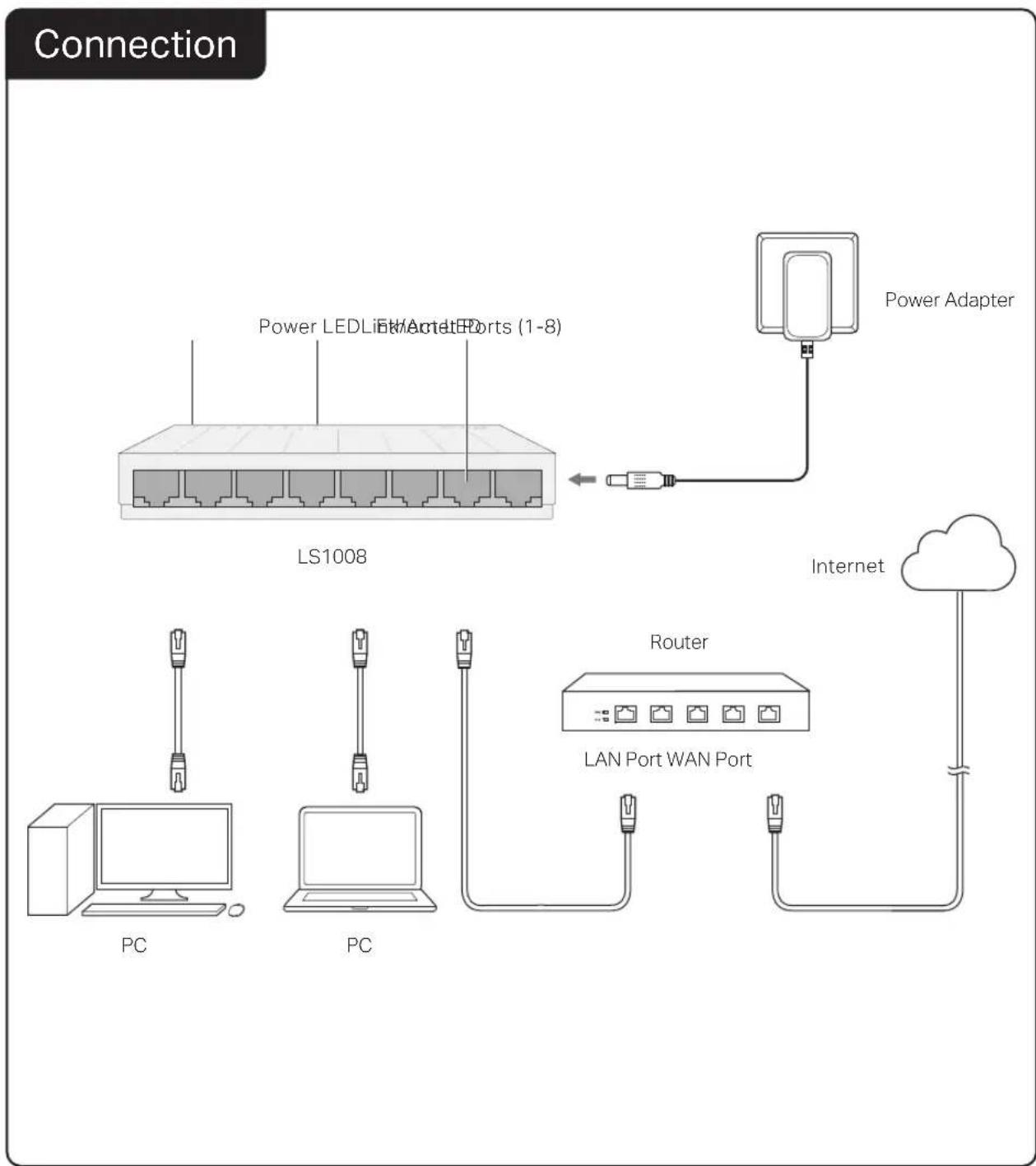
flowchart
graph TD
    A["Power Adapter"] --> B["LS1008"]
    B --> C["PC"]
    B --> D["PC"]
    B --> E["LAN Port WAN Port"]
    E --> F["Router"]
    F --> G["Internet"]
    style A fill:#f9f,stroke:#333
    style B fill:#ccf,stroke:#333
    style C fill:#cfc,stroke:#333
    style D fill:#fcc,stroke:#333
    style E fill:#cff,stroke:#333
    style F fill:#ffc,stroke:#333
    style G fill:#cfc,stroke:#333
Frequently Asked Questions (FAQ)
Q1. The Power LED is not lit.
The Power LED should be lit when the power system is working normally. If the Power LED is not lit, check as follows:
A1: Make sure the power adapter is connected to the switch with power source properly.
A2: Make sure the voltage of the power supply meets the requirements of the input voltage of the switch.
A3: Make sure the power source is ON.
Q2. The Link/Act LED is not lit when a device is connected to the corresponding port.
It is recommended that you check the following items:
A1: Make sure that the cable connectors are firmly plugged into the switch and the device.
A2: Make sure the connected device is turned on and works normally.
A3: The cable must be less than 100 meters long (328 feet).
Specifications
General Specifications
| Standard | IEEE802.3, IEEE802.3i, IEEE802.3u, IEEE802.3x |
| Protocol | CSMA/CD |
| Data Transfer Rate | Ethernet: 10Mbps (Half Duplex), 20Mbps (Full Duplex)Fast Ethernet: 100Mbps (Half Duplex), 200Mbps (Full Duplex) |
| Network Media (Cable) | 10Base-T: UTP category 3, 4, 5 cable (maximum 100m)EIA/TIA-568 100Ω STP (maximum 100m)100Base-TX: UTP category 5, 5e cable (maximum 100m)EIA/TIA-568 100Ω STP (maximum 100m) |
| Interface | 5/8 10/100Mbps Auto-Negotiation RJ45 Ports |
| LED Indicators | Power, Link/Act LED |
| Transfer Method | Store-and-Forward |
| MAC Address Learning | Automatically learning, automatically aging |
| Frame Forward Rate | 10Base-T: 14881pps/Port100Base-TX: 148810pps/Port |
Environmental and Physical Specifications
| Operating Temperature | 0°C to 40°C (32°F to 104°F) |
| Operating Humidity | 10% to 90%RH non-condensing |
| Storage Humidity | 5% to 90%RH non-condensing |


To ask questions, find answers, and communicate with TP-Link users or engineers, please visit https://community.tp-link.com to join TP-Link Community.

For technical support and other information, please visit https://www.to-link.com/support, or simply scan the QR code.

If you have any suggestions or needs on the product guides, welcome to email techwriter@tp-link.com.cn.
Safety Information
- Keep the device away from water, fire, humidity or hot environments.
- Do not attempt to disassemble, repair, or modify the device. If you need service, please contact us.
- Do not use damaged charger or USB cable to charge the device.
- Do not use any other chargers than those recommended.
- Adapter shall be installed near the equipment and shall be easily accessible.
- Place the device with its bottom surface downward.
TP-Link hereby declares that the device is in compliance with the essential requirements and other relevant provisions of directives 2014/30/EU, 2014/35/EU, 2009/125/EC, 2011/65/EU and (EU)2015/863.
The original EU declaration of conformity may be found at https://www.tp-link.com/en/ce.