
Mi Smart Scale - Vægt Xiaomi - Gratis brugsanvisning og manual
Find enhedens vejledning gratis Mi Smart Scale Xiaomi i PDF-format.


Brugerspørgsmål om Mi Smart Scale Xiaomi
0 spørgsmål om dette apparat. Besvar dem du kender, eller stil dit eget.
Stil et nyt spørgsmål om dette apparat
Download vejledningen til din Vægt i PDF-format gratis! Find din vejledning Mi Smart Scale - Xiaomi og tag din elektroniske enhed tilbage i hånden. På denne side er alle dokumenter nødvendige for brugen af din enhed offentliggjort. Mi Smart Scale af mærket Xiaomi.
BRUGSANVISNING Mi Smart Scale Xiaomi
Battery Installation
On image, which is below, shown how to open unit cover for the battery. Then place 4 batteries in the unit. Pull down the button cover

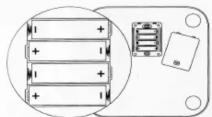
Xiaomi Smart Scales
Setting unit for weight measurement
You can adjust and set required unit for weight measurement by moving to the right, left, Mi scales can measure weight in kg, jīn and pounds.

Getting Started
After installing batteries, close the cover and set scales in a stable, level ground. Wait until on scale appears «HELLO», and then you can stand on it. Once on the scales numbers will flash, it means that your weight is defined.
To ensure accurate measurements, do not set scales on carpets, rugs, or other soft surfaces.

Installing «Mi Fit» APP on your mobile Pairing scales with mobile Meaning of symbols (characters)
To download and install the application «Mi Fit» for scales on mobile, in Mi Store or Apple Store find «Mi Fit» or scan QR-code.
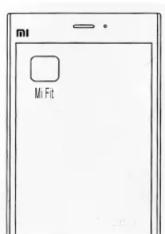

Attention! You need to login to your Mi-account.
Register there:
http://i.mi.com
Switch on scales application «Mi Fit», basing on the registration number of Mi scales connect it to mobile. After pairing, you can save results in the «cloud» check your weight on your phone and history of weighing.
If during weighing battery icon appears with a small charge, which you see on a picture below, please change them immediately.

If scales will flash OL (see picture below), this means the excess of the maximum weight 150 kg.

Cautions Основные характеристики Warranty
* Do not install scales on a slippery, wet surface, and do not stand on scales with wet feet to avoid falling.
* While weighing get with your both feet on the middle of scales to avoid them overturned.
* Surface is made of glass, so do not drop any items on scales, not to break them down or to damage.
* Use scales only on a dry surface, can not be immersed in water.
* Use wet and clean towel (cloth) to wipe the surface of scales, avoid contact with organic solvents, and other chemicals.
* After batteries are fully discharged, immediately remove them from scales, to avoid battery leakage and corrosion of scales body.
Weight range: 5-150kg The lowest value of division: 50g
Net weight: 1,9kg Weighing units: kg, pnd, jīn Surface material: tempered glass Bottom surface material: ABS
Operating temperature: 10-40C Power: 1.5W 4 AA batteries Size: 300mm x 300mm x 28.2mm
Requirements: Android 4.4 system and higher, support for Bluetooth 4.0 Mi phone; iOS 7.0 system and iPhone 4s / 5 / 5c / 5s / 6/6 Plus and above.
Warranty service is carried out in accordance with the law on «rights of consumers of China» and «Law of the PRC on the quality of products.» The warranty service includes:
During warranty period you have right for repair, exchange or to return product. For repair, replacement or returned goods you need to submit a receipt.
-
Within 7 days from the date of purchase, in case of a problem of «fault list» service center Xiaomi determines cause of the problem, then you can choose a free replacement of product, return or repair.
-
Within 8-15 days from the date of purchase, in case of a problem of «fault list» service center Xiaomi defines the problem, and then you choose a free replacement or repair of the product.
Warranty Fault list
- Within 12 months from the date of purchase, in case of a problem of «fault list» service center Xiaomi defines the problem, after which you are given a free repair.
| Product Name | List of faults |
| Scales MI | Scales MI Malfunction functions described in manual misincorporated weighing device or screen does not light up / misspelled words (characters) / it can not synchronize data leakage cracks due to construction or material devices |
Conditions are not covered by warranty
- Damages caused by (because of) unauthorized repair, improper use, falling objects, water ingress, accidents, alteration, misuse, or if, due to software installation problems arises with the device; or if broken, changed tags or serial number;
- The warranty period has already expired;
- Damage caused by force majeure;
- Did not match to Xiaomi service center «fault list».
Presence of toxic and hazardous substances
| Name | Toxic and hazardous substances or elements | |||||
| Pb | Hg | Cd | CrVI | PBB | PBDE | |
| Mi Scales | x | 0 | 0 | 0 | 0 | 0 |
O: toxic and harmful substances in all components of the device contained in an amount below the limit of value according to SJ / T11363-2006 «requirements limiting the presence of toxic and hazardous substances in products.»
X: indicates the presence of toxic and hazardous substances in at least one of the components in this product in excess of the limit, according to SJ / T11363-2006 «requirements limiting the presence of toxic and hazardous substances in products.»
This product complies to the European RoHS requirements and regulations for the protection of the environment; international countries still can not replace or reduce the aluminum content in copper alloy.
XIAOMI-MI.COM


- Battery Installation
- Xiaomi Smart Scales
- Setting unit for weight measurement
- Getting Started
- Installing «Mi Fit» APP on your mobile Pairing scales with mobile Meaning of symbols (characters)
- Cautions Основные характеристики Warranty
- Warranty Fault list
- Conditions are not covered by warranty
- Presence of toxic and hazardous substances
Mærke : Xiaomi
Model : Mi Smart Scale
Kategori : Vægt