
ELC 125/500 - Flash Elinchrom - Gratis brugsanvisning og manual
Find enhedens vejledning gratis ELC 125/500 Elinchrom i PDF-format.


Brugerspørgsmål om ELC 125/500 Elinchrom
0 spørgsmål om dette apparat. Besvar dem du kender, eller stil dit eget.
Stil et nyt spørgsmål om dette apparat
Download vejledningen til din Flash i PDF-format gratis! Find din vejledning ELC 125/500 - Elinchrom og tag din elektroniske enhed tilbage i hånden. På denne side er alle dokumenter nødvendige for brugen af din enhed offentliggjort. ELC 125/500 af mærket Elinchrom.
BRUGSANVISNING ELC 125/500 Elinchrom
ERROR MANAGEMENT ELC CONNECTION
www.elinchrom.ch/support
| Error number | Description Solution | |
| 1 Capacitor overvoltage | Switch the unit off, wait 2 minutes and switch the unit on again. If the error shows up again the unit requires a check-up at an authorized Elinichrom Service Centre. | |
| 4 Charge timeout | ||
| 6 | Voltage unstable (Charge hold error) | |
| 18 Discharge circuit error | ||
| 32 Head board type unknown | ||
| 33 14 VDC error | ||
elinchrom
ELC
125 / 500
Unit
natural_image
Exterior view of a modern office building (no signage)Quick Start Guide
| Radio | Mode Off Normal Speed | ||
| Group 1-4 | |||
| Frequency 1-20 | |||
| Flash mode | Flash mode Standard Action | ||
| Recycling time Fast Eco | |||
| Flash before ready | Yes No | ||
| Photocell mode On Off | |||
| Extras | Auto stand-by | Off | 1-59 min. |
| Auto-off | Off | 1-60 min. | |
| Auto-on | Yes No | ||
| Favorite function | Flash mode, Recycling time, Flash before ready, Second Group, Technical mode, Large ground | ||
| Logo mode | Low, High, Off, Low on ready, High on ready | ||
| Logo color | Group color | White | |
| Ready tone | 1-12 | ||
| Ready volume | Off, Min, Low, Default, High, Max | ||
| Error volume | Off, Min, Low, Default, High, Max | ||
| Keyboard click | Off, Min, Low, Default, High, Max | ||
| Background | Black | White | |
| Info | Friendly name | *ELC XXX - 1 by default (on through computer), XXX = 135/100 depending on the model | |
| Firmware rev. | ***** | ||
| Skyport ID | ***** | ||
| Life time | In hours (hhhhmm) | ||
| Power-on count | How many times the units has been turned on | ||
| Flash count | Total flash number | ||
-
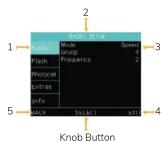
Menu selected
-
Selected menu options
-
Menu option settings navigation
-
Exit menu navigation
-
Back
Knob Button :
Scroll function to change setting /
press function to enter the menu option.
MODELLING LAMP BUTTON
Long press to enter the menu. Press menu for Mode, VFC, Tir
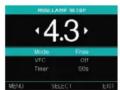
CONTROL PANELSETUP MENU
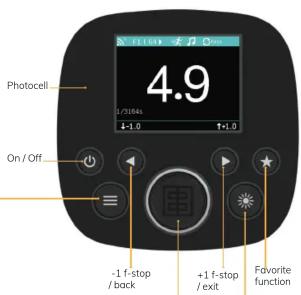
Knob Button
CW: +0.1 f-stop / down
CCW: -0.1 f-stop / up
DISPLAY PANEL – DASHBOARD
The colours of the upper bar correspond to the group number: blue for the group 1, yellow for the group 2, red for the group 3 and green for the group 4.

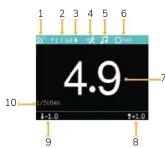
- EL-Skyport Synchronisation
(normal or speed sync mode)
2. EL-Skyport frequency channel
and group number
3. Photocell status
4. Flash mode Action
5. Volume
Mærke : Elinchrom
Model : ELC 125/500
Kategori : Flash