
SGH-E215L - Smartphone SAMSUNG - Gratis brugsanvisning og manual
Find enhedens vejledning gratis SGH-E215L SAMSUNG i PDF-format.


Brugerspørgsmål om SGH-E215L SAMSUNG
0 spørgsmål om dette apparat. Besvar dem du kender, eller stil dit eget.
Stil et nyt spørgsmål om dette apparat
Download vejledningen til din Smartphone i PDF-format gratis! Find din vejledning SGH-E215L - SAMSUNG og tag din elektroniske enhed tilbage i hånden. På denne side er alle dokumenter nødvendige for brugen af din enhed offentliggjort. SGH-E215L af mærket SAMSUNG.
BRUGSANVISNING SGH-E215L SAMSUNG
text_image
SAMSUNG SGH-E215L User's Guide Some of the contents in this guide may differ from your phone depending on the software of the phone or your service provider. Bluetooth QD ID: 8013992 World Voice Web http://www.samsungmobile.com Printed In Korea Code No.: SG189-352304 English (LTH), 06/2008, Rev.1.0Installing the SIM card and battery
- Remove the battery cover and insert the SIM card.
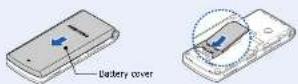
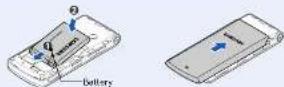
- Install the battery and reattach the battery cover.
Charging the battery
- Plug the supplied travel adapter into the phone and a power outlet.
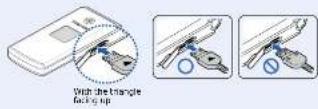
- When charging is finished, unplug the travel acceptor.
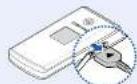
Note: Do not remove the battery from the phone without unplugging the travel adapter first. Otherwise, the phone may be damaged.
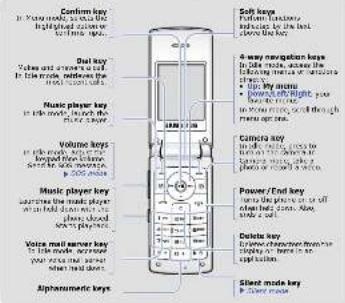
Phone layout and key functions
text_image
Confirm key in My mode, you can like highly connected mouse for this mode. Del key Value and correct key in the mode, touches the first mode call. Music player key in the mode, switches the player key. Volume keys in role with a key took then volume start to move to 200+ models. Music player key search the music player when I hold down each other played out do not playmen. Voice mail server key in the mode, we move from the mode to when I hold down. Alpharmomatic keys. Soft keys Default function in the mode, it is below the key. 4-way navigation keys in the mode, following functions of navigation shares: Up my mode Power/night gain, put to the mode. In your mode, click through make up one. Camera key in the mode, uses to to the mode. Camera key, click to the mode or more than a device. Power/End key that is like phone or off also used. Also, should be a set. Delete key in the mode, from the session in home to the set back Sled mode key in the mode.
Press and hold in Idle mode to disable all sounds on the phone. To exit, press and hold this key again.

With the phone closed, press the Volume keys 4 times to send an SOS message to preset phone numbers. Once the SOS message is sent, the phone will change to SOS mode and will receive calls only from the registered recipients. Upon receiving a call from the SOS message recipients, the phone will automatically answer the call. Press /40 call SOS mode.

Display
Your phone is in Idle mode when you are not on a call or using a menu. You must be in Idle mode to dial a phone number.
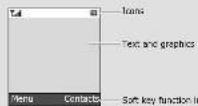
Your phone displays the following status indicators on the top of the screen:
Icon Description
Tail Signal strength
GPRS (2.5G) network
Connecting to
(2.55) network
G) Transferring data in
OPRS (2.36) NETWORK
Call it: progress
Out of your service area or offline music
Corporated to secured
web page
Cronaster
Cell diverting active
- Charging network
New message
- Доки voice тал!
(二) 2017年1月1日
Icon Description
SOS message feature
active
88 Bidders are active
n Bluetooth hands-free car
(1) Allemont
M
[Unreadable]
Silent mode (virration)
Silent mode (Mode)
Call finger set to vibore
Whisper mode, during a
(1)
Mute Moce, during a bar
Battery power level
Switching on or off the phone
-
Press and hold for more than one second to switch on the phone.
-
Press and hold for more than two seconds to switch off the phone.
Changing the display language
-
In idle mode, press the Menu soft key.
-
Select Settings → Phone settings → Language
-
Select a language
Making a call
-
In Idle mode, enter an area code and phone number, and press
-
Press forward the call.
Answering a call
- When the phone rings, press the Accept soft key or to answer a
call.
Press the Reject soft key or 10 reject the cell.
- Press to end the call.
Adjusting the volume
-
In Idle mode, press the Menu soft key.
-
Select Settings · Sound settings · Incoming call · Call alert
volume
-
Press Left or Right to adjust the volume level.
-
Press the Save soft key.
While a call is in progress, press the Volume keys to adjust the earpiece volume.
Changing a ringtone for calls
-
In Idle mode, press the Menu soft key.
-
Select Settings + Sound settings → Incoming call → Ringtone.
-
Select a ringtone category > a ringtone and press the Save soft key.
Redialing recent numbers
-
In idle mode, press
-
Press Leftor Right to select a call type.
-
Press Up or Down to scroll to the number you want.
-
Press to call the number.
Using the menus
In Idle mode, press the Menu soft key to enter the main menu.
Labels at the bottom corners of the display show the
current soft key functions. Press the left soft key (1) or right soft key (2) to perform the function
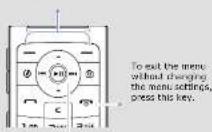
Use the 4-way navigation keys as shortcuts to access
your favorite means.
-
In idle mode, press the Menu soft key.
-
Select Settings · Phone settings · Shortcuts
-
Seal of Buy
-
Select a menu to be assigned to the key.
To select or modify a menu or feature.
-
In Idle mode, press the Menu soft key.
-
Press the Navigation keys to reach a desired menu and then press the Select soft key or ⏻
-
If the menu contains any submenus, locate the one you want by pressing the Navigation keys. Press the Select soft key or enter the submenu.
If the selected menu contains additional submenus, repeat this step.
-
Press the Navigation keys to find the setting of your choice.
-
Press the Select soft key or (60) confirm your chosen setting.
Shortcut numbers
You can quickly access the menu you want by using shortcut numbers. The shortcut number displays in front of the menu name in Menu made.
Menu map
| 1. Call log | 3.9 Converter | 6.5 Other files | |
| 1.1 Broadcast cards | 4.0 Timer | 6.6 Memory card | |
| 1.2 Missed calls | 3.1 Swapbox | 6.7 Memory static | |
| 1.3 Draded calls | 3.1 SIM RIS | ||
| 1.4 Received calls | 7. Calendar | ||
| 1.5 Delete all | 4. Browser | ||
| 1.6 Call manager | 4.1 Frame | 8. Camera | |
| 4.2 Image URL | |||
| 2. Phonebook | 4.3 Bookmarks | 9. Settings | |
| 2.1 Contact log | 4.4 Clear cache | 9.1 Time and date | |
| 2.2 License cardred | 4.5 Browser settings | 9.2 Phone settings | |
| 2.3 Group | 9.3 Display settings | ||
| 2.4 Special dial | 9.4 Soundings | ||
| 2.5 My name/act | 5. Messages | 9.5 Light settings | |
| 2.6 Own numbers | 5.1 Create messages | 9.6 Network services | |
| 2.7 Management | 5.2 My messages | 9.7 Burcath | |
| 2.8 Service number* | 5.3 Manager | 9.8 Security | |
| 5.4 Delete all | 9.9 Correct on | ||
| 5.5 Settings | 9.9 Correct on | ||
| 3. Applications | 5.6 5.8 Messages | 10.0 Memory status | |
| 3.1 Alarm | 5.7 Memory status | 10.1 Asset settings | |
| 3.2 Music player | 6. My files | ||
| 3.3 Voice recorder | 1. Download only 2 supported by your 50% card | ||
| 3.4 My video | 6.1 Images | ||
| 3.5 Video | 6.2 Audio | ||
| 3.6 Home | 6.3 Macr | 2. Download only 4 memory card or recorded | |
| 3.7 Third clock | 6.4 Sounds | ||
| 3.8 Calendar |
Entering text
Changing the text input mode
- Press and hold its switch between 19 mode and ABC mode.
- Press to change case or switch to Number mode.
- Press and hold, so switch to symbol mode;
T9 mode
- Press 2 to 9 to start entering a word. Press each key once for one letter.
The word you are entering appears on the display. It may change with each keypress. Finish entering the word before editing or deleting any keystrokes.
Example: To enter "Hello" in T9 mode, press 4, 3, 5, 5, and 6.
-
To display alternate word choices, press 0.
-
Press to insert a space and enter the next word.
ABC mode
Press the keys labeled with the letter you want once for the first letter, twice for the second letter, and so an.
For example, press 2 three times to enter "C" and 5 two times to enter "K."
Number mode
Press the keys corresponding to the digits you want.
Symbol mode
Press the keys corresponding to the symbol you want and press the OK soft key. You can press the Navigation keys to scroll to a symbol set.
Tips for entering text
• To move the cursor, press the Navigation keys.
• To delete characters one by one, press C. To delete all of the characters,
press and hold C.
- To insert a space between characters, press #
- The client (particulars) thanks to the place of a sec. mode, pressure

Sending an SMS message
-
In Idle mode, press the Menu soft key.
-
Select Messages → Create message → Text message.
-
Enter the message text.
-
Press the Options soft key and add items using the following options:
- Insert: add text templates, contacts, or bookmark items
- Add image: add images.
- Add animation: add emotions or animations.
Menu Description
| Menu > Applications> Timer | Set a period of time for the phone to count down. |
| Menu > Applications> Stopwatch | Measure elapsed time. |
| Menu > Applications> SIM AT | Use a variety of additional service offered by your service provider. Depending on your SIM card, this may available but localized differently. |
| Menu > Browser> Hama | Connect your phone to the network and feed the homepage at the wireless web service provider. |
| Menu > Browser> Enter URL | Enter a URL address in order to quickly access with pages. |
| Menu > Browser> Bookmarks | Serve URL addresses in order to quickly access web pages. |
| Menu > Browser> Clear cache | Clear the cache, which is a temporary memory. Also that stores recently accessed web pages. |
| Menu > Browser> Browser settings | Select a connection profile to be used for accessing the wireless web. |
| Menu > Messages> Create message> Text message or Multimetric message | Create and send messages to other mobile phones. |
Menu Description
| Menu > Settings> Security> Phone lock | Activate your phone password to protect your phone against unauthorised use. |
| Menu > Settings> Security> Change password | Change the phone password. |
| Menu > Settings> Security > Privacy | Lock access to messages, files, or all menu functions on the phone, except for cell functions. |
| Menu > Settings> Security > SIM lock | Set the phone to work only with the current SIM card by assigning a SIM lock password. |
| Menu > Settings> Security> Fixed dialling mode | Set the phone to restrict calls to a limited set of phone numbers, if supported by your SIM card. |
| Menu > Settings> Security> Change PIN2 code | Change your current PIN2, if supported by your SIM card. |
| Menu> Settings> Security> Mobile tracker | Track your phone when it is stolen or lost. When someone tries to use your phone with other SIM card, the phone will automatically send the press tracking message to your family or friends. This feature may be unavailable due to certain features supported by your service provider. |
- Add melody: add sounds.
- Attach: attach a contact, calendar item, memo, or task.
-
Press the Options soft key and select Send only or Save and send
-
Enter a destination number.
-
Press ⓤ to send the message.

Taking a photo
-
In Idle mode, press .⑧
-
Aim the lens at the subject and make any desired adjustments.
-
Press take a photo.
-
Press the Preview soft key to take another photo, or press C to delete the photo.

Quick feature reference
This section provides brief explanations of features on your phone.
Menu Description
| Menu > Call log> Recent contacts,Missed calls, Dialledcalls, or Receivedcalls | View the most recent calls you have missed,dialled, or received. |
Menu Description
| Menu > Messages> My messages | Access messages that you have received, sent, or failed in sending. |
| Menu > Messages> Tempurates | Insert templates of frequently used messages. |
| Menu > Messages> Doome all | Delete messages in each message folder, or all messages at once. |
| Menu > Messages> Settings | Set options for using messaging services. |
| Menu > Messages> SOS messages | Activate the SOS message feature. Enter recipients and select the repeat mode. |
| Menu > Messages> Memory status | Check information about the memory currently in use. |
| Menu > My files > Images, Videos, Music, Sounds, or Other files | Access media files and other files stored on the phone's memory. |
| Menu > My files > Memory cards | Access the files stored on a memory card. This menu is only available when you insert a memory card into the phone. |
| Menu > My files > Memory status | Check information about the memory currently in use. |
Menu > Calendar Keep track of daily or monthly schedule.
Menu Description
| Menu > Settings > Connection settings | Create and customize the profiles containing the settings for connecting your phone to the network. |
| Menu > Settings > Memory status | Check information about the memory currently in use. |
| Menu > Settings > Reset settings | Reset the phone to the factory default settings. |
| Important safety precautions | |
| Rece these guidelines before using your wireless phone, failure to comply with them may be dangerous or illegal. | |
| Drive safety at all times | |
| Do not use a hand-held phone while driving, park your vehicle first. | |
| Switching off when refuelling | |
| Do not use the phone at a reluding pair (service station) or near facts or chemicals. | |
| Switching off in an aircraft | |
| Wireless phones can cause interference. Using them in an aircraft is both illegal and consensus. | |
| Switching off near all medical equipment | |
| Hospitals and health care facilities may be using equipment that could be sensitive to external RF energy. Follow any regulators or rules in force. | |
| Interference | |
Menu Description
| Menu > Call log> Delete all | Delete the call logs in each call type, or all logs at once. |
| Menu> Call log> Call manager | View the duration of recent calls you have dated and received, and the cost of your calls, if supported by your SIM card. Also, make a list of the phone numbers from which you want to reject calls. |
| Menu > Phonebook> Contact list | Search for contacts in Phonebook. |
| Menu > Phonebook> Create contact | Add a new contact to Phonebook. |
| Menu > Phonebook> Group | Create a group and select a ringtone and image for incoming calls from members of a group. Also, change the group name. |
| Menu > Phonebook> Space dial | Assign speed dial numbers to your most frequently dated numbers. |
| Menu > Phonebook> My homecard | Create a name card and send it to other people. |
| Menu > Phonebook> Own numbers | Check your phone numbers or assign a name to them. |
| Menu > Phonebook> Management | Copy or move all contacts on the SIM card to the phone's memory, and vice versa. You can also check memory information for contacts. |
Menu Description
| Menu > Camora Take photos in various modes. | |
| Menu > Settings > Time and date | Set the current time and date manually or set your loci time zone. |
| Menu > Settings > Phone settings > Language | Select a language to be used for the display text. |
| Menu > Settings > Phone settings > Greeting message | Enter the greeting messages to be displayed when the phone is switched on. |
| Menu > Settings > Phone settings > Shortcuts | Set the Navigation keys as shortcuts to access your favorite menu directly. |
| Menu > Settings > Phone settings > My menu | Set up a menu of your own using your favorite menu items, which can be easily accessed by arising [14] in loci music. |
| Menu > Settings > Phone settings > Volume key | Set whether the phone mates the call ninger or rejects a call if you press and hold the Volume keys when a call comes in. |
| Menu > Settings > Phone settings > Extra settings | Set the automatic replacing feature or the answering method. |
All wireless phones may be subject to interference, which could affect their performance.
Special regulations
Follow any special regulations in force in any area and always switch off your people wherever it is forbidden to use it.
Water resistance
Your phone is not water-resistant. Keep it cry.
Sensible use
Use only in the normal position (paid to your car). Avoid unnecessary contact with the antenna when the phone is switched on.
Emergency calls
Key in the emergency number for your present location, then press [→]o not
Email children and your phone
Keep the phone and all its parts including accessories out of reach of small
Accessories and batteries
Use only Samsung-approved batteries and accessories, such as headsets and PC data cables. Use of any unauthorized accessories could damage your phone and may be dangerous.

Risk of explosion if a battery is replaced by an incorrect type. Dispose of used batteries according to the instructions.

At very high volume, prolonged listening to a headset can damage your hearing.
Menu Description
| Menu > Phenobox > Service number | Access the list of service numbers assigned by your service provider. |
| Menu > Applications > Alarm | Set an alarm to sound at a specific time. |
| Menu > Applications > Music player | Listen to music. You can also make your own music playlists. |
| Menu > Applications > Voice recorder | Record voice memos and listen to them. |
| Menu > Applications > FM radio | Listen to music or news via the FM radio on your phone. First, you must connect your phone with the headset, which serves as a radio antenna. |
| Menu > Applications > Java world | Access the embedded Java games and downloaded Java applications. |
| Menu > Applications > Mema | Make momos for things that are important and manage them. |
| Menu > Applications > Word clock | Set your local time zone and find out the current time in another part of the world. |
| Menu > Applications > Calculator | Perform basic arithmetic functions. |
| Menu > Applications > Converter | Do conversions such as length and temperature. |
Menu Description
| Menu > Settings > Phone settings > Offline mode | Switch the phone to Offline mode. This mode is hopeful when you want to use your phone in a piece where you are not allowed to use mobile devices, such as in an airplane and at a hospital. |
| Menu > Settings > Display settings | Change the settings for the display. |
| Menu > Settings > Sound settings | Change the settings for the various sounds. |
| Menu > Settings > Light settings | Change the settings for the backlight and keypad light. |
| Menu > Settings > Network services | Across network services offered by your service provider. |
| Menu > Settings > Bluetooth | Connect the phone wirelessly to other Bluetooth devices and exchange data with them, toix hands-on-hand, or control the phone remotely. |
| Menu > Settings > Security > PIN check | Activate your PIN to protect your SIM card against unauthorized use. |
| Menu > Settings > Security > Change PIN code | Change the PIN. |
Qualified service
Only qualified service personnel may repair your phone.
SAR information
Your wireless phone is a radio transmitter and receiver. It is designed and manufactured not to exceed the emission limits for exposure at radio frequency (RF) energy used by the Federal Commission of Commercial FCC of the U.S. (100 W). The standard, approximate, and comprehensive guidelines and conditions permitted levels of RF energy for the general population. The guidelines are based on the safety standards that were developed by independent scientific organizations through periodic and thorough evaluation of scientific studies. The standards include a substantial safety margin designed to ensure the safety of all persons, regardless of age and health. The exposure standards for wireless phones emails a unit of measurement known as Specific Absorption Race (SAR). The SAR limit set by the FCC is 1.6 W/kg. The highest SAR values for this mode shown are reported to the FCC are 0.95 W/kg. Daily mean: 0.85 W/kg; CCR 1500 Hz/Hz: 1.04 W/kg; Daily avg: 0.343 W/kg.
^a In the U.S. and Canada, the S&P limit for mobile phones used by the public is 2.6 metering (WHP) required over the gram of tissues. The standard incorporation is a substantial margin of safety to give additional protection for the public and to account for any variations in measurements.