SC11HD-V2 - Ukategoriseret Blustream - Gratis brugsanvisning og manual
Find enhedens vejledning gratis SC11HD-V2 Blustream i PDF-format.


Brugerspørgsmål om SC11HD-V2 Blustream
0 spørgsmål om dette apparat. Besvar dem du kender, eller stil dit eget.
Stil et nyt spørgsmål om dette apparat
Download vejledningen til din Ukategoriseret i PDF-format gratis! Find din vejledning SC11HD-V2 - Blustream og tag din elektroniske enhed tilbage i hånden. På denne side er alle dokumenter nødvendige for brugen af din enhed offentliggjort. SC11HD-V2 af mærket Blustream.
BRUGSANVISNING SC11HD-V2 Blustream
SC11HD-V2
Quick Reference Guide
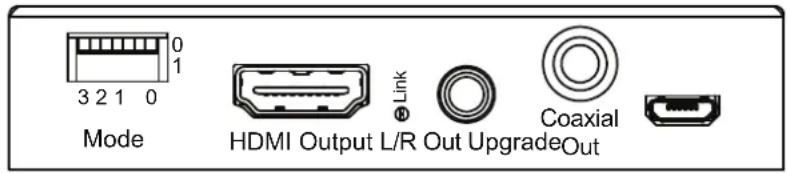
text_image
0 1 3 2 1 0 Mode HDMI Output L/R Out UpgradeOut Link Coaxial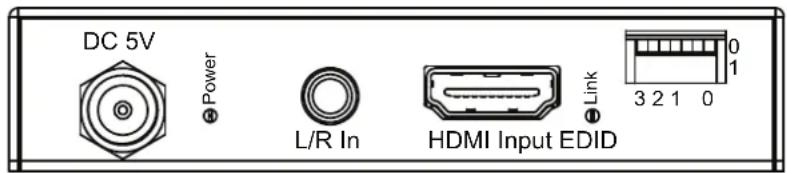
text_image
DC 5V Power L/R In HDMI Input EDID Link 0 1 3 2 1 0Introduction
Our Blustream SC11HD-V2 is a HDMI 4K scaler, designed for installations with multiple displays that support different maximum video resolutions. The SC11HD-V2 is ideal for installations with multiple output resolution requirements.
The SC11HD-V2 supports down-scaling of 4K video to 1080p and supports HDCP 2.2 with advanced EDID management. It also features either de-embedding or embedding audio within the HDMI signal path.
KEY FEATURES:
- HDMI 4K video scaler
• Supports 4K UHD video input (3840 x 2160 @30Hz 4:4:4 with HDR) 3840 x 2160 @ 50/60Hz 4:2:0)
• HDMI output will downscale 4K@24/25/30Hz 4:4:4 to 1080p@24/25/30Hz, and 4K@24/25/30/50/60Hz 4:2:0 to 1080p@24/25/30/50/60Hz
• Supports 10-bit HDR10 - Can be configured to work as either a HDMI audio de-embedder or audio embedder
- HDMI audio de-embedded to both analogue L/R audio and coaxial digital outputs concurrently (2CH PCM only)
- Embed analogue L/R 2CH audio input onto HDMI output
• Supports bitstream passthrough of multichannel surround sound including object-based audio formats in line with HDMI specifications
• Advanced EDID management - HDCP 2.2 support
• CEC and ARC pass through
Specifications
Audio Input Connectors: 1x Analogue Left/Right audio (3.5mm stereo jack)
Audio Output Connectors: 1x RCA (SPDIF) & 1x Analogue Left/Right audio (3.5mm stereo jack)
Video Input Connectors: 1x HDMI Type A, 19-pin, female
Video Output Connectors: 1x HDMI Type A, 19-pin, female
EDID: 4-PIN DIP Switch
MODE: 4-PIN DIP Switch
Product upgrade: 1x Female Micro USB
Dimensions including connections (W x H x D): 83mm x 15mm x 83mm
Shipping Weight: 0.5kg
Operating Temperature: 32°F to 104°F (0°C to 40°C)
Storage Temperature: - 4°F to 140°F (- 20°C to 60°C)
Power Supply: 5V/1A DC
Package Contents:
- 1x SC11HD-V2
- 1x 5V/1A DC power supply
- 1x Mounting kit
- 1x Quick Reference Guide
Maintenance
Clean this unit with a soft, dry cloth. Never use alcohol, paint thinner or benzene to clean this unit.
Certifications
FCC NOTICE
This equipment has been tested and found to comply with the limits for a Class B digital device, pursuant to part 15 of the FCC Rules. These limits are designed to provide reasonable protection against harmful interference in a residential installation. This equipment generates, uses, and can radiate radio frequency energy and, if not installed and used in accordance with the instructions, may cause harmful interference to radio communications. However, there is no guarantee that interference will not occur in a particular installation. If this equipment does cause harmful interference to radio or television reception, which can be determined by turning the equipment off and on, the user is encouraged to try to correct the interference by one or more of the following measures:
• Reorient or relocate the receiving antenna.
- Increase the separation between the equipment and receiver.
- Connect the equipment into an outlet on a circuit different from that to which the receiver is connected.
- Consult the dealer or an experienced radio/TV technician for help.
CAUTION - changes or modifications not expressly approved by the party responsible for compliance could void the user's authority to operate the equipment.
CANADA, INDUSTRY CANADA (IC) NOTICES
This Class B digital apparatus complies with Canadian ICES-003.
Operation is subject to the following two conditions: (1) this device may not cause interference, and (2) this device must accept any interference, including interference that may cause undesired operation of the device.
CORRECT DISPOSAL OF THIS PRODUCT
This marking indicates that this product should not be disposed with other household wastes. To prevent possible harm to the environment or human health from uncontrolled waste disposal, recycle it responsibly to promote the sustainable reuse of material resources. To return your used device, please use the return and collection systems or contact the retailer where the product was purchased. They can take this product for environmentally safe recycling.
For the full Blustream SC11HD-V2 User Manual please visit the download area of our website www.blustream.co.uk
Panel Descriptions
Front Panel
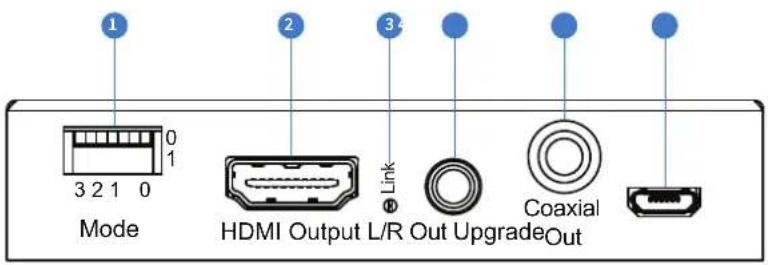
text_image
1 2 3 4 Mode HDMI Output L/R Out Upgrade OutConnections:
1 MODE dip-switches - adjust the MODE setting for HDMI output - see page 5 for further details
2 HDMI output - connect to a HDMI display / end point
3 HDMI LED indicator - lit when there is an active HDMI connection to a display / end point
4 Left/Right Analogue Audio Output 3.5mm stereo jack - Extract audio from HDMI input source NOTE: Source audio must be PCM 2 channel
5 Coaxial Digital Output - used when audio is de-embedded from HDMI
6 Micro USB port - used for firmware upgrade only
Rear Panel

text_image
DC 5V Power L/R In HDMI Input EDID Link 7 8 9 10 11 0 1 3 2 1 0Connections:
7 Power connection – use supplied 5V 1A DC adaptor
8 Left/Right Analogue Audio Input
9 HDMI input - connect to source device
10 HDMI LED indicator - lit when there is an active HDMI connection from source device
EDID dip-switches - adjust the EDID setting for source input - see page 4 for further details
EDID Management
EDID (Extended Display Identification Data) is a data structure that is used between a display and a source. This data is used by the source to find out what audio and video resolutions are supported by the display then from this information the source will determine what the best resolution is to output.
While the objective of EDID is to make connecting a digital display to a source a simple plug and play procedure issues do arise when multiple displays or video matrix switching is introduced because of the increased number of variables.
The SC11HD-V2 will act as an 'end point' in the HDMI signal path. Using the EDID dip-switches pre-determins the video resolution and audio format of the source regardless of the video output resolution that the SC11HD-V2 scales to.
To change the EDID settings move the EDID dip-switches as required on the front panel of the unit. Please see adjacent table for settings.
Note: You must power-cycle the SC11HD-V2 after changes have been made in order for the EDID settings to update.
| 3210 | EDID Type | ||
| Combination of DIP positions | |||
| 0000 Copy EDID from output | |||
| 0001 1080p 2.0ch | |||
| 0010 1080p 5.1ch | |||
| 0011 1080p 7.1ch | |||
| 0100 1080i 2.0ch | |||
| 0101 1080i 5.1ch | |||
| 0110 1080i 7.1ch | |||
| 0111 4K60Hz 4:2:0 2.0CH | |||
| 1000 4K60Hz 4:2:0 5.1CH, | |||
| 1001 4K60Hz 4:2:0 7.1CH | |||
| 1010 4K30Hz 4:4:4 2.0CH | |||
| 1011 4K30Hz 4:4:4 5.1CH | |||
| 1100 4K30Hz 4:4:4 7.1CH | |||
| 1101 DVI 1280x1024 | |||
| 1110 DVI 1920x1080 | |||
| 1111 DVI 1920x1200 | |||
Mode Management
| 3 2 1 0Combination of DIP positions | Mode Settings |
| 1 x x 0 Always convert 4K formats to 1080p | |
| 0 x x 0 Auto convert 4K formats to 1080p when the device detects the display cannot support 4K | |
| x 1 x 0 HDCP follows the source device | |
| x 0 x 0 HDCP follows the display device | |
| x x 1 0 Audio embed mode - embeds the analogue left/right audio onto the HDMI signal | |
| x x 0 0 Audio bypass mode - allows HDMI audio to pass through | |
| x x x 1 Mode control by serial USB | |
| x x x 0 Mode control by DIP switch | |
Note: You must power-cycle the SC11HD-V2 after changes have been made in order for the Mode settings to update. The SC11HD-V2 cannot up-scale to 4K video formats.