Quokka Run - Lommelygte Knog - Gratis brugsanvisning og manual
Find enhedens vejledning gratis Quokka Run Knog i PDF-format.


Brugerspørgsmål om Quokka Run Knog
0 spørgsmål om dette apparat. Besvar dem du kender, eller stil dit eget.
Stil et nyt spørgsmål om dette apparat
Download vejledningen til din Lommelygte i PDF-format gratis! Find din vejledning Quokka Run - Knog og tag din elektroniske enhed tilbage i hånden. På denne side er alle dokumenter nødvendige for brugen af din enhed offentliggjort. Quokka Run af mærket Knog.
BRUGSANVISNING Quokka Run Knog
QUOKKA RUN
QUICK START GUIDE
GET STARTED
Quokka comes locked
To unlock hold the button for 5 seconds, light will unlock and turn on at the last used mode.
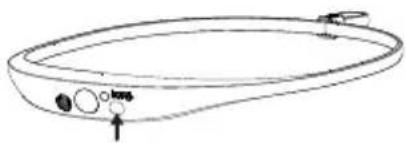
natural_image
Line drawing of a bowl-shaped object with control buttons and an arrow pointing to the bottom (no text or symbols)OPERATION
Turn On / Off: Long press of the button.
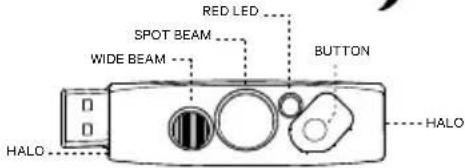
Modes: To change between the 4 light modes, use a quick double press of the button.
The modes are:
Combo (Spot with Wide) / Spot Only / Wide Only / Halo.
Brightness & Flash Setting: To adjust the brightness or flash of a mode, use a single press of the button.
The brightness settings for all modes except Halo: High / Medium / Low / High Steady & Halo / High Steady & Halo Flash.
The brightness settings for Halo are:
High / Medium / Low / High Flash / Random Flash.
CHARGING
Fully charge the Quokka before first use.
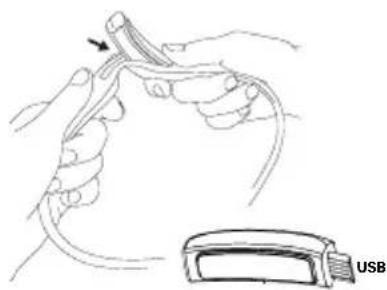
To charge, take the light out of the silicone strap.
Pop out left side of the light first (to avoid damaging the usb on right side).
Then charge in any USB charge port.
Charge time: 3.3 hr.
HEADSTRAP
Secure the band with adjustable strap toggle. Once you've found your size you can set and forget.
BATTERY INDICATOR
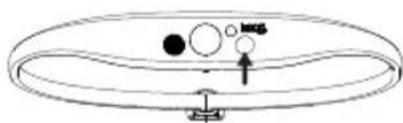
When the light is turned on/off the Red LED will flash twice to indicate battery is Low. When charging, the Red LED is on. Once fully charged, the Red charging LED turns off.
LOCK BUTTON
TO LOCK:
If light is off: After 1 second of holding button, the light will turn on, if button is held for an additional 4 seconds the Spot LED will flash 3 times to indicate the light is locked.
If light is on: After 1 second of holding button, the light will turn off, if button is held for an additional 4 seconds the Spot LED will flash 3 times to indicate the light is locked.
natural_image
Illustration of hands holding a medical device with an arrow pointing to a cable or wire (no text or symbols present)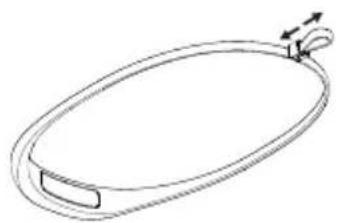
natural_image
Simple line drawing of an oval-shaped object with a handle and a small loop, no text or symbols present.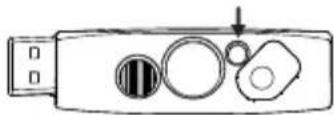
natural_image
Simple line drawing of a circular object with internal circles and an arrow, no text or symbols presentTO UNLOCK:
Hold button for 5 seconds, light will unlock and turn on in the last used mode.
| Modes / Lumen | Max Lumen Runtime | Min Lumen Runtime |
| Combo 100 Lm 2.5 hr 25 hr | ||
| Spot 75 Lm 4 hr 24 hr | ||
| Wide 20 Lm 10 hr 46 hr | ||
| Halo 12 Lm 6.5 hr 36 hr |
CARE & MAINTENANCE
To clean: wipe with damp, lint-free cloth, don't use harsh chemicals, air dry, don't sun dry.
WARRANTY
The light is guaranteed for 2 years against manufacturing defects only. The battery is guaranteed for 6 months against manufacturing defects only. See the website for more details. KNOG.COM.AU