Bilby - Lommelygte Knog - Gratis brugsanvisning og manual
Find enhedens vejledning gratis Bilby Knog i PDF-format.


Brugerspørgsmål om Bilby Knog
0 spørgsmål om dette apparat. Besvar dem du kender, eller stil dit eget.
Stil et nyt spørgsmål om dette apparat
Download vejledningen til din Lommelygte i PDF-format gratis! Find din vejledning Bilby - Knog og tag din elektroniske enhed tilbage i hånden. På denne side er alle dokumenter nødvendige for brugen af din enhed offentliggjort. Bilby af mærket Knog.
BRUGSANVISNING Bilby Knog
GET STARTED
Bilby comes locked
To unlock hold both buttons for 3 seconds
OPERATION
Turn On: Long press of button 1
Turn Off: Press and hold both buttons
WHEN LIGHT IS ON WHEN LIGHT IS OFF
| OPERATION BUTTON 1 BUTTON 2 | ||
| Short Press | Change Mode | Change Brightness |
| Long Press | Tilt Beam Down | Tilt Beam Up |
| Double Press | Boost Mode 1 | Boost Mode 2 |
| Press & Hold both buttons | Turn Off | |
| OPERATION | BUTTON 1 | BUTTON 2 |
| Short Press | Battery Charge Status | Battery Charge Status |
| Long Press | Turn Light On | - |
| Double Press | - | - |
| Press & Hold both buttons | Lock/Unlock Light | |
CHARGING
Fully charge the Bilby before the first use.
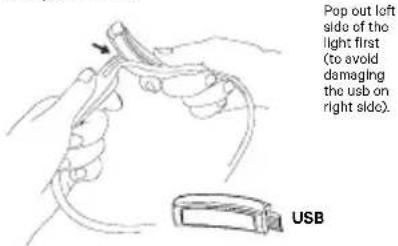
Pop out the inner pod to access the USB.
Then charge in any USB charge port.
Charge time: 4 hr.
text_image
Pop out left side of the light first (to avoid damaging the usb on right side). USBADJUSTABLE HEADSTRAP
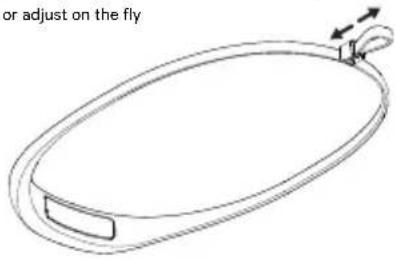
The silicone strap adjusts with a toggle. Once you've found your size you can set and forget or adjust on the fly
text_image
or adjust on the flyCHECKING BATTERY LEVEL
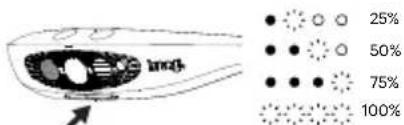
The reading lights show the battery level. When Bilby is turned off, quick press any button.
text_image
imol 25% 50% 75% 100%reading lights / battery indicator
Lights will flash while charging showing the battery level it has charged to. Four flashing LEDs indicate it is fully charged.
LOCK
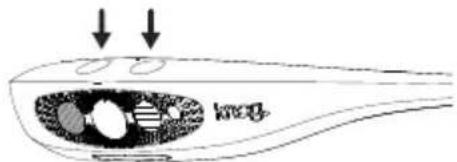
If you accidentally press any button when the Bilby is locked the red light will flash twice.
To lock/unlock: Hold both buttons for 3 seconds. White light will flash twice to show that Bilby is unlocked. Red light will flash twice to show that Bilby is locked.
text_image
Diagram illustrating a biological or chemical process with arrows pointing to internal components labeled 'mog' and 'mog'.MODES
Short press of button 1 to scroll through modes. The light will slowly dim to extend runtime, if you wish to go back to full output of your chosen mode press the mode button once.
Modes: Spot, Wide, Low, Red, Reading
BRIGHTNESS
Short press of button 2 to scroll through brightness settings. Brightness: Max, High, Med, Low
TILT FUNCTION
Hold down the button 1 to tilt the light down.
Hold down the button 2 to tilt the light up.
| SETTINGS | OUTPUT (LUMEN) | RUNTIME (HOURS) |
| Boost Right High 400 5 | ||
| Boost Right Low 50 60 | ||
| Boost Left High 240 9 | ||
| Boost Left Low 35 80 | ||
| Ambient Right High 200 14 | ||
| Ambient Right Low 25 105 | ||
| Ambient Left High 48 | 22 | |
| Ambiont Loft Low 7 98 | ||
| Spot High | 200 14 | |
| Spot Low | 25 105 | |
| Red High | 7 | 32 |
| Red Low | 2 103 | |
| Reading High | 10 | 17 |
| Reading Low | 2 75 |
BOOST MODES
Double click either button to activate boost mode, the Bilby will power up to maximum.
Button 1 - Spot and low (240 Lm)
Button 2 - Spot and wide (400 Lm)
The light will slowly dim to extend runtime, to boost to full output double click again.
LOW BATTERY
When the battery is low the light output with drop to increase runtime.
MODEMAKER
The Bilby is compatible with the ModeMaker app to allow customisation of the light modes. Open ModeMaker, plug the USB into your computer, drag and drop the modes that you want and select upload.
CARE & MAINTENANCE
To clean: wipe with cloth, don't use harsh chemicals, air dry, don't sun dry.
WARRANTY
The light is guaranteed for 2 years against manufacturing defects only.
See the website for more details KNOG.COM