
DCC-3400 - Kaffemaskine CUISINART - Gratis brugsanvisning og manual
Find enhedens vejledning gratis DCC-3400 CUISINART i PDF-format.


Brugerspørgsmål om DCC-3400 CUISINART
0 spørgsmål om dette apparat. Besvar dem du kender, eller stil dit eget.
Stil et nyt spørgsmål om dette apparat
Download vejledningen til din Kaffemaskine i PDF-format gratis! Find din vejledning DCC-3400 - CUISINART og tag din elektroniske enhed tilbage i hånden. På denne side er alle dokumenter nødvendige for brugen af din enhed offentliggjort. DCC-3400 af mærket CUISINART.
BRUGSANVISNING DCC-3400 CUISINART
GUÍA DE REFERENCIA RÁPIDA
PREPARACIÓN Y USO
Antes de usar su cafetera por primera vez, siga los pasos 1, 2 y 4 a continuación, usando solamente agua, para enjuagar el sistema interno.
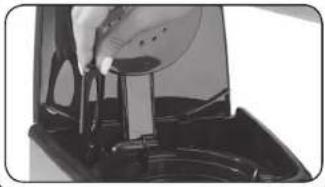
- Remoje el filtro de agua de carbón en agua fría por 15 minutos. Sostenga el filtro debajo de agua corriente durante 10 segundos para enjuagarlo. Abra el depósito de agua y deslice el filtro adentro.
natural_image
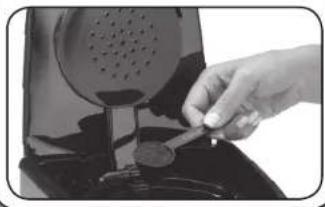
Close-up of a hand pouring liquid into a container with a tool, no visible text or symbols- Instale un filtro dorado permanente o un filtro de papel en el portafiltros. Agregue 1 cucharada de café molido por taza (145 ml) de café. Ajuste la cantidad de café molido a gusto y cierre la tapa.
natural_image
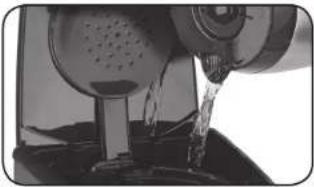
Close-up of a hand inserting a coin into a pot (no text or symbols visible)- Agregue la cantidad de agua deseada, usando las marcas de medición en el costado de la cafetera.
natural_image
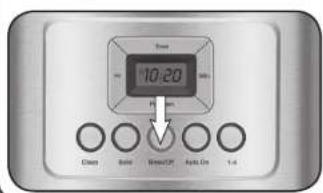
Close-up of a mechanical device pouring liquid into a container (no visible text or symbols)- Para empezar la preparación, presione el botón BREW/OFF. Si la señal de lista ha sido activada, la cafetera emitirá 5 pitidos al final de la preparación.
text_image
Time 10:20 Clean Solid Smooth Off Soft On 1-6IMPORTANTE:
No tire esta hoja. Lea esta información antes de usar su nueva cafetera por primera vez. Guarde esta información para futura referencia.
Estos útiles consejos complementan el manual de instrucciones. Para lograr un rendimiento óptimo y una operación segura, lea el manual de instrucciones.
Véase las instrucciones de programación al dorso.
QUICK REFERENCE GUIDE
PROGRAMMING
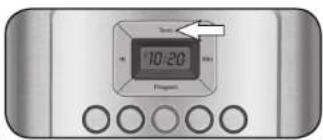
- To set the time: Hold down Hour or Minute button until the clock begins flashing. Press either button to select the desired time. When the number displayed approaches the desired time, press and release to advance one digit at a time. To complete clock setting do not touch buttons for 5 seconds. The clock will stop flashing and selected time will be displayed.
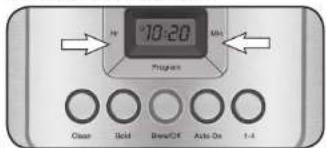
text_image
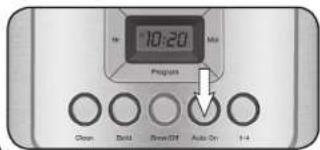
H 10:20 Program Clean Field Break/Off Active On 1-4Auto On Notes: To exit Auto On, just press Auto On button again. To activate Auto On using previously selected time, press the Auto On button, the previously set time will appear and indicator will illuminate. The display will return to clock setting. To deactivate, press illuminated Auto On, light will go out.
text_image
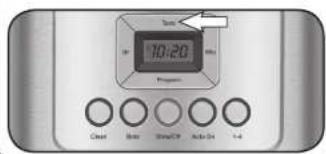
10:20 Program Clean Build Break/Off Auto On 1+4- Turning the Ready Tone On/Off: Your coffeemaker features a Ready Tone alert that beeps 5 times when the coffee has finished brewing. This alert is on by default. To turn off, simply press the Tone button once; an icon will display to indicate tone is off. To turn on again, press Tone button again; icon will disappear.
text_image
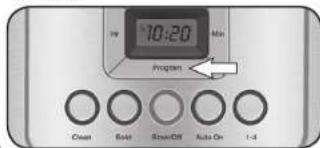
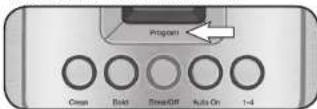
Time 10:20 Program Clean Reset Show/CP Auto-Dr 1-4- To program the AUTO ON: Press the PROGRAM button. The display will flash the default time or previously selected time. Follow directions under SETTING THE TIME to program your start-brew time. After 5 seconds, the unit will exit the Program function. When Auto On indicator is lit, Auto On is activated.
text_image
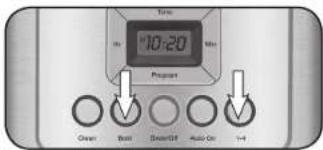
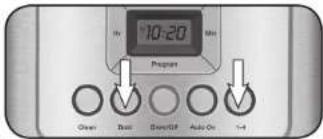
TV 10:20 Min Program Crown Boat ScrewOff Auto On 1-4- Set coffee strength and/or 1-4 cup setting: Set coffee strength and/or 1-4 cup setting; Select desired coffee strength (Regular or Bold) and 1-4 cup setting by pressing the appropriate buttons. The indicator lights will illuminate.
text_image
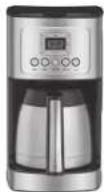
Time 10:20 Min Prevent Clean Reset Decor/Off Audio On 1-4Cuisinart®
PerfecTemp®
12-Cup Programmable Thermal Coffeemaker
Please see reverse side for setup and use instructions.
QUICK REFERENCE GUIDE
SETUP AND USE
Before using your Cuisinart 12-Cup PerfectTemp® Thermal Coffeemaker for the first time, follow steps 1, 2 and 4 below using only water to thoroughly rinse the coffeemaker.
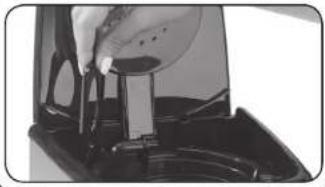
- Fully immerse the charcoal water filter in cold tap water and soak for 15 minutes Flush filter under cold water for 10 seconds and insert the filter into the water filter holder. Open the water reservoir and slide into the unit.
natural_image
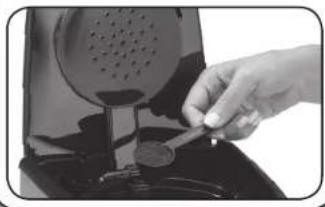
Close-up of a hand pouring liquid into a container with a stand (no visible text or symbols)- Insert a permanent gold-tone filter OR paper filter into the filter basket holder. Using the scoop provided, add 1 scoop of ground coffee per cup. Adjust the amount to taste and close the lid.
natural_image
Close-up of a hand inserting a coin into a device (no visible text or symbols)- Pour your desired amount of water into the water reservoir, using the water level indicator located in the window on the side of the coffeemaker.
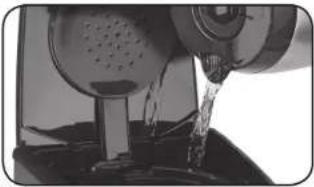
natural_image
Close-up of a mechanical device pouring liquid into a container (no visible text or symbols)- To brew coffee, press the BREW/OFF button. If the ready tone is set to "on", it will beep 5 times when the brewing process is complete.
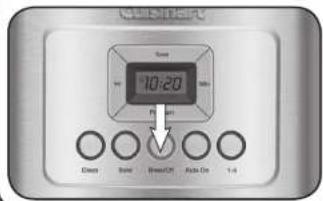
text_image
CD-ROM Time 10:20 B Clean Solid BreakOff Auto On 1-4IMPORTANT!
Do not discard. Read before operating your new coffeemaker. Keep for further reference.
These helpful hints are intended to be a supplement to the Instruction Booklet. In order to ensure proper operation and optimum performance, please read the entire Instruction Booklet.
Please see reverse side for programming instructions.
GUÍA DE REFERENCIA RÁPIDA
PROGRAMACIÓN
- Cómo fijar la hora: Mantenga oprimido el botón HOUR o MIN hasta que la hora empiece a parpadear. Oprima el botón HOUR para fijar la hora y el botón MIN para fijar los minutos. Cuando llegue cerca del número deseado, suelte el botón y avance un número a la vez. Después de fijar la hora, no toque ningún botón durante 5 segundos. La pantalla dejará de parpadear y la hora programada aparecerá en la pantalla.
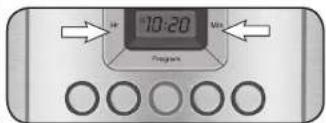
text_image
10:20 ProgramsNotas acerca del modo de encendido
automático: para salir del modo de programación, presione el botón AUTO ON. Para activar la hora de encendido automático previamente programada, presione AUTO ON; la hora previamente programada aparecerá en la pantalla y el indicador luminoso se encenderá. Luego, la hora normal aparecerá en la pantalla. Para desactivar el encendido automático, presione el botón AUTO ON iluminado.
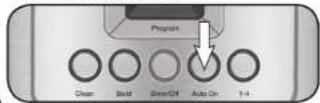
- Para activar/desactivar la señal de listo: Su cafetera cuenta con una señal sonora que emite 5 pitidos al final de la preparación. Esta función está activada por defecto. Para desactivarla, presione el botón TONE; un ícono aparecerá en la pantalla para indicar que la función ha sido desactivada. Para volver a activaría, presione el botón TONE; el ícono desaparecerá.
text_image
Time + 10:20 Program- Para programar la hora de encendido automático: Presione el botón PROGRAM. La hora por defecto (12:00) o la hora de encendido automático pereviamente fijada aparecerá en la pantalla. Utilice dos botones HOUR y MIN para programar la hora de encendido automático. Después de 5 segundos, la unidad saldrá del modo de programación. El indicador luminoso AUTO ON se iluminará para indicar que el encendido automático ha sido activado.
3. Ellja la Intensidad del café y/o seleccione la opción 1–4 tazas
(si corresponde): Elija la intensidad del café y/o seleccione la opción 1–4 tazas (si corresponde): oprima el botón BOLD para preparar café fuerte; oprima el botón “1–4” para preparar menos de cinco tazas de café. El indicador luminoso se encenderá.
text_image
10:20 Min Response Open Basic Sweet/Off Auto On 1-4Cuisinart®
PerfecTemp®
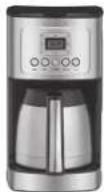
Cafetera térmica programable de 12 tazas (1.75 L)
Véase las instrucciones de preparación al dorso.