
BT-ZW-9031S08 - Støvsuger BUSH - Gratis brugsanvisning og manual
Find enhedens vejledning gratis BT-ZW-9031S08 BUSH i PDF-format.


Brugerspørgsmål om BT-ZW-9031S08 BUSH
0 spørgsmål om dette apparat. Besvar dem du kender, eller stil dit eget.
Stil et nyt spørgsmål om dette apparat
Download vejledningen til din Støvsuger i PDF-format gratis! Find din vejledning BT-ZW-9031S08 - BUSH og tag din elektroniske enhed tilbage i hånden. På denne side er alle dokumenter nødvendige for brugen af din enhed offentliggjort. BT-ZW-9031S08 af mærket BUSH.
BRUGSANVISNING BT-ZW-9031S08 BUSH
BUSH
Instruction manual
BT-ZW-9031S08
natural_image
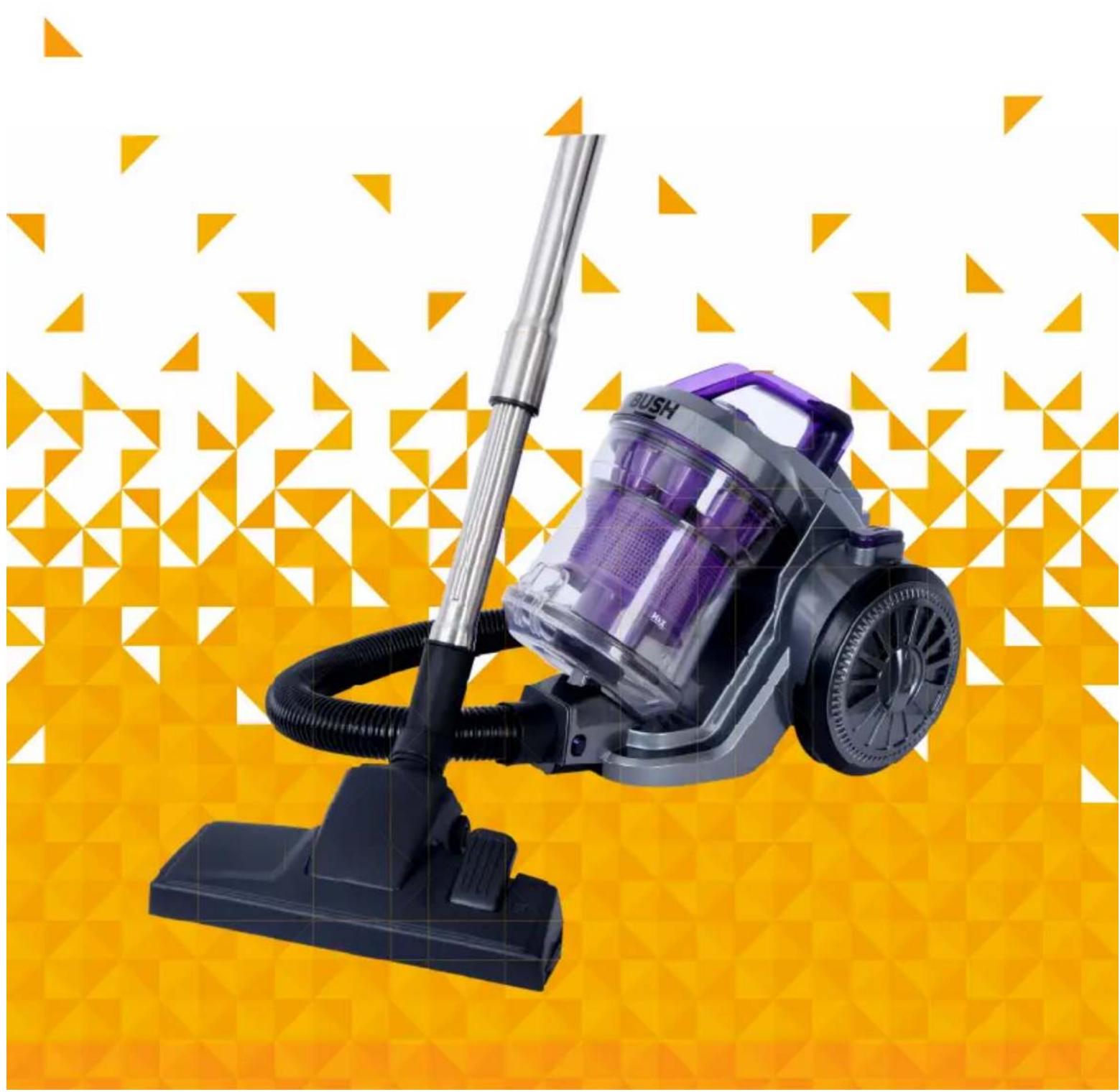
Purple and black vacuum cleaner with a brush, displayed against a geometric orange patterned background (no text or symbols visible on the device itself).You'll soon be enjoying your new vacuum cleaner.
It all begins here, with your instructions. Don't worry, there's nothing too technical coming up. Just simple, step-by-step guidance to get you up and running quickly. Sound good? Then let's get started.
Help and Guidance
We're here to help you get the most from your vacuum cleaner. Should you require any guidance, a simple solution can often be found online at:
www.argos-support.co.uk
If you still require further assistance, call one of our experts on 0844 557 0320.
Contents
1 Safety information
Safety information 6
2 Getting to know your vacuum cleaner
Ready? Let's begin 10
Accessories 12
3 Installing your vacuum cleaner
Unpacking 14
Assembly 14
4 Using your vacuum cleaner
First use of vacuum cleaner. 16
Using the vacuum cleaner 17
5 Care and maintenance
Cleaning 20
Care and maintenance 21
Technical specification 22
6 Product support
Toubleshooting 24
Help and assistance 25
Declaration of conformance to product 26
Standards
Disposal 27
Safety information
1

natural_image
Abstract geometric pattern with orange triangles and white gaps on a white background (no text or symbols)Safety Information
Important - Please read all instructions before use and keep for future reference
WARNINGS
- This appliance is intended for domestic household use only and should not be used for any other purpose or in any other application, such as for non-domestic use or in a commercial environment.
- If the supply cord is damaged, it must be replaced by the manufacturer, its service agent or similarly qualified persons in order to avoid a hazard.
- Regarding the detailed instructions for the method and frequency of cleaning and the precautions during user maintenance, refer to the section "Care and Maintenance" on page 21 of the manual.
- This appliance can be used by children aged from 8 years and above and persons with reduced physical, sensory or mental capabilities or lack of experience and knowledge if they have been given supervision or instruction concerning use of the appliance in a safe way and understand the hazards involved. Children shall not play with the appliance. Cleaning and user maintenance shall not be made by children without supervision.
Safety Information
Important - Please read all instructions before use and keep for future reference
• The plug must be removed from the socket-outlet before cleaning or maintaining the appliance.
- Following objects are strictly banned, otherwise the vacuum cleaner will be damaged or fire calamity will be caused, which bring such accidents as human body injuries:
- Don't pick up large or sharp broken such as glasses.
- Don't pick up harming or erodent liquids (solvent, corrosive, detergent...).
- Don't pick up inflammable or explosive substance such as gasoline or alcohol.
- Don't pick up/ vacuum burning or glowing objects (cigarettes, matches, hot ashes).
Safety Information
Important - Please read all instructions before use and keep for future reference
Electrical
⚠️ Any electrical work that is required to install this appliance MUST be carried out by a qualified electrician.
Before making any electrical connections, ensure that:
- Do not bend, stretch or pull the supply cable to avoid electric shock.
- Ensure the power socket is suitable for the maximum power of the machine.
- The supply voltage should be the same as that indicated in the technical specifications and the appliance rating plate.
- If the socket outlets in your home are not suitable for the plug supplied with this unit check with a qualified electrician for replacement.
- The use of adapters, multiple connectors or extension cables are not recommended.
- The appliance must be connected to a 220-240 volt 50Hz AC supply by means of a three pin socket, suitably earthed and protected by a 13 amp fuse.
- Should the fuse need to be replaced, a 13 amp fuse approved to BS1362 must be used.
- The plug contains a removable fuse cover that must be refitted when the fuse is replaced. If the fuse cover is lost or damaged, the plug must not be used until a replacement cover has been fitted or the plug is replaced.
- A damaged plug should be cut off as close to the plug body as possible, the fuse should be removed and the plug disposed of safely.
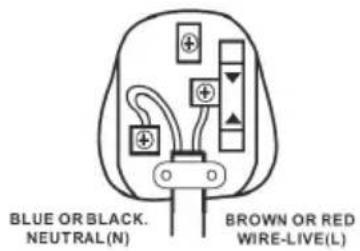
Plug replacement (UK & Ireland only) Should you need to replace the plug; the wires in the power cable are coloured in the following way:
Blue - Neutral 'N'
Brown - Live 'L'
As the colours of the wires in the power cable may not correspond with the coloured markings identifying the terminals in your plug, and proceed as follows:
The blue wire must be connected to the terminal that is marked with the letter N.
The brown wire must be connected to the terminal that is marked with the letter L.
If power supply cord is damaged, it must replaced by the manufacturer or its service agent or a similar qualified person in order to avoid a hazard.
Getting to know your vacuum cleaner
2

natural_image
Abstract geometric pattern with orange triangles and white gaps on a white background (no text or symbols)Getting to know your vacuum cleaner
You'll be up and running in no time
Ready? Let's begin...
Please read these instructions carefully. They contain important information which will help you get the best from your vacuum cleaner and ensure safe and correct installation and operation.
If you require any further assistance, our technical experts are happy to help. For full details, refer to the product support section at the end of these instructions.
Getting to know your vacuum cleaner
You'll be up and running in no time
Components
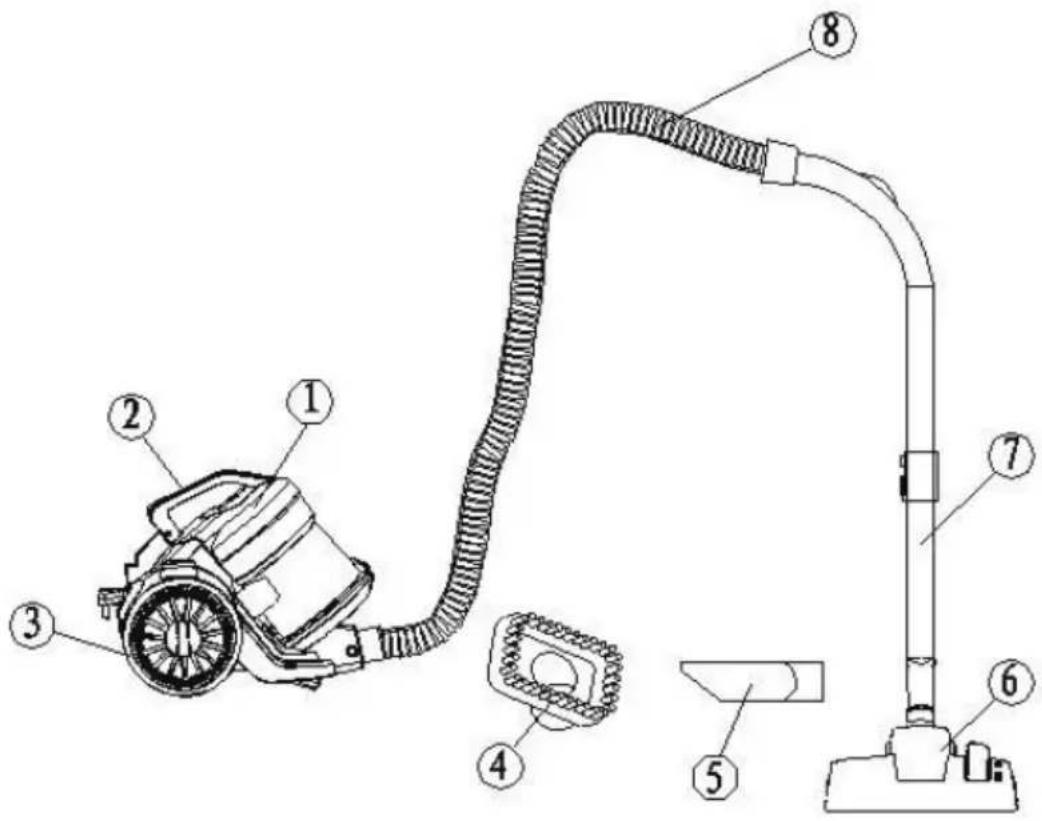
- Dust Container
- Handle of the dust container
- Big wheel
- Dusting brush
5.2 in 1 crevice tool
6.Cleaning head
7. Telescopic metal tube
8.Hose and handle

| Model no | Specification | Annual energy consumption | Hard floor | Carpet | Dust re-emission class |
| BT-ZW-9031S08 | 220-240V~50/60Hz 800W | A | A | D | A |
Accessories
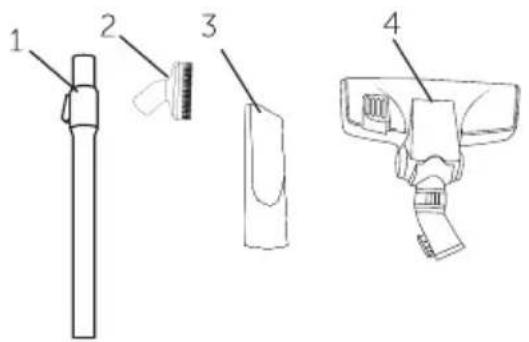
This machine includes below accessories, please install these parts by yourself before operating.
- Telescopic tubes
- Dusting brush
3.Crevice tool
4.Cleaning head
If you require any technical guidance or find that your product is not operating as intended, a simple solution can often be found in the Troubleshooting section of these instructions.
Installing your vacuum cleaner
3

natural_image
Abstract geometric pattern with orange triangles and white gaps on a white background (no text or symbols)Installing your vacuum cleaner
Bringing it all together
Unpacking
Unpacking your vacuum cleaner
Carefully remove all packing materials including the foam base, accessories and dispose them correctly.
ASSEMBLY
Always disconnect the appliance from the mains socket before assembling or disassembling accessories.
-
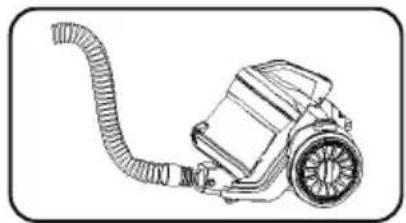
First connect the hose socket with unit.
-
Attach the tube into the hose handle by inserting the bigger end if one tube into the handle.
-
Push forward the switch on the telescope tube. Pull the tube to desired length. Then release the switch to lock the telescope tube in place
-
Attach the cleaning head to the end of the Telescopic tube.
-
Assemble of part is completed. You can use the product
To remove the cleaning head and tubes, hold each piece tightly and pull firmly apart.
To remove the hose, press the both release button of the suction mouth.
natural_image
Line drawing of a vacuum cleaner with coiled hose and wheels (no text or symbols)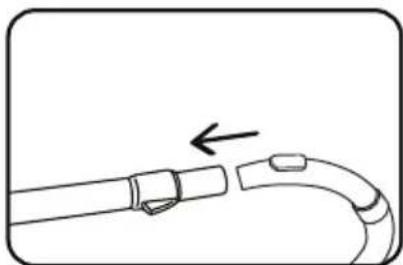
natural_image
Diagram of a curved pipe or conduit with a directional arrow indicating movement (no text or symbols present)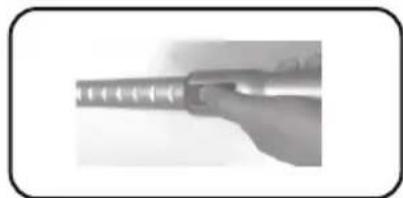
natural_image
Close-up of a hand holding a pen tip with a screwdriver (no visible text or symbols)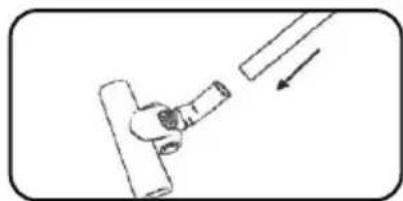
natural_image
Simple line drawing of a robotic arm interacting with a vertical bar, with an arrow indicating motion (no text or symbols)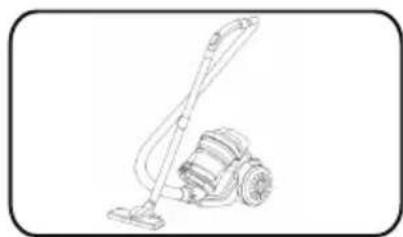
natural_image
Line drawing of a vacuum cleaner with handle and wheels (no text or symbols)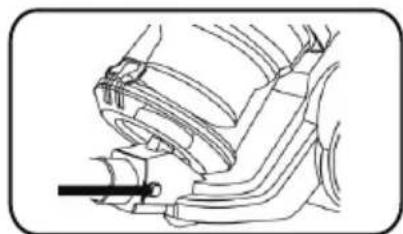
natural_image
Technical line drawing of a mechanical assembly with a tool inserted (no text or symbols)If you require any technical guidance or find that your product is not operating as intended, a simple solution can often be found in the Troubleshooting section of these instructions.
Using your vacuum cleaner
4

natural_image
Abstract geometric pattern with orange triangles and white gaps on a white background (no text or symbols)Using your vacuum cleaner
Getting the most from your appliance First use of vacuum cleaner
CAUTION: Always switch off the vacuum cleaner before connecting or disconnecting the hose/attachments or removing and emptying the dirt container.
IMPORTANT: The vacuum cleaner is equipped with a thermal cut-out. If for any reason the vacuum deaner does overheat, the thermostat will automatically turn the vacuum cleaner off. If this happens, switch the vacuum cleaner off and unplug from electrical socket. Remove and empty the dirt container also check the vacuum deaner for blockages. Allow the vacuum cleaner to cool for approximately 1 hour (if you have cleaned the filters, please wait 24 hours for the filters to fully dry before putting back into the machine).
Using the vacuum cleaner
Operation
Plug the appliance into the mains socket.
Press the power button on top of the appliance to switch on the appliance.
natural_image
Technical line drawing of a handheld device with a circular component and directional arrow (no text or symbols)Advanced functions/use
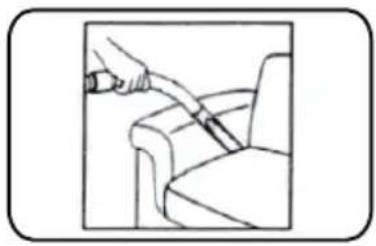
Remove the cleaning head from the tubes then attach the crevice tool to the tubes.
The crevice tool is used for narrow gaps and hard-to-reach places.
Use this crevice tool to vacuum down the side of cushions, corners, edges or small spaces.
natural_image
Line drawing of a hand using a tool to lift or lift a chair seat (no text or symbols)Using on wall/curtains
Use the dusting brush by attaching it to the telescopic tube to clean more delicate surfaces, e.g. curtains.
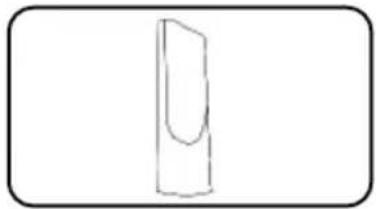
natural_image
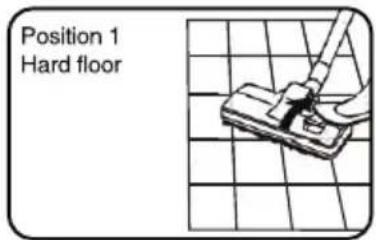
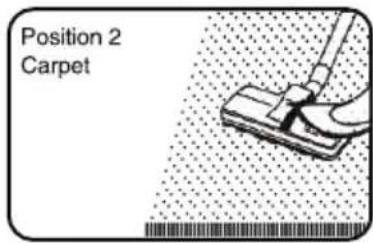
Simple line drawing of a vertical rectangular shape with a curved cutout on top (no text or symbols)Using on carpet/floor brush
Position1: Bristles extended
for hard floors

Position2:Bristles retracted
for carpets

Use on the stairs
This machine can be used on stairs.
Just connect accessories: hose assembly,
tube socket, crevice tool or dusting brush
or online at www.argos-support.co.uk if you still require further assistance, call one of our experts on: 0844 557 0320.
Care and maintenance
5

natural_image
Abstract geometric pattern with orange triangles and white squares on a white background (no text or symbols)Care and maintenance
Looking after your appliance
Cleaning
Always switch off the appliance and unplug from the mains socket before carrying out any maintenance or cleaning.
Clean the outside of the appliance with a damp cloth. Dry thoroughly before use.
Never immerse the appliance in the water.
Do not use abrasive or chemical cleaning agents.
Empty the Dust Container
Empty the dust container when the dust reaches the MAX line.
Failure to do this will impair the efficiency of the cleaner.
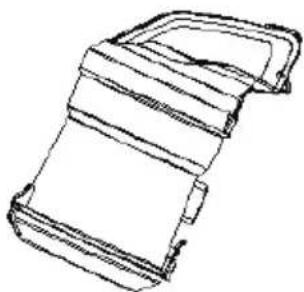
- Press the dust container release button to remove the dust container.
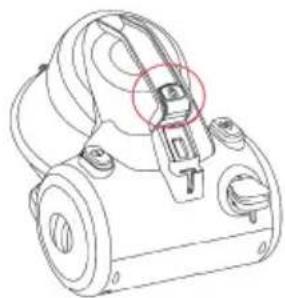
natural_image
Technical line drawing of a mechanical device with no visible text or symbols- Hold the dust container over a bin and then pull the latch downward to open the cover on the bottom of the dust to allow the dust fall out to bin.
natural_image
Line drawing of a closed mechanical device with a handle and side panel (no text or symbols)- Close the dust container door after emptying.
If you require any technical guidance or find that your product is not operating as intended, a simple solution can often be found in the Troubleshooting section of these instructions.
Care and maintenance
Cleaning the HEPA Filter
The high efficiency particulate air (HEPA) filter is an effective system in removing almost all indoor pollutants, dust mites, pollen and mould spores.
Filters require cleaning at least every 3-6 months (depending on the level of use). Don't use your vacuum cleaner without all the filters in place.
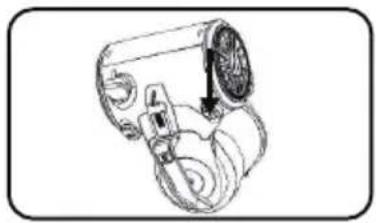
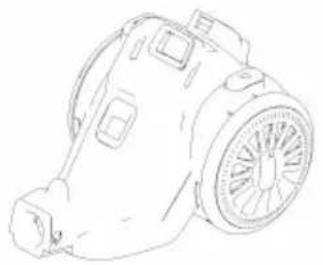
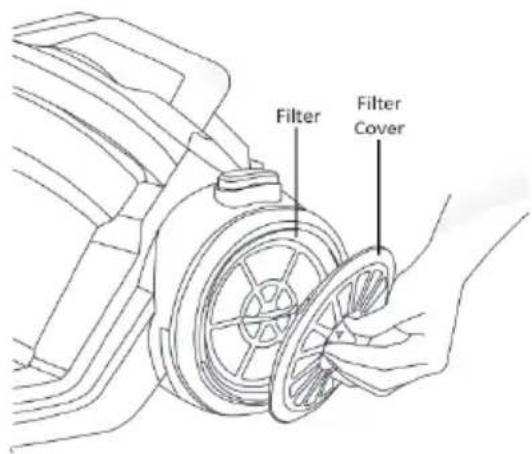
- Turn the filter cover anti-clockwise to remove from the body.
natural_image
Line drawing of a vacuum cleaner with fan blades and mounting holes (no text or symbols)-
Open the filter cover and take out the HEPA filter
-
Tap the HEPA filter over a bin to remove the dust.
-
Pull the HEPA filter back into the casing. Turn the HEPA filter clock-wise to fix it and install the filter cover back to the unit body.
-
Wash the filter under water (max. 40 degree). DO NOT USE DETERGENTS to clean all parts. Leave it to dry for 24 hours or until fully dry before placing back in the vacuum cleaner.
-
Place the filter housing into the dust container and turn it clockwise until it locks into position.
-
Place the filter in the housing and then turn it clockwise until it locks into position.
-
Replace the dust container lid onto the dust container.
-
Attach the dust container back to the appliance until a click is heard.
Technical Specifications
| Model Number | Voltage | Annual energy consumption | Carpet cleaning performance class |
| BT-ZW-9031S08 | 230V 50/60Hz600W | 25.3kWh/annum | D |
| Hard floor cleaning performance class | Dust re-emission class | Sound power level | Rated input power |
| A | A | 79dB(A) | 800W |
If you require any technical guidance or find that your product is not operating as intended, a simple solution can often be found in the Troubleshooting section of these instructions.
Product support
6

natural_image
Abstract geometric pattern with orange triangles and white gaps on a white background (no text or symbols)Product support
Help is always at hand
TROUBLESHOOTING
Please check the following details before you have your appliance repaired by an authorised servicing agent.
- Vacuum cleaner does not work.
You can check if the power plug is firmly inserted into the power outlet.
And if the power switch of the appliances is on.
- Suction power becomes weak.
You can check if the brush or tube is clogged or damaged. Or check if the dust container is full or check if the filter is clogged and if the tubes are correctly attached. The possible solution is to immediately remove the obstruction. Or empty the dust container or clean the filter or reassemble the tubes.
- Vacuum cleaner is overheating
You can check if the filter is blocked. The possible solution is to clean the filter.
- Dust is coming out of the vacuum cleaner
You can check if the dust container is properly fitted to the cleaner. The possible solution is to refit the dust container to the cleaner.
Product support
Help is always at hand
Help and assistance
If you require any technical guidance or find that your wash vacuum cleaner is not operating as intended, a simple solution can often be found in the Troubleshooting section of these instructions or online at
www.argos-support.co.uk
If you still require further assistance, call one of our experts on 0345 640 0800. To help give us give you a fast and efficient service please have the following information ready:
Model Ref.
Serial number
Date of purchase
You can find these on the rating plate - a small information panel (usually a sticker or metal plate) on the rear of your appliance
This will be shown on your receipt
Local call rates applies*
Lines open 8am-7pm Monday to Saturday and 10am-4pm Sunday.
*Calls to Argos enquiry lines may attract a charge and set up fee from residential lines depending on your call plan/tarif. Mobile and other providers costs may vary, see www.bt.com/pricing for details.
For Security and training purposes, telephone calls to and from customer service centres maybe recorded and monitored. Calls from Republic of Ireland will attract international call charges.
Product support
Help is always at hand

This appliance complies with the following CE directives:
2014/35/EU low voltage directive
2014/30/EU the EMC directive
2011/65/EU the ROHS directive

This is a class II appliance.
Notes on disposal:
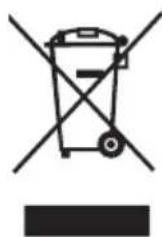
This marking indicates that this product should not be disposed with other household wastes throughout the EU. To prevent possible harm to the environment or human health from uncontrolled waste disposal, recycle it responsibly to promote the sustainable reuse of material resources. To return your used device, please use the collection systems or contact the retailer where the product was purchased. They return and can take this product for environmental safe recycling.
If you require any technical guidance or find that your product is not operating as intended, a simple solution can often be found in the Troubleshooting section of these instructions.
Product support
Help is always at hand
BUSH
Call us now and activate your 12 month guarantee
Thank you for choosing Bush. Your new product is guaranteed against faults and breakdowns for 12 months. Don't forget to register it with us today so we can provide you with our best possible after-sales service and useful updates.
www.bushregistration.co.uk
FREEPHONE*
0800 597 8548
Lines are open 8am - 8pm, 365 days a year. *Calls may be recorded and monitored.
Your Bush Guarantee
This product is guaranteed for twelve months from the date of original purchase. Any defect that arises due to faulty materials or workmanship will be repaired free of charge (or if applicable the product will be replaced or the purchase price refunded) where possible during this period by the dealer from who your purchased the unit.
The guarantee is subject to the following provisions:
- The guarantee does not cover accidental damage, misuse, cabinet parts, knobs or consumable items.
- The product must be correctly installed and operated in accordance with the instructions contained in the manual.
- It must be used solely for domestic purposes. The guarantee will be rendered invalid if the product is
re-sold or has been damaged by inexpert repair.
- Specifications are subject to change without notice.
- Bush disclaim any liability for loss or damage arising from the breakdown of the product.
- This guarantee is in addition to and does not diminish your statutory or legal rights.
Important Data Protection Information
If you provide us with information about another person, you confirm that they have appointed you to act for them, to consent to the processing of their personal data including sensitive personal data and that you have informed them of our identity and the purposes (as set out in the Important Data Privacy notice displayed overleaf) for which their personal data will be processed.
You are entitled to ask for a copy of the information we hold about you (for which we may charge a small fee) and to have any inaccuracies in your information corrected.
For quality control and training purposes, we may monitor or record your communications with us.
If your personal details change, if you change your mind about any of your marketing preferences or if you have any queries about how we use your information, please let us know by contacting our Data Protection Officer, Domestic & General, Leicester House 17 Leicester Street, Bedworth, Warwickshire CV12 8JP.
Guarantor: Argos Limited - 489 - 499 Avebury Blvd. - Milton Keynes - M109 2NW
BUSH
- BUSH
- Instruction manual
- Help and Guidance
- Contents
- Safety information
- Getting to know your vacuum cleaner
- Installing your vacuum cleaner
- Using your vacuum cleaner
- Care and maintenance
- Product support
- Safety information
- 1
- WARNINGS
- Electrical
- Getting to know your vacuum cleaner
- 2
- Ready? Let's begin...
- Accessories
- Installing your vacuum cleaner
- 3
- ASSEMBLY
- Using your vacuum cleaner
- 4
- Using the vacuum cleaner
- Operation
- Advanced functions/use
- Using on wall/curtains
- Using on carpet/floor brush
- Use on the stairs
- Care and maintenance
- 5
- Cleaning the HEPA Filter
- Technical Specifications
- Product support
- 6
- TROUBLESHOOTING
- Help and assistance
- Notes on disposal:
- Call us now and activate your 12 month guarantee
- www.bushregistration.co.uk
- Your Bush Guarantee
- The guarantee is subject to the following provisions:
- Important Data Protection Information
Mærke : BUSH
Model : BT-ZW-9031S08
Kategori : Støvsuger