
Collection A168WA-1YES - Ur CASIO - Gratis brugsanvisning og manual
Find enhedens vejledning gratis Collection A168WA-1YES CASIO i PDF-format.


Brugerspørgsmål om Collection A168WA-1YES CASIO
0 spørgsmål om dette apparat. Besvar dem du kender, eller stil dit eget.
Stil et nyt spørgsmål om dette apparat
Download vejledningen til din Ur i PDF-format gratis! Find din vejledning Collection A168WA-1YES - CASIO og tag din elektroniske enhed tilbage i hånden. På denne side er alle dokumenter nødvendige for brugen af din enhed offentliggjort. Collection A168WA-1YES af mærket CASIO.
BRUGSANVISNING Collection A168WA-1YES CASIO
Operation Guide 3298
CASIO®
General Guide
- Press Ⓑ to change from mode to mode. Each mode is explained in detail on the following pages.
- After you perform an operation in any mode, pressing Ⓑ returns to the Timekeeping Mode.

flowchart
graph LR
    A["Timekeeping Mode"] --> B["Alarm Mode"]
    B --> C["Stopwatch Mode"]
    C --> D["Time Setting Mode"]
E
E-1
Timekeeping Mode
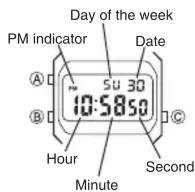
- In the Timekeeping Mode, press © to switch between the 12-hour and 24-hour formats. Day of the week is displayed as follows.
SU:Sunday MO:Monday TU:Tuesday WE:Wednesday TH:Thursday FR:Friday SA:Saturday
E-2
Alarm Mode
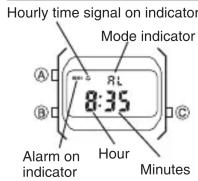
When the Daily Alarm is switched on, the alarm sounds for 20 seconds at the preset time each day. When the Hourly Time Signal is switched on, the watch beeps every hour on the hour.
To set the alarm time
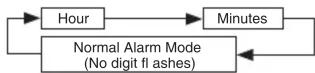
- In the Alarm Mode, press Ⓐ. The hour digits flash because they are selected.
- Press Ⓐ to change the selection in the following sequence.
E-3
- Press © to increase the selected digits. Holding down © changes the number at high speed.
- The format (12-hour and 24-hour) of the alarm time matches the format you select for normal timekeeping.
- When setting the alarm time using the 12-hour format, take care to set the time correctly as morning or afternoon (PM).
- After you set the alarm time, press Ⓐ to return to the Alarm Mode. At this time the Daily Alarm is switched on automatically.
To stop the alarm
Press Ⓐ to stop the alarm after it starts to sound.
To switch the Daily Alarm and Hourly Time Signal on and off
Press © while in the Alarm Mode to change the status of the Daily Alarm and Hourly Time Signal in the following sequence.
[Alarm on Indicator/Hourly Time Signal on Indicator]

flowchart
graph LR
    A["Both on"] --> B["Both off"]
    B --> C["Daily Alarm only"]
    C --> D["Hourly Time Signal only"]
E-5
E-4
Stopwatch Mode
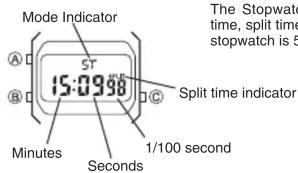
The Stopwatch Mode lets you measure elapsed time, split times, and two finishes. The range of the stopwatch is 59 minutes, 59.99 seconds.
(a) Elapsed time measurement

(b) Split time measurement

(c) Split time and 1st-2nd place times
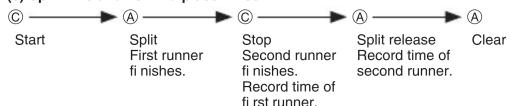
flowchart
graph LR
    Start --> A1["A"]
    A1 --> A2["C"]
    A2 --> A3["A"]
    A3 --> Clear
    Start --> Split["Split First runner fi nishes."]
    A2 --> Stop["Stop Second runner fi nishes. Record time of fi rst runner."]
    A3 --> Split_Release["Split release Record time of second runner."]
E-7
E-6
Time Setting Mode
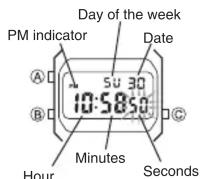
To set the time and date
Use 1. Ⓑ to enter the Time Setting Mode.
- The seconds digits flash because they are selected.
2. Press Ⓐ to change the selection in the following sequence.
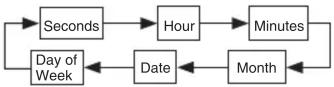
- While the seconds digits are selected (flashing), press © to reset the seconds to "00". If you press © while the seconds count is in the range of 30 to 59, the seconds are reset to "00" and 1 is added to the minutes. If the seconds count is in the range of 00 to 29, the minutes count is unchanged.
- While any other digits (besides seconds) are selected (flashing), press Ⓐ to increase the number. While the day of the week is selected, pressing Ⓐ advances to the next day. Holding down Ⓐ changes the current selection at high speed.
After you set the time and date, press 5. Ⓑ to return to the Timekeeping Mode.
- If you do not operate any button for a few minutes while a selection is flashing, the fl ashing stops and the watch goes back to the Timekeeping Mode automatically.
E-8
E-9
Specifications
Accuracy at normal temperature: ± 30 seconds a month
Timekeeping Mode: Hour, minutes, seconds, am/pm, date and day of the week
Time system: Switchable between 12-hour and 24-hour formats
Calendar system: Auto-calendar set at 28 days for February
Alarm Mode: Daily alarm, hourly time signal
Stopwatch Mode
Measuring units: 1/100th of a second
Measuring capacity: 59 minutes, 59.99 seconds
Measuring modes: Elapsed time, split time and two finishes
Other: Backlight (Electro-luminescent light)
Battery: One lithium battery (Type: CR2016)
Approximately 7 years on type CR2016 (Assuming 1 second light operation
and 20 seconds alarm operation per day)
Frequent use of the backlight shortens the battery life noted above.
Mærke : CASIO
Model : Collection A168WA-1YES
Kategori : Ur