
Edifice EFV-600D-4AVUEF - Armbåndsur CASIO - Gratis brugsanvisning og manual
Find enhedens vejledning gratis Edifice EFV-600D-4AVUEF CASIO i PDF-format.


Brugerspørgsmål om Edifice EFV-600D-4AVUEF CASIO
0 spørgsmål om dette apparat. Besvar dem du kender, eller stil dit eget.
Stil et nyt spørgsmål om dette apparat
Download vejledningen til din Armbåndsur i PDF-format gratis! Find din vejledning Edifice EFV-600D-4AVUEF - CASIO og tag din elektroniske enhed tilbage i hånden. På denne side er alle dokumenter nødvendige for brugen af din enhed offentliggjort. Edifice EFV-600D-4AVUEF af mærket CASIO.
BRUGSANVISNING Edifice EFV-600D-4AVUEF CASIO
Operation Guide ANA(H3H-1)
CASIO®
- Your watch may differ somewhat from the one shown in the illustration.
- Some models may use a combination of hands and rotating disks to indicate information. The word "hand" in this section is used to mean both analog hands and rotating disks.

Stopwatch functions
To adjust the time setting
When the second hand is at 12 o'clock, pull the Crown out to Click 2.
Rotate the Crown to change the time setting.
Push the Crown back in on a time signal to resume timekeeping.
Note
• Take care that you set the correct AM or PM time.
- When changing the time, move the minute hand four or five minutes past your final setting, and then back it up to the setting you want.
To change the day indicator setting
Pull the Crown out to Click 1.
Rotate the Crown away from you to set the day.
Push the Crown back in.
Note
- The day indicator setting uses a 31-day month. Make adjustments for months of shorter lengths.
- Avoid changing the day indicator setting between the hours of 9 p.m. and 1 a.m. Otherwise, the day indicator may not change correctly at midnight.
Crown Operations
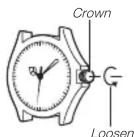
Some water-resistant models (100 meters, 200 meters) have a screw-in crown. When you need to perform a crown operation, rotate it towards you to unscrew it. Then pull the crown out. Avoid applying undue force when pulling. The watch loses its water resistance while the crown is unscrewed. After performing a crown operation, fully screw the crown back in.
If your watch has a rotary bezel...
You can rotate the bezel to align its ▼ mark with the minute hand. Then you will be able to tell how much time has elapsed since aligning the ▼ mark.

Using the Stopwatch
The stopwatch measures elapsed time in 1/10-second increments up to 59 minutes, 59.9 seconds.
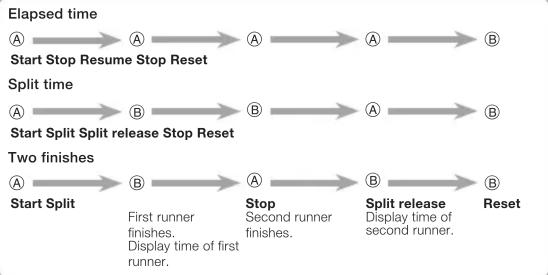
flowchart
graph LR
    A1["Start Stop Resume Stop Reset"] --> A2["Start Split"]
    A2 --> A3["Two finishes"]

    B1["Start Split Split release Stop Reset"] --> B2["Two finishes"]

    C1["Start Split"] --> C2["Two finishes"]

    style A1 fill:#f9f,stroke:#333
    style A2 fill:#f9f,stroke:#333
    style B1 fill:#f9f,stroke:#333
    style B2 fill:#f9f,stroke:#333
    style C1 fill:#f9f,stroke:#333
Important!
- Do not operate the stopwatch with the crown pulled out.
Note
• An elapsed time operation will stop automatically at the end of 60 minutes.
Correcting the 0 Positions of the Hands
Perform the following procedure if the stopwatch hands do not return to their 0 (zero) positions when you reset the stopwatch.
Pull the Crown out to Click 2.
Press Ⓐ to move the Stopwatch 1/10-Second Hand clockwise.
- Holding down Ⓐ will move the hand at high speed.
Press Ⓑ to move the Stopwatch Second Hand clockwise.
- Holding down Ⓑ will move the hand at high speed.
- The Stopwatch Minute Hand is synchronized with the Stopwatch Second Hand
After all of the hands are the way you want, push the Crown back in.
Important!
- Timekeeping stops while the crown is pulled out. Correct the current time setting after performing the above operation.
Specifications
| Module No. | Accuracy at normal temperature (per month) | Battery type | Battery life(60 minutes stopwatch operation per day) |
| 5517/5521 ±20 seconds SR920SW Approx. 2 years | |||
| 5579 ±20 seconds SR920SW Approx. 3 years | |||
Stopwatch: Measuring Capacity: 59'59.9" (60 minutes)
Measuring Unit: 1/10 second
Measurements: Elapsed time; split time; two finishes
Specifications are subject to change without notice.
Mærke : CASIO
Model : Edifice EFV-600D-4AVUEF
Kategori : Armbåndsur