
Collection LA670WEA-7EF - Ur CASIO - Gratis brugsanvisning og manual
Find enhedens vejledning gratis Collection LA670WEA-7EF CASIO i PDF-format.


Brugerspørgsmål om Collection LA670WEA-7EF CASIO
0 spørgsmål om dette apparat. Besvar dem du kender, eller stil dit eget.
Stil et nyt spørgsmål om dette apparat
Download vejledningen til din Ur i PDF-format gratis! Find din vejledning Collection LA670WEA-7EF - CASIO og tag din elektroniske enhed tilbage i hånden. På denne side er alle dokumenter nødvendige for brugen af din enhed offentliggjort. Collection LA670WEA-7EF af mærket CASIO.
BRUGSANVISNING Collection LA670WEA-7EF CASIO
Operation Guide 3191
CASIO®
Reading the display
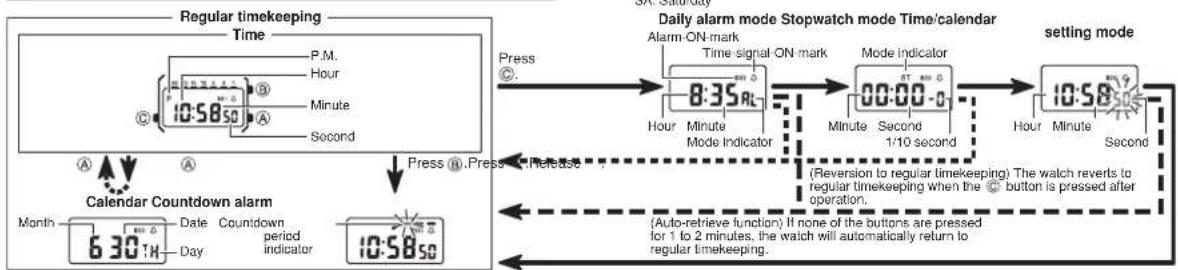
flowchart
graph TD
    A["Regular timekeeping Time"] --> B["P.M. Hour"]
    B --> C["Minute"]
    C --> D["Second"]
    D --> E["10:58 So"]
    E --> F["Calendar Countdown alarm Month 6:30 H"]
    F --> G["Date Countdow period indicator 10:58 So"]
    G --> H["Press (i).Press (j).Release"]
    H --> I["Daily alarm mode Stopwatch mode Time/calendar"]
    I --> J["Setting mode"]
    J --> K["Alarm ON-mark 8:35 RL"]
    K --> L["Time signal ON mark"]
    L --> M["Mode indicator 00:00-0"]
    M --> N["1/10 second"]
    N --> O["Reversion to regular timekeeping"]
    O --> P["The watch reverts to regular timekeeping when the button is pressed after operation."]
    P --> Q["Auto-retrieve function"]
    Q --> R["If none of the buttons are pressed for 1 to 2 minutes, the watch will automatically return to regular timekeeping."]
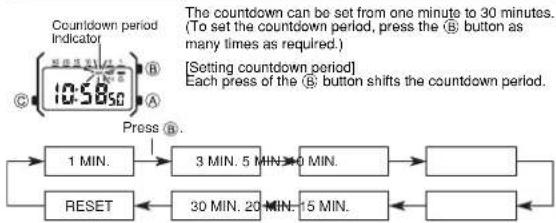
Countdown alarm operation
flowchart
graph TD
    A["Countdown period Indicator"] --> B["1 MIN."]
    B --> C["3 MIN. 5 MIN."]
    C --> D["30 MIN. 20 MIN."]
    D --> E["15 MIN."]
    E --> F["Reset"]
    F --> G["Press R."]
    G --> H["Setting countdown period"]
    H --> I["To set the countdown period, press the B button as many times as required."]
    I --> J["Each press of the B button shifts the countdown period."]
Countdown starts when the Ⓑ button is released. When the countdown reaches zero, the alarm will sound for 10 seconds. Pressing any button stops the alarm.
Setting daily alarm
If the daily alarm is set, the beeper sounds for 20 seconds at the preset time every day until cleared. To stop the beeper, press any button. If the time signal is set, the watch sounds every hour on the hour with a "Be-o-op" signal. (Sound demonstration) Press and hold the Ⓐ button in alarm mode to sound the beeper.
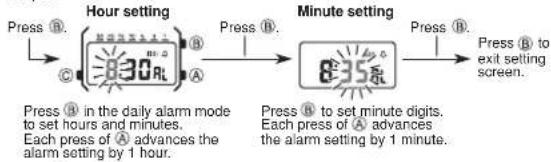
flowchart
graph LR
    A["Press B. Hour setting (8:30 R) A"] --> B["Press B. Minute setting (8:35 R)"]
    B --> C["Press B. exit setting screen."]
    D["Press B. in the daily alarm mode to set hours and minutes. Each press of A advances the alarm setting by 1 hour."] --> E["Press B. to set minute digits. Each press of A advances the alarm setting by 1 minute."]
* If the Ⓐ button is pressed, the watch reverts to the regular timekeeping mode. (Quick digit advance) When the Ⓐ button is pressed for more than 2 seconds, the digit advances quickly. When released, digit advance will stop.
[ON or OFF setting of daily alarm and time signal]
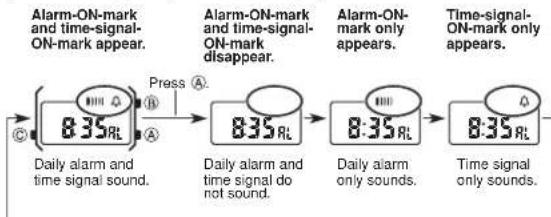
flowchart
graph LR
    A["8:35 RL"] -->|Press A| B["8:35 RL"]
    B -->|Press B| C["8:35 RL"]
    C -->|Press C| D["Time signal only sounds."]
    style A fill:#f9f,stroke:#333
    style B fill:#f9f,stroke:#333
    style C fill:#f9f,stroke:#333
    style D fill:#f9f,stroke:#333
Stopwatch operation
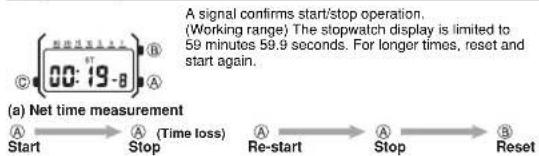
flowchart
graph LR
    A["Start"] --> B["Stop"]
    B --> C["Re-start"]
    C --> D["Stop"]
    D --> E["Reset"]
Setting time and calendar
- In the time setting mode, first press Ⓐ on a time signal to correct seconds.
- Press Ⓑ to shift flashing position. The digit(s) to be changed will flash.

flowchart
graph TD
    A["SECOND"] --> B["HOUR"]
    B --> C["MINUTE"]
    C --> D["MONTH"]
    D --> E["DATE"]
    E --> F["DAY"]
    F --> G["SECOND"]
    H["Press Ⓝ."] --> B
- Each press of Ⓐ advances the setting by one. Keep pressed for quick advance.
- Press © to complete setting.
Specifications
Accuracy at normal temperature: ± 30 seconds per month
Display capacity:
• Regular timekeeping mode
Hour, minute, second, am/pm, month, date, day (double display)
Calendar system: Auto-calendar (set at 28 days for February)
- Countdown alarm mode
Input range: 1 to 30 minutes
- Daily alarm
• Hourly time signal
- Stopwatch mode
Measuring capacity: 59 minutes 59.9 seconds
Measuring unit: 1/10th of a second
Measuring modes: Net time
Battery: Battery type Battery life*
CR1216 Approx. 2 years
* Includes an average of 20-second alarm per day.