
Collection A178WEA-1AES - Ur CASIO - Gratis brugsanvisning og manual
Find enhedens vejledning gratis Collection A178WEA-1AES CASIO i PDF-format.


Brugerspørgsmål om Collection A178WEA-1AES CASIO
0 spørgsmål om dette apparat. Besvar dem du kender, eller stil dit eget.
Stil et nyt spørgsmål om dette apparat
Download vejledningen til din Ur i PDF-format gratis! Find din vejledning Collection A178WEA-1AES - CASIO og tag din elektroniske enhed tilbage i hånden. På denne side er alle dokumenter nødvendige for brugen af din enhed offentliggjort. Collection A178WEA-1AES af mærket CASIO.
BRUGSANVISNING Collection A178WEA-1AES CASIO
USER'S GUIDE 2519
CASIO
General Guide
- Press © to change from mode to mode.
• In any mode, press Ⓑ to illuminate the display.
- In any mode, hold down © for about two seconds to return to the Timekeeping Mode.

flowchart
graph LR
    A["Timekeeping Mode"] -->|Press ©.| B["Alarm Mode"]
    B --> C["Dual Time Mode"]
    C --> D["DT"]
Timekeeping
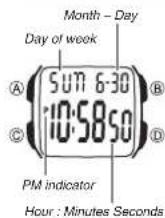
Use the Timekeeping Mode to set and view the current time and date.
To set the time and date
-
In the Timekeeping Mode, hold down Ⓐ until the seconds start to flash, which indicates the setting screen.
-
Press © to move the flashing in the sequence shown below to select other settings.

- When the setting you want to change is flashing, press Ⓓ to change it as described below.
| To change this setting | Perform this button operation |
| Seconds | Press 1 to reset to 00. |
| Hour, Minutes, Year, Month, Day | Press 2 to increase the setting. |
- Pressing (D) while the seconds are in the range of 30 to 59 resets them to 00 and adds 1 to the minutes. In the range of 00 to 29, the minutes are unchanged.
- Press Ⓐ to exit the setting screen.
• The day of the week is automatically displayed in accordance with the date (year, month, and day) settings.
• The year can be set in the range of 2000 to 2099.
- The watch's built-in full automatic calendar automatically makes allowances for different month lengths and leap years. Once you set the date, there should be no reason to change it except after you have the watch's battery replaced.
To toggle between 12-hour and 24-hour timekeeping
In the Timekeeping Mode, press Ⓓ to toggle between 12-hour timekeeping and 24-hour timekeeping.
- With the 12-hour format, the P (PM) indicator appears to the left of the hour digits for times in the range of noon to 11:59 p.m. and no indicator appears to the left of the hour digits for times in the range of midnight to 11:59 a.m. - With the 24-hour format, times are displayed in the range of 0:00 to 23:59, without any indicator.
•The 12-hour/24-hour timekeeping format you select in the Timekeeping Mode is applied in all other modes.
Alarm
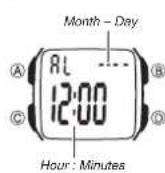
The multi-function alarm lets you specify the hour, minutes, month, and day for the alarm. You can set up the alarm so it sounds once when the alarm time is reached, or for a snooze alarm that repeats up to seven times, every five minutes.
You can also turn on an Hourly Time Signal that causes the watch to beep twice every hour on the hour.
- Pressing Ⓓ In the Alarm Mode toggles between the alarm screen (Alarm time displayed) and the Hourly Time Signal screen (☐☐ displayed).
• An alarm setting (and an Hourly Time Signal setting) is available in the Alarm Mode, which you enter by pressing ©.
Alarm Types
The alarm type is determined by the settings you make, as described below.
• Daily alarm
Set the hour and minutes for the alarm time. This type of setting causes the alarm to sound everyday at the time you set.
- Date alarm
Set the month, day, hour and minutes for the alarm time. This type of setting causes the alarm to sound at the specific time, on the specific date you set.
■ 1-Month alarm
Set the month, hour and minutes for the alarm time. This type of setting causes the alarm to sound everyday at time you set, only during the month you set.
- Monthly alarm
Set the day, hour and minutes for the alarm time. This type of setting causes the alarm to sound every month at time you set, on the day you set.
To set an alarm time
-
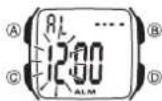
In the Alarm Mode, press Ⓓ to display the alarm screen.
-
Hold down Ⓐ until the hour setting of the alarm time starts to flash, which indicates the setting screen.
• This operation automatically turns on the one-time alarm.
- Press © to move the flashing in the sequence shown below to select other settings.

- While a setting is flashing, press Ⓓ to increase it.
- To set an alarm that does not include a month (Dally alarm, Monthly alarm), set - for the month. Press ① until the - mark appears (between 12 and 1) while month setting is flashing.
- To set an alarm that does not include a day (Daily alarm, 1-Month alarm), set -- for the day. Press Ⓓ until the -- mark appears (between the end of the month and 1) while the day setting is flashing.
- When setting the alarm time using the 12-hour format, take care to set the time correctly as a.m. or p.m. (P indicator).
- Press Ⓐ to exit the setting screen.
Alarm Operation
The alarm tone sounds at the preset time for about 10 seconds. In the case of the snooze alarm, the alarm repeats up to seven times every five minutes. - Pressing any button stops the alarm tone operation.
•The alarm and the Hourly Time Signal sound in all modes.
To select the alarm type
text_image
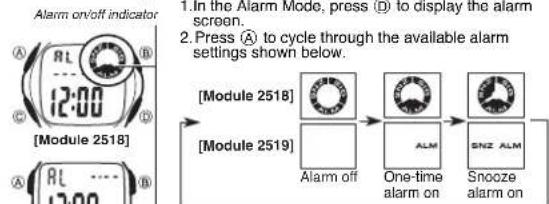
Alarm on/off indicator 1. In the Alarm Mode, press (D) to display the alarm screen. 2. Press Ⓐ to cycle through the available alarm settings shown below. Module 2518 Module 2519 Alarm off One-time alarm on SNZ ALM Snooze alarm on- The alarm on indicator and the snooze alarm on indicator are shown on the display in all modes while these functions are turned on.
[Module 2519] • The snooze alarm on indicator flashes during the 5-minute intervals between alarms.
•Displaying the Alarm Mode setting screen automatically changes the alarm type to one-time alarm
- Changing the Timekeeping Mode setting screen during a 5-minute interval between snooze alarms stops the current snooze alarm operation (but snooze alarm remains as the alarm type setting).
- If a snooze alarm time is reached while you are setting the current time in the Timekeeping Mode, the alarm sounds only once. Subsequent snooze alarm operations are not performed.
Stopping a Snooze Alarm Operation
After a snooze alarm time is reached, you can perform the following steps during any 5-minute interval between alarms to stop the snooze alarm operation.
To stop a Snooze Alarm Operation
- While in the Alarm Mode, press Ⓓ to display the alarm screen.
- Next, press Ⓔ to turn off the alarm or to select the one-time alarm. • Note that this also changes the alarm type setting. If you want to use the snooze alarm again, you must re-select it as the alarm type. See "To select the alarm type" for more information.
To test the alarm
• In the Alarm Mode, hold down Ⓓ to sound the alarm.
To turn the Hourly Time Signal on and off
- In the Alarm Mode, press Ⓓ to display the Hourly Time Signal screen.
- Press Ⓐ to turn it on and off.
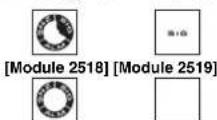
Indicates Hourly Time Signal is on.
- The Hourly Time Signal on Indicator is shown on the display in all modes while this function is turned on.
Stopwatch
text_image
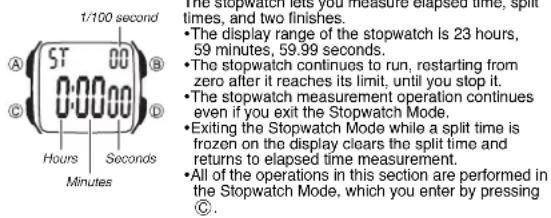
1/100 second A 5T 00 B C 0:00:00 D Hours Seconds Minutes The stopwatch sets you measure elapsed time, split times, and two finishes. • The display range of the stopwatch is 23 hours, 59 minutes, 59.99 seconds. • The stopwatch continues to run, restarting from zero after it reaches its limit, until you stop it. • The stopwatch measurement operation continues even if you exit the Stopwatch Mode. • Exiting the Stopwatch Mode while a split time is frozen on the display clears the split time and returns to elapsed time measurement. • All of the operations in this section are performed in the Stopwatch Mode, which you enter by pressing C.To measure times with the stopwatch
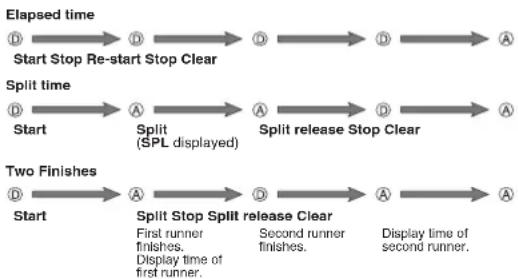
flowchart
graph LR
    A["Start"] --> B["Start Stop Re-start Stop Clear"]
    B --> C["Split time"]
    C --> D["Start"]
    D --> E["A Split (SPL displayed)"]
    E --> F["Split release Stop Clear"]
    F --> G["Two Finishes"]
    G --> H["Start"]
    H --> I["A Split Stop Split release Clear"]
    I --> J["First runner finishes. Display time of first runner."]
    I --> K["Second runner finishes. Display time of second runner."]
    J --> L["A Split Release Stop Clear"]
    L --> M["End"]
Dual Time
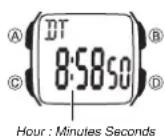
The Dual Time Mode lets you keep track of time in a different time zone.
• In the Dual Time Mode, the seconds count is synchronized with the seconds
count of the Timekeeping Mode.
To set the Dual Time
-
Press © to enter the Dual Time Mode.
-
In the Dual Time Mode, hold down Ⓐ until the
hour setting starts to flash, which indicates the
setting screen
- Press © to change the selection in the following
sequence.

-
Press Ⓓ to increase the setting.
-
Press Ⓐ to exit the setting screen.
Reference
This section contains more detailed and technical information about watch operation. It also contains important precautions and notes about the various features and functions of this watch.
Auto return features
- If you leave a screen with flashing digits for two or three minutes without performing any operation, the watch automatically saves any settings you have made up to that point and exits the setting screen.
Data and Setting Scrolling
The Ⓓ button is used to scroll through setting screen data on the display. Holding down this button during a scroll operation scrolls through the data at high speed.
Backlight Precautions
The backlight uses an LED (light-emitting diode) and a light guide panel that cause the entire display to glow for easy reading in the dark. In any mode, press (R) to illuminate the display for about one second
• The illumination provided by the backlight may be hard to see when viewed under direct sunlight.
- The backlight automatically stops illuminating whenever an alarm sounds. - Frequent use of the backlight shortens the battery life.