
Collection AQ-230A-1DMQYES - Armbåndsur CASIO - Gratis brugsanvisning og manual
Find enhedens vejledning gratis Collection AQ-230A-1DMQYES CASIO i PDF-format.


Brugerspørgsmål om Collection AQ-230A-1DMQYES CASIO
0 spørgsmål om dette apparat. Besvar dem du kender, eller stil dit eget.
Stil et nyt spørgsmål om dette apparat
Download vejledningen til din Armbåndsur i PDF-format gratis! Find din vejledning Collection AQ-230A-1DMQYES - CASIO og tag din elektroniske enhed tilbage i hånden. På denne side er alle dokumenter nødvendige for brugen af din enhed offentliggjort. Collection AQ-230A-1DMQYES af mærket CASIO.
BRUGSANVISNING Collection AQ-230A-1DMQYES CASIO
OPERATION CHART:MODULE QW-1301
GENERAL GUIDE
- Press B to change from mode to mode. Each mode is explained in detail on the following pages.
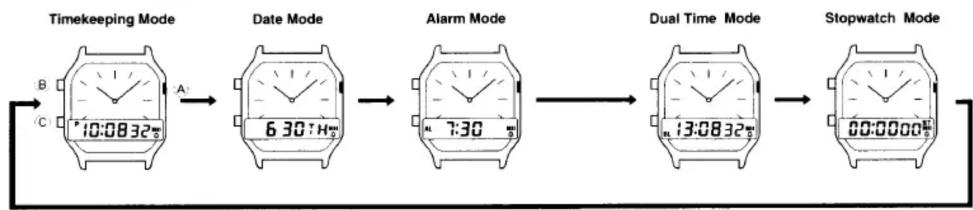
flowchart
graph LR
    A["Timekeeping Mode"] --> B["Date Mode"]
    B --> C["Alarm Mode"]
    C --> D["Dual Time Mode"]
    D --> E["Stopwatch Mode"]
TIMEKEEPING MODE

To set the digital time
- Hold down (C) while in the Timekeeping Mode until the seconds digits start to flash on the digital display.
The seconds flash because they are selected.
- Press C: to change the selection in the following sequence.
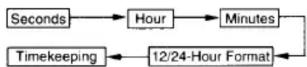
- Once you reach the Timekeeping display, you have to hold down C again to display the flashing seconds.
-
While the seconds digits are selected (flashing), press 'B' to reset the seconds to "00". If you press 'B' while the seconds count is in the range of 30 to 59, it is reset to "00" and 1 is added to the minutes. If the seconds count is in the range of 00 to 29, the minutes count is unchanged.
-
While any other digits (besides seconds) are selected (flashing), press B to increase the number. Holding down B changes the current selection at high speed. While the 12/24 hour setting is selected, press B to switch between the two formats.
- After you set the time and format, press (C) to select the Timekeeping Mode.
- If you do not operate any button for a few minutes while a selection is flashing, the flashing stops and the watch goes back to the Timekeeping Mode automatically.
To set the analog time
When in the any Mode, press A to advance the analog time setting.
Hold down A advances the analog setting at high speed. You can only advance the setting and cannot reverse it.
DATE MODE
To set the date
- Hold down 'C' while in the Date Mode until the month digits start to flash on the digital display. The month digits flash because they are selected.
- Press C to change the selection in the following sequence.
Month → Date → Day of week → Date Mode
- Once you reach the Date Mode display, you have to hold down C again to display the flashing month.
-
While the month or date digits are selected (flashing), press β to increase the number. While the day of the week is selected, pressing β advances to the next day. Holding down β changes the current selection at high speed.
-
After you set the date, press C to select the Date Mode.
-
The watch does not make any allowance for leap years. Be sure to manually set February 29 (when one occurs) for the appropriate date.
- If you do not operate any button for a few minutes while a selection is flashing, the flashing stops and the watch goes back to the Timekeeping Mode automatically.

STOPWATCH MODE
The Stopwatch Mode measures elapsed time and cumulative elapsed time. The range of the stopwatch is 59 minutes, 59.99 seconds.
To measure elapsed time
- Press C: to start the stopwatch.
- Press C to stop the stopwatch.
- Hold down C until the stopwatch is cleared to "00:00 00"
To measure cumulative elapsed time
- Press C to start the stopwatch.
- Press C: to stop the stopwatch.
- Press C again to resume timing from the time shown on the display.
You can repeat steps 2 and 3 as many times as you like. - Hold down C until the stopwatch is cleared to "00:00 00".
Alarm ON indicator
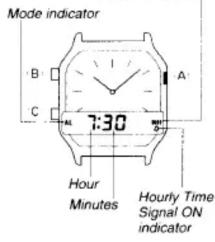
ALARM MODE
When the Daily Alarm Function is switched on, the alarm sounds for 20 seconds at the preset time each day. Press any button to stop the alarm after it starts to sound. When the Hourly Time Signal is switched on, the watch keeps every hour on the hour. Note that the Daily Alarm and the Hourly Time Signal operate based on the digital time setting.
- If you do not press any button for a few minutes in the Alarm Mode, the watch goes back to the Timekeeping Mode automatically.
To set the alarm time
- Hold down 'C' while in the Alarm Mode until the hour digits start to flash on the display. The hour digits flash because they are selected.
- Press C to change the selection in the following sequence.

- Once you reach the Alarm Mode display, you have to hold down C again to display the flashing hour.
- Press B to increase the selected digits. Holding down B changes the selection at high speed.
• The format (12-hour or 24-hour) of the alarm time matches the format you select for digital timekeeping. - When setting the alarm time you using the 12-hour format, take care of set the time correctly as morning or afternoon.
- While the Daily Alarm/Hourly Time Signal setting is selected, press B to change the status in the following sequence.
[Alarm ON Indicator/Hourly Time Signal ON Indicator]

- After you make your alarm setting, press C to select the Alarm Mode.
- If you do not operate any button for a few minutes while a selection is flashing, the flashing stops and the watch goes back to the Timekeeping Mode automatically.
To test the alarm
Hold down B in any mode to sound the alarm. Note that pressing B also changes the mode.

Mode indicator
DUAL TIME MODE
The Dual Time function lets you set a second digital time that operates independently of the current analog and digital times. This means you can keep track of time in another time zone.
To set the Dual Time
- Hold down (C) while in the Dual Time Mode until the hour digits start to flash on the display. The hour digits flash because they are selected.
- Press C to change the selection in the following sequence.

- Once you reach the Dual Time Mode display, you have to hold down 'C' again to display the flashing hour.
- Press B to increase the selected digits. Holding down B changes the selection at high speed. While the 12/24-hour setting is selected, press B to switch between the two formats.
- After you set the time, press C to select the Dual Time Mode.
- If you do not operate any button for a few minutes while a selection is flashing, the flashing stops and the watch goes back to the Timekeeping Mode automatically.
Mærke : CASIO
Model : Collection AQ-230A-1DMQYES
Kategori : Armbåndsur