
Collection LA680WEA-1EF - Ur CASIO - Gratis brugsanvisning og manual
Find enhedens vejledning gratis Collection LA680WEA-1EF CASIO i PDF-format.


Brugerspørgsmål om Collection LA680WEA-1EF CASIO
0 spørgsmål om dette apparat. Besvar dem du kender, eller stil dit eget.
Stil et nyt spørgsmål om dette apparat
Download vejledningen til din Ur i PDF-format gratis! Find din vejledning Collection LA680WEA-1EF - CASIO og tag din elektroniske enhed tilbage i hånden. På denne side er alle dokumenter nødvendige for brugen af din enhed offentliggjort. Collection LA680WEA-1EF af mærket CASIO.
BRUGSANVISNING Collection LA680WEA-1EF CASIO
Operation Guide 3284
CASIO®
About This Manual
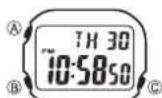
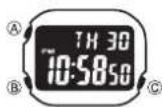
Depending on the model of your watch, display text appears either as dark fi gures on a light background, or light fi gures on a dark background. All sample displays in this manual are shown using dark fi gures on a light background.
Button operations are indicated using the letters shown in the illustration.
Each section of this manual provides you with the information you need to perform operations in each mode.
- Note that the product illustrations in this manual are intended for reference only, and so the actual product may appear somewhat different than depicted by an illustration.
E
E·1
Contents
| General Guide | E-4 |
| Timekeeping | E-6 |
| Alarm | E-8 |
| Stopwatch | E-11 |
| Time Setting | E-13 |
| Specifications | E-15 |
Procedure Lookup
| The following is a handy reference list of all the operational procedures contained in this manual. |
To toggle between 12-hour and 24-hour timekeeping....E-6
| To set the alarm time....E-8 |
| To stop the alarm....E-10 |
| To switch the Daily Alarm and Hourly Time Signal on and off....E-10 |
| To test the alarm....E-10 |
| To measure times with the stopwatch....E-12 |
| To set the time and date....E-13 |
E-2
E-3
General Guide
- Press Ⓑ to change from mode to mode.
- After you perform an operation in any mode, pressing Ⓑ returns to the Timekeeping Mode.

flowchart
graph LR
    A["Timekeeping Mode"] -->|Press (B)| B["Alarm Mode"]
    B --> C["Stopwatch Mode"]
    C --> D["Time Setting Mode"]

    subgraph Timekeeping Mode
        A1["TH 30 10:58:50"]
        A2["A"]
        A3["B"]
        A4["C"]
    end

    subgraph Alarm Mode
        B1["AL 12:00"]
        B2["A"]
        B3["B"]
        B4["C"]
    end

    subgraph Stopwatch Mode
        C1["ST 00:00:00"]
        C2["A"]
        C3["B"]
        C4["C"]
    end

    subgraph Time Setting Mode
        D1["TH 30 10:56:50"]
        D2["A"]
        D3["B"]
        D4["C"]
    end
E-4
E-5
Timekeeping
PM Indicator
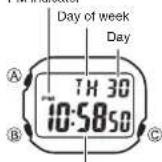
Hour : Minutes Seconds
Use the Timekeeping Mode to view the current time and date.
Day of the week is displayed as follows.
SU : Sunday
MO: Monday
TU : Tuesday
WE: Wednesday
TH:Thursday
FR : Friday
SA : Saturday
To toggle between 12-hour and 24-hour timekeeping
In the Timekeeping Mode, press Ⓐ to switch between the
12-hour and 24-hour formats.
- With the 12-hour format, the PM indicator appears for times in the range of noon to 11:59 p.m. and no indicator appears for times in the range of midnight to 11:59 a.m.
E-6
- The watch returns to the Timekeeping Mode automatically if you do not perform any button operation for one or two minutes in the Alarm Mode and Time Setting Mode.
- In any mode, press Ⓒ to illuminate the display.
- The watch returns to the Timekeeping Mode automatically if you do not perform any button operation for one or two minutes in the Alarm Mode and Time Setting Mode.
- In any mode, press Ⓐ to illuminate the display.
- With the 24-hour format, times are displayed in the range of 0:00 to 23:59, with 24H indicator.
- With the 24-hour format, times are displayed in the range of 0:00 to 23:59, with 24H indicator.
Alarm
Alarm on indicator
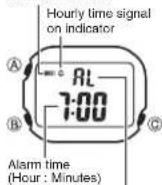
Mode indicator
When the Daily Alarm is turned on, the alarm sounds for 20 seconds at the preset time each day. When the Hourly Time Signal is turned on, the watch beeps every hour on the hour.
All of the operations in this section are performed in the Alarm Mode, which you enter by pressing (B) (page E-4).
To set the alarm time
In the Alarm Mode, press 1. ©. The hour digits II ash because they are selected.
This operation automatically turns on the alarm.
E-8
E-7
Press 2. © to change the selection in the following sequence.
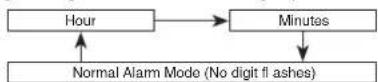
- Press Ⓐ to increase the selected digits. Holding down Ⓐ changes the number at high speed.
The format (12-hour and 24-hour) of the alarm time matches the format you select • for normal timekeeping.
When setting the alarm time using the 12-hour format, take care to set the time • correctly as morning or afternoon (PM).
After you set the alarm time, use 4. © to return to the Alarm Mode.
If you do not operate any button for one or two minutes while a selection is flashing, the flashing stops and the watch goes back to the Timekeeping Mode automatically.
E-9
To stop the alarm
Press any button to stop the alarm after it starts to sound.
To switch the Daily Alarm and Hourly Time Signal on and off
Press Ⓐ while in the Alarm Mode to change the status of the Daily Alarm and Hourly Time Signal in the following sequence.

flowchart
graph LR
    A["Both on"] --> B["Both off"]
    B --> C["Daily Alarm only"]
    C --> D["Hourly Time Signal only"]
To test the alarm
Hold down Ⓐ while in the Alarm Mode to sound the alarm.
Stopwatch
Mode indicator
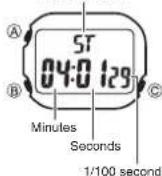
The Stopwatch Mode lets you measure elapsed time, split times, and two finishes. The range of the stopwatch is 59 minutes, 59.99 seconds.
The stopwatch continues to run, restarting from zero after it reaches its limit, until you stop it.
The stopwatch measurement operation continues even if you exit the Stopwatch Mode.
Exiting the Stopwatch Mode while a split time is frozen on the display clears the split time and returns to elapsed time measurement.
All of the operations in this section are performed in the Stopwatch Mode, which you enter by pressing (E) (page E-5).
E-10
E·11
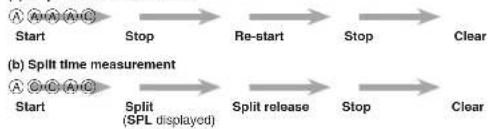
To measure times with the stopwatch
(a) Elapsed time measurement
flowchart
graph LR
    A["Start"] --> B["Stop"]
    B --> C["Re-start"]
    C --> D["Stop"]
    D --> E["Clear"]

    F["Start"] --> G["Split (SPL displayed)"]
    G --> H["Split release"]
    H --> I["Stop"]
    I --> J["Clear"]
(c) Split time and 1st-2nd place times

flowchart
graph LR
    A["Start"] --> B["Split"]
    B --> C["Stop"]
    C --> D["Split release"]
    D --> E["Clear"]

    B --> F["First runner finishes. Display time of first runner."]
    C --> G["Second runner finishes."]
    D --> H["Display time of second runner."]
E-12
Time Setting
PM Indicator

Hour : Minutes Seconds
Use the Time Setting Mode to set the current time and date.
To set the time and date
Use 1. Ⓑ to enter the Time Setting Mode (page E-5). The second's digits flash because they are selected. • Press 2. Ⓞ to change the selection in the following sequence.
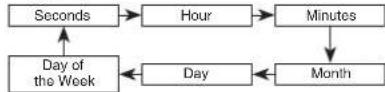
E-13
While the second's digits are selected (if ashing), press 3. Ⓐ to reset the seconds to ☐ If you press Ⓐ while the second's count is in the range of 30 to 59, the seconds are reset to ☐ and 1 is added to the minutes. If the second's count is in the range of 00 to 29, the minute's count is unchanged.
While any other digits (besides seconds) are selected (fl ashing), press 4. Ⓐ to increase the number. While the day of the week is selected, pressing Ⓐ advances to the next day. Holding down Ⓐ changes the current selection at high speed.
After you set the time and date, press 5. Ⓑ to return to the Timekeeping Mode. If you do not operate any button for one or two minutes while a selection is fl ashing, the fl ashing stops and the watch goes back to the Timekeeping Mode automatically.
E-14
Specifications
Accuracy at normal temperature: ±30 seconds a month
Timekeeping: Hour, minutes, seconds, p.m., day, and day of the week
Time system: Switchable between 12-hour and 24-hour formats
Calendar system: Auto-calendar set at 28 days for February
Alarm: Daily alarm, Hourly time signal
Stopwatch
Measuring units: 1/100 seconds
Measuring capacity: 59 minutes, 59.99 seconds
Measuring modes: Elapsed time, split time, and two finishes
Illumination: LED (light-emitting diode)
Battery: One lithium battery
Type: CR1616
Battery life: Approx. 5 years
• 1 second of illumination operation per day
• 20 seconds of alarm operation per day
E-15