Illumination - Armbåndsur Daniel Steiger - Gratis brugsanvisning og manual
Find enhedens vejledning gratis Illumination Daniel Steiger i PDF-format.


Brugerspørgsmål om Illumination Daniel Steiger
0 spørgsmål om dette apparat. Besvar dem du kender, eller stil dit eget.
Stil et nyt spørgsmål om dette apparat
Download vejledningen til din Armbåndsur i PDF-format gratis! Find din vejledning Illumination - Daniel Steiger og tag din elektroniske enhed tilbage i hånden. På denne side er alle dokumenter nødvendige for brugen af din enhed offentliggjort. Illumination af mærket Daniel Steiger.
BRUGSANVISNING Illumination Daniel Steiger

5 YEAR WARRANTY This is a genuine item from the Daniel Steiger range.
For all queries call our customer services team toll free -1 888 768 4468
Illumination Watch
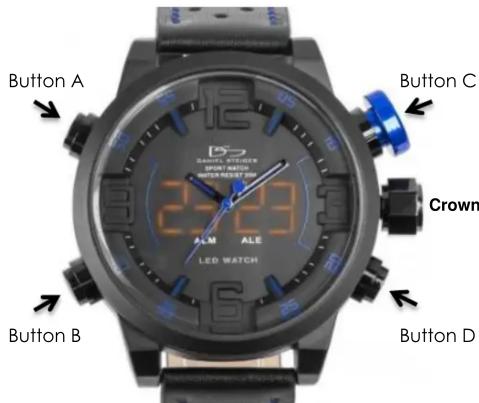
How to use the watch display:
Press any of the four buttons once, to see the time. Press button A twice, to display the date. Press button C twice, to display the day of the week (note that this is worked out automatically by the watch itself, based on the date & year you select). Press button D twice, to display the current alarm set time.
How to set the digital time, date, & day:
First of all, push any button to bring up the time LEDs. Then, hold down button B until the seconds start to flash. Push button B again, once, & you will see the hour digits flashing. To change the hour, push button C until the desired hour is reached. Once the hour has been set, if you push button B again, each push will - in this order - take you through the minutes, the year, the month, the date, and the 24 hour/AM-PM time display option. In each case, you can change any of these by pushing button C.
How to operate/set the alarm:
To turn the alarm on/off, push button D once, and then push it again, but hold the button in until you see the LED digits on the face flashing, & saying AL OFF, or AL ON. Push button C to switch between on, and off. While the LEDs are still flashing, push button D again, and you will see the time the alarm is set for, again flashing. Use button C to change the hour to the desired time, then push button D once, and again use button C to adjust the minutes to the desired time. Once the alarm time is set, it can just be left; no further button pushes are needed.
Note that when ALM is illuminated, that means you are in the alarm setting mode. When it is not, you are not in the alarm setting mode. When ALE is illuminated, that means the alarm is on. When it is not, the alarm is off.
Warranty:
This warranty service run by: Timepieces International Inc, 12800 NW South River Drive, Medley, FL, 33178, with the authorization of Daniel Steiger. This warranty covers the watch movement against manufacturer's defects for 5 years from date of purchase. Within the period your watch will be repaired free of charge, except for a handling and transportation fee (\$29.95). This fee must be enclosed when returning your watch for service. We cannot accept responsibility for damage or loss caused in transit.
Important: Not covered by warranty
1.) Case, glass and band
2.) Damage caused through accidents, misuse, neglect, or inexpert repairs
3.) Any discoloration, or wear
4.) Any loss or damage whilst the watch is not in our possession, including transit by any means
5.) Any consequential loss whatsoever and how so ever arising, so be accepted by us
6.) Batteries
Mærke : Daniel Steiger
Model : Illumination
Kategori : Armbåndsur