Dress RM313GX9 - Ur Lorus - Gratis brugsanvisning og manual
Find enhedens vejledning gratis Dress RM313GX9 Lorus i PDF-format.


Brugerspørgsmål om Dress RM313GX9 Lorus
0 spørgsmål om dette apparat. Besvar dem du kender, eller stil dit eget.
Stil et nyt spørgsmål om dette apparat
Download vejledningen til din Ur i PDF-format gratis! Find din vejledning Dress RM313GX9 - Lorus og tag din elektroniske enhed tilbage i hånden. På denne side er alle dokumenter nødvendige for brugen af din enhed offentliggjort. Dress RM313GX9 af mærket Lorus.
BRUGSANVISNING Dress RM313GX9 Lorus
NREVD57C
8-2010
PREVD57C Instruction Manual

LORUS
CAL. VD57 (RM3 SERIES) CAL. V657(RJN SERIES)
LORUS
CHARACTERISTICS
-
Time: Indicated by the hour, minute and second hands
-
Date: Displayed in numerals.
-
Stopwatch: Measures up to 60 minutes in 1/10 second increments
• Split time measurement
■ DISPLAY AND CROWN OPERATION
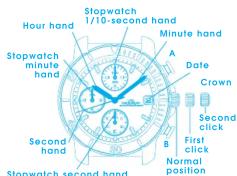
Stopwatch second hand
Crown
Normal position : Free
First click :Setting the date
Second click :• Setting the time • Adjusting the stopwatch hand position
■ ADJUSTING THE STOPWATCH HAND POSITION
Before setting the time, be sure to check if the stopwatch hands are in the "0" position when the stopwatch is reset.
- If the stopwatch is in use, press the buttons
In the following order to reset it. • If the stopwatch is counting : A → B
• If the stopwatch is stopped : B
- If the split time is displayed : B → A → B
- If any of the stopwatch hands do not return to the "0" position when the stopwatch is
to the 5-position when the stepware is reset, follow the procedure below to reset the hands.
The hands.
Stopwatch 1/10-second hand
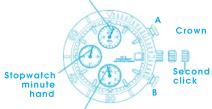
Stopwatch second hand
-
Pull out the crown all the way.
-
Press "A" repeatedly to reset the stopwatch
1) 10-second hand to the "0" position. Press "B" repeatedly to reset the stopwatch second and minute hands to the "0" position. * The hands move quickly if the respective buttons are kept pressed.
- Push the crown back into the normal position.
■ HOW TO SET THE TIME/CALENDAR
- If the stopwatch is in use, be sure to reset it before setting the time
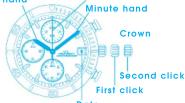
Hour hand
Second hand
-
Pull out the crown to the first click.
-
Turn the crown clockwise until the previous day's date appears.
-
Pull out the crown to the second click when the second hand is at the 12 o'clock position. The second hand will stop on the spot.
-
Turn the crown clockwise until the desired date appears, and set the hour and minute hands to the desired time.
-
Push the crown back into the normal position in accordance with a time signal
Notes:
- While the crown is at the second click, do not press any button. Otherwise, the stopwatch hands will move.
* To reset them to the "0" position, refer to "ADJUSTING THE STOPWATCH HAND POSITION",
- Do not set the date between 9:00 p.m. and 1:00 a.m. Otherwise, the date may not change properly.
* If it is necessary to set the date during that time period, first change the time to any time outside it, set the date and then reset the correct time.
-
When setting the hour hand, be sure to check that AM/PM is correctly set. The watch is so designed that the date changes once in 24 hours.
-
When setting the minute hand, first advance it 4 to 5 minutes ahead of the desired time and then turn it back to the exact minute.
■ HOW TO USE THE STOPWATCH
• The stopwatch can measure up to 60 minutes in 1/10 second increments.
• The measured time is indicated by the small stopwatch hands that move independently of the center hands.
Stopwatch 1/10-second hand☆
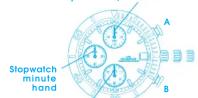
Stopwatch second hand
☆ After the measurement exceeds 1 minute, the stopwatch 1/10-second hand stays at the "0" position.
When the measurement is stopped, it will move to indicate the elapsed 1/10 seconds.
Stopwatch operation
Standard measurement
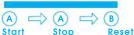

Accumulated elapsed time measurement
| Start | Stop | Restart | Stop | Reset |
* Restart and stop of stopwatch can be repeated by pressing button "A".
Split time measurement
| A Start | B Split | B Split | A Stop | B Reset |
• Measurement and release of split time can be repeated by pressing button "B".
Note: When "B" is pressed to reset the stopwatch to "00", the stopwatch second and minute hands return to "0" position in 40 seconds.
■ NECESSARY PROCEDURE AFTER BATTERY
CHANGE
- When the battery is replaced, the time information stored in the built-in IC and the time indicated by the stopwatch hands do not correspond with each other. Before using the watch, therefore, be sure to reset the hands to the "0" position, following the procedure below.
* In case any of the hands should move improperly, follow the procedure below to adjust the hand movement.
Stopwatch 1/10-second hand
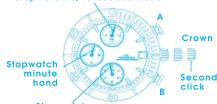
Stopwatch second hand
1. Pull out the crown all the way.
2. Press and hold "A" and "B" at the same time for 2 seconds, and then release the buttons.
* The stopwatch second hand turns half a circle counterclockwise and then returns where it was. The stopwatch 1/10-second hand turns a full circle clockwise and stops.
3. Press "A" repeatedly to reset the stopwatch 1/10-second hand to the "0" position.
Press "B" repeatedly to reset the stopwatch second and minute hands to the "0" position.
* The hands move quickly if the respective buttons are kept pressed.
4. Turn the crown to set the hour and minute hands to the desired time.
* For details, refer to "HOW TO SET THE TIME/CALENDAR".
5. Push the crown back into the normal position.
LUMIBRITE WATCH
* If your watch is a LORUS LUMIBRITE watch, it has following features.
LORUS LUMIBRITE watches absorb and store light energy from natural and artificial light sources and emit light in the dark. They are made of environmentally friendly material, and therefore, are harmless to human beings and the environment.
- With a full charge, LORUS LUMIBRITE watches glow in the dark hours longer than conventional luminous watches of this type. If exposed to a light of more than 500 lux (i.e., the brightness of a typical office) for approximately 10 minutes, or direct sunlight for 2 minutes, they will glow for hours.
- Since LORUS LUMIBRITE watches emit the light they store, the brightness will decrease gradually over time. The length of time they will glow may also differ slightly depending on such factors as the brightness of and distance from the light source used to charge the watch.
BATTERY CHANGE
The battery SEIKO SR920SW, Maxwell SR920SW, SONY SR920SW, Matsushita SR920SW or EVEREADY 371, which powers your watch, should last approximately 2 years. However, because it is inserted at the factory, the actual life of the battery once in your possession may be less than the specified period. Be sure to replace the battery to prevent any possible malfunction as soon as it runs down. To replace the battery, we recommend taking the watch to a local watch repair shop.
Note: If the stopwatch is used more than 60 minutes a day, the battery life may be shorter than the above specified period.
■ CARE OF YOUR LORUS WATCH - BATTERY
| CAUTIONDo not expose the old battery to fire or recharge it. Keep it at a place beyond the reach of children. If a child swallows it, consult a doctor immediately. |
- WATER RESISTANT
| Condition or useIndication on the daily/case back | Accidental contact with water such as splashes and rain | Swimming and taking a shower | Skin diving | Scuba diving |
| No Indication | NO | NO | NO | NO |
| WATER RESISTANT | YES | NO NO | NO | |
| WATER RESISTANT*(SOM/5 BAR) | YES | YES NO | NO | |
| WATER RESISTANT*(100M/10 BAR)or above | YES | YES YES | NO |
- If your watch is 200 M/20 BAR, 100 M/10 BAR or 50 M/5 BAR water resistant, it is so indicated on the dial/case back. - Do not press the buttons or turn the crown when the watch is wet. - If the watch is exposed to salt water, rinse it in fresh water and then wipe it thoroughly dry.
Caution:
Leather straps are not water resistant except so indicated, even if the watch head is water resistant.
• ALLERGIC REACTION
Because the case and band touch the skin directly, it is important to clean them regularly. If not, shirt sleeves may be stained and those with delicate skin may develop a rash. Please wear the watch with some play to avoid any possible allergic reaction. If you develop a rash on your wrist, stop wearing and consult a physician.
• MAGNETISM
Your watch will be adversely affected by strong magnetism. Keep it away from close contact
Mærke : Lorus
Model : Dress RM313GX9
Kategori : Ur