MIC-555 - Mikrofon Steren - Gratis brugsanvisning og manual
Find enhedens vejledning gratis MIC-555 Steren i PDF-format.


Brugerspørgsmål om MIC-555 Steren
0 spørgsmål om dette apparat. Besvar dem du kender, eller stil dit eget.
Stil et nyt spørgsmål om dette apparat
Download vejledningen til din Mikrofon i PDF-format gratis! Find din vejledning MIC-555 - Steren og tag din elektroniske enhed tilbage i hånden. På denne side er alle dokumenter nødvendige for brugen af din enhed offentliggjort. MIC-555 af mærket Steren.
BRUGSANVISNING MIC-555 Steren
text_image
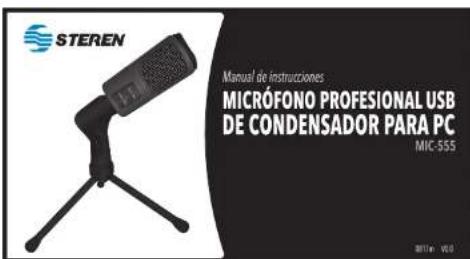
STEREN Manual de instrucciones MICRÓFONO PROFESIONAL USB DE CONDENSADOR PARA PC MIC-555 2011e: VOLDIMPORTANTE
Lea cuidadosamente este instructivo para evitar cualquier mal funcionamiento.
La información que se muestra en este manual sirve únicamente como referencia sobre el producto. Debido a actualizaciones pueden existir diferencias.
Por favor, consulte nuestra página web www.steren.com para obtener la versión más reciente de este manual.
PRECAUCIONES
- No use ni almacene este producto en lugares donde existan goteras o salpicaduras.
- No coloque objetos pesados sobre el producto.
- Este aparato NO está destinado para ser utilizado por personas con capacidades diferentes, a menos que cuenten con la preparación y supervisión adecuadas.
- Este producto NO es un juguete; manténgalo fuera del alcance de los niños.
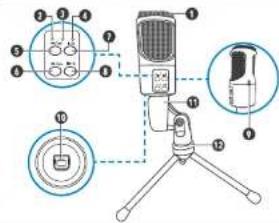
PARTES
text_image
Diagram of a desktop microphone with labeled parts including front, side, and top viewsCOLOCACIÓN
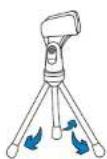
1 Extienda las patas del tripié y colóquelo sobre una superficie firme y plana.
- Mozka
- Indicador de microfono en silencio
- Indicador de pictos en elente
- Fisù anterior (previsto una veril)
Valores de gaborado - (marieng) - Valujejenje (prájekne and kazy)
- Detener gista (posteine universi) Silencia
miordano | maritenga presionada
A. September 2016 (pre-2017) - April 15:00
- Conductor USB
- Ciparabine
- Vpd
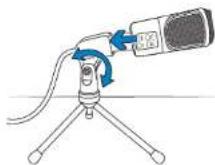
2 Coloque el micrófono en el clip del tripié y ajustelo en la posición deseada.
MODO DE USO
1 Conecte el cable al micrófono y a un puerto USB de la computadora. Automáticamente detectará e instalará el micrófono.
2 Utilice su programa de grabación de voz favorito.
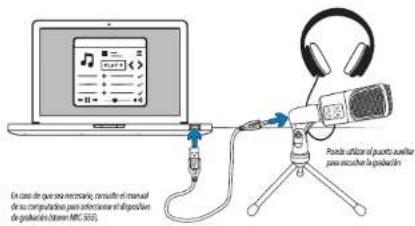
text_image
En caso de que una inescendir, consulte el manual de su computadora para analisear el dispositions de produzione (litter: MRC 355) Pende utilizan el puerto auxiliar para acucho la produzioneESPECIFICACIONES
Alimentación: 5 V --- (x USB)
Sensibilidad: -35 dB + 2 dB
Impedancia: ≤ 2,2 kΩ
Relación señal ruido: -90 dBA
Respuesta en frecuencia: 30 Hz-18 kHz
text_image
STEREN Instruction manual USB PROFESSIONAL CONDENSER PC MICROPHONE MIC 555 M11e v10IMPORTANT
Before to use the product, please read carefully this manual to avoid any malfunction. The info in this manual is shown as reference.
Due to updates can exist differences.
Please, consult our website www.steren.com to obtain the current version of this manual.
CAUTIONS
- Do not use or store this product in dripping or splashing places.
- Do not place heavy objects on the product.
- This device is NOT intended for use by persons with different capacities, unless they are properly prepared and supervised.
- This product is not a toy; Keep out of reach of children.
PARTS
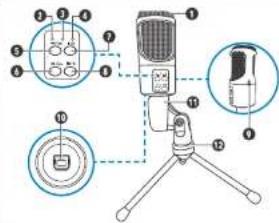
text_image
Diagram of a desktop microphone with labeled parts including front, side, and top viewsPLACING
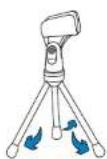
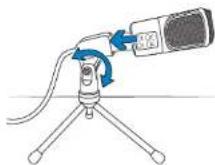
1 Extend the legs of the tripod and place it on a stable and flat surface.
- Macphore
- Macophone mode indicator
- Operating indicator
- Murrack indicator
- Pivian bank (prentice)/
- Next work later on the
Recording volume + (press and hold) - Stop and press over; Mute microphone press
and hold)
B. (Fig.1) Pasc max point test; (Mole max point and
Perry
9.2014/03/17 10.15T - Infektivinde
- kprod
2 Place the microphone on the tripod clip and adjust it in the desired position.
HOW TO USE
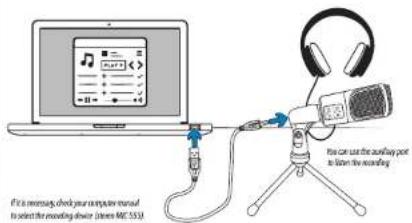
1 Connect the cable to the microphone and into an USB port of the computer. It will automatically detect and install the microphone.
2 Use your favorite voice recording program.
text_image
It is necessary, check your computer manual to select the recording device (lemon ME 553) I can use the audio packet to listen the recordingSPECIFICATIONS
Input: 5 V—(x USB)
Sensitivity: -35 dB ± 2 dB
Impedance: < 2.2 kΩ
SNR: -90 dBA
Frequency response: 30 Hz - 18 kHz