TER-150 - Vejrstation Steren - Gratis brugsanvisning og manual
Find enhedens vejledning gratis TER-150 Steren i PDF-format.


Brugerspørgsmål om TER-150 Steren
0 spørgsmål om dette apparat. Besvar dem du kender, eller stil dit eget.
Stil et nyt spørgsmål om dette apparat
Download vejledningen til din Vejrstation i PDF-format gratis! Find din vejledning TER-150 - Steren og tag din elektroniske enhed tilbage i hånden. På denne side er alle dokumenter nødvendige for brugen af din enhed offentliggjort. TER-150 af mærket Steren.
BRUGSANVISNING TER-150 Steren
IMPORTANTE
Antes de utilizar el producto, lea cuidadosamente este instructivo para evitar cualquier mal funcionamiento. La información presentada sirve únicamente como referencia sobre el producto. Debido a actualizaciones pueden existir diferencias. Consulte nuestra página web www.steren.com para obtener la versión más reciente de este manual.
PRECAUCIONES
- Este producto NO es un juguete; manténgalo fuera del alcance de los niños.
- No use ni almacene el equipo en lugares donde existan goteras y salpicaduras.
- Cualquier reparación no autorizada puede ocasionar mal funcionamiento y anulará la garantía.
- No coloque objetos pesados sobre el dispositivo.
- Este aparato NO está destinado a ser utilizado por personas con capacidades diferentes, a menos que cuenten con la preparación y supervisión adecuadas.
DESCRIPCIÓN CONFIGURACIÓN
text_image
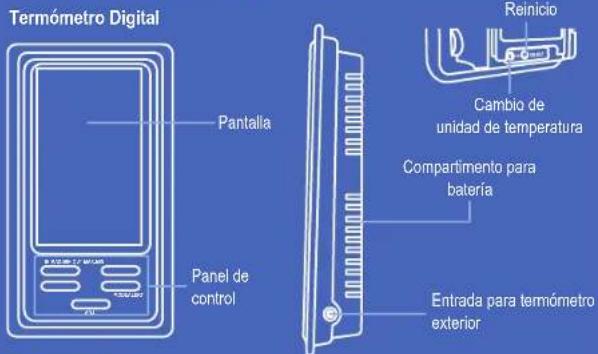
Termómetro Digital Pantalla Panel de control Reinicio Cambio de unidad de temperatura Compartimento para batería Entrada para termómetro exteriorPanel de control
text_image
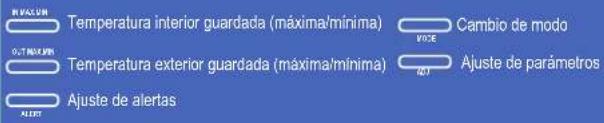
MASCUM Temperatura interior guardada (máxima/mínima) G.T.MASCUM Temperatura exterior guardada (máxima/mínima) Ajuste de alertas VIOE Cambio de modo Ajuste de parámetros ALERTPantalla
text_image
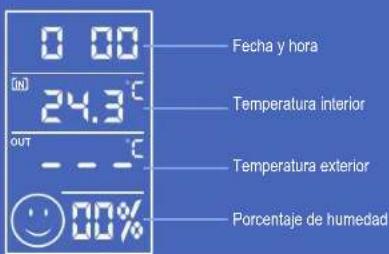
0 00 (in) 24.3°C out - - - - - 00% Fecha y hora Temperatura interior Temperatura exterior Porcentaje de humedadCOLOCACIÓN DE LA BATERÍA
natural_image
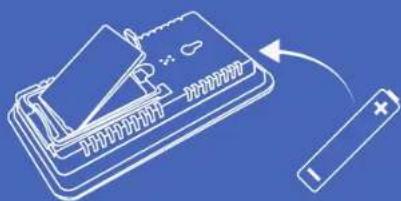
Illustration of a battery connected to a card slot, showing electrical connections (no text or symbols)Coloque una batería "AAA" cuidando que la polaridad sea correcta. Una vez colocada la batería, el termómetro enciende automáticamente
MODO DE USO
Coloque el termómetro sobre una superficie estable. Inserte el conector del termómetro exterior en la entrada correspondiente y coloque el extremo con el sensor en el lugar donde desea tomar las lecturas. Puede adherirlo en alguna superficie lisa.

natural_image
Line drawing of a handheld electronic device connected to a vertical line with a cable (no text or symbols)TER-150
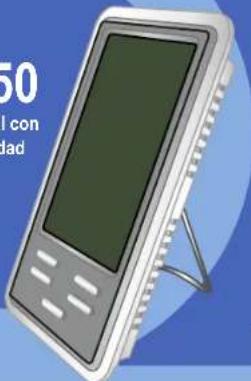
Termómetro digital con sensor de humedad
text_image
50 con dadV0.0 / 0117v

Si se exceden 10 segundos entre cada ajuste el termómetro saldrá del modo de edición, y tendrá que repetirse el procedimiento desde el principio
Ajuste de hora y fecha
- Mantenga presionado el botón MODE hasta que los números superiores comiencen a parpadear.
- Presione ADJ para elegir el sistema horario (24H o 12H). Presione nuevamente MODE.
- Presione ADJ para cambiar la hora; presione MODE. Presione ADJ para cambiar los minutos; presione MODE.
- Presione ADJ para elegir el año. Presione nuevamente MODE.
- Presione ADJ para elegir el mes; presione MODE. Presione ADJ para elegir el día; presione MODE.
Seleccionar unidad de temperatura
Inserte algún objeto con punta en el orificio °C/F para cambiar la unidad de temperatura.
OTRAS FUNCIONES
Alerta de límite de temperatura externa
Cada vez que la temperatura exceda el rango establecido, sonará una alerta en el temómetro
- Presione ALERT para seleccionar la temperatura límite que desea establecer. En pantalla aparecerán los iconos: ↑ Temperature máxima Temperatura mínima
- Para activar la alarma presione el botón ADJ. El icono 🔒 aparecerá en la pantalla.
- Mantenga presionado el botón ALERT hasta que los números comiencen a parpadear.
- Presione ADJ hasta seleccionar la temperatura deseada. Espere algunos segundos (sin presionar ningún botón) para que se guarden los cambios.
Alarma del reloj
Una alarma sonará a la hora establecida. Presione cualquier botón para apagarla.
1. Presione MODE una vez. Aparecerá el icono AL
2. Mantenga presionado MODE hasta que los números comiencen a parpadear.
3. Presione ADJ para cambiar la hora; presione MODE. Presione ADJ para cambiar los minutos; presione MODE.
4. Para activar la alarma presione el botón ADJ. El icono ◇ aparecerá en la pantalla.
Reinicio
Inserte algún objeto con punta en el orificio RESET y mantenga presionado para restablecer los parámetros de fábrica.
ESPECIFICACIONES
Alimentación: 1,5V --- (1xAAA)
Rango de temperatura interna: -10 a 50 °C
Rango de temperatura exterior: -50 a 90 °C
Humedad: 10 a 99 % no condensada
Las especificaciones pueden cambiar sin previo aviso
Produto: Termómetro digital con sensor de humedad
Mede: TERT-150
- 2017年,公司与上海浦东发展银行股份有限公司签订了《关于使用部分闲置募集资金进行现金管理的协议》。
FÓLIZA DE GARANTÍA
Esos póliza garantiza a producto por el término de un año en todos sus componentes y mano de otra, contra cualquier defecto de fabricación y Agnicoamplante, a partir de la fraco de entres
CHOS EMAFO, a Period de la Tecta de Enferg. CONDICIONES
1.-Para hacer efectiva la garantía, presente esta poliza y el producto, en conde fue adquirido o en Electronica Steren 5.A. de C.V.
2 - Electrica Starer S.A. de C.V. se comorólete a recuperar el producto en caso de estar defecte o sin rington cargo al consumidor. Los gastos de transporto a la cuabidas para propietos
3 - El tiempo de reparación en ningún caso será mayor a 30 días, contados a partir de la recepción del producto en cualquier de los silos donde
pueda reversa efectiva la garantía.
4 - El lugar conda puede adquirir partes, componentes, consumibles y accesorios, así como hacer válida esta garantía es en cual quena de las cleo unas personales posteriormente.
The image is too blurry to recognize any text content.
PSTA POLIZANO SE HARA EFECTIVA EN LOS SIGUIENTES DASOS
1 - Cuando el producto ha son utilizada ac exerciciones distrias a las normas
-
Cuarto el precluso no fin 936 operado de scuelos con efectivo de us
-
Cuando el produca no sica a la enasa o reparado por persona in situado por electrical sector S.V. de C.V. El core-bur-dej potra secretar que se hasta efectiva la garantía ante la propria casa comercial donde adquirió el produca. Si la presente garantía se extraviera, el consumida
puede recurre a su provoscer para que le excido otra pública, previa presentación de la nota de compra o factura respectiva.
DATOS DEL DISTRIBUIDOR
Nombre del Distribuer
Domiclo
Eproduces
Fecha de entrega
ELECTRÓNICA STEREN S.A. DE C.V. Biólogo Vaxmno Martinez No. 3408, San
Salvador Xachimanca, Del. Azcapotario, Ciudad de México, CA170 RFC
PS1926/45
SIEREN PRODUCTO EVPACADO S.A. DE C.V. Aucopista Mexico - Qm. 6m 28:
SIN NAVA 3-A, Co. Lomas de Boulvaras, Delinantes da Paz Estado de Mexico
M6150, CP 54320, RFC SPE541219H43

Centro de Atención a Clientes
018005009000
IMPORTANT
Before to use the product, please read carefully this manual to avoid any malfunction. The info in this manual is shown as reference. Due to updates can exist differences. Consult our website www.steren.com to obtain the current version of this manual.

CAUTIONS
• This product is NOT a toy; keep it away from children.
- Don't use or store the device in places where exist water or splashes.
- Any reparation not authorized may cause malfunction and avoid the warranty.
- Don't place heavy objects over the device.
• This device cannot be used by people with different abilities, unless they have preparation and supervision.
TER-150
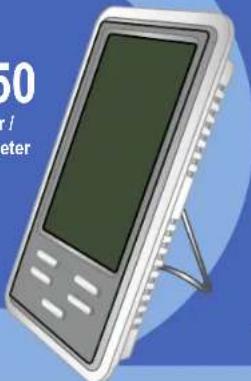
Humidity indoor / outdoor thermometer
natural_image
Illustration of a handheld electronic device with a screen and stand (no text or symbols visible)V0.0 / 0117v
DESCRIPTION
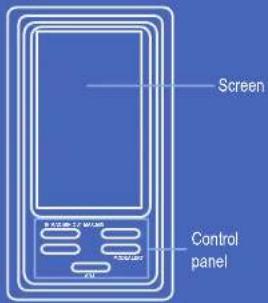
Digital thermometer
text_image
Screen Control panel
text_image
Temperature unity change Battery compartment Outdoor thermometer plugControl panel

text_image
MAXIMUM Show the stored maximum temperature (max/min) Mode change 0.5 MAXIMUM Show the stored minimum temperature (max/min) Parameters settings Alert settingsScreen
text_image
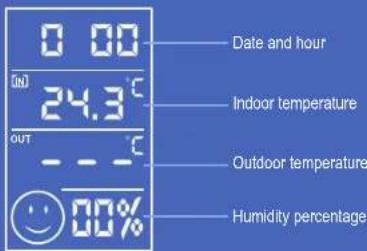
0 00 24.3°C OUT - - - °C 00% Date and hour Indoor temperature Outdoor temperature Humidity percentageBATTERY PLACEMENT
natural_image
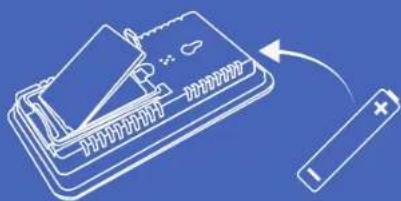
Illustration of a battery connected to a card slot, no text or symbols presentPlace a "AAA" battery, ensure that the polarity is right. Once placed the battery, the thermometer turn on automatically
HOW TO USE
Place the thermometer over a flat place.
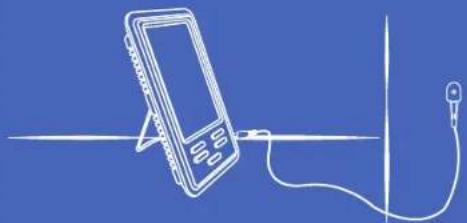
Insert the connector of the external thermometer into the corresponding plug and set the sensor where you want to measure temperature. You can stick it in some flat surface.
natural_image
Line drawing of a handheld electronic device connected to a vertical line with a cable (no text or symbols)CONFIGURATION
If you exceed 10 seconds between each setting, the thermometer back to main menu and you must repeat the process.
Date and hour setting
- Press and hold the MODE button until the superior numbers flashing
- Press ADJ to choose the hour system (24H or 12H). Press MODE again.
- Press ADJ to change the hour; Press MODE. Press ADJ to change the minutes; Press MODE.
- Press ADJ to choose the year. Press MODE again.
- Press ADJ to select the month; Press MODE. Press ADJ to choose the day: Press MODE.
Select the temperature unity
Insert some pointed object into the ^ C/F hole to change the temperature unity.
ANOTHER FUNCTIONS
External temperature alert limit
Everytime that the temperature exceed the range, will sound an alert in the thermometer.
- Press ALERT to select the limit temperature that you want to establish. In the screen will appear the icons: Max temperature Min temperature
- To activate the alarm press the ADJ button. The 🔔 icon will appear in the screen.
- Press and hold the ALERT button until the numbers flashing
- Press ADJ until select the wished temperature, Wait some seconds (do not press any button) to save the changes.
Clock alert
An alarm will sound in the selected hour. Press any button to deactivate it.
1. Press MODE once. The AL icon will appears.
2. Press and hold MODE until the numbers flashing.
3. Press ADJ to change the time; Press MODE. Press ADJ to change the minutes; Press MODE.
4. To activate the alarm press the ADJ button. The 🔒 icon will appear on the screen.
Restart
Insert some pointed object in the RESET hole and long press for back to factory settings.
SPECIFICATIONS
Input: 1.5V --- (1xAAA)
Indoor temperature range: -10 to 50 °C
Outdoor temperature range: -50 to 90 °C
Humidity: 10 to 99 % non condensed
Specifications may change without notice
Product Humidity Indoor / outdoor thermometer
Part number: TER-100
The quick brown fox jumps over the lazy dog.
VARRANTY
This Steran product is warranted under normal usage against defects in workmanship and materials to the original purchaser for one year from the date of purchase.
m = 311
CONDITIONS
-
This warranty care with all the required information, invoice, product box or package, and product, must be presented when warranty service is
-
If the product is in the warranty time, the company will repair a free of charge.
-
The missing time will not exceed 30 natural days from the day the claim was received.
-
Sterer sell parts, components, consumables and accessories to customer, as well as warranty service, at any of the addresses mentioned later
THIS WARRANTY IS VOID IN THE NEXT CASES:
If the product has been damaged by an accident, acts of God, manarding, leaky batteries, failure to follow enclosed instructions. Improper repair by uncontrolled personnel, movement safety, among others
6) To care men on people the company series in the purchase establishment
by if you lose the warranty card, we can rescue it, if you show the invoice of purchase ticket.
RETAILER INFORMATION
Name of the retailer
Address
EcoDust
Brand

STEREN

01 800 500 9000