SMEDIAKB - Tastatur Sandstrøm - Gratis brugsanvisning og manual
Find enhedens vejledning gratis SMEDIAKB Sandstrøm i PDF-format.


Brugerspørgsmål om SMEDIAKB Sandstrøm
0 spørgsmål om dette apparat. Besvar dem du kender, eller stil dit eget.
Stil et nyt spørgsmål om dette apparat
Download vejledningen til din Tastatur i PDF-format gratis! Find din vejledning SMEDIAKB - Sandstrøm og tag din elektroniske enhed tilbage i hånden. På denne side er alle dokumenter nødvendige for brugen af din enhed offentliggjort. SMEDIAKB af mærket Sandstrøm.
BRUGSANVISNING SMEDIAKB Sandstrøm
Instruction Manual Wireless Touchpad Keyboard
SMEDIAKB
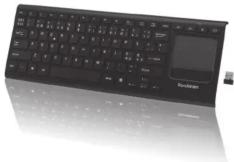
Sandostrøm
SMEDIAKB_IB_RC_140805_Zell.indd 2-5 5/8/14 6:14 pm
Safety Warnings
- Don't disassemble the keyboard or remove any parts.
- Don't put the keyboard into water or any liquid.
- Don't use the keyboard close to heat sources or expose to high temperatures.
• Don't use the k
present. Strong electromagnetic waves will cause damage to the
keyboard.
- Keep the keyboard away from direct sunlight, moisture, dirt or excessive chemical products (cleaning products etc).
abrasive chemic
Wireless Devices:
Before boarding any aircraft or packing a wireless device in luggage
that will be checked, remove the batteries from the wireless device. Wireless devices transmit a wide range of (95) remote devices
wireless devices can transmit radio frequency (RF) energy, whenever batteries are installed and the wireless device is tuned on (If it has an
Batteries are Inst On/Off switch).
Battery-Powered Devices:
Improper use of batteries may result in battery fluid leakage,
overheating, or explosion
Released battery fluid is corrosive and may be toxic. It can cause skin and eyeburne, and is harmful if swallowed.
and eye buns, all
To Reduce the Risk of Injury:
- Keep batteries out of the reach of children.
- Do not heat, open, puncture, mutilate, or dispose of batteries in fire.
- Do not mix new and old batteries or batteries of different types.
- Do not allow metal objects to touch the battery device; they can become hot and cause burns.
Thank you for purchasing your new
Sandstrøm Keyboard.
We recommend that you spend some time reading
this instruction manual so that you fully understand
all the operational features it offers. You will also
find some hints and tips to help you resolve any
issues.
Read all the safety instructions carefully before
use and keep this instruction manual for future
reference.
Unpacking
Remove all packaging from the unit. Retain the packaging.
If you dispose of it please do so according to local
regulations.
The following items are included:
• Keyboard
• Donale
• USB Charging Cable
• Instruction Manual
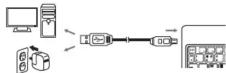
Charging the Keyboard
Your keyboard will need charging before you can use it.
-
Connect the USB charging cable to the keyboard.
-
Connect the other end of the USB charging cable to a
-
Connect the other end powered USB device.
-
The charging indicator light will switch on to show the
-
The charging indicator light will switch on to show the keyboard is charging. The indicator light will turn off.
keyboard is charging. The indicator when the keyboard is fully charged
when the keyboard is fully charged.
If the indicator starts to flash the battery po
low. Charge the keyboard as shown above.
Connecting the USB Dongle
- Plug the dongle directly and fully into your computer's
USB port

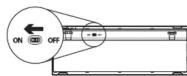
- Switch the ON/OFF button on the bottom of the
keyboard to the ON position.
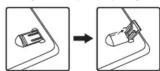
- Adjust the angle of the keyboard by lifting the feet.
Trademarks

The symbol on the product or its packaging indicates that this product must not be disposed of with your other household.
waste. Instead, it is your responsibility to dispose of your waste environment by handling its waste a designated collection plant
equipment by handling it over to a designated collection point for the recycling of waste electrical and electronic equipment.
The separate collection and recycling of your waste equipment at the time of disposal will help conserve natural resources and
ensure that it is recycled in a manner that protects human health and the environment.
Health and the environment. For more information about w
for recycling, please contact your local authority, or where you
purchased your product.
Notes for battery disposal
The batteries used with this product contain chemicals that are harmful to the environment.
To preserve our e
local laws or regulations. Do not dispose of batteries with normal household
For more information, pleas
you purchased the product.
Windows is a registered trademark of Microsoft Corporation in the United
States and other countries.
The wireless LAN hardware in your product conforms to the requirements and
THE WIRCESS LAN hardware in your product conforms to the requirements and provisions set out in European Directive 1999/5/EC (R&TTE). Limitations may
apply for details go to www.curnys.co.uk/compliance
All trademarks are the property of their respective owners and all rights are
acknowledged.
DSG Retail Ltd. (co. no. 504877)
Maylands Avenue, Hemel Hempstead, Herts., HP2 7TG, UK
IB-SMEDIAKB-140B0SV2
SMEDIAKB_IB_RC_140805_Zell.indd 6-10 5/8/14 6:14 pm
Specifications
| Model: MEDIARS | |
| Working Voltage DC: 3.7V ~ 4.2V | |
| Rated Working Current: 10mA | |
| Wireless Frequency: 2.4G | |
| Operating Range: Max: 10M | |
| Battery Capacity: 500 mAh re-chargeable battery | |
| Operating Systems | Microsoft Windows® 2000/XP/VistaTM / 7 / 8 & MAC OS X |
| Dimension (W x H x D): 130 x 17 x 364 mm | |
| Net Weight: 365g | |
Features and specifications are subject to change without prior notice.
Hints and Tips
Keyboard Not Working:
- Ensure that the power switch is in the ON position.
• Make sure the Nano Receiver is plugged into a USB and
the computer is on.
- Remove metallic objects between the mouse and the
Nano receiver.
- If the Nano receiver is plugged into a USB hub, try
plugging it directly into the computer.
• Move the keyboard closer to the receiver
• Charge the keyboard for at least 15 minutes
- Charge the keyboard for at least 15 minutes.
- Use a different USB port
- Restart the computer.
Touchpad Gestures

One-finger Click
→ Left Button

Two-finger Click
→ Middle Button

Three-finger Click
→ Right Button

One-finger Drag

Two-finger Pinch/Spread
→ Zoom In/Out
Function Keys
To access the primary functions, press the keys* as normal. To access the secondary functions (different coloured text on the keys), press the Fn key and the desired key together
| Fn+F1 F11 | ||
| Fn+F2 F12 | ||
| Fn+ ← | Home Home Key | |
| Fn+ ↑ | PgUp Page Up | |
| Fn+ ↓ | PgDn Page Down | |
| Fn+ → | End End Key | |
Other Function Keys
| Play/Pause | |
| Volume up | |
| Mute | |
| Volume down |
Mærke : Sandstrøm
Model : SMEDIAKB
Kategori : Tastatur